How to Land a Tech Job in the USA in 90 Days in 2026
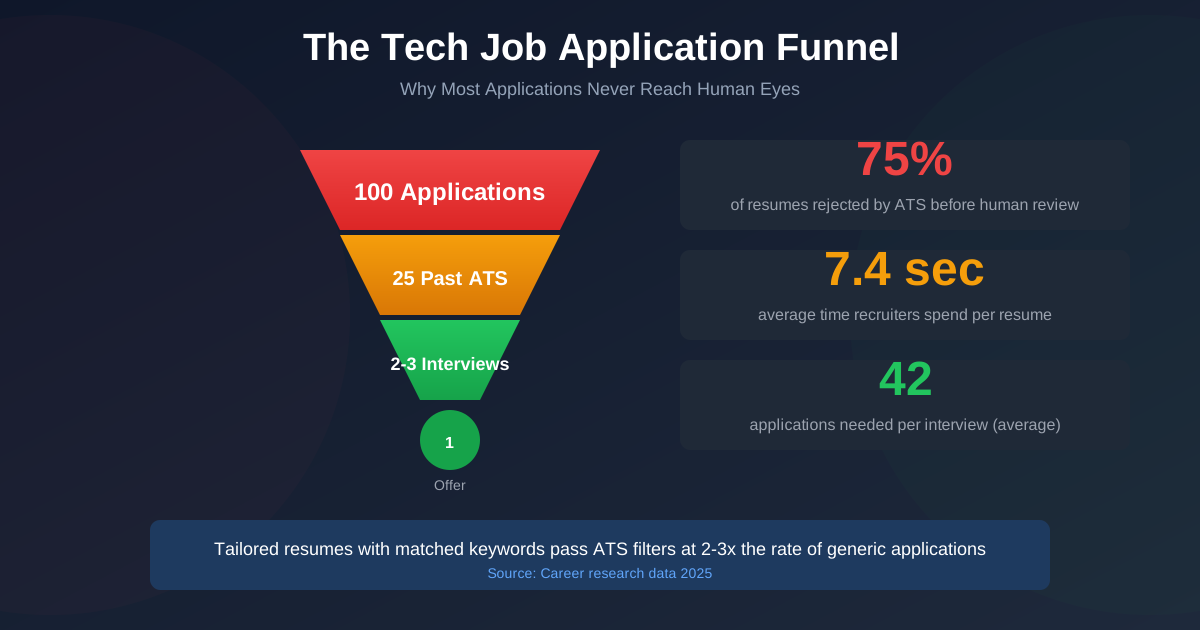
The average tech job seeker sends 42 applications before landing a single interview. In a market where tech job postings dropped 36% from pre-pandemic levels and entry-level hiring has fallen 73% in the past year, a scattershot approach wastes your most limited resource: time.
But here is the good news. With a focused 30-day plan, you do not need to be one of those people sending hundreds of untailored applications into the void. This guide breaks your job search into four tactical weeks: resume optimization, LinkedIn positioning, targeted outreach, and interview preparation. Each week builds on the last, so by Day 30, you have a polished resume, a recruiter-visible LinkedIn profile, an active application pipeline, and the interview skills to close.
A quick note: this plan is designed to get you interviews, not offers. Interviews come from positioning and volume. Offers come from preparation and performance. We will cover both, but set your 30-day goal as “scheduled interviews on my calendar.”
Week 1: Build a Tech Resume That Passes ATS Filters (Days 1-7)
Before you apply to a single job, your resume needs to work. Not “look good.” Work. That means passing automated screening software and grabbing a recruiter’s attention in the 7.4 seconds they spend on each resume.
Over 90% of employers now use automated systems to filter job applications. About 75% of resumes get rejected before a human ever reads them. Your Week 1 goal is making sure yours is not one of them.
Day 1-2: Analyze 15-20 Target Job Descriptions
Open 15-20 job postings for roles you want. Copy the full descriptions into a document. Highlight the skills, tools, and qualifications that appear across multiple listings.
You are looking for patterns. If 12 out of 15 postings mention “Python,” “AWS,” and “CI/CD,” those terms belong on your resume. If eight mention “cross-functional collaboration” or “Agile methodologies,” note those too.
Create three lists from your research:
- Technical skills mentioned in 10+ postings (these are non-negotiable for your resume).
- Soft skills and methodologies repeated across postings (weave these into your experience bullets).
- Nice-to-have tools mentioned in 5-7 postings (include if you have experience, skip if you do not).
Day 3-4: Rewrite Your Resume for ATS and Relevance
Now rebuild your resume with these tech resume tips:
- Use standard section headers: ATS software looks for “Experience,” “Education,” and “Skills.” Creative headers like “Where I Have Made an Impact” confuse parsing algorithms.
- Match exact keyword phrasing: If a job posting says “React.js,” write “React.js” on your resume, not “React” alone, not “ReactJS.” Automated filters often match exact strings.
- Quantify every accomplishment: “Improved API response time by 40%, reducing average load time from 2.3s to 1.4s” beats “Improved API performance” every time. Numbers give recruiters something concrete to evaluate.
- Front-load your bullets with action verbs: Start each bullet with what you did: “Built,” “Reduced,” “Designed,” “Migrated,” “Automated.” Avoid starting with “Responsible for” or “Helped with.”
- Keep it to one page (early career) or two pages (10+ years): Recruiters spend 7.4 seconds on a first scan. Dense three-page resumes get skimmed or skipped entirely.
Day 5-6: Create a Master Resume and 2-3 Tailored Versions
Your master resume holds everything: every project, every skill, every accomplishment. You will never send this version to anyone.
From the master, create 2-3 tailored versions for the types of roles you are targeting. A frontend developer applying to both React-heavy product companies and full-stack startup roles needs at least two versions, each emphasizing different projects and skills.
Here is the reality most job seekers face: tailoring resumes works, but it takes forever. The average job seeker applies to 100-200 positions during an active search. Spending 20-30 minutes tailoring each resume means 50-100 hours just on resume customization.

FastApply eliminates the trade-off between quality and volume. The Chrome extension reads each job description and automatically tailors your resume to match. Relevant experiences move to the top. Keywords from the posting get emphasized in your skills and experience sections. But unlike fully automated tools that spray generic applications everywhere, FastApply pauses before submission. You review the tailored resume, make adjustments if needed, and approve. This prevents embarrassing mismatches while maintaining the speed you need.
Day 7: Test and Refine
Run your resume through an ATS checker. Several free tools exist for this, including Jobscan and Resume Worded. Aim for a match score of 70% or higher against your target job descriptions.
Also send your resume to 2-3 people in your target industry for feedback. Ask specific questions: “Does my most recent role clearly show what I built?” and “Would you interview me for a mid-level backend role based on this?”
Week 2: Turn Your LinkedIn Into a Recruiter Magnet (Days 8-14)
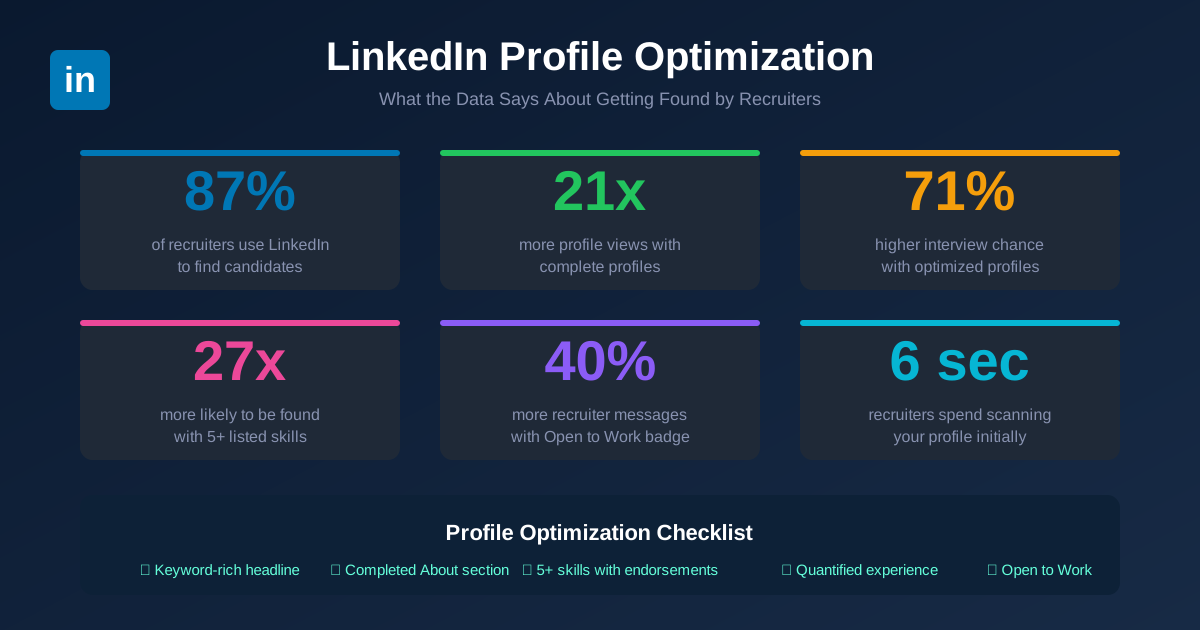
With your resume ready, Week 2 focuses on LinkedIn job search tips that make recruiters come to you. The data here is striking: 87% of recruiters use LinkedIn to find candidates. Profiles with complete information get 21 times more views. Job seekers with comprehensive LinkedIn profiles have a 71% higher chance of landing an interview.
LinkedIn is not a digital resume. It is a searchable database that recruiters query dozens of times per day. Your job is to show up in those searches.
Day 8-9: Rewrite Your Headline and About Section
Your headline is the single most searched field on LinkedIn. Recruiters type job titles and skills into LinkedIn Recruiter, and the algorithm weights your headline heavily.
Bad headline: “Looking for New Opportunities”
Good headline: “Senior Full-Stack Engineer | React, Node.js, AWS | Building Scalable SaaS Products”
The formula: [Target Role] | [Top 3-4 Technical Skills] | [Value Statement or Domain]
For your About section, write 3-4 short paragraphs in first person. Open with what you do and who you do it for. Follow with your technical specialties. Close with what you are looking for. Stuff this section with the same keywords from your resume research in Week 1.
Day 10-11: Rebuild Your Experience Section with Metrics
Your LinkedIn experience section should mirror your tailored resume, but with one difference: you have more space. Use it.
Each role should include 4-6 bullet points with quantified results. Here is a simple framework for writing tech achievement bullets:
[Action verb] + [what you built/did] + [technology used] + [measurable result]
Example: “Designed a microservices architecture using Kubernetes and Go that reduced deployment time from 45 minutes to 3 minutes and supported 10x traffic growth.”
Day 12: Add Skills, Get Endorsements, and Toggle Open to Work
LinkedIn lets you list up to 50 skills. Add as many as you can, prioritizing the ones from your job description research. Profiles listing 5 or more skills get 17 times more recruiter discovery than profiles with fewer.
Turn on the “Open to Work” badge. Data from LinkedIn shows this feature increases recruiter InMail messages by 40%. Select the specific job titles, locations, and work types you want.
Message 10-15 former colleagues and ask them to endorse your top 5 skills. Offer to endorse theirs in return. This takes 15 minutes and boosts your search ranking.
Day 13-14: Start Posting and Engaging
Recruiters do not just search for candidates. They also notice people who show up in their feeds. Only about 1% of LinkedIn’s 310 million monthly active users post content weekly. This means even basic posting puts you ahead of 99% of the platform.
You do not need to write thought leadership essays. Post about:
-
A technical problem you solved recently and what you learned.
-
An interesting article from your field with your take on it.
-
A project you shipped and the tradeoffs you made.
-
A question about a technology you are learning.
Comment on 5-10 posts per day from people in your target companies and industry. Thoughtful comments (not “Great post!”) increase your visibility and create warm connections for Week 3 outreach.
Week 3: Launch a Targeted Application Blitz (Days 15-21)
Your resume is ATS-ready. Your LinkedIn is recruiter-visible. Now you apply with purpose and speed.
The math matters here. Research from career data platforms shows that about 42 applications yield one interview for the average job seeker. But “average” includes people sending untailored resumes to irrelevant roles. With your polished materials from Weeks 1-2, your hit rate should be significantly higher. Target 1 interview for every 15-20 quality applications.
Day 15-16: Build Your Target List
Create a spreadsheet with four columns: Company, Role, URL, and Status. Populate it with 40-60 roles across these sources:
- Job boards: Indeed, LinkedIn Jobs, and Glassdoor for broad coverage.
- Company career pages: Go directly to the career pages of 10-15 companies you admire. Roles posted here sometimes do not appear on aggregator sites.
- Startup-specific boards: Wellfound (formerly AngelList), Y Combinator’s Work at a Startup, and Hacker News “Who’s Hiring” threads.
- Niche boards: If you specialize in a specific area, check boards like Climatebase for climate tech, Dice for general tech, or Built In for startup-heavy markets.
Day 17-19: Apply in Batches with Quality Control
Apply to 8-12 positions per day across platforms. For each application:
- Read the full job description (not just the title).
- Tailor your resume to emphasize the most relevant skills.
- Write a brief, specific cover letter for roles at companies you care about.
- Track every application in your spreadsheet.
This is where the time math gets brutal. At 20-30 minutes per tailored application, 10 applications eat 3-5 hours of your day. FastApply compresses this process. The extension works across Indeed, LinkedIn, Glassdoor, Lever, Greenhouse, and Workday platforms. It reads the job description, tailors your resume, generates a role-specific cover letter, and fills out the application form. What normally takes 30 minutes becomes a 3-minute review and approval.
Over three days of batch applications, FastApply users typically submit 40-60 tailored applications instead of the 15-20 they would manage manually. That is the difference between scraping by with one interview and scheduling three or four.
Day 20-21: Activate Your Network
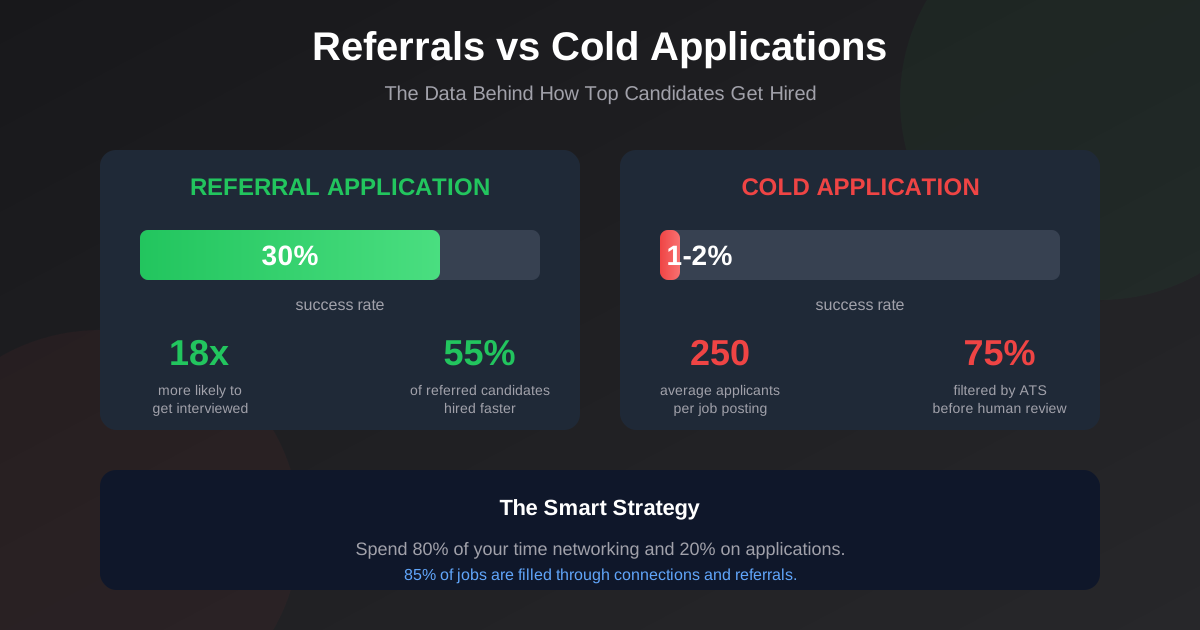
Referral candidates get hired at a 30% rate compared to the 1-2% rate for cold applications. Spend these two days reaching out to your network.
Message 15-20 people with this framework:
First line: Specific reference to their work or your shared connection.
Second line: What you are looking for (be precise about role type and level).
Third line: A soft ask. “Would you be open to a 15-minute call about what it is like working at [Company]?” works better than “Do you know of any openings?”
Also reach out to 5-10 recruiters who specialize in your tech stack or domain. Recruiters fill roles that never get posted publicly. A brief, skills-focused message with your resume attached gets their attention.
Week 4: Follow Up and Prepare to Convert (Days 22-30)
By Week 4, your applications are out and your network is activated. Some responses will start coming in. This week is about converting interest into scheduled interviews and preparing to perform.
Day 22-23: Send Strategic Follow-Ups
For applications submitted in Week 3, send a follow-up email or LinkedIn message to the hiring manager or recruiter. A short message works best:
“Hi [Name], I applied for the [Role] position at [Company] last week. I am especially interested in [specific project or challenge the team is working on]. I would welcome the chance to discuss how my experience with [relevant skill] could contribute. Happy to share more detail at your convenience.”
Research from recruiting data shows that 80% of job offers happen after five or more follow-ups, but most candidates never follow up once. A single polite message puts you ahead of the majority.
Day 24-26: Prepare for Technical Interviews
With interviews starting to land on your calendar, shift into preparation mode.
- For coding interviews: Spend 1-2 hours daily on LeetCode or NeetCode. Focus on the most common patterns: arrays, hash maps, trees, graphs, and DP problems. Practice talking through your approach out loud as you solve problems.
- For system design interviews: Study 3-5 common system design problems. Resources like the System Design Primer on GitHub and the book “Designing Data-Intensive Applications” by Martin Kleppmann provide strong foundations. Practice drawing architectures on a whiteboard or digital tool.
- For behavioral interviews: Prepare 8-10 stories using the STAR format (Situation, Task, Action, Result). Cover common themes: a time you disagreed with a teammate, a project that failed, a time you led without authority, and your biggest technical accomplishment.
Day 27-28: Run Mock Interviews
Practice with a real person. Options include:
- A friend or former colleague in tech (free, but quality varies).
- Pramp for free peer-to-peer mock coding interviews.
- Interviewing.io for anonymous practice with engineers from top companies.
Record yourself if possible. Watch for filler words, unclear explanations, and moments where you rush through your reasoning.
Day 29-30: Review, Adjust, and Plan Ahead
Look at your numbers from the past 30 days:
- How many applications did you send?
- How many responses did you receive?
- What is your application-to-interview ratio?
If your ratio is worse than 1 interview per 25 applications, revisit your resume and targeting. If you are getting interviews but not advancing, the issue is interview performance, not materials.
Set your plan for the next 30 days based on what the data tells you. The job search does not always wrap up in one month, but after these four weeks, you have every piece of the system in place.
Tools and Systems to Keep You on Track
A structured job search needs tracking. Here is what to set up:
-
Application tracker: A simple spreadsheet with columns for company, role, date applied, status, follow-up date, and notes. Google Sheets works. So does Notion or Airtable.
-
Calendar blocks: Schedule 2-3 hours daily for job search activities. Treat these blocks like meetings you would not cancel.
-
FastApply: For application volume without sacrificing quality. The extension handles resume tailoring, cover letter generation, and form-filling across six platforms (Indeed, LinkedIn, Glassdoor, Lever, Greenhouse, Workday). You maintain control through the review-before-submit workflow. The built-in application tracking keeps your pipeline organized without a separate spreadsheet.
-
LinkedIn alerts: Set up job alerts for your target titles and locations. New postings get sent to your inbox so you apply within the first 24-48 hours, when response rates are highest.
FAQ
How many applications should I send to get a tech interview?
Research from 2025 shows the average is about 42 applications per interview. With a tailored resume and targeted approach, you should aim for 1 interview per 15-20 quality applications. Referral-based applications perform far better, with a 30% success rate compared to 1-2% for cold applications.
Does tailoring my resume for each job posting make a real difference?
Yes. Over 90% of employers use automated screening tools, and about 75% of resumes get filtered out before a human sees them. Matching your resume keywords to each job posting significantly increases your chances of passing these filters.
How do I get recruiters to find me on LinkedIn?
Complete your profile fully (profiles with complete information get 21 times more views). Use your target job title in your headline. List 5 or more skills (this increases recruiter discovery by 27 times). Turn on “Open to Work” for a 40% increase in recruiter messages. Post or comment regularly to appear in recruiter feeds.
Is it worth applying on company career pages directly?
Yes. Some roles appear only on company career pages and never reach job boards. Applying directly also shows initiative. Combine direct applications with board applications for the broadest reach.
What is the best time to apply for tech jobs?
Apply within the first 48 hours of a posting going live. Early applicants get reviewed before the volume builds up. Monday through Wednesday mornings tend to see the highest recruiter activity.
Should I use AI tools for my job applications?
AI tools help with the repetitive parts of applying: tailoring resumes, generating cover letters, and filling forms. The best approach combines AI speed with human judgment. Tools like FastApply handle the automation while letting you review and approve each application before it goes out.
How long does a tech job search take on average?
The median time-to-hire in 2025 reached about 68 days, over two months. A focused strategy like this 30-day plan aims to compress the early stages so interviews begin sooner, even if the full hiring cycle extends beyond the month.
#How to get tech interviews in 30 days
#30 days tech interview plan
#2026 LinkedIn strategy
#ATS resume

Fastapply Team
Career Experts