FastApply vs Simplify vs Huntr: Which Auto-Apply Tool Is Best for Your Job Search? (2026)
Job searching in 2026 demands volume and precision at the same time. The average job seeker needs to submit between 32 and 200+ applications before landing a single offer, according to HiringThing’s 2025 Job Application Statistics report. Yet only 2-3% of applicants reach the interview stage, meaning generic, high-volume approaches rarely deliver results.
Three tools are getting the most attention from serious job seekers right now: FastApply, Simplify, and Huntr. Each is built to solve the same core problem: reducing the time and friction of job applications without forcing you to spend dozens of hours each week on repetitive forms and manual admin work.
This comparison breaks down exactly what each tool does, where it falls short, and which type of job seeker gets the most from each. If you are searching for clarity on the “simplify vs huntr” debate, or evaluating FastApply alongside both options, read this before you install anything.
The Problem These Tools Are Trying to Solve
Before comparing platforms, understand the actual bottleneck in modern job searching.
A single corporate job posting now attracts an average of 250+ applications, with entry-level roles often drawing 400 or more, according to HiringThing’s 2026 Job Application Statistics data. From that pool, roughly 3% of applicants get called for an interview. The interview-to-hire ratio sits at 27%, meaning only 1 in 4 interviewed candidates receives an offer.
Do the math: at 100 applications with a 3% interview rate, you get three interviews. At a 27% close rate, that is less than one offer. Most job seekers need far more than 100 applications to land a single role.
The problem with manual applications is time. A tailored application takes 20-45 minutes when you account for resume customization, cover letter writing, and form completion. At that pace, submitting 100 applications represents 35-75 hours of work, nearly two full work weeks of unpaid labor, as The Interview Guys research notes.
Auto-apply tools promise to close that gap. The question is how well each one delivers in practice.
FastApply: Built for Volume With Tailored Output
FastApply is a Chrome extension and web platform designed around a complete application workflow: discover relevant roles, tailor your resume to each one, review before submitting, then track every outcome.
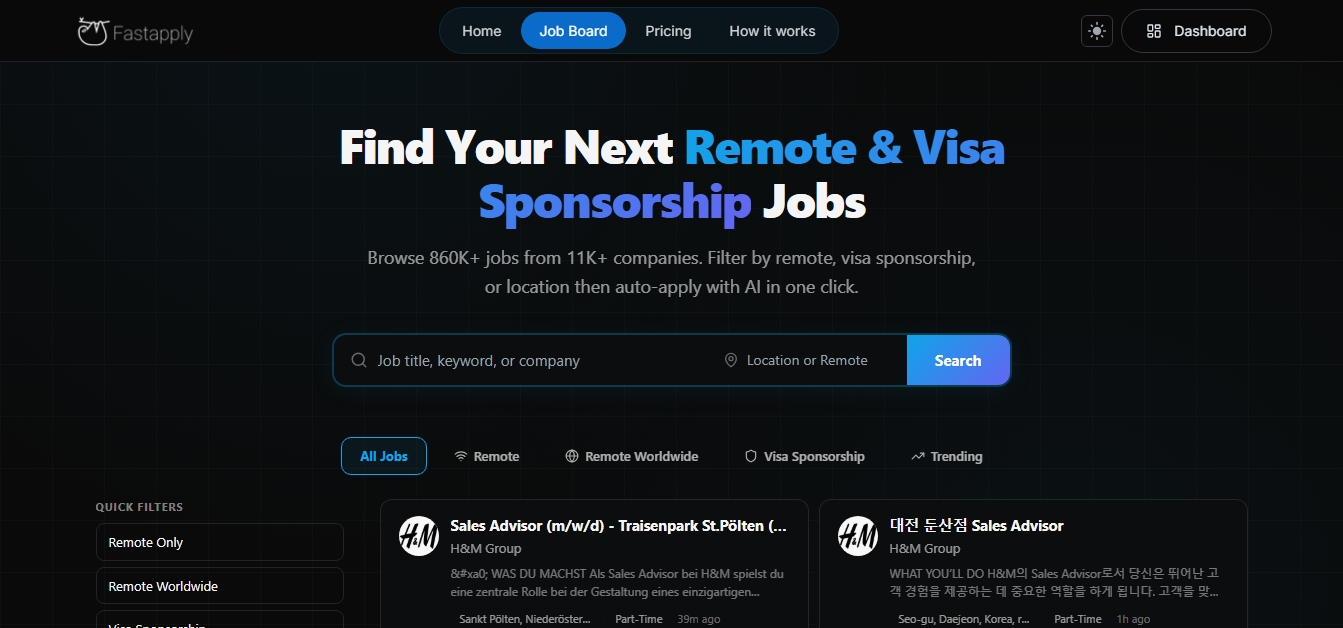
The platform works across 20+ job boards and ATS platforms, including Indeed, Glassdoor, ZipRecruiter, Workday, and Greenhouse. When you set up your profile, the AI reads your resume and preferences, then automatically identifies matching roles across those platforms.
Instead of jumping between Indeed, Ashby, Glassdoor, and company career pages in separate tabs, FastApply surfaces matching roles from all of them in one consolidated feed. This solves the fragmented discovery problem. Job seekers typically waste significant time running the same searches across multiple platforms, seeing duplicate listings, and losing track of where they spotted which role. FastApply’s built-in job board pulls listings from 20+ platforms into a single view, filtered by your role, seniority, salary expectations, and remote/hybrid preferences. You see better-matched opportunities faster because the tool pre-filters before you ever click a listing.
When you flag a role to apply to, the AI rewrites your resume to match the specific job description. Keywords get emphasized. Relevant experiences move up. The cover letter references the specific company and role. Unlike tools that spray your existing, generic resume at hundreds of listings, FastApply generates a fresh, tailored version for each application.
The differentiator most worth noting: FastApply pauses before submission. You review the tailored resume and cover letter, make any adjustments, and approve. This human-in-the-loop model prevents the mismatches that plague fully automated tools: applying to a role your experience does not match, submitting a cover letter with placeholder text, or sending an application that clearly reads as bot-generated.
A 30-minute application process becomes a 3-minute review. The AI handles the tedious parts. You handle the judgment calls.
FastApply offers a free tier with 5 applications at no cost, no card required. Paid plans scale with your application volume, with Pro and Elite tiers covering unlimited AI-tailored resumes and cover letters.
FastApply suits job seekers who need volume without sacrificing quality. If you are actively searching and need to hit 50-100+ applications per week while keeping each one relevant and tailored, this is the tool that covers the full workflow from discovery through tracking.
Simplify: The Autofill Standard
Simplify Copilot built its reputation on one thing: making form-filling fast.
You build a profile once with your work history, education, skills, and preferences. When Simplify’s popup appears to signal compatibility: you click to autofill. The extension maps your saved profile data to the form fields automatically.
Simplify also analyzes job descriptions and flags keywords missing from your resume, giving you a quick gap check before submitting.
The free version includes unlimited autofill and application tracking. The paid plan, Simplify+, adds AI resume generation, cover letter writing, and AI-generated answers to custom application questions. Based on third-party reviews from early 2025, pricing on Simplify+ runs approximately $19.99 for one week, $39.99 for one month, and $89.99 for three months, as reported by Skywork’s Simplify review.
Simplify also offers a multi-page autofill setting. When enabled, the extension moves through multi-page applications automatically without requiring you to click through each step, per Simplify’s help documentation.
Simplify speeds up form-filling, but it does not change what you submit. Your resume goes in as-is, with no per-job tailoring unless you edit it manually. This works well if your resume is already strong and targeted. But for roles that require customization to pass ATS filters or stand out, it leaves important work undone. Some users also report billing transparency concerns with the Simplify+ plan. Overall, Simplify is best for reducing repetitive application tasks, not improving application quality.
Huntr: The Organized Search Manager
Huntr takes a different angle entirely. Rather than automating submissions, Huntr focuses on organizing your search and giving you the data to improve it over time.
At its core, Huntr is a Kanban-style job tracker. You add roles to a board, move cards from “Wishlist” to “Applied” to “Interview” to “Offer,” and log contacts, notes, and interview dates for each. Think of it as a CRM for your job search, as Scoutify’s Huntr review describes it.
The Chrome extension clips job listings from any site into your board with one click, pulling in the title, company, and description automatically. This eliminates copy-paste work when bookmarking opportunities.
On the Pro plan, Huntr offers AI resume tailoring, cover letter generation, and resume scoring against job descriptions. The AI extracts keywords and qualifications from each posting and scores your resume against them, giving you a concrete alignment signal before you apply.
Huntr also tracks application outcomes at scale. The company’s 2025 Annual Job Search Trends Report analyzed 598,627 applications across 60,000+ candidates, finding that Google Jobs led all platforms with an 11.3% application-to-response rate, substantially higher than most job boards. This kind of cross-platform outcome data helps users direct effort where it produces results.
The Chrome extension carries 1,100+ reviews with a 4.9-star rating, per the ResumeHog Huntr review.
Huntr offers a free plan with basic job tracking for up to 100 applications. The Pro plan runs $40/month billed monthly, $30/month billed quarterly, or $160 every six months, according to Huntr’s pricing page. The Pro plan includes unlimited AI resume generations, tailoring, cover letters, and resume reviews.
Huntr is built as a management tool, not a submission engine. It does not auto-submit applications, so you still fill out forms manually. While autofill helps with basic fields, it slows down high-volume job searches compared to tools focused on speed.
Its strength is organization, tracking, and analytics, not raw application volume. That makes it better suited for job seekers applying to fewer roles with more intention, or those who want detailed visibility into their search.
At $40/month, it is also the most expensive option among the three.
Head-to-Head Comparison: FastApply vs Simplify vs Huntr
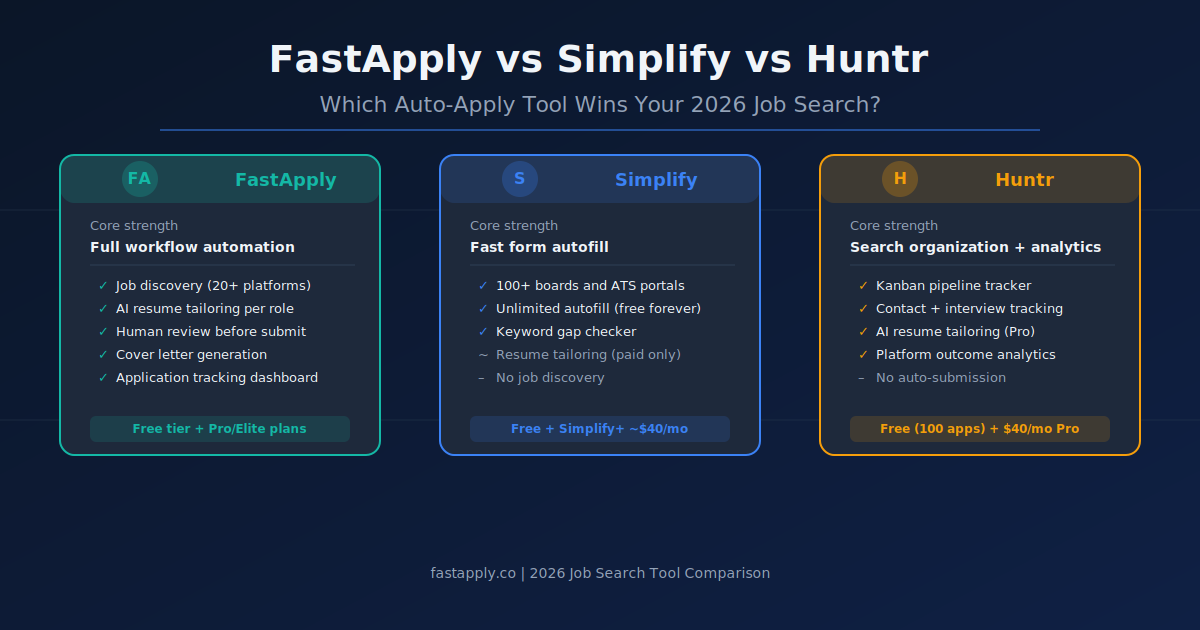
| Feature | FastApply | Simplify | Huntr |
|---|---|---|---|
| Auto-submission | Yes | Autofill only | No (autofill assist only) |
| Per-job resume tailoring | Yes (AI-generated) | Partial (keyword check only) | Yes (Pro plan) |
| Cover letter generation | Yes | Yes (paid) | Yes (Pro plan) |
| Job discovery / aggregation | Yes (20+ platforms) | No | No |
| Application tracking | Yes | Yes | Yes (strongest) |
| Human review before submit | Yes | Optional | N/A |
| ATS platform coverage | 20+ | 100+ boards and portals | Major platforms |
| Free tier | Yes (5 apps) | Yes (unlimited autofill) | Yes (100 apps tracked) |
| Paid pricing | Tiered (Pro/Elite) | ~$40/month | $40/month |
| Contact/interview tracking | Basic | No | Yes (strongest) |
| Chrome extension rating | Not publicly listed | 4.9 stars (1M+ users) | 4.9 stars (1,100+ reviews) |
The Core Trade-Off: Speed vs. Organization vs. Discovery
Three distinct use cases map to three different tools.
-
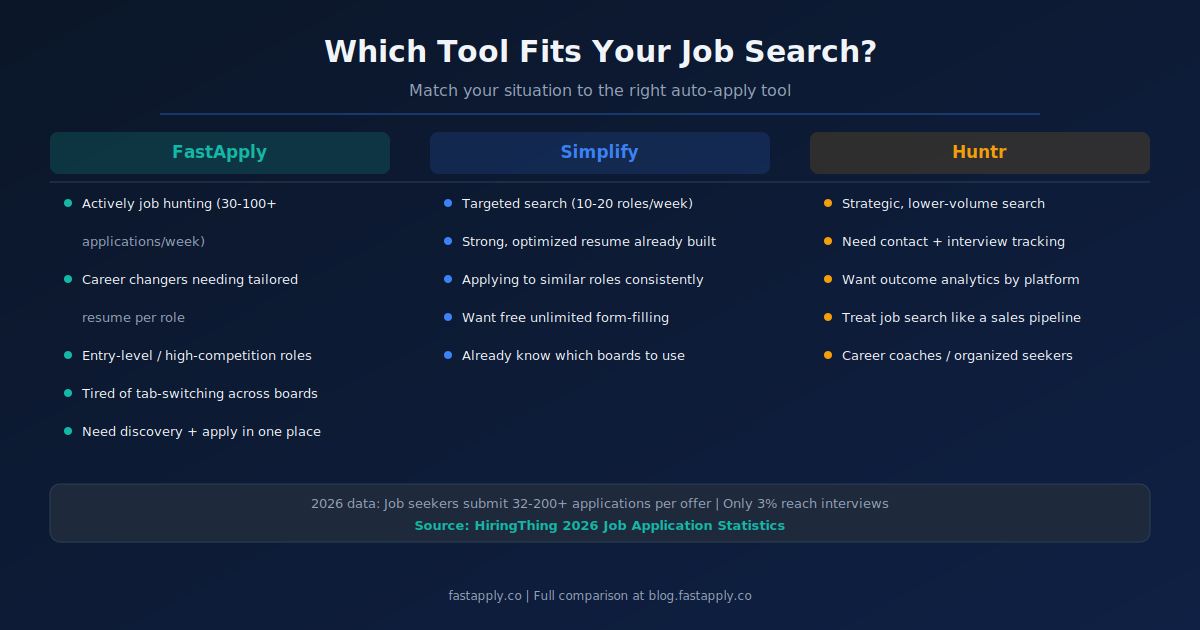
If you need to increase application volume without burning out, the daily bottleneck is time-per-application. FastApply addresses this directly. It handles discovery, tailoring, and submission in a single workflow, so you do not switch between tabs, repeat searches on different platforms, or spend 20 minutes editing a resume for each role. The review-before-submit model keeps quality high enough to generate callbacks. This is the tool for active job seekers who need to sustain 30-100+ applications per week without it consuming their entire waking life.
-
If you already know exactly where you are applying and just hate filling out forms, Simplify removes the friction from a workflow you are already managing. You find the jobs. You decide which to apply for. Simplify fills the forms. For job seekers with a targeted search strategy who are applying to a focused set of 10-20 roles per week, Simplify’s free tier delivers solid value.
-
If your search is highly strategic and you want to track outcomes and relationships, Huntr gives you the infrastructure. You see your pipeline, follow up with contacts, measure response rates by platform, and make data-driven decisions about where to direct effort. For job seekers who treat their search like a sales process: tracking every touchpoint and iterating based on data: Huntr’s Pro plan earns its cost.
The “simplify vs huntr” comparison misses this core distinction: these tools are not direct competitors. Simplify speeds up form-filling. Huntr organizes and measures. FastApply covers the full loop from finding opportunities to submitting them with tailored materials.
What Actually Works (and Which Tool to Choose)
High-volume, generic applications are becoming less effective. As more companies use AI in hiring, systems filter out resumes that do not closely match the job description.
In competitive roles with hundreds of applicants, candidates who move forward are usually those whose resumes reflect the specific language of the posting.
This is where most tools diverge.
Simplify speeds up submissions but sends your resume as-is. That works if your resume is already tightly aligned with your target role. If not, results can be inconsistent.
Huntr supports quality through tracking and organization, but it requires manual effort to tailor each application. It is better suited for slower, more intentional searches.
FastApply is built for a different workflow. It combines job discovery, AI-powered resume tailoring, a human review step, and application tracking in one system. Each application is customized before submission, but the process still takes only a few minutes.
The most effective approach today is not choosing between volume or quality. It is combining both.
If you need to apply at scale without sacrificing relevance, FastApply fits best. If your resume is already optimized and you want to remove form-filling friction, Simplify is sufficient. If your priority is organization and visibility into your search, Huntr is the better choice.
The best tool is the one that removes your biggest bottleneck, and that you can use consistently.
How to Choose Based on Your Situation
Not every job seeker is in the same phase of their search. The right tool depends on where you are.
-
Newly unemployed and need to move fast: Time is your biggest constraint. You need to apply to a large number of roles quickly without spending all day on it. FastApply’s combined workflow covers discovery, tailoring, and submission. You will not spend time bouncing between job boards or customizing individual resumes from scratch for each role.
-
Employed and passively exploring: You are applying to a small number of highly targeted roles, probably 5-10 per month. Huntr’s organizational layer helps you track contacts and follow-up dates without letting anything fall through. The Pro plan’s resume tailoring is worth using for each of those carefully chosen applications.
-
Career changer applying across multiple industries: Your resume needs significant modification per role because you are positioning the same experience differently depending on the job. A static autofill tool like Simplify sends the same resume everywhere. FastApply’s per-job tailoring addresses this directly.
-
Student or recent graduate in a targeted search: Entry-level roles attract the most applications, sometimes 400+ per posting per the HiringThing data above. Volume and tailoring both matter here. Starting with FastApply’s free tier gives you 5 tailored applications at no cost to see how the workflow fits your needs before upgrading.
-
Someone who has been applying for months without results: The issue is almost certainly keyword mismatch, not application volume. Huntr’s resume scoring tool helps identify the gap between your current resume and what employers are searching for. Rebuilding your resume through that lens, then switching to a higher-volume tool once it is optimized, tends to produce better outcomes than continuing to spam the same document.
Frequently Asked Questions
- What is the main difference between Simplify and Huntr?
Simplify is an autofill tool that speeds up form-completion on job applications. Huntr is a job search management platform that focuses on organizing your pipeline, tracking contacts, and helping you tailor resumes to specific postings. Simplify saves time per application. Huntr helps you understand which applications are working and why.
- Does Simplify automatically submit applications?
Simplify does not submit applications fully automatically by default. It autofills form fields, but you still control when to hit submit. The multi-page autofill setting does allow Simplify to advance through multi-page applications automatically, but submission itself remains user-controlled.
- Is Huntr worth the $40/month price?
Huntr’s Pro plan makes sense if you actively use its contact tracking, interview management, and outcome analytics features. For job seekers who want only resume tailoring and basic tracking, the price is high relative to alternatives. The free plan covers tracking up to 100 applications, which is sufficient for many job seekers in an active search.
- How is FastApply different from Simplify?
FastApply covers the full workflow: it finds relevant jobs from 20+ platforms in a single feed. It tailors your resume and cover letter for each role, submits through a human-review step, and tracks every application. Simplify focuses specifically on autofilling forms on job boards you navigate to yourself. FastApply automates discovery and tailoring. Simplify automates form completion.
- Do these tools work on Workday applications?
All three tools have some level of Workday compatibility. Simplify specifically lists Workday as a supported platform. Huntr’s autofill feature works on major ATS platforms including Workday. FastApply covers Workday as part of its 20+ platform support.
- Which tool is best for a first job search or entry-level roles?
For entry-level job seekers applying to high volumes of roles across multiple industries, FastApply’s combined discovery and tailoring approach produces the biggest impact. Entry-level applications often get filtered aggressively by ATS keyword matching, so per-job resume customization matters more at this stage, not less.
- Are these tools safe to use with your resume data?
All three tools require access to your resume and personal data to function. Simplify explicitly states it does not sell user data to advertisers. Huntr and FastApply both have privacy policies governing data use. Review each platform’s terms before uploading sensitive personal information, and use professional email addresses rather than personal ones when creating accounts.
#simplify vs huntr
#fastapply vs simplify
#best job autofill tool
#job application tool comparison

Fastapply Team
Career Experts