How to Apply to 100 Remote Jobs Per Week Without Burning Out in 2026
You sent out 40 remote job applications last week. You heard back from two of them. It feels like screaming into a void.
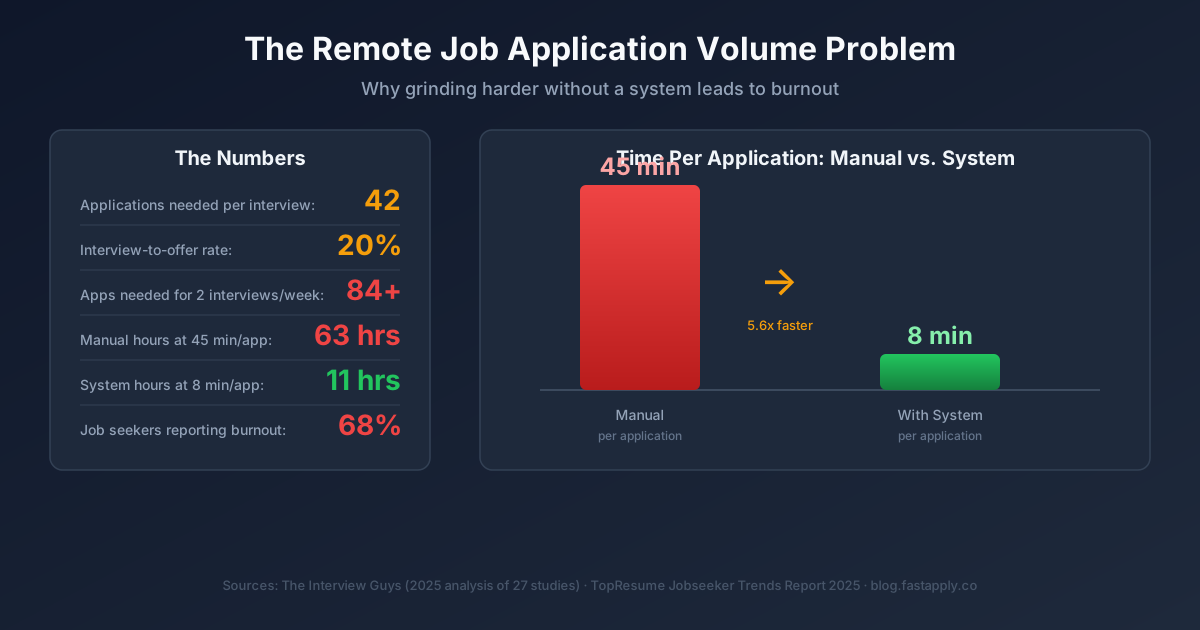
You are not alone. According to research analyzed by The Interview Guys, it takes an average of 42 applications to land a single interview in 2025. Only 2.4% of candidates make it to the interview stage. Remote roles attract even more competition. A single remote posting draws hundreds of applicants within hours.
The math is brutal. To land two to four interviews per week, you need 80 to 170 applications in flight. That is the volume required to beat the odds. But here is the problem: most people try to hit those numbers by grinding through applications one by one, spending 30 to 60 minutes per job. Within days, they hit a wall of exhaustion, start submitting sloppy work, and then wonder why nothing converts.
This guide shows you how to apply to remote jobs fast, 100 per week, without sacrificing quality or your sanity.
Why Remote Job Seekers Burn Out So Fast
Before you fix the problem, you need to understand what causes it.
A 2025 survey by TopResume found that 68.4% of job seekers said the search process hurt their mental health. Of those, 31.7% reported serious impacts: anxiety, loss of confidence, and symptoms of full-blown burnout. Another 33.2% described the process as chronically stressful.
Remote seekers face extra layers of friction:
The global competition problem. When a role is remote, it is open to anyone with a laptop and the right timezone. A software engineer in Austin now competes with engineers in Berlin, Lagos, and Manila. The applicant pool doubles or triples compared to on-site roles.
The platform fragmentation problem. Remote jobs scatter across dozens of platforms: LinkedIn, Indeed, We Work Remotely, RemoteOK, Glassdoor, Greenhouse, Lever, Workday. Checking all of them every day drains time before you submit a single application.
The customization trap. Career advice universally says to tailor every resume and cover letter. That is good advice, but it breaks down at scale. If you spend 45 minutes customizing each application, 100 applications per week requires 75 hours. That is not a job search. That is a second job with no pay.
The silence spiral. According to that same TopResume data, 71.3% of job seekers got ghosted by an employer in the past year. Sending hundreds of applications and hearing nothing creates a psychological drain that compounds daily. The silence feels personal even when it is structural.
The solution is not to apply to fewer jobs. It is to build a system that applies at scale without requiring 75 hours of manual effort per week.
Build Your Remote Job Application System
Step 1: Create Tiered Resume Templates (Not One Generic Resume)
The conventional advice to tailor every resume is partially right. You need tailoring. But you do not need to write from scratch every time.
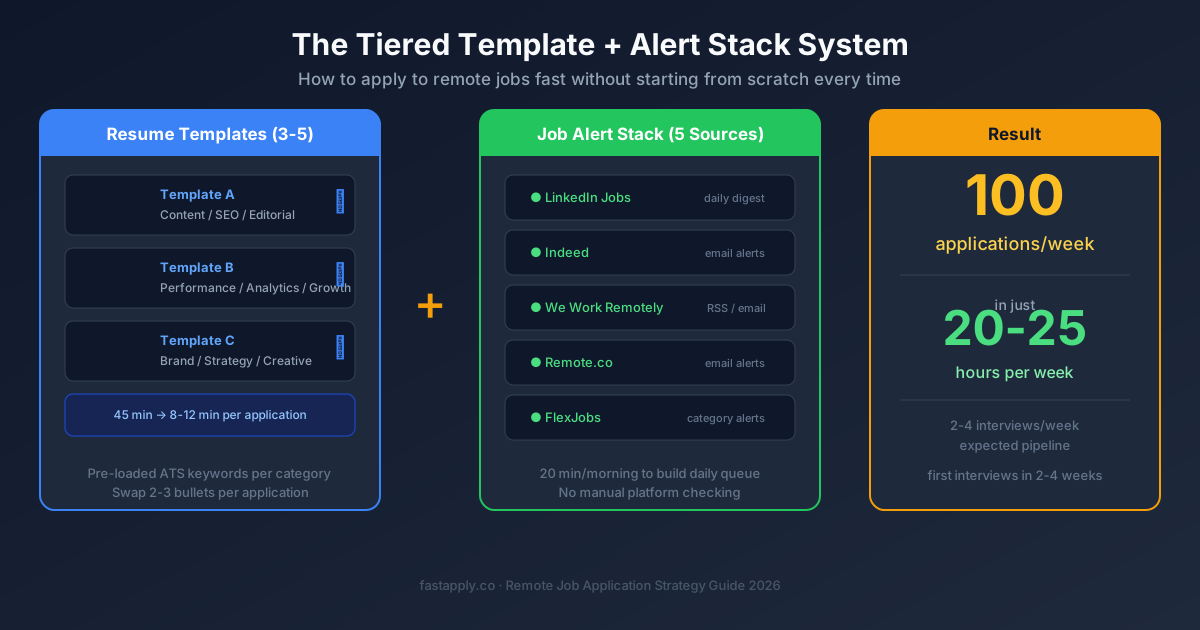
Build three to five resume templates, each targeting a specific job category. If you are a marketer, you might have:
- Template A: Content Marketing (blog, SEO, editorial focus)
- Template B: Performance Marketing (paid ads, analytics, growth focus)
- Template C: Brand Marketing (strategy, positioning, creative oversight)
Each template has the right keywords pre-loaded for its category. The skills section, summary, and bullet points already match what ATS systems in that vertical are scanning for. Jobscan research confirms that 97.4% of Fortune 500 companies use ATS technology to screen candidates before a human sees the resume.
When you apply to a specific role, you pick the closest template and make minor tweaks: swap in the company name, adjust one or two bullet points, update the summary sentence. This drops per-application time from 45 minutes to 8 to 12 minutes without hurting ATS performance.
Step 2: Write Five Cover Letter Frameworks
The same tiered logic applies to cover letters. Write five frameworks, one per role category, that cover your core value proposition, a relevant achievement, and a closing CTA.
Each framework has placeholder fields: [COMPANY NAME], [ROLE TITLE], [SPECIFIC CHALLENGE THEY FACE]. Filling those fields takes two minutes. You get a personalized-feeling letter in a fraction of the time.
Avoid the temptation to use fully generic letters. Hiring managers at remote-first companies read dozens of applications per day. A letter that references their product, mission, or recent news converts at a higher rate than a generic opening about how excited you are for the opportunity.
Step 3: Set Up Your Job Alert Stack
Stop manually checking platforms. Set alerts to bring jobs to you.
Configure job alerts on at least five sources:
- LinkedIn Jobs: Set daily email digests for your top five job titles with “Remote” as the location filter
- Indeed: Set email alerts with a remote filter. Indeed aggregates listings from thousands of company career pages
- We Work Remotely: RSS feed or email alerts for your category (tech, marketing, design, etc.)
- RemoteOK: Browse by category or set bookmarked searches for your role type
- Company career pages: Use Google Alerts:
site:company.com/careers "remote" "job title"for companies you specifically want to work for
This consolidates discovery into a single daily inbox review rather than nine browser tabs. You spend 20 minutes each morning reviewing what came in overnight, flagging targets, and building your daily application queue.
The Weekly Schedule That Makes 100 Applications Possible
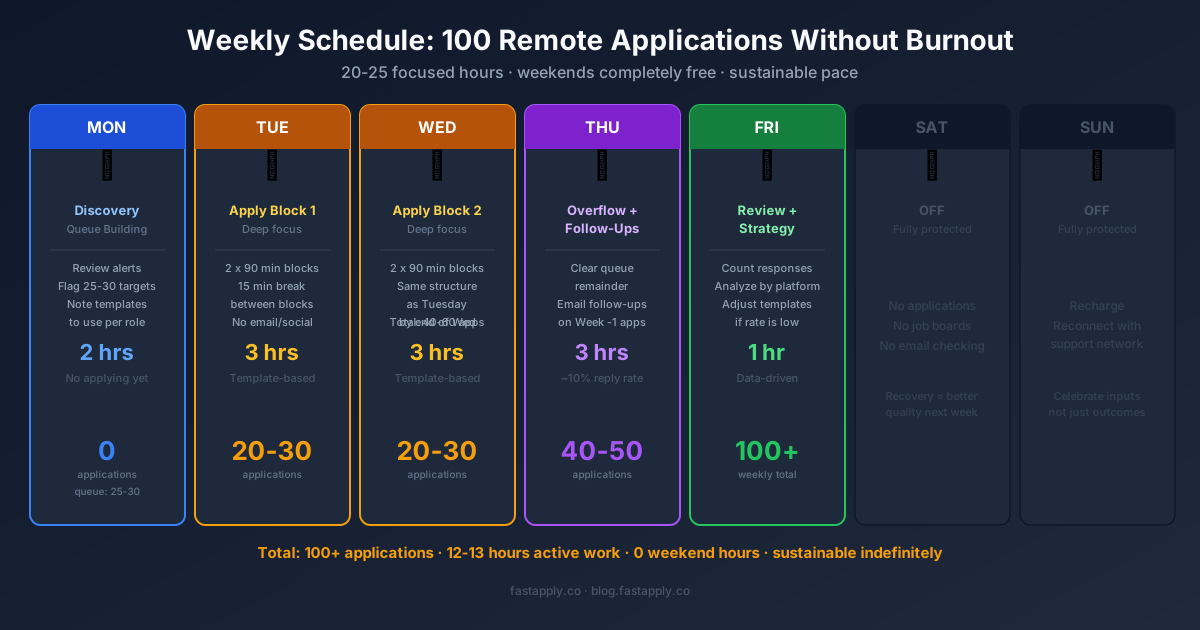
Applying to 100 remote jobs per week does not require 75 hours. It requires about 20 to 25 focused hours, structured correctly.
Here is the weekly block schedule:
Monday: Discovery and Queue Building (2 hours) Review all job alerts from the weekend. Flag every role that is a fit. Aim to build a queue of 25 to 30 targets for the week. Do not apply yet. Just build the list with notes on which template to use and any company-specific details to include.
Tuesday and Wednesday: Application Blocks (3 hours each day) Apply in focused 90-minute blocks with a 15-minute break between. Do not multitask. Do not check email mid-session. Each block should yield 10 to 15 applications if you are working from pre-built templates. Two days of two blocks each equals 40 to 60 applications.
Thursday: Overflow and Follow-Up (3 hours) Apply to the remaining queue items. Send follow-up emails to applications from the prior week that generated no response after 7 to 10 days. A brief, polite follow-up moves your application back to the top of the pile for roughly 10% of roles.
Friday: Quality Review and Strategy (1 hour) Track your numbers: How many applications this week? How many responses? What categories or platforms are converting? Adjust your template and targeting strategy based on the data.
This schedule leaves weekends free. Rest is not optional. It is part of the system. According to JobEase research, job seekers who push past healthy limits show a measurable decline in application quality, which creates a feedback loop of worse results and deeper discouragement.
How to Auto Apply to Remote Jobs with AI Tools
Manual batching gets you to 60 to 80 applications per week. To reach 100 or more without adding hours, you need automation for the repetitive parts.
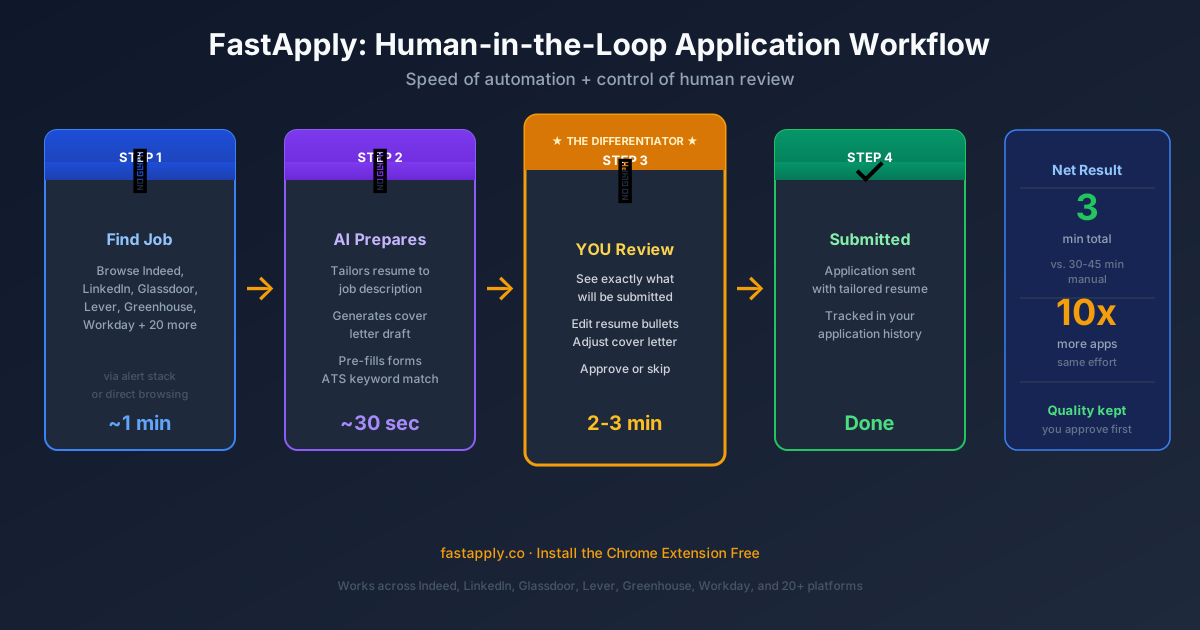
This is where FastApply becomes the difference between a functional job search and an exhausting grind. FastApply is a Chrome extension that automates the mechanical parts of applying: filling in forms, submitting standard fields, and adapting your resume to each posting. It works across Indeed, LinkedIn, Glassdoor, Lever, Greenhouse, and Workday, among 20+ other platforms.
What separates FastApply from fully automated “spray and pray” tools is the human-in-the-loop review step. Before any application is submitted, you see exactly what is being sent. You review the tailored resume, the cover letter, and the form fields. You approve or adjust. The 30-minute-per-application process becomes a 3-minute review. You stay in control while the tool handles the mechanical work.
For remote job seekers applying at scale, this means:
- Your resume gets tailored to match each specific job description
- Your cover letter references the role and company correctly
- You are not blindly spamming applications that could damage your reputation
- You apply faster across platforms without switching between eight browser tabs
Combined with your tiered templates and alert stack, FastApply takes a 25-hour week down to 12 to 15 hours while maintaining the quality needed to convert applications into interviews.
Install the FastApply Chrome extension and start applying immediately.
The Remote Job Application Quality Checklist
Volume without baseline quality is wasted effort. Before you scale, make sure each application clears this bar:
Resume
- Uses the correct template for the role category
- Contains the exact job title from the posting (ATS matching)
- Has three to five quantified achievements (percentages, dollar amounts, time savings)
- Does not have a generic objective statement at the top
Cover Letter
- Opens with a specific insight about the company or role, not “I am writing to express my interest”
- Mentions one achievement that directly addresses the job’s stated challenge
- Is under 250 words. Remote hiring managers skim fast
- Does not duplicate the resume word for word
Platform Profile
- LinkedIn profile is fully complete with an “Open to Work” remote filter enabled
- Profile headline matches the keywords you are targeting
- “Remote” appears in your location preferences
A weak application at high volume teaches you nothing useful because the rejection signal is too noisy. A high-quality application at high volume gives you clean data: if you have a 2% to 4% response rate, your targeting is right and the volume is working. If you are at 0.5%, something in the materials needs fixing before you add more applications.
Protecting Your Mental Health While Mass Applying
High-volume job searching without burnout protection fails. Here is what works:
Cap your daily application count. Set a hard stop at 20 to 25 applications per day, five days per week. This is the sustainable pace that reaches 100 per week without the crash that comes from 50-application marathon sessions.
Track metrics, not feelings. Build a simple spreadsheet: date applied, company, role, platform, response (yes/no), outcome. When you track data instead of just experiencing the silence, the numbers replace the emotional narrative. “I have a 3.2% response rate this week” is easier to work with than “I feel like nobody wants me.”
Build a support structure. The TopResume 2025 survey found that 36.7% of job seekers were still searching after months without a result. The people who stay in the game are those who have accountability partners, job search groups, or career coaches providing external perspective. Reddit communities like r/cscareerquestions and r/remotework offer peer support from people in the same situation.
Protect non-search time. Schedule two days per week with zero job search activity. These breaks do not slow your search. They keep you sharp enough to do the work well.
Celebrate inputs, not outcomes. You do not control whether a recruiter replies. You do control submitting 20 quality applications today. Acknowledge the inputs you hit. The outcomes will follow.
Tracking Your Remote Job Application Strategy Results
A mass apply remote jobs approach works only if you measure it. Without tracking, you are flying blind.
Your tracking spreadsheet should include:
| Column | What to Capture |
|---|---|
| Date | When you applied |
| Company | Company name |
| Role | Exact job title |
| Platform | Where you found and applied |
| Template Used | Which resume/cover letter version |
| Response | Yes / No / Pending |
| Stage | Application / Phone Screen / Interview / Offer |
| Notes | Any feedback received |
Review this data weekly. Look for patterns:
- Which platforms generate the most responses? (Double down on those)
- Which role categories convert? (Focus templates there)
- Which company sizes respond most? (Startups vs. enterprise behave differently)
- What day of the week did successful applications go in? (Tuesday and Wednesday applications get reviewed before the end-of-week rush)
This is the difference between a random job search and a remote job application strategy. Data turns 100 applications into a learning engine that improves every week.
Resources
#apply to remote jobs fast
#mass apply remote jobs
#auto apply remote jobs
#remote job application strategy
#remote job search 2026
#job search burnout

FastApply Team
Career Experts