
Beat the Workday ATS in 2026: Autofill Every Form Free
If you’ve applied to a job at a Fortune 500 company in the last two years, you’ve likely struggled with the Workday ATS. Workday is the applicant tracking system used by over 39% of Fortune 500 companies, and it’s also the ATS job seekers complain about most. The reason is simple: a single Workday application takes 30 to 45 minutes to complete, and 60% of applicants abandon them mid-way.
If you’re searching for “how to beat Workday applications” or “how to auto-fill Workday,” you’re in the right place. This 2026 guide covers why Workday is so painful, seven tested tactics to beat it, and how to auto-fill any Workday application in under 60 seconds without sacrificing quality or getting filtered out by the resume parser.
A common pain point: you upload a resume, and then Workday asks you to re-enter all the same details (work history, education, skills) into individual form fields. That structure helps the company organize data, but it turns every application into a 45-minute process.
According to the Jobscan 2025 ATS Usage Report, more than 39% of Fortune 500 companies use Workday as their applicant tracking system, making it the most widely used ATS among the largest U.S. employers. Because of its widespread adoption, many job seekers interact with Workday multiple times during their search.
This guide explains how Workday applications are structured, why the process can take longer than expected, and how to auto-fill Workday applications efficiently without sacrificing quality.
Why Workday Applications Take So Long
Workday was built for HR departments and finance teams. Companies adopt Workday because its financial management software ranks among the best in the industry.
Once organizations implement Workday for finance and HR, the recruiting module often becomes part of the same system. As a result, hiring teams manage applications within the broader enterprise platform used across the company.
Because the system prioritizes structured data like standardized job history, education records, and skill entries, applicants are often asked to enter information into specific fields rather than relying solely on the uploaded resume. This structure helps companies organize candidate data consistently, but it can make the application process feel longer for job seekers
The Redundant Data Entry Problem
Here is the typical Workday application workflow:
- You upload your resume as a PDF or Word document.
- Workday attempts to parse that resume into structured fields.
- The parser struggles with formatting, columns, or design elements.
- You manually re-enter your work history, education, skills, and contact details into separate form fields.
- Some companies add screening questions, voluntary demographic surveys, and cover letter requests on top of that.
A report from Simplify found that employers using Workday see up to 70% fewer completed applications compared to companies with simpler processes. Another report notes that 60% of job seekers abandon online applications mid-process because of length and complexity.
The Time Cost Adds Up Fast
A single Workday application takes roughly 30 minutes when the parser fails and you need to re-enter everything manually. Now multiply that across a full job search. Recent data shows job seekers submit between 32 ad 200+ applications on average during an active search. If even half of those applications use Workday, you are looking at 25 to 50 hours spent fighting one platform alone.
That is time you should spend preparing for interviews, networking, or tailoring your resume to specific roles.
How Workday Processes Your Application Behind the Scenes
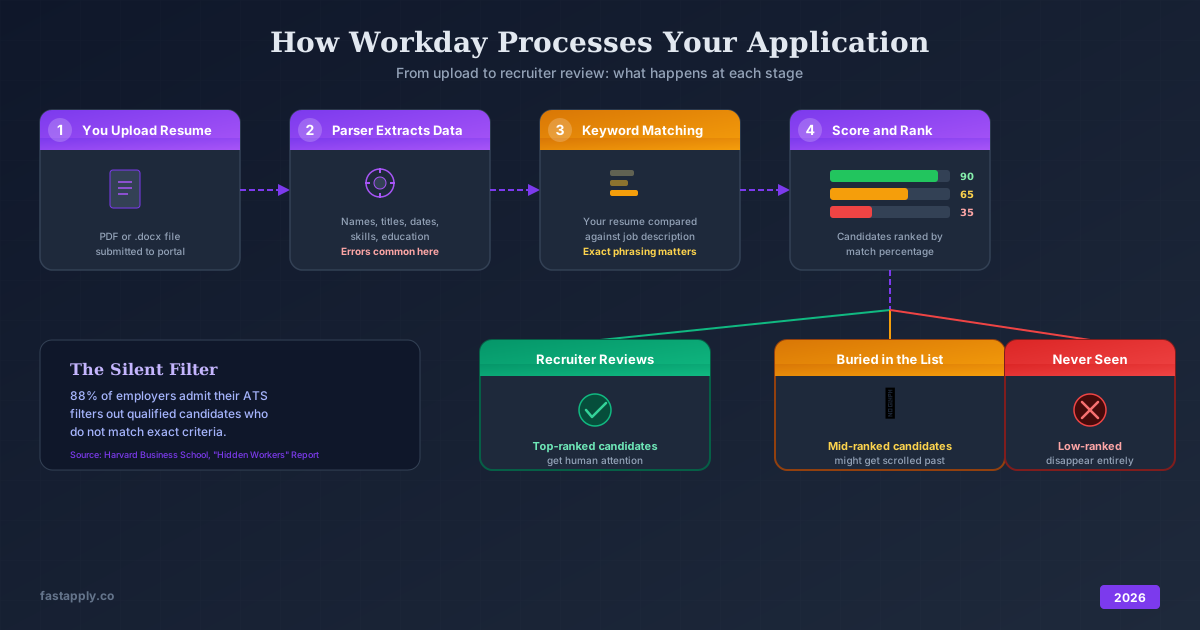
Understanding how Workday works behind the scenes gives you a real advantage. The system does not just store your application. It actively filters and ranks it.
Keyword Matching and Ranking
Workday parses your resume and compares extracted data against the requirements listed in the job posting. Some implementations use simple keyword matching. Others use more advanced AI-powered screening, including tools like HiredScore, which Workday acquired to rank candidates based on role relevance.
When recruiters log in, they typically see the highest-ranked candidates first. If your resume does not match the right terms, a human recruiter might never scroll down far enough to see your application.
A joint report from Harvard Business School and Accenture found that 88% of employers acknowledged their ATS filtered out qualified high-skill candidates because those candidates did not match the exact criteria in the job description. That does not mean the ATS made the wrong call on its own. The filters were set by humans. But the outcome is the same for you: one missing phrase and your application disappears.
What Workday Looks For in Your Resume
Workday’s data fields are what recruiters use to search and filter applicants. Incomplete sections reduce your visibility. Here is what matters most:
-
Job titles that match the posting. If the role says “Marketing Manager” and your resume says “Marketing Lead,” the system might not make the connection. Use the exact title from the job description when your experience matches.
-
Skills listed explicitly. Workday pulls skills from your resume and maps them to its internal taxonomy. If a job requires “Tableau” and your resume mentions “data visualization tools” without naming Tableau specifically, you lose points.
-
Education details completed fully. Missing fields in the education section reduce your searchability. Fill in degree type, institution name, graduation year, and field of study.
-
Location information. Many recruiters filter by location. If you leave this blank or enter it inconsistently, your profile drops from location-based searches.
6 Workday Application Tips That Get Your Resume Past the Filter
These are specific, tested strategies for beating Workday’s screening process.
1. Create a Plain-Text “ATS Version” of Your Resume
Workday’s parser reads plain text more effectively than heavily formatted documents. Keep a separate version of your resume that uses:
- No tables, columns, or text boxes
- Standard section headers: “Experience,” “Education,” “Skills”
- .docx format (Word) rather than PDF when the system gives you a choice
- Simple bullet points, not custom symbols or icons
This does not mean your resume needs to look ugly. It means your upload version should prioritize parseability over design.
2. Mirror the Job Description’s Language
Pull specific phrases from the job posting and weave them into your resume. This is not about keyword stuffing. It is about speaking the same language the system expects.
Example: The job description says “cross-functional collaboration” but your resume says “worked with multiple teams.” Change it to “led cross-functional collaboration across engineering, design, and product teams.”
The goal is one-to-one matching between the job requirements and your stated experience.
3. Fill Every Field Manually After Upload
Do not trust the parser. After Workday pulls your data, review every single field. Common parsing errors include:
- Job dates that show the wrong month or year
- Company names merged with job titles
- Education credentials placed in the wrong fields
- Skills listed under the wrong categories
Taking five extra minutes to correct parsing errors prevents your application from looking incomplete or inaccurate to recruiters.
4. Answer Screening Questions With Specifics
Many Workday applications include custom screening questions set by the employer. These often ask about years of experience, specific tools, or willingness to relocate.
Do not answer with one word. If the question asks “Describe your experience with project management software,” write two to three sentences naming the specific tools you have used, how long you have used them, and what you accomplished.
5. Apply Early
Roles on Workday attract high volumes of applications quickly. Recruiters often begin reviewing candidates within the first few days of a posting going live. Submitting early means your application sits near the top of the queue while active review is happening.
6. Keep Your Workday Profile Updated Across Companies
Workday does not share a unified profile across employers. Each company runs its own instance. But many companies using Workday allow you to create a candidate account. Keep your profile current in each one. If you applied to Company A six months ago, your old profile data might auto-fill when you apply to a new role there. Outdated information creates mismatches.
How to Auto-Fill Workday Applications Without Losing Quality
Here is the reality most job seekers face: tailoring resumes and filling out ATS forms correctly works, but the process eats hours out of every week. The average job seeker applying to 100+ positions during an active search faces a brutal math problem. If each Workday application takes 20 to 30 minutes of manual data entry and review, that is 33 to 50 hours spent on form-filling alone.
FastApply’s AI that auto-applies for jobs eliminates the trade-off between quality and volume. The Chrome extension detects Workday application forms and automatically fills in your information across every field. Job titles, work history, education, skills, and screening questions populate in seconds instead of minutes.
But unlike tools that blast generic applications everywhere, FastApply pauses before submission. You see exactly what the system will send. You review the tailored resume, adjust any details that need fine-tuning, and approve the application only when it looks right. This human-in-the-loop workflow prevents the embarrassing mismatches that happen when automation runs on autopilot.
FastApply works across Workday, Lever, Greenhouse, and platforms like Indeed, Glassdoor and many more. A 30-minute Workday application becomes a 3-minute review. Over the course of a job search with 100+ applications, that adds up to days of time saved.
Fastapply tailors your resume to each specific job description before submission. Keywords from the posting get emphasized. Relevant experiences move to the top. This gives you the ATS optimization that manual tailoring provides, at the speed of automation. The free tier includes 5 applications, and paid plans start at $14/month.
Common Workday Mistakes That Get Applications Rejected
Avoid these errors that trip up even experienced job seekers:
-
Uploading a Designed Resume Without Checking the Parse
Creative resumes with sidebars, icons, and custom fonts look great to humans. They look like gibberish to Workday’s parser.
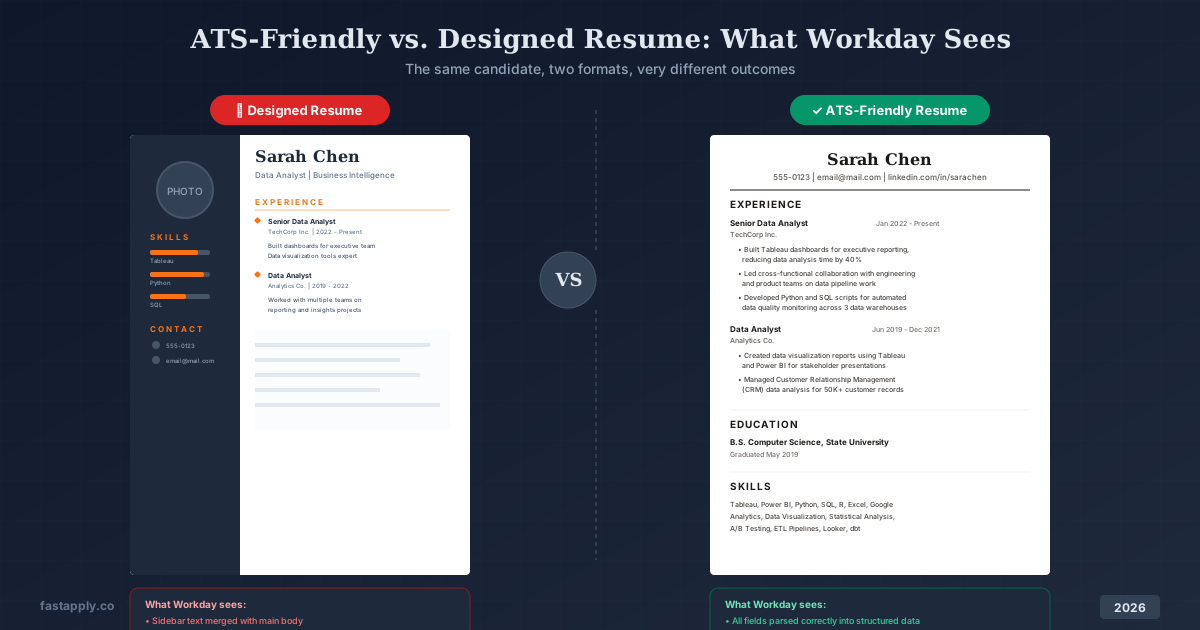
Always check what the system extracted after upload. If the parsed version is a mess, you need to manually correct every field or use a simpler resume format.
-
Leaving Optional Fields Blank
Fields marked “optional” in Workday still show up in recruiter search filters. Your phone number, LinkedIn URL, and additional skills sections all affect discoverability. Fill in everything you reasonably have information for.
-
Using Acronyms Without Spelling Them Out
Write “Search Engine Optimization (SEO)” not just “SEO.” Write “Customer Relationship Management (CRM)” not just “CRM.” Workday might search for either the full term or the acronym. Including both covers your bases.
-
Skipping the Cover Letter When It Is Listed as Optional
Some companies weight cover letter submissions in their evaluation. If Workday offers a cover letter field and you leave it blank, you might rank lower than candidates who submitted one. Keep a tailored template ready and adjust it for each role.
FAQ
- How long does a typical Workday application take?
A complete Workday application takes 20 to 30 minutes on average when you need to manually correct parsed data, fill in all required fields, and answer screening questions. Applications with extensive questionnaires take longer. Tools like FastApply reduce this to around 3 minutes per application by auto-filling form fields.
- Why does Workday make me re-enter information from my resume?
Workday’s resume parser attempts to extract your data automatically, but it often fails with non-standard formatting. Tables, columns, graphics, and unusual fonts confuse the parser. The system then requires manual entry to ensure data accuracy in its structured fields.
- Does Workday automatically reject applications?
Workday itself does not send automatic rejection emails based on algorithmic scores in most implementations. What it does do is rank and filter applicants so that lower-scoring candidates appear further down the list. If a recruiter never scrolls to your name, the result feels like rejection even though a human technically made the decision not to review further.
What file format should I use for Workday uploads?
Use .docx (Word) format when possible. Workday’s parser handles Word documents more reliably than PDFs. If the system only accepts PDF, use a PDF generated from a simple, single-column Word document rather than one exported from a design tool like Canva.
- Do Workday applications transfer between companies?
No. Each company runs its own Workday instance with separate candidate databases. You need to create a new account and submit a new application for each employer, even if multiple companies all use Workday. Some employers let you save a candidate profile, but that data stays within their specific system.
- How does FastApply work with Workday specifically?
FastApply’s Chrome extension detects when you are on a Workday application page. It reads the job description, auto-fills your information into every form field, and tailors your resume to match the specific role. Before anything submits, you review the completed application and approve it. This prevents errors while cutting the application time from 30 minutes to about 3 minutes.
- What are the most common Workday parsing errors?
The most frequent issues include dates being read incorrectly, job titles merging with company names, education fields pulling the wrong degree or institution, and skills being placed in the wrong categories. Multi-column resume layouts cause the most severe parsing failures.
#workday application tips
#how to autofill workday
#workday ats hack
#beat workday applications

Fastapply Team
Career Experts