
Job Bank Canada: How to Find Jobs Posted in the Last 3 Days
Job postings receive 50% of their applications within the first three days. After one week, response rates drop significantly. Speed matters in the Canadian job market.
Job Bank is the Government of Canada’s official employment platform. Over 100,000 job postings are active at any time. Employers registered with Job Bank include federal government departments, provincial agencies, and private sector companies of all sizes.
This guide teaches you how to filter Job Bank for recent postings, set up alerts, and submit applications before the competition floods in.
Why Recent Postings Matter
Hiring managers review applications in batches. The first batch typically arrives within 24 to 72 hours of posting. Many positions receive 100+ applications in this window. By day seven, some postings have 500+ applications.
Early applicants receive more attention. When a hiring manager opens 50 applications at once, the first 10 to 20 get thorough reviews. The rest get skimmed. Applying early puts you in the thorough review pile.
Recent postings also indicate active hiring. Jobs posted months ago may have already been filled through other channels. The employer simply forgot to remove the posting. Jobs posted in the last three days represent genuine, current opportunities.
Understanding Job Bank Canada
Job Bank is operated by Employment and Social Development Canada (ESDC). The platform serves two purposes: connecting Canadian job seekers with employers and providing labour market information.
For job seekers, Job Bank offers free tools including job search, job alerts, resume builder, and career exploration resources. All services are free. No premium subscriptions exist.
Job Bank aggregates postings from multiple sources. Verified jobs come directly from employers who registered with Job Bank. These display a red maple leaf icon. Aggregated jobs come from other job boards and company websites.
Verified jobs offer more reliable information. Employers must provide wage ranges, job requirements, and contact details. Aggregated jobs may contain incomplete information.
Foreign workers should pay attention to the “Canadian work experience required” field. Many Job Bank postings specify whether the employer accepts applications from workers outside Canada or those requiring LMIA support.
Job Bank also serves employers required to advertise positions before LMIA applications. ESDC requires employers to post jobs on Job Bank for at least 28 days as part of the LMIA recruitment effort. These postings often appear on Job Bank before other platforms. Checking Job Bank daily captures LMIA-supporting positions early.
The platform undergoes regular updates. Recent additions include an hourly wage filter, green job indicators for environmentally focused positions, and improved job matching algorithms. The “Best Match” sorting option now factors in recency and location more heavily.
Creating Your Job Bank Account
Registration is optional for basic job searches. Creating an account unlocks additional features.
Standard Account (free) provides:
- Job alerts via email (daily or weekly)
- Saved job searches
- Application history tracking
- Resume builder with templates
- Job Match recommendations
Plus Account (free) provides everything in Standard plus:
- Enhanced Job Match features
- Direct application through Job Bank
- Profile visibility to employers
- Priority placement in search results
To create an account, visit Job Bank and select “Sign up” in the top right corner. You need a valid email address. Canadian residents with a Social Insurance Number (SIN) starting with “9” (temporary residents) are now eligible for Plus accounts.
Complete your profile thoroughly. Job Bank uses your profile information to recommend relevant positions. Incomplete profiles receive fewer and less relevant matches.
Profile sections to complete:
- Personal information: Name, contact details, location preferences.
- Work history: Previous positions, employers, dates, and responsibilities.
- Education: Degrees, diplomas, certifications, and training programs.
- Skills: Technical skills, soft skills, and language abilities.
- Job preferences: Desired occupations, salary expectations, hours, and willingness to relocate.
- Languages: Proficiency levels in English, French, and other languages.
Each section improves your Job Match score and helps employers find your profile in searches. Incomplete profiles are less visible to potential employers.
Searching for Recent Jobs
Job Bank’s search interface appears on the homepage. Enter a job title or keyword and a location to begin.
The results page displays all matching postings. By default, results sort by “Best Match” which considers relevance, recency, and proximity to your location.
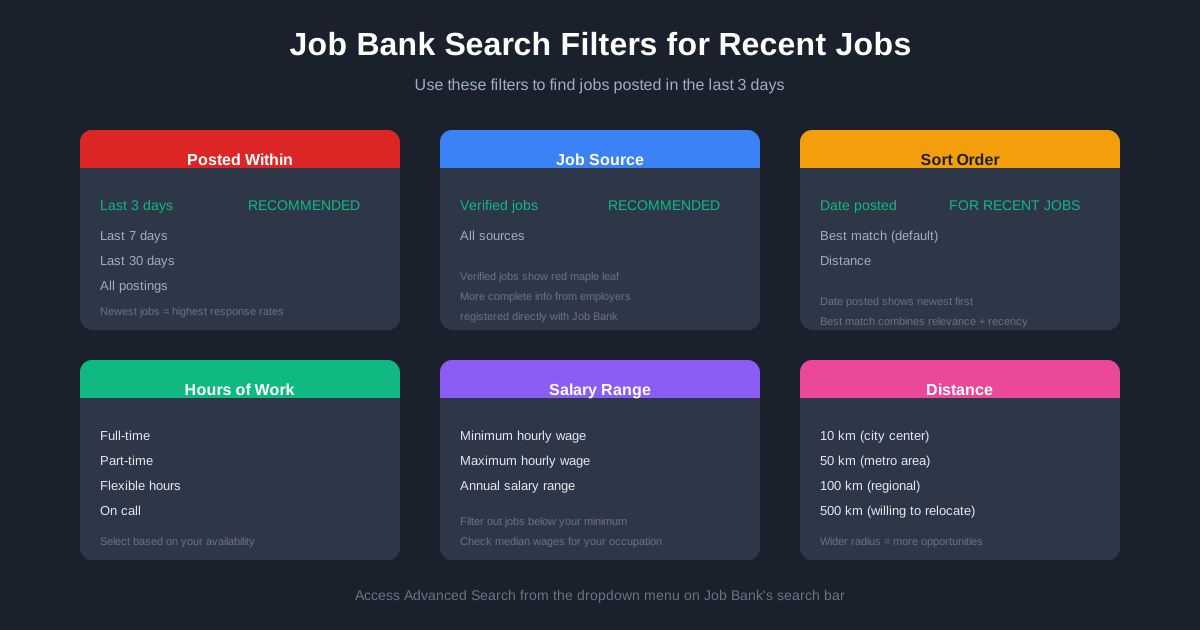
To find the most recent postings, change the sort order to “Date posted” using the dropdown menu above the results. This places the newest jobs at the top.
The Advanced Search page provides additional filters. Access it by selecting “Advanced search” from the main search bar dropdown.
Key filters for finding recent jobs:
- Posted within: Select “Last 3 days” to see only recent postings. Other options include last 7 days, last 30 days, or all postings.
- Job source: Select “Verified jobs” to see only postings from employers registered directly with Job Bank. These display the red maple leaf icon and contain more complete information.
- Salary: Enter minimum and maximum hourly wage or annual salary to filter by compensation.
- Hours of work: Filter by full-time, part-time, or flexible arrangements.
- Distance: Set the radius from your selected location (10 to 500 kilometers).
The Posted within filter is your primary tool for finding fresh opportunities. Combine it with other filters to narrow results to relevant positions.
Setting Up Job Alerts
Job Alerts notify you when new postings match your criteria. This automates the process of checking for recent jobs.
To create a Job Alert:
- Perform a search with your desired criteria (job title, location, filters)
- Select “Create Job Alert” at the top of the results page
- Choose notification frequency (daily or weekly)
- Confirm your email address
Daily alerts arrive once per day with all new matching postings from the previous 24 hours. Weekly alerts compile the week’s new postings into a single email.
For maximum speed, choose daily alerts. Review them each morning and apply to relevant positions immediately.
You can create multiple alerts for different searches. Set up alerts for your primary job title, related job titles, and broader industry categories to capture more opportunities.
Modify alerts by clicking “Modify this alert” in any Job Alerts email or through your account dashboard.
The Speed Advantage: Automating the Process
Setting up alerts is a great first step, but the manual process of tailoring your resume and cover letter for every single alert can be overwhelming. If you receive 10 alerts a day, writing 10 custom cover letters might take you 5 hours.
This is where automation becomes your competitive advantage. Tools like FastApply allow you to respond to these alerts instantly. FastApply uses AI to generate tailored resumes and cover letters that match the specific keywords in the job description, which is crucial for passing the ATS filters used by many Canadian employers.
By automating the tailoring process, you can submit high-quality applications within minutes of a job being posted, ensuring you’re in that critical first batch of applicants that hiring managers actually read.
Optimizing Your Job Match Profile
Job Match is Job Bank’s recommendation engine. It analyzes your profile and suggests relevant positions.
To activate Job Match, complete your job seeker profile with:
- Skills and abilities
- Work experience
- Education and training
- Languages
- Desired job characteristics (location, hours, salary)
Job Match assigns compatibility scores to each recommended position. Higher scores indicate better matches between your profile and the job requirements.
Review Job Match recommendations regularly. The system updates as new positions are posted. Enable email notifications to receive alerts when high-match positions appear.
Job Match works best with detailed profiles. Generic profiles generate generic recommendations. Specific skills, certifications, and experience produce more targeted matches.
Applying Through Job Bank
Job Bank offers two application methods depending on the posting.
Direct applications go through Job Bank’s system. Select “Apply” on the job posting. Attach your resume and cover letter. Submit. Your application goes directly to the employer’s Job Bank dashboard.
External applications redirect you to the employer’s website or email. Select “Apply” and follow the external link. Complete the employer’s application process on their platform.
Verified jobs (red maple leaf) typically support direct applications. Aggregated jobs usually require external applications.
For direct applications, Job Bank tracks your submission in your account dashboard. You can see which jobs you applied to and when.
Response rates vary by employer. Government positions typically acknowledge all applications. Private sector employers may only contact candidates selected for interviews.
Using Job Bank on Mobile
The Job Bank mobile app is available for iOS and Android. It provides the same search and alert functionality as the website.
Mobile features include:
- Location-based search using your device GPS
- Push notifications for Job Alerts
- Swipe interface for browsing jobs (swipe left to skip, right to save)
- Filter toggles for quick refinement
The mobile app is useful for checking alerts and applying quickly while away from your computer. However, the desktop site offers easier navigation for complex searches and profile management.
App users should enable push notifications for fastest alert delivery.
Job Bank vs Other Platforms
Job Bank is one of several job search platforms available in Canada. Understanding the differences helps you allocate your search time effectively.
Job Bank strengths:
- Free with no premium upsells
- Direct government verification of many employers
- Integrated with Canadian immigration systems
- Labour market information and wage data
- Required advertising platform for many LMIA applications
Indeed Canada strengths:
- Largest volume of postings
- Company reviews and salary data from employees
- Easy application with Indeed Resume
- Wider international employer coverage
LinkedIn strengths:
- Professional networking and referrals
- Company pages with employee insights
- Premium features for job seekers
- Recruiter InMail access
Glassdoor Canada strengths:
- Employee reviews and interview experiences
- Salary reports by company and role
- Company culture insights
The smart approach: use multiple platforms. Set up alerts on Job Bank, Indeed, and LinkedIn. Check each daily. Apply to relevant positions regardless of where you found them.
Job Bank has unique value for immigration purposes. Many employers required to advertise on Job Bank before LMIA approval post exclusively there first. Checking Job Bank daily captures these opportunities before they appear elsewhere.
Timing your searches strategically improves results. Monday mornings see high posting volumes as HR teams return from weekends. Tuesday and Wednesday maintain strong activity. Posting volumes drop Thursday afternoon through Sunday. Focus your most intensive searching early in the week.
Seasonal patterns affect job availability. January sees strong hiring as companies execute new budgets. September brings another surge as summer ends and businesses plan for Q4. June and December typically show lower activity due to vacations and holidays.
Industry-specific patterns also exist. Retail hiring spikes before holiday seasons. Construction peaks in spring and summer. Accounting firms hire heavily before tax season. Understanding your industry’s rhythm helps time your search effectively.
Researching Employers on Job Bank
Job Bank provides employer profiles for registered companies. Access them by selecting the employer name on any job posting.
Employer profiles show:
- Company description
- Total job postings on Job Bank
- Location and contact information
- Industry classification
For additional research, note the employer name and search for:
- Company website
- LinkedIn company page
- Glassdoor reviews
- News articles
Research helps you customize applications and prepare for interviews. Generic applications get ignored. Customized applications that reference company specifics stand out.
Wages and Labour Market Information
Job Bank integrates labour market data from Statistics Canada. This information helps you evaluate whether a job offer is competitive.
Wage reports show low, median, and high wages for specific occupations in specific locations. Access them through the “Explore careers” section or by selecting wage information on individual job postings.
Compare offered wages against the median for your occupation and location. Offers below median may indicate entry-level positions or employers testing the market. Offers above median suggest high-demand skills or senior positions.
Labour market outlooks indicate whether occupations are expected to grow, remain stable, or decline. Pursuing careers in growing fields improves long-term employment stability.
Tips for International Workers
Job Bank serves both Canadian residents and international job seekers. Foreign workers should filter results for relevant opportunities.
When searching, look for postings that indicate:
- “Foreign workers welcome” or similar language
- No Canadian work experience required
- LMIA support available
- Remote work options (some roles allow working from outside Canada initially)
The “Jobs for foreign workers” section on Job Bank filters for positions from employers seeking temporary foreign workers. These employers have indicated willingness to pursue LMIA support.
Be realistic about response rates. Many Canadian employers prefer local candidates due to simplified hiring processes. Focus your applications on employers who explicitly welcome international applications.
Express Entry candidates should note that valid job offers no longer add CRS points as of March 2025. However, job offers remain valuable for demonstrating ties to Canada and may support Provincial Nominee Program applications.
Certain provinces actively recruit international workers. Alberta, Saskatchewan, and the Atlantic provinces have streams specifically for foreign workers with job offers. Research provincial programs that match your occupation and experience.
Remote work considerations: Some Canadian employers hire workers who initially work remotely from outside Canada. This arrangement can lead to eventual relocation and work permit sponsorship. Search for “remote” positions and inquire about international hiring during applications.
Language requirements vary by position. Technical roles may emphasize specific skills over language proficiency. Customer-facing positions require strong communication. Self-assess honestly and apply to positions matching your abilities.
Cultural fit matters to Canadian employers. Research Canadian workplace norms. Understand expectations around communication style, punctuality, and teamwork. Demonstrate cultural awareness in cover letters and interviews.
Building an Effective Resume
Job Bank’s Resume Builder provides templates optimized for Canadian employers. Two main templates exist: Traditional (for experienced workers) and Youth/Recent Graduates (for those with limited work history).
Canadian resume conventions differ from other countries:
- No photos
- No personal information (age, marital status, religion)
- Reverse chronological order (most recent experience first)
- One to two pages maximum
- Focus on achievements rather than duties
Use action verbs to describe accomplishments. “Increased sales by 25%” is stronger than “Responsible for sales.”
Quantify results whenever possible. Numbers catch attention and provide concrete evidence of your impact.
Tailor each resume to the specific job. Match your skills and experience to the job requirements. Use similar language to the job posting where appropriate.
Cover letters require equal attention. Address the hiring manager by name when possible. Explain specifically why you want this position at this company. Connect your experience directly to the job requirements. Keep the letter to one page maximum.
Many Canadian employers use Applicant Tracking Systems (ATS). These systems scan resumes for keywords before human review. Include exact terms from the job posting in your resume. Avoid tables, graphics, and unusual formatting that ATS software struggles to parse.
The Resume Builder creates ATS-friendly formats. Templates use standard sections and clean layouts. Exported resumes work well with both automated systems and human reviewers.
Tracking Your Applications
Organized tracking improves your job search effectiveness.
Job Bank’s dashboard tracks applications submitted through the platform. For external applications, maintain your own tracking system.
Track for each application:
- Company name
- Position title
- Date applied
- Application method (Job Bank, company website, email)
- Response received (yes/no)
- Follow-up dates
Review your tracking data weekly. Identify patterns. Which types of positions generate responses? Which application methods work best? Adjust your strategy based on results.
Follow up on applications after one week if you have not received a response. A brief email expressing continued interest can move your application to the top of the pile.
Common Job Search Mistakes
Applying without reading the full posting wastes everyone’s time. Requirements like “must be eligible to work in Canada” or “5+ years experience required” are non-negotiable for most employers.
Generic cover letters get ignored. Each application should reference the specific company and position. Explain why you want this job at this company.
Applying to everything reduces quality. Focus on positions where you meet at least 70% of the requirements. Stretch applications occasionally, but not constantly.
Ignoring salary ranges leads to wasted effort. If a posting shows $40,000 to $50,000 and you need $70,000, do not apply. Neither party benefits from that interview.
Poor formatting hurts first impressions. Use clean, professional resume templates. Proofread everything. Typos suggest carelessness.
Not following up reduces your chances. After one week without response, send a brief follow-up email. Express continued interest. Ask if additional information would help your application. This simple step moves many applications forward.
Applying during off-hours can help visibility. Applications submitted early morning (before 8 AM) or late evening face less immediate competition. Hiring managers reviewing applications first thing see yours near the top of the new submissions.
Neglecting networking limits opportunities. Many positions never get posted publicly. Employers fill them through internal referrals and professional networks. Build connections on LinkedIn. Attend industry events. Let people know you are searching.
Resources
Daily Job Search Routine
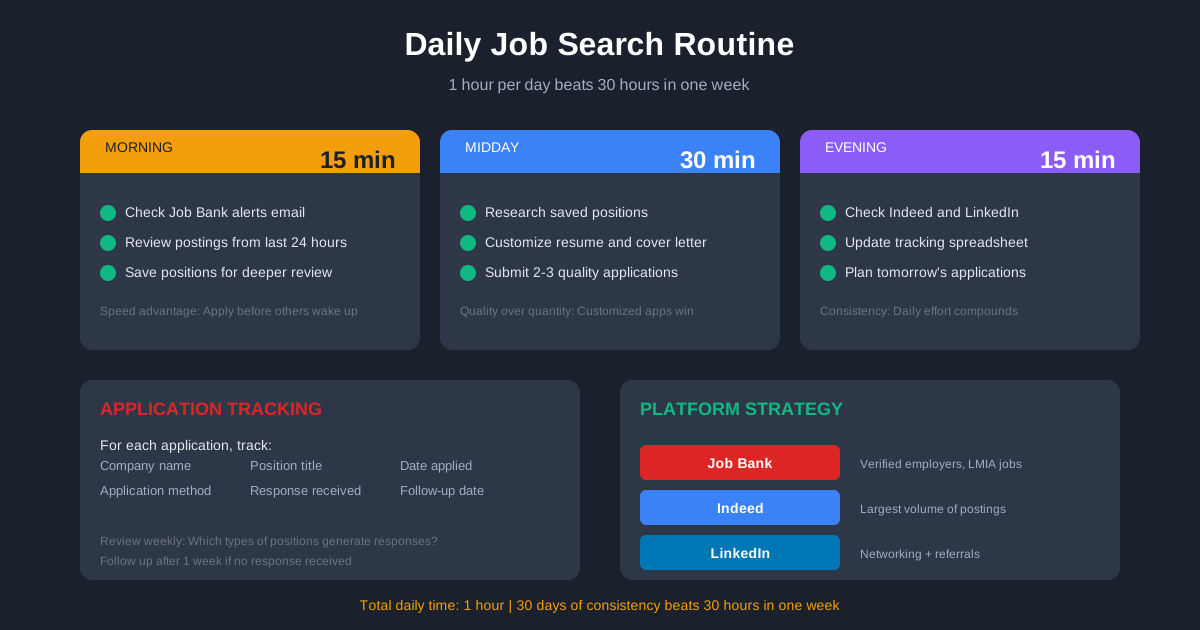
An effective routine maximizes your chances of finding recent opportunities.
Morning (15 minutes):
- Check Job Bank alerts email
- Review new postings from the last 24 hours
- Star or save positions for deeper review
Midday (30 minutes):
- Research saved positions
- Customize resume and cover letter for top matches
- Submit applications
Evening (15 minutes):
- Check Indeed and LinkedIn for new postings
- Update tracking spreadsheet
- Plan tomorrow’s applications
Consistency beats intensity. One hour per day for 30 days produces better results than 30 hours in one week followed by nothing.
Taking Action
The next step is clear. Visit Job Bank and create your account. Set up your first Job Alert for positions posted in the last 3 days. Complete your profile to enable Job Match recommendations.
Apply to relevant positions within 24 hours of discovery. Speed gives you an advantage most candidates ignore.
Job Bank is one tool in your search. Combine it with networking, direct company applications, and other job boards for comprehensive coverage.
The Canadian job market rewards prepared, persistent candidates. Start today.
#Job Bank Canada
#jobs in Canada
#Canadian job search
#employment Canada
#Job Bank alerts
#find jobs Canada
#Canada work visa jobs
#LMIA jobs Canada
#government of Canada jobs

FastApply Team
Career Experts