How to Cancel BetterApply (And Get a Refund) in 2026
Short answer: Email [email protected] with the subject line “Cancel my subscription and refund per Terms of Service.” If you are inside the 14-day refund window from your first paid charge, BetterApply’s posted policy gives you a full refund. Outside that window, request a 50% partial refund (a few reviewers have received one). If denied, file a card dispute through your bank. Then switch to a tool that does not pre-charge you, so you never end up in this position again.
Below is the full process, the exact phrasing that works, and the documented outcomes from real BetterApply customers who went through this in late 2025 and early 2026.
Disclosure: I am the founder of FastApply, which competes with BetterApply. This post is built around BetterApply’s own posted policy and public Trustpilot reviewer outcomes, not my opinion. Every cancellation outcome cited links to the public review where the customer described what happened.
What Day Are You On?
This is the single most important question. BetterApply’s refund policy is a 14-day window from your first paid charge, not from the day you signed up for the free trial. The free trial itself is not refundable because nothing was charged for it.
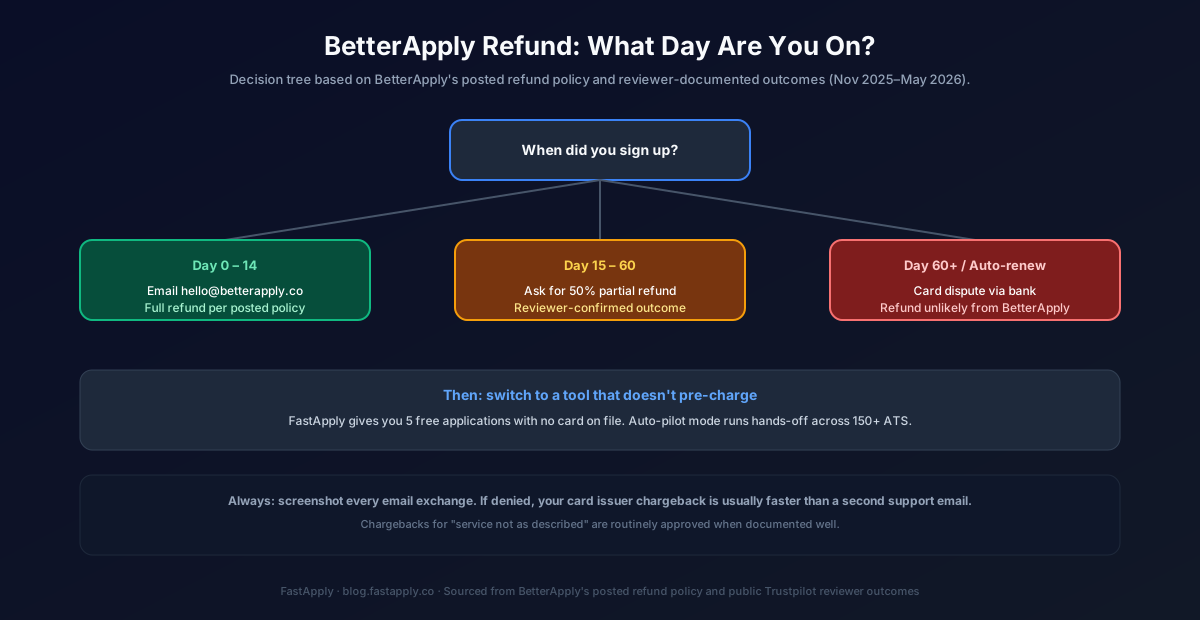
If you are inside Day 0 to 14, the cancellation is mechanical. If you are between Day 15 and roughly Day 60, you are negotiating a partial refund based on goodwill, and the documented outcomes vary. If you have hit a 90-day bundle auto-renewal or a 30-day standard renewal past Day 60, BetterApply will most likely point you back to the Terms of Service. The path to a refund at that stage runs through your card issuer, not BetterApply.
Step 1: Cancel the Subscription First, Then Ask for the Refund
Cancel the auto-renewal before the refund email. If you ask for a refund without cancelling first, you can still be charged again on the next billing date while support reviews your request. This has happened to multiple reviewers including Jack Wolgast, who described being charged $50 the month after the initial $15 promo while waiting for support to respond.
To cancel, log in to your BetterApply dashboard, open Account Settings, and look for the subscription panel. The cancellation control is in the same panel as your billing history. BetterApply does not always send a confirmation email for cancellation, so screenshot the confirmation screen the moment it appears.
If you cannot find the cancellation toggle, email support and ask for “immediate cancellation of auto-renewal.” Do not ask for the refund in the same email. Cancellation is a separate request that BetterApply has consistently processed quickly.
Step 2: Send the Refund Request With Precise Language
The phrasing matters. BetterApply’s support team has a documented pattern of approving refunds when the request cites their own Terms of Service, and denying or stalling refunds when the request reads as emotional or accusatory.
Use this template:
Subject: Refund request per Terms of Service (account: [email protected])
Hello,
I am requesting a refund of the $XX charge dated [date] for my BetterApply subscription, which I cancelled on [date]. I am within the 14-day refund window from my first paid charge. Per the Terms of Service refund policy posted on betterapply.co, please process this refund to the card on file.
If there is any reason this request would be declined, please reply with the specific clause of the Terms of Service that applies so I can review it.
Thank you.
Two things in that email matter. First, it cites the policy by name, which gives the support agent a clean approval path. Second, the closing line asks for the specific clause if the answer is no, which prevents a vague “we don’t do refunds” reply and forces a documented denial that you can later forward to your card issuer.
Step 3: If You Are Outside the 14-Day Window
BetterApply’s posted policy is a flat 14 days, but a meaningful number of reviewers outside that window have received partial refunds, typically around 50% of the disputed charge. Anthony Hicklin and Maygon documented this outcome after pushing back on initial denials. BetterApply has a discretionary refund path that they do not advertise on the policy page.
To ask for it, send a follow-up email after the initial denial:
I understand the full refund window has passed. Given that I cancelled within X days of the renewal charge and have not used the service since cancellation, I am asking for a partial refund as a goodwill resolution. Many of your reviewers on Trustpilot have received 50% in similar situations. Please escalate this to a manager if needed.
Mentioning Trustpilot is intentional. BetterApply actively monitors and responds to its public reviews, and the goodwill refund pattern shows up specifically in cases where the customer’s review is visible or threatened.
Step 4: If BetterApply Says No, Dispute the Card Charge
This is the path most BetterApply customers do not realize they have. If your card issuer is a major US bank (Chase, Capital One, AmEx, Bank of America), the dispute process is well-defined and routinely approved when documented well.
The reason code to use is “service not as described” for ATS coverage or feature shortfalls, or “unauthorized recurring charge” for auto-renewals you were not notified about. Both reason codes are valid under Visa and Mastercard rules for subscription disputes.
Documentation you should attach to the dispute:
- The original email confirming your cancellation request and the date of that request.
- A screenshot of BetterApply’s posted refund policy from their public Terms of Service page.
- The email from BetterApply support denying your refund.
- One or two paragraphs explaining specifically what was not as described (use specifics: “Auto-apply required one click per job per their own public reply on Trustpilot, not hands-off submission as advertised at signup” works).
Card disputes typically resolve in 30 to 60 days. The provisional credit is usually applied to your statement within a week, so you stop carrying the disputed charge while the bank reviews.
What to Switch To: A Tool That Does Not Pre-Charge You
The reason BetterApply cancellations are this complicated is structural. You are charged before you know whether the product works for your specific field, profile, and ATS coverage. By the time you find out, the refund window has often closed.
FastApply solves this differently. You get 5 free applications without a card on file. That is enough to test whether the matching engine and ATS coverage work for your specific use case before any money moves. If it does not work, you walk away with no cancellation flow to navigate. If it does, you choose your plan at upgrade time.
The feature parity at the entry tier:
| Feature | BetterApply Intro | FastApply Starter |
|---|---|---|
| Free applications | 5 (then auto-renews) | 5 (no card needed) |
| Hands-off auto-apply | No (1 click per job, per their public reply) | Yes (Auto-pilot mode) |
| ATS coverage | LinkedIn-heavy | 20+ job platforms and ATS systems |
| 24/7 AI Job Matcher | No | Yes |
| Cancellation | Email support | Dashboard toggle |
| Renewal predictability | Auto-renews at $50 | Choose plan on upgrade |
| 14-day refund trap | Yes | Not applicable (no upfront charge) |
The Auto-pilot vs one-click distinction is the operational difference. BetterApply has publicly clarified that auto-apply on their platform “currently requires one click of approval from you before submitting.” FastApply’s Auto-pilot mode runs hands-off across its 20+ job platforms and ATS systems once you set your preferences. Set it once, the 24/7 AI Job Matcher finds matching roles, and applications submit while you work, sleep, or travel.
For the full side-by-side, see our BetterApply Review 2026 and FastApply vs BetterApply comparison.
What Not to Do
Three patterns show up repeatedly in BetterApply reviewer accounts that delay or kill the refund path.
Do not call your bank before emailing BetterApply. Card issuers expect you to attempt resolution with the merchant first. If you dispute without that documented attempt, the issuer can deny the dispute and refer you back to BetterApply, which slows the timeline.
Do not leave a one-star Trustpilot review before the refund is processed. BetterApply’s support tone in publicly visible replies is consistently professional and policy-citing. The replies in your private email thread are functionally similar. Negative public reviews before resolution have not, in the documented cases, accelerated refunds. They have occasionally prompted a “we will look into this” public reply that does not translate to a real refund.
Do not pay for the annual plan to “save money” while you decide whether you like it. The annual plan compresses the refund window into the same 14 days while raising the disputed amount tenfold. Ben described being auto-renewed for three months after landing a job. The monthly plan is the only one with manageable downside if your circumstances change mid-search.
After You Cancel
Most BetterApply customers cancel because they wanted a fully hands-off auto-apply tool and discovered the one-click-per-job requirement after the refund window closed. That is the structural mismatch, and switching tools is the resolution.
Try FastApply free for 5 applications with no card on file. Turn on Auto-pilot mode if you want hands-off submission across 20+ job platforms and ATS systems, or Co-pilot mode if you want to review each application before it sends. Plans start at $14 per month, or $38 for the 90-Day Interview Sprint (the package built around the average US job-search window).
The point is not “try our product instead.” The point is that the BetterApply cancellation process is annoying enough that you should not have to do it twice. Whatever you switch to, make sure the next signup does not put you in a 14-day refund-window race.
Related guides
- Is BetterApply Legit? Real Trustpilot Review Breakdown
- BetterApply Pricing 2026: Real Plans, Hidden Caps & $19.99 Math
- FastApply vs BetterApply 2026 Comparison
- Best AI Job Search Tools in 2026
- Set It and Forget It: 5 AI Tools That Auto-Apply 24/7
Try FastApply Free
Stop applying one job at a time. Install the FastApply Chrome extension and run 5 free applications on us. No credit card. Works on LinkedIn, Indeed, Workday, Greenhouse, Lever, Ashby, iCIMS, Taleo, and the rest of FastApply’s 20+ job platforms and ATS systems.
Turn on Auto-pilot mode and let FastApply apply while you are at work, on vacation, or asleep. Set your preferences once. The 24/7 AI Job Matcher finds matching roles the moment they are posted and submits with a tailored resume per job.
Plans start at $14/month, or $38 for the full 90-Day Interview Sprint (save vs paying monthly). Cancel anytime, from the dashboard, with no refund-window race.
#cancel betterapply
#betterapply refund
#how to cancel betterapply
#betterapply cancellation
#BetterApply alternative
#BetterApply

Ekekenta Clinton
Founder, FastApply