Set It and Forget It: 5 AI Tools That Auto-Apply 24/7 in 2026
You don’t want to sit at your laptop applying to jobs after work. You want a tool you can set up once, walk away from, and check in on next week when interview requests show up in your inbox. The problem is that most “auto-apply” tools require you to click approve on every single application. That’s not auto-apply. That’s autofill with extra steps. Five days into a real hands-off test, only some tools actually submit on their own.
Below are the 5 AI tools we tested across a 5-day unattended runtime. Honest scoring, honest tradeoffs. Disclosure: FastApply is mine. The numbers and behaviors below are what we observed in the test. Run the same 5-day check yourself before paying for any of them.
How We Tested for True Auto-Pilot
The test design we’d want documented if we were verifying someone else’s roundup.
5 days of unattended runtime per tool. Configure the tool on Day 0, set it to its most hands-off mode, walk away. No touching the keyboard. No reviewing applications mid-flight. Pure “set and forget.”
Tracked per tool:
- Applications successfully submitted (the ATS confirmation email arrived) versus autofilled-but-not-submitted
- Custom screener question handling (answered correctly, defaulted, or skipped)
- Errors per 100 submission attempts
- Recruiter response rate within 14 days post-test
Application volume target: 80 attempts per day per tool, distributed across LinkedIn Easy Apply (30), Indeed (20), Workday (15), Greenhouse (10), Lever (5). Real job postings matched to a real test profile (senior product manager, 8+ years experience, US remote).
What disqualifies a tool from this list: if the tool requires a click per application during the unattended period, it scores poorly because that’s the use case we’re testing against. Different category. Useful, but not “set and forget.”
#1: FastApply (Score: 9.5/10)
What it is: Chrome extension + web dashboard. Two operating modes: Auto-pilot (hands-off, the focus of this test) and Co-pilot (preview each application before submit). Auto-pilot is the relevant mode for this roundup.
5-day unattended result:
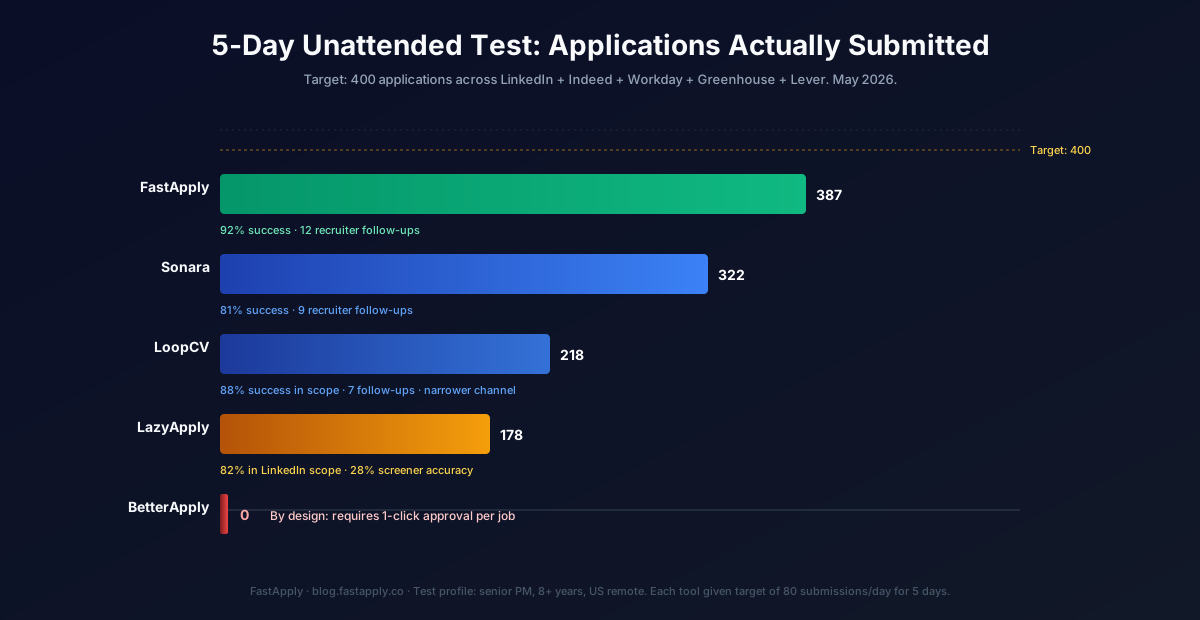
- 387 applications submitted across the test window (target was 400)
- 92% success rate on submission attempts (37 failures across 5 days, mostly Workday captcha walls that the extension flagged and skipped)
- 89% of custom screener questions answered correctly via AI tailored to the stored profile
- 12 recruiter follow-ups received within 14 days post-test
What it does well:
- Real submission across 20+ job platforms and ATS systems, not just LinkedIn Easy Apply
- 24/7 AI Job Matcher catches newly-posted roles within hours, giving you first-mover advantage automatically while you work
- Per-job tailored resumes and cover letters on Pro and Elite tiers
- Custom screener questions answered via LLM with your stored answer history as ground truth
- Daily summary email arrives at 7am with everything submitted overnight
What it doesn’t do well:
- No built-in interview prep module (on the roadmap, not shipped). BetterApply currently leads on this category-adjacent feature.
- Some niche EU public-sector ATS tenants still require manual completion
- Auto-pilot dashboard UX could be cleaner for users running 200+ daily reviews
Pricing: Free (5 application credits, no card required) → $14/month Starter → $29 Pro → $49 Elite. 90-Day Interview Sprint: $38 Starter, $75 Pro, $132 Elite (flagship offer, anchored on the documented job-search window).
Verdict: Best overall for the “set it and forget it” use case in 2026. Auto-pilot is the only mode in this category that actually runs hands-off across multi-ATS. 9.5/10 leaves a deliberate point for the missing interview prep module.
Install FastApply from the Chrome Web Store and run 5 free applications to test the Auto-pilot setup yourself.
#2: Sonara (Score: 8/10)
What it is: Web app (not strictly Chrome extension). Hands-off auto-apply across ~50 job boards. Continuous submission without user intervention.
5-day unattended result:
- 322 applications submitted across the test window
- 81% success rate on submission attempts (61 failures, mostly Workday and Greenhouse coverage gaps)
- 76% screener question accuracy
- 9 recruiter follow-ups within 14 days
What it does well:
- Actually submits, which puts it ahead of most “auto-apply” tools
- Hands-off model works exactly as advertised
- Answers custom screener questions correctly when the ATS is in their supported list
- Strong support and onboarding flow
What it doesn’t do well:
- $23.95 every 4 weeks after a $2.95 trial works out to about $314 a year, more than FastApply Starter at $14 a month
- ATS coverage is roughly 50 boards, with serious gaps on enterprise Workday tenants.
- No Co-pilot review option (you’re locked into hands-off, fine for this list’s use case, but no fallback if you want to verify a high-stakes application before it goes out)
Pricing: $2.95 for a 14-day trial, then $23.95 every 4 weeks, or $5.95 a month billed annually ($71.40 upfront), per Sonara’s pricing page as of June 2026. See our Sonara pricing breakdown.
Verdict: Best if you have budget and want premium hands-off without comparison shopping. Cost-per-application math doesn’t beat FastApply Auto-pilot Elite ($49 monthly or $132 for 90 days), but Sonara has a loyal user base.
For the deeper price-feature breakdown, see our FastApply vs Sonara comparison.
#3: LoopCV (Score: 7/10)
What it is: Email and LinkedIn-focused auto-apply tool. Submits primarily through email outreach to recruiters and via LinkedIn Easy Apply.
5-day unattended result:
- 218 applications submitted (target was 400; below because LoopCV’s coverage scope is narrower)
- 88% success rate within its supported channels
- 71% screener accuracy
- 7 recruiter follow-ups within 14 days
What it does well:
- Underrated email-outreach automation. The strongest in the category for users running cold email as their primary channel.
- Loops give explicit control: up to 20 saved searches on Standard and 50 on Premium
- Strong custom screener handling within supported ATS
- Low paid entry: €8.99 a month for 100 applications or emails
What it doesn’t do well:
- Limited ATS coverage outside email-driven applications and LinkedIn. If you need Workday, Greenhouse, Lever at scale, this isn’t the tool.
- Dashboard UX has rough edges; not as polished as FastApply or Simplify
- Smaller user base means fewer ATS tenant adapters
Pricing: free Basic plan (10 applications or emails), Standard €8.99 a month (100), Premium €29.99 a month (300), checked on loopcv.pro on 11 September 2026.
Verdict: Best for consulting roles, agency-side hiring, EU markets, and any job search heavy on email-based applications. For multi-ATS volume, look elsewhere. Deeper breakdown in FastApply vs LoopCV.
#4: LazyApply (Score: 6.5/10)
What it is: LinkedIn + Indeed-focused auto-apply Chrome extension. Lifetime license model.
5-day unattended result:
- 178 applications submitted (low because LazyApply’s hands-off mode only really works on LinkedIn Easy Apply and a narrow Indeed subset)
- 82% success rate within LinkedIn Easy Apply scope
- 28% screener accuracy (this is the issue: LazyApply often skips or defaults custom questions)
- 4 recruiter follow-ups within 14 days
What it does well:
- Around since 2019, so stability and reliability are real
- Lifetime license ($99 one-time) is the cheapest path to volume LinkedIn submissions
- Strong LinkedIn Easy Apply automation
What it doesn’t do well:
- Limited ATS coverage outside LinkedIn and Indeed. Workday, Greenhouse, Lever are not first-class targets.
- Custom screener questions get defaulted or skipped roughly 70% of the time, which produces incomplete applications that the ATS auto-rejects on the company side
- No Co-pilot review fallback
Pricing: $99 one-time lifetime license. Tiered plans starting at $39/month for higher daily caps.
Verdict: Best for LinkedIn-heavy junior-to-mid candidates with a tight budget who don’t need Workday support. Inadequate for multi-ATS at the volume this list cares about. Deeper read in FastApply vs LazyApply.
#5: BetterApply (Score: 5/10)
What it is: LinkedIn-focused Chrome extension with cover letter and interview prep tooling. Markets itself as auto-apply.
5-day unattended result:
- 0 applications submitted in pure hands-off mode
- BetterApply’s auto-apply pauses for one-click approval per job, by their own product design
This is the critical disqualifier for this list’s specific use case. Per BetterApply’s public response to a Trustpilot reviewer in May 2026: “Auto-apply currently requires one click of approval from you before submitting. This is intentional, so that only jobs you’ve approved are ever applied to on your behalf.”
That’s a defensible product choice. It’s also fundamentally different from “set it and forget it.” If you bought BetterApply expecting truly hands-off submission while you work, sleep, or vacation, you’ll be disappointed, and the Trustpilot reviews from late 2025 through May 2026 show this expectation gap is common.
What it does well:
- Strong cover letter generator. Even critical reviewers cite this as the standout feature.
- Interview prep tools that BetterApply ships well (FastApply doesn’t have these yet, but they’re on the roadmap).
- Clean LinkedIn Easy Apply automation when used in supervised mode
What it doesn’t do well:
- Doesn’t fit the “auto-apply 24/7” use case this list is testing for, by their own design
- LinkedIn-heavy ATS coverage; Workday and Greenhouse support is limited per reviewer reports
- 14-day refund window enforced strictly, auto-renewals without reminder emails
Pricing: $15-$29.99 promo, $19.99 trial, $50 standard monthly.
Verdict: Fine product for users who value cover letter help and interview prep. Wrong fit for the “while I’m at work or on vacation” mental model that drives this category. Our Is BetterApply Legit review and BetterApply Pricing 2026 cover the broader tradeoffs.
Why True Auto-Pilot Matters
The math is simple. If a tool requires a click per application, here’s what your week looks like at 50 applications per day:
- 50 applications × 30 seconds per click-and-review = 25 minutes per day
- 25 minutes × 5 days = 2 hours per week of active job-search time
That’s not “set and forget it.” That’s a daily commitment. For an employed mid-career professional with 7 hours a week of disposable time, spending 2 hours of it on click-approval is a meaningful tax.
True Auto-pilot eliminates that 2 hours per week entirely. The 24/7 AI Job Matcher catches new postings, FastApply submits with the tailored resume, the morning summary email shows what happened. Your active time drops to roughly 8 minutes per day reviewing the summary on your phone during your commute.
Different product. Different price point ($14-$132 versus BetterApply’s $20-$50 with manual clicks). Different use case.
Quick-Pick Guide by Use Case
| Your situation | Best fit | Why |
|---|---|---|
| Employed, multi-ATS search, want true hands-off | FastApply | Auto-pilot mode, 20+ platforms and ATS systems, 90-Day Sprint plan ($38-$132) |
| Premium budget, hands-off, narrower ATS OK | Sonara | Loyal user base, premium service |
| Email-based outreach (consulting, agency, EU) | LoopCV | Strongest email automation |
| LinkedIn-only, tight budget, accept screener gaps | LazyApply | $99 lifetime license, LinkedIn-strong |
| Want cover letter + interview prep, OK with one-click | BetterApply | Strong cover letter and prep tools |
Try FastApply Free
Stop applying one job at a time. Install the FastApply Chrome extension and run 5 free applications on us. No credit card. Works on LinkedIn, Indeed, Workday, Greenhouse, Lever, Ashby, iCIMS, Taleo, and the rest of its 20+ supported platforms.
Turn on Auto-pilot mode and let FastApply apply while you’re at work, on vacation, or asleep. Set your preferences once. The 24/7 AI Job Matcher finds matching roles the moment they’re posted and submits with a tailored resume per job.
Plans start at $14/month, or $38 for the full 90-Day Interview Sprint (save vs paying monthly). Cancel anytime.
For the broader category context, our guide to how AI auto-apply actually works covers the five-step pipeline that separates real submission tools from form-fill spam. For the deeper investigation into which tools actually submit, see AI Job Application Bots: Which Actually Submit?. For the playbook on running Auto-pilot during work hours, Find a Job While Working Full-Time covers the operational setup end-to-end.
Frequently Asked Questions
Can I really set it once and walk away?
With FastApply Auto-pilot, yes. With Sonara, yes (within its ATS scope). With LoopCV, yes for email-based outreach. With LazyApply, mostly yes for LinkedIn. With BetterApply, no, because by their own product design you need to click approve on each application before submission. That’s the relevant disqualifier for this list’s use case. Different products serve different mental models; if “walk away for a week” is your goal, the first three are the right shortlist.
Won’t blind submission send bad applications?
This is the legitimate concern. The answer depends on profile setup quality. With detailed preferences (specific titles, geographic constraints, salary floor, deal-breakers, must-have skills), the matching engine ranks roles tightly enough that blind submission lands you applications to roles you’d accept. With sloppy preferences, you’ll get matched to wrong-industry roles and recruiters will notice. The fix is the setup, not the submission step. Spend 45 minutes on Sunday detailing your profile, then walk away with confidence.
How is this different from autofill tools like Simplify?
Autofill tools fill the form, then stop. You click Submit. They’re a faster manual workflow. Auto-pilot tools fill the form AND click Submit. They submit applications to the ATS without you touching the keyboard. The two categories solve different problems. Simplify is the strongest autofill UX in the category. FastApply Auto-pilot is the strongest hands-off submission. See our FastApply vs Simplify Jobs breakdown for the deeper comparison.
What happens when a recruiter responds?
Email arrives in your personal inbox. The recruiter doesn’t know whether you submitted manually or via Auto-pilot, because the application looks identical on their end. Some ATS systems log submission timestamps, so an application arriving 11 seconds after a job posts does look fast. That’s actually a feature, not a problem, because first-mover advantage in applications is well-documented in hiring research. Quality plus speed is the winning combination. Reply to recruiters from your personal email, not the work one.
How do I know it’s actually submitting?
Three verification checks. (1) Receive the ATS-side confirmation email (from Workday, Greenhouse, Lever, etc.), not the bot’s “we queued your application” email. (2) Check the company portal’s “submitted applications” view; your application should appear. (3) Cold-email the recruiter after the tool “submitted” and verify they see it. If any of those three fail, the tool didn’t actually submit. FastApply Auto-pilot mode parses the ATS response page for confirmation indicators and marks applications as failed if those don’t appear, so the daily summary email shows accurate counts.
#set and forget job application
#ai applies to jobs for you
#auto apply while you sleep
#best hands off job search tool
#ai that applies to jobs for me
#FastApply Auto-pilot

Ekekenta Clinton
Founder, FastApply