How to Job Search on Company Time Without Getting Caught (2026)
I’m not going to tell you whether to job search at work. I’m going to tell you that if you’re going to, here’s how to do it without losing your current paycheck before the new one arrives. The risks are real and operational, not theoretical. Every quarter someone gets walked out of the building because their manager saw their LinkedIn tab. Every quarter someone takes a recruiter call during a Zoom they forgot was being recorded. The list goes on. The fix isn’t willpower. The fix is a system that runs the application volume in the background and keeps the human-facing parts off your work computer entirely.
This guide is the operational manual. The strategic playbook is in How to Find a Job While Working Full-Time, which covers Auto-pilot setup and the 90-day timeline. This post is the day-to-day discipline: browser hygiene, calendar tactics, recruiter call routing, communication separation, and how to resign cleanly when an offer lands.
Disclosure: I’m the founder of FastApply. The system below leans on FastApply Auto-pilot because it’s the only product I know of that actually runs applications hands-off while you work. You can adapt the operational hygiene to any tool you use; the application-volume side gets harder the more clicks the tool requires.
The Browser Discipline
Three rules. If you follow these, the digital surface of your job search is invisible to your employer.
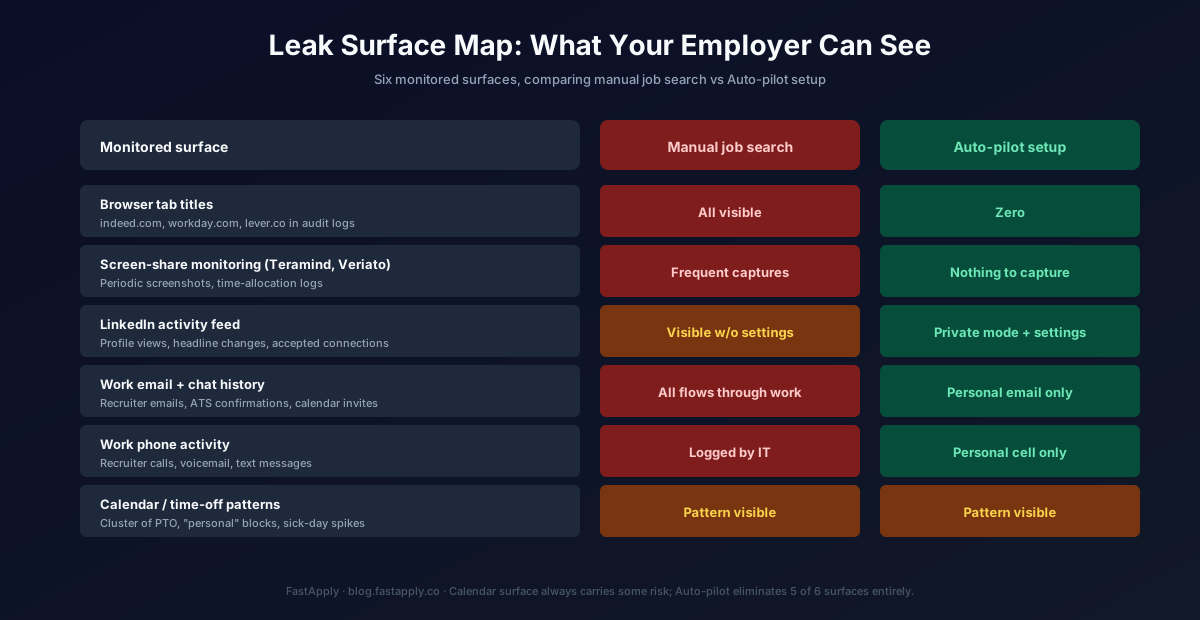
Use a separate browser profile or guest mode on your work laptop. Chrome → Profile menu → “Add” → create a new profile called “Personal.” Sign in with your personal Google account, not your work one. Bookmark recruiter messages, job postings, and your LinkedIn login under that profile only. Switch profiles when you want to check anything job-related. Most IT screen-monitoring tools don’t distinguish between profiles, but tab titles and URLs that say “indeed.com” or “workday.com” do show up in audit logs. Separation reduces the noise.
Never leave job-related tabs open when you step away. Bathroom break, coffee run, even a quick “got a sec?” from a colleague, close the tab first. Pin a “scratch” Excel workbook in your taskbar that you can switch to in one click. The 3-second rule: anything you wouldn’t want your manager to see should not be on your screen for more than 3 seconds when you’re not physically at the keyboard.
Set LinkedIn to private when browsing. LinkedIn → Settings → “Profile viewing options” → Anonymous. Recruiters at your current company can’t see who you’ve been viewing. Your “recently viewed” panel doesn’t broadcast that you spent 20 minutes on the regional manager’s profile at a competitor.
If your IT team uses one of the modern screen-share monitoring tools (Teramind, Veriato, Hubstaff), assume every tab title is logged. The realistic mitigation: don’t open job-related tabs on the work laptop at all. Use your phone for any active browsing. The work laptop should never load workday.com, lever.co, greenhouse.io, or any ATS URL.
Why Auto-Pilot Is the Only Sustainable Answer
Active browsing during work hours is the highest-risk move. Every tab is a leak surface. Every recruiter message you read is 30 seconds your screen-share might catch. Every “let me just check LinkedIn” turns into 15 minutes that shows up in your time-allocation reports.
Auto-pilot mode in FastApply solves the structural problem. You configure preferences once on a Sunday afternoon from your personal laptop. The system then submits applications to LinkedIn, Indeed, Workday, Greenhouse, Lever, Ashby, and the rest of its 20+ supported platforms continuously, while you work, sleep, or sit in meetings. The 24/7 AI Job Matcher catches newly-posted roles within hours of publication, which gives you the first-mover advantage automatically.
Your only daily touchpoint is the 7am summary email. You read it on your phone during your commute or your morning coffee. It shows what was submitted overnight, which recruiter follow-ups arrived, and which applications had errors that need attention. Total time: 8 minutes a day. Total time on your work computer: zero.
This is the structural difference between a job search at work that gets caught and one that doesn’t. The job search literally never touches the work computer. Recruiter emails arrive in your personal inbox. Application submissions happen from FastApply’s infrastructure. Resume tailoring happens server-side. Nothing in this system requires you to type “indeed.com” into a browser at your desk.
Plans start at $14/month, or $38 for the 90-Day Interview Sprint that’s anchored on the documented average job-search window. We launched the Sprint plan in late May and it’s been the fastest-growing tier since: customers who can’t browse all day were exactly the segment it was built for.
Calendar Tactics for Interview Days
Recruiter calls are the most exposed surface in a job search at work. They happen on someone else’s schedule, they require uninterrupted talking, and the people around you can hear half the conversation. The tactical answers below.
30-minute first-round screens, code as “personal errand” or “doctor visit.” Block 45 minutes on your work calendar (30 for the call, 15 for buffer). Pick one euphemism and use it consistently. Don’t have three dentist appointments in one week, because that’s a pattern your manager will notice. Mix it up across the month.
1-hour second rounds, “extended personal errand.” Same euphemism approach. Schedule for late morning (10am-11am) or right after lunch (1pm-2pm) so the cover story is plausible.
Half-day final rounds, take a PTO half-day. Save accrued PTO for these. Don’t burn full sick days on interview rounds; HR may audit usage patterns and four sick days in a quarter looks suspicious.
Full-day onsites, take a PTO day. Mark it as “personal” on the shared calendar. Don’t post about it. Don’t tell colleagues you’re “exploring opportunities” even if they ask directly.
The 3-hour vacation rule. When you take PTO for interviews, take half-days for first/second rounds and full days for final rounds and onsites. Spread the PTO across the quarter so HR doesn’t see a pattern like “5 PTO days all in March.”
Block your status as “busy” on shared calendars, never “Out of office.” OOO triggers Slack messages, “while you were out” digests, and a delegated coverage handoff. “Busy” just shows you’re occupied and people send their question via Slack instead.
Recruiter Phone Calls
Default to text or async first. Most recruiters in 2026 will respect “I prefer email/text for first contact, calls after we’ve aligned on basics.” When a call is required, here’s the playbook.
Use your personal cell only. Never give a recruiter your work phone or work email. If a recruiter calls your work number despite your instructions, decline the call. Reply via personal email within 5 minutes: “In a meeting, can I call you back at [time] from my personal line?”
Step outside or use your car. Don’t take recruiter calls from your desk, even in an empty conference room. Glass doors are see-through; someone walking past will see “Sarah Khan, ABC Corp” on the screen and connect dots. Walk to the lobby or your car, then call back.
Schedule first calls for 7am, 12pm, or 6pm. Most recruiters will accommodate these times. They’re outside the workday’s high-attention windows. If a recruiter insists on 2pm Tuesday and you can’t move it, propose Wednesday morning before work as an alternative.
Never take a recruiter call during a shared Zoom or meeting. Decline immediately. Text the recruiter: “In a meeting, will call you in [X] minutes.” Then actually do it within the window.
Set your personal phone to silent during work meetings. A vibrating phone with “Sarah Khan calling” on the lock screen is a leak you don’t want.
Communication Hygiene
The principle: complete separation between your work communication stack and your job search communication stack. No overlap. No cross-references. No accidental forwards.
Use a personal email for all job search activity. Never give a recruiter your work email. If you signed up for any job board or recruiter platform with your work email, change it now. Use gmail, fastmail, proton, whatever you prefer, but make sure it’s clearly personal and not detectable via internal email forwarding.
Use your personal phone number. Same rule. If you’ve shared your work phone with recruiters historically, change to personal cell going forward.
Use a personal LinkedIn profile that doesn’t link to your work email. LinkedIn → Settings → Account → Email addresses → make sure your personal email is the primary, not a work email. Even if your work email isn’t visible on your public profile, LinkedIn’s account-recovery flow uses it, which means a determined IT auditor could trace.
Avoid job-related searches on work devices. This sounds obvious. It isn’t, because everyone does it once when they’re in a hurry. The catch is that browser autocomplete and corporate-monitored search history persists. A search for “workday autofill chrome extension” or “how to apply to many jobs” three weeks ago can surface in an HR investigation later. Use your phone or personal laptop only.
Don’t accept recruiter LinkedIn connection requests during work hours. The notification posts to your network’s feeds. Your colleagues will see “Clinton accepted Sarah Khan’s connection request” in their LinkedIn feed if Sarah works at a competitor. Accept the connections in the evening from your phone.
When You Get the Offer
Don’t tell anyone at your current company until you have a signed offer letter in hand. Not your best work friend. Not your most trusted colleague. Not the person you grab coffee with every Tuesday. The signal leaks faster than you think; one person tells one person, and within 48 hours your manager has heard.
When you do resign, give standard 2 weeks notice. No more. Don’t agree to “stay one more month for the big launch,” because that’s how you end up resigning twice, with the second one being involuntary. Hand over a transition document on Day 1 of the notice period. Be visibly available during the 2 weeks. Don’t update LinkedIn until your first day at the new company.
Decline counter-offers. Industry data on counter-offer acceptance consistently shows roughly 89% of accepted counters result in the employee leaving within 12 months anyway, often involuntarily. The reasons you wanted to leave are still there. The counter-offer is a retention bridge to give your manager time to plan your replacement on their terms. Take the new offer.
Try FastApply Free
Stop applying one job at a time. Install the FastApply Chrome extension and run 5 free applications on us. No credit card. Works across 20+ job platforms and ATS systems, including LinkedIn, Indeed, Workday, Greenhouse, Lever, and Ashby.
Turn on Auto-pilot mode and let FastApply apply while you’re at work, on vacation, or asleep. Set your preferences once. The 24/7 AI Job Matcher finds matching roles the moment they’re posted and submits with a tailored resume per job. Your work computer never touches the application flow.
Plans start at $14/month, or $38 for the full 90-Day Interview Sprint (save vs paying monthly). Cancel anytime.
For the broader strategic playbook, see How to Find a Job While Working Full-Time. For the next-level move (running Auto-pilot during a 7-day vacation), see How to Apply to Jobs While on Vacation. For the Workday-specific tactical setup, the 7 Workday ATS tactics post drops application time from 15 minutes to about 90 seconds.
Frequently Asked Questions
Can my employer actually monitor my job search?
Yes, more than most people realize. Modern endpoint-monitoring tools log browser tabs, search history, file uploads, USB activity, and screen-share sessions. If you visit indeed.com or workday.com on your work laptop, that visit is almost certainly logged somewhere. The fix is not to visit those sites on your work laptop. Use your personal phone for any active browsing. Use Auto-pilot tools that submit applications from their own infrastructure so your work computer never makes the outbound request.
Is it ethical to job search at work?
Job searching while employed is normal and expected. The ethics question is about company time and resources. Don’t use your work laptop for job applications. Don’t take recruiter calls during meetings you’re paid to attend. Don’t schedule interviews during deliverable deadlines that depend on you. If you follow the Auto-pilot setup (running on your personal device, not your work computer), you’re not using company time or resources at all. The system runs while you work, not instead of it.
What if my employer asks me directly?
You’re not legally required to answer. The professional response: “I’m focused on my work here.” That’s not a lie if you actually are focused on your work during work hours (which the Auto-pilot setup enables). If your manager presses, you can say “I always evaluate my options, and right now I’m here.” Don’t confirm an active search. Don’t deny it absolutely either, because that creates a credibility problem if you resign 6 weeks later.
How do I explain interview days?
Use consistent euphemisms across the month. “Doctor appointment,” “personal errand,” “extended lunch” all work for 30-60 minute blocks. For half-days and full days, take PTO and code it as “personal day.” Don’t post about it on social media. Don’t tell colleagues you’re traveling for an interview even if asked directly. The cover story should require zero memory work to maintain. Keep it simple.
What’s the smallest footprint I can leave?
Setup once on Sunday. Run Auto-pilot from FastApply’s infrastructure during the week so your work computer never touches the application flow. Take recruiter calls from your car or the lobby on your personal cell. Use a personal email for all communication. Code interview days as personal errands. Update LinkedIn only after you’ve started the new role. Total visible footprint at your current employer: zero browser tabs, zero recruiter calls overheard, zero LinkedIn updates, zero email traces. The new offer becomes the first thing they know about your search.
#job search at work
#applying for jobs at work
#job hunting at work without getting caught
#how to job search at work
#interview at work without boss knowing
#FastApply Auto-pilot

Ekekenta Clinton
Founder, FastApply