How to Find a Job While Working Full-Time (2026 Guide)
The average mid-career professional in 2026 has roughly 7 hours per week of disposable time. The average job seeker now sends 84 applications before landing an interview. If you’re employed and want to switch roles, that math doesn’t work. You can’t spend 4 hours a night clicking through Workday forms, and you can’t browse LinkedIn at your desk without it showing up in your manager’s “recently viewed” list eventually.
A job search while working full time has to run in the background. Set preferences once. Let it submit applications while you’re in meetings, at lunch, asleep. Review the summary in your morning routine. Take recruiter calls on your personal phone during breaks. Schedule interviews for PTO days. Resign cleanly when an offer lands.
This is the playbook for finding a new job while employed without your current employer ever knowing. The system uses FastApply Auto-pilot mode plus the 24/7 AI Job Matcher because those are the only tools we know of that actually run hands-off. Disclosure: I’m the founder. You can run a version of this playbook with any auto-apply tool, but the time math gets worse the more clicks the tool requires.
The Five Risks of Job Searching at Work
If you’re going to job search while employed, you have to manage these five risks. None of them are theoretical. Each costs someone their current job every week.
1. Being seen on LinkedIn. Recruiters at your current company can see when you flip your “Open to work” toggle. Your boss can see when you update your headline. Your colleagues see when you accept a connection from a recruiter. Every one of those signals leaks.
2. Leaving browser tabs open. You step away for coffee. Someone walks by your desk. The Workday tab is open. Or your IT team’s screen-share-monitoring tool flags “indeed.com” 12 times this week. Or your camera-on Zoom shows your second monitor with a recruiter email in the corner.
3. Recruiter calls during meetings. “Hey, this is Sarah from XYZ Corp.” Your manager is in the same Zoom. Or your work phone rings during a deal review. Or you take a screen and your colleague messages “everything okay?” Recruiters call when it works for them, not when it works for you.
4. Calendar conflicts on interview days. You blocked the morning as “personal” but the regional VP scheduled an all-hands at the same time. Now you have to either reschedule a final-round interview or invent an excuse strong enough to skip the all-hands.
5. Social mentions. A friend congratulates you on LinkedIn for “exploring new opportunities.” A recruiter tags you in a public post. Your old college roommate mentions seeing you at a coffee chat. The signal doesn’t have to come from you.
The whole rest of this guide is about reducing each of those five risks to zero by running the application volume in the background and handling the human-facing parts on your time, not the recruiter’s.
Set Up Auto-Pilot Once, Let It Run
This is the core of the playbook. Auto-pilot mode in FastApply is set-and-forget. You configure preferences once, toggle it on, and the system applies to matching roles across LinkedIn, Indeed, Workday, Greenhouse, Lever, Ashby, and the rest of its 20+ supported platforms while you’re at work, asleep, on vacation, or in a meeting. Your only daily touchpoint is a 7am email summary showing what was submitted overnight.
Here’s the exact setup. Do it on a Sunday afternoon in 45 minutes. Then leave it alone.
Step 1: Create the FastApply profile with detailed preferences. Job titles you’d accept (list 5-7 variants because most companies use slightly different wording). Seniority you’re targeting. Geographic constraints (remote anywhere, remote within state, hybrid 1-2 days, on-site only). Salary floor (don’t accept anything below). Must-have skills. Deal-breakers (industries, company sizes, work-authorization requirements). Be specific. The more detailed the profile, the better the matching engine ranks roles for you.
Step 2: Toggle Auto-pilot mode on, Co-pilot off. Co-pilot pauses for your review before each submission. Auto-pilot submits without intervention. For a job search while employed, you want Auto-pilot. Co-pilot’s review queue requires sitting at the laptop, which defeats the discretion you need.
Step 3: Connect the 24/7 AI Job Matcher to 12+ job boards. The Matcher scans LinkedIn, Indeed, ZipRecruiter, Glassdoor, Dice, Workday, Greenhouse, Lever, Ashby, and others continuously. When a new role matching your preferences gets posted, FastApply submits within hours. First-mover advantage in applications is well-documented, and the Matcher delivers it automatically while you’re working.
Step 4: Set daily caps. Recommended: 30 LinkedIn Easy Apply per day (below LinkedIn’s soft throttle), 50 Indeed per day, 50-100 direct ATS. Total: 130-180 applications per day. Spread across the morning + afternoon to avoid platform pattern detection.
Step 5: Daily summary email arrives at 7am. Review on your phone during your commute, not at your work computer. Approve a few flagged candidates if Co-pilot mode is partially enabled. Otherwise, just scan the numbers and the response queue. Total time: 8 minutes.
Total active time per week with Auto-pilot running: roughly 60 minutes. Total applications submitted: 800-1,200. Realistic recruiter responses at 5-8% on tailored applications: 40-90 per week.
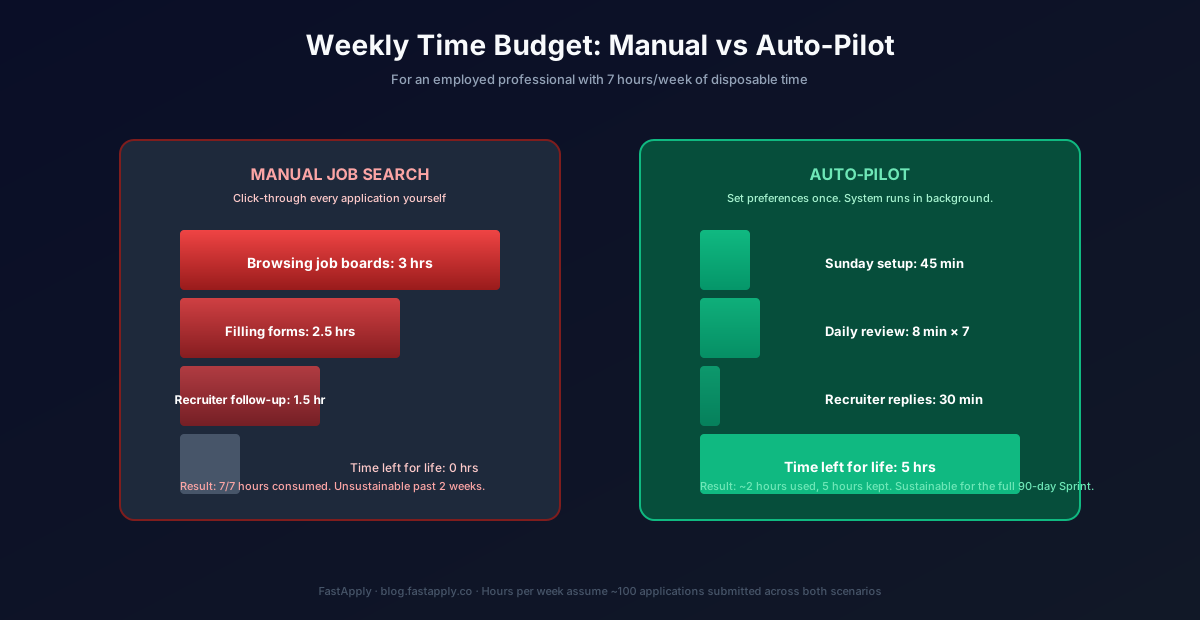
That’s the math that makes a job search while working full-time actually viable. Doing it manually doesn’t work. Doing it on Auto-pilot does.
LinkedIn Settings Every Working Job Seeker Should Toggle
LinkedIn leaks. By default, it tells your manager you updated your profile, tells your colleagues you accepted recruiter connections, and tells recruiters at your current company that you’re “Open to work.” Fix all of this in 8 minutes.
Open to work, private mode. LinkedIn → Settings → “Open to work.” Toggle on, but set visibility to “Recruiters only” AND uncheck “Show to my current company’s recruiters and HR.” LinkedIn does honor this. Your current employer’s recruiters won’t see the flag.
Disable profile-update sharing. LinkedIn → Settings → “Sharing profile edits.” Turn off. Otherwise every resume update broadcasts to your network.
Turn off “Let recruiters at my current company see I’m open.” Buried in the “Open to work” settings. Critical.
Use a personal email on your LinkedIn profile. Not your work email. Recruiters will email this address, and you don’t want any of that traffic going through your work inbox where IT may audit it.
Hide your activity feed. LinkedIn → Settings → Visibility → “Profile viewing options.” Set to anonymous so recruiters at your current company can’t see who you’ve been viewing.
Don’t accept recruiter connections during work hours. The notification posts to your network’s feeds. Accept on your phone in the evening.
How to Take Interview Calls Without Suspicion
Recruiter calls are the most exposed surface in a job search at work. Default to text first. If a recruiter requests a 30-minute screen, here’s the playbook.
Use your personal cell. Always. Never give a recruiter your work phone or work email. If they call your work phone, decline and follow up via personal email.
Calendar-block as a discreet appointment. “Dentist appointment,” “personal errand,” “doctor visit.” Pick one and stick with it (don’t have three dentist appointments in a week, that’s the pattern). For 30-minute screens use a 45-minute calendar block: 30 for the call, 15 for buffer.
Step outside the building or use your car. Don’t take recruiter calls from your desk. Even an empty conference room is risky if someone walks past the glass door and sees you on the phone with a non-work name on the screen.
The 3-hour vacation rule. Save accrued PTO and floating holidays for final-round interviews and onsites. Don’t burn PTO on first screens. Use lunch breaks and “appointments” for those.
Schedule first calls for lunch or before/after work. Most recruiters will accommodate 7am, 12pm, or 6pm calls if you propose them. If a recruiter insists on 2pm Tuesday, push back politely or use a real appointment slot.
Never take a recruiter call during a shared Zoom or meeting. Decline. Reply via text within 5 minutes: “In a meeting, can I call back at 12:30?”
What to Do on Vacation
Vacation is the highest-conversion period in a job search while employed. Auto-pilot can run unbounded because you’re not interrupting it. You have time to actually take interview calls when companies respond. The pre-vacation Auto-pilot configuration takes 10 minutes and roughly doubles your application volume for that week.
We cover the pre-trip setup, the daily-during-vacation expectation, and the post-trip triage in How to Apply to Jobs While on Vacation. If you have a vacation in the next 90 days, plan around it.
How to Resign Cleanly After You Land
Don’t tell anyone at your current company until you have a signed offer letter. Not your best friend at work. Not your most trusted colleague. The signal leaks otherwise.
When you do resign: standard 2 weeks notice. No more. Don’t agree to “one more big project” that extends you another month. Hand over your transition document on Day 1 of the notice period. Be visibly available to answer questions during the 2 weeks. Don’t post on LinkedIn until your start date at the new company.
Decline counter-offers. Industry data consistently shows ~89% of accepted counter-offers result in the employee leaving within 12 months anyway, often involuntarily. The counter-offer is a retention bridge, not a relationship reset. The reasons you wanted to leave are still there. Take the new offer.
The 90-Day Realistic Timeline
For most working professionals, here’s what to expect:
Days 1-7: Auto-pilot setup, LinkedIn discretion settings, calendar templates. Total active time: 4 hours.
Days 8-30: Auto-pilot runs in the background. ~3,000 applications submitted across the month. First recruiter responses arrive between Days 12-18. First screens scheduled.
Days 31-60: First-round screens during PTO/lunch. Pipeline forms. Second rounds begin. By Day 60 most candidates have 2-4 active conversations.
Days 61-90: Final rounds and onsites. Offers arrive between Days 70-90. Negotiation. Accept the strongest offer.
This timeline is exactly why we built the 90-Day Interview Sprint plan. It matches the documented average job-search window for active mid-career professionals. Most users land an offer inside it.
Try FastApply Free
Stop applying one job at a time. Install the FastApply Chrome extension and run 5 free applications on us. No credit card. Works across 20+ job platforms and ATS systems, including LinkedIn, Indeed, Workday, Greenhouse, Lever, and Ashby.
Turn on Auto-pilot mode and let FastApply apply while you’re at work, on vacation, or asleep. Set your preferences once. The 24/7 AI Job Matcher finds matching roles the moment they’re posted and submits with a tailored resume per job.
Plans start at $14/month, or $38 for the full 90-Day Interview Sprint (save vs paying monthly). Cancel anytime.
For the broader category context, our guide to AI auto-apply for jobs covers the five-step pipeline that separates real submission tools from form-fill spam. For Workday-specific tactics, the 7 Workday ATS tactics post drops application time per Workday submission from 15 minutes to about 90 seconds. For the volume side, applying to 100 remote jobs per week without burning out covers the sustainable cadence.
Frequently Asked Questions
Can my employer see I’m job searching?
If you follow the LinkedIn discretion settings above (private “Open to work,” disable profile-update sharing, opt out of current-company recruiter visibility), no. Auto-pilot runs entirely from your personal device or cloud account, so your work computer never touches the application flow if you set it up correctly. The risk surface is human: calls during work hours, leaked screens, social mentions. The system protects against the digital surface; you protect against the human one.
How do I interview without taking PTO?
For first-round screens (typically 30 minutes), use lunch breaks or before/after-work slots. Schedule via your personal calendar, not your work calendar. For final rounds and onsites (2-6 hours), take PTO. Save accrued PTO and floating holidays for these. The 3-hour vacation rule: half-days work for final rounds; full days work for onsites; sick days work for true emergencies only (don’t burn them on interviews because IT may audit usage patterns).
What if a recruiter calls me at work?
Decline the call. Reply via text within 5 minutes: “In a meeting, can I call back at [time]?” Use your personal cell, never the work phone. If a recruiter insists on calling your work phone, give them only your personal cell and personal email going forward. Recruiters understand the pattern, and most won’t push back.
Is it ethical to job search at work?
Job searching while employed is normal and expected. The ethics question is about company time and resources. Don’t use your work laptop for job applications. Don’t take recruiter calls during meetings you’re paid to attend. Don’t schedule interviews during deliverable deadlines. If you follow the Auto-pilot setup (running on your personal device, not your work computer), you’re not using company time or resources at all. The system runs while you work, not instead of it.
How long does this usually take?
Realistic timeline for mid-career professionals: 60-90 days from Auto-pilot setup to signed offer. This is the documented average job-search duration and exactly why we priced the 90-Day Interview Sprint at $38-$132 across the three tiers. Some candidates land in 30-45 days (typically senior IC or specialized skills in high demand). Some take 120+ days (specialized industries, regional constraints, or high-comp targets). Plan for 90.
#job search while working full time
#find a new job while employed
#how to find a job while working
#applying for jobs while employed
#secret job search
#FastApply Auto-pilot

Ekekenta Clinton
Founder, FastApply