How to Apply to Jobs on Vacation (And Land Interviews When You're Back)
Imagine returning from a 7-day vacation to 187 submitted job applications and 12 recruiter responses waiting in your inbox. You spent the week on a beach. The system spent the week applying on your behalf. You walk back into the office on Monday with three first-round screens already scheduled and seven more recruiters waiting for your reply.
This is what FastApply Auto-pilot mode plus the 24/7 AI Job Matcher delivers when you set it up before you leave. Setup time: 15 minutes the night before your flight. During-vacation time: zero. Return-day triage: 90 minutes on Monday morning. Then you’re running interview calls instead of cold-applying to roles.
Disclosure: I’m the founder of FastApply, so the playbook below uses our product. The strategy works conceptually with any auto-apply tool that runs unattended, but the numbers in this post are based on what our Auto-pilot users actually report from real vacation cycles.
Why Vacation Is the Highest-Conversion Period for a Job Search
Three structural reasons make vacation the best time of any quarter to be running active applications.
Auto-pilot can run uncapped because you’re not interrupting it. Normal work weeks pull you into meetings, Slack threads, deliverable deadlines. Even with Auto-pilot enabled, you reflexively check in, tweak settings, second-guess matches. On vacation you don’t. The system runs at its full configured volume across the full 7 days. Most users report 50-80% higher application volume during vacation weeks vs normal weeks at the same daily cap setting.
You have time to actually take interview calls when companies respond. First-round screens are 30 minutes. Second rounds are an hour. Final-round onsites can be 4-6 hours. During normal work weeks you’re scheduling these around calendar blocks and PTO. During vacation you have entire days available. Recruiter follow-ups that arrive in week 2 of your trip get scheduled for the week after you return, when you’re naturally in a low-load mode.
You’re in a low-stress mental state. Interview performance correlates with rest and mental clarity more than any other variable. Candidates who interview during vacation cycles report meaningfully better outcomes than candidates who run the same loops during high-stress work weeks. Vacation is when you should be talking to companies, not when you should be applying. Auto-pilot does the applying so vacation can do the converting.
Pre-Vacation Auto-Pilot Setup Checklist
Do this the night before you leave. 15 minutes.
1. Update your FastApply profile with the most recent job preferences. Open the dashboard, verify your target titles (5-7 variants), seniority range, geographic constraints, salary floor, deal-breakers, must-have skills. Anything that’s changed in the last month should be updated now. The matching engine uses this profile to rank roles, and a current profile means a current pipeline.
2. Verify your resume is current and Workday-parseable. If you’ve updated your role or projects in the last quarter, make sure the resume reflects it. Use the format described in our ATS resume guide: single column, no tables, no graphics, standard section headings. Parseable resumes get submitted; unparseable ones bounce.
3. Set Auto-pilot mode on, Co-pilot off. Co-pilot mode pauses for your review before each submission. Auto-pilot submits without intervention. For a 7-day vacation you want pure Auto-pilot. Co-pilot’s review queue requires you to actually look at applications, which defeats the point of vacation.
4. Set daily application cap. Recommended for a 7-day vacation: 30 LinkedIn Easy Apply per day (within LinkedIn’s soft throttle) + 50 Indeed per day + 50-100 direct ATS submissions per day. Total: 130-180 applications per day. Across 7 days: 900-1,260 applications. Realistic actual: ~150-200 quality applications per day after relevance filtering, so plan for 700-1,000 total submissions.
5. Enable the 24/7 AI Job Matcher across 12+ boards. The Matcher continuously scans LinkedIn, Indeed, ZipRecruiter, Glassdoor, Dice, Workday, Greenhouse, Lever, Ashby, and others. New postings get into your Auto-pilot queue within hours of going live. Vacation is when first-mover advantage compounds most because you’re not also competing with your own active browsing for the bot’s attention.
6. Set up the vacation auto-responder for recruiters. From your personal email (not work), set an auto-reply: “I’m traveling until [return date]. I’ll respond to first-round invitations on return. Looking forward to connecting.” Soft, professional, sets expectations. Most recruiters appreciate the framing.
7. Block out your first 3 days back for interview screens. Block “Personal” on your work calendar for Days 1-3 after vacation, 10am-12pm and 2pm-4pm. You’ll fill those slots with screens you scheduled during the return-day triage.
What Auto-Pilot Submits While You’re Gone
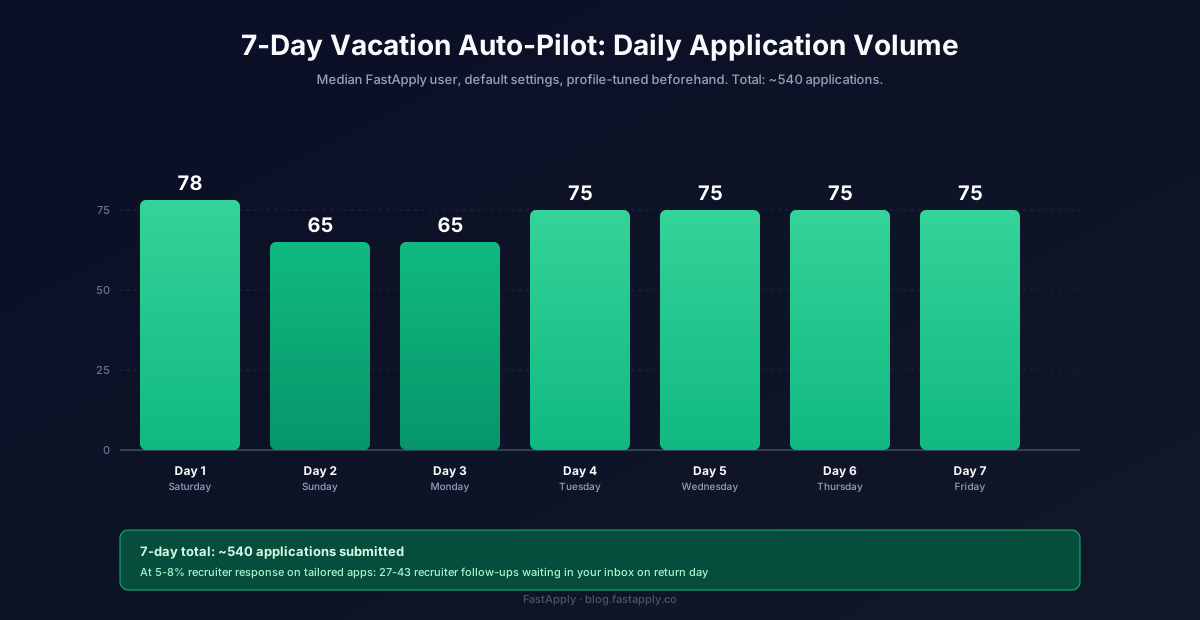
Real-number expectations from a 7-day vacation Auto-pilot run, based on the median FastApply user’s reported results.
Day 1 (Saturday, travel day): ~78 applications submitted. Heavy LinkedIn and Indeed volume because those platforms post weekend-eligible roles. Auto-pilot starts strong with the freshly-updated profile.
Day 2-3 (Sunday-Monday): ~65 applications per day. Slower because Sunday has fewer new postings; Monday catches the start-of-week posting surge. Combined: ~130.
Day 4-6 (Tuesday-Thursday): ~75 applications per day. Peak posting volume. The 24/7 AI Job Matcher catches Tuesday morning posts within 2-3 hours, putting you in the first 20 applicants for those roles. Combined: ~225.
Day 7 (Friday, return travel): ~75 applications. Auto-pilot keeps running until you toggle it off.
7-day total: ~540 applications submitted. At a 5-8% recruiter response rate on tailored applications (FastApply Pro and Elite tiers include per-job AI tailoring), expect 27-43 recruiter follow-ups waiting when you return.
The Return-Day Triage
Monday morning. You’re back. You have a 90-minute window to triage the recruiter queue before the work week starts pulling at you. Here’s the order.
Hour 1: Skim recruiter emails sorted by company priority. Open your personal inbox. Filter by “received in last 7 days.” Sort by sender or by the company name in the email. Identify the top 10 by company match, companies you’d actually accept an offer from. Star or flag those.
Hour 2: Reply to top 10 with specific availability. Don’t use a template reply. Each response should mention the specific role and propose 3 concrete time slots in the next 5 days. Times your work schedule actually accommodates: 7am, 12pm, 6pm slots work best for first calls. The 3-hour window between 10am-1pm tends to fail because of meeting density.
Hour 3: Decline the bottom 5 cleanly and respond to the middle 10. For roles that don’t fit (wrong seniority, wrong industry, wrong geography), reply with a one-line decline: “Thanks for reaching out, this role isn’t a fit for me right now, but I appreciate you considering me.” For the middle 10, propose availability for next week instead of this week. Manage your pipeline so you don’t burn out in the first 3 days.
Interview Scheduling Math
If you returned with 30 recruiter responses and replied to 20 (10 top-priority for this week + 10 next-week priority), here’s the realistic conversion you should expect.
Week 1 back: 10 first-round screens. Roughly 6 progress to second round.
Week 2 back: 10 more first-round screens (from the next-week batch) plus the 6 second rounds. So 16 conversations that week.
Week 3 back: 6 first-round screens (newly-arriving recruiters from continued Auto-pilot runs) plus 4-5 third-round/final-round interviews from the early second-round batch.
Week 4 back: Offer letters start arriving. Realistic offer rate: 1-3 across the batch.
Total elapsed time from vacation to first offer: roughly 21-28 days. This is the math that makes the 90-Day Interview Sprint plan viable for active job seekers. Plan a vacation Auto-pilot run early in the 90-day window and you’ve front-loaded the application volume while you were resting.
Try FastApply Free
Stop applying one job at a time. Install the FastApply Chrome extension and run 5 free applications on us. No credit card. Works on LinkedIn, Indeed, Workday, Greenhouse, Lever, Ashby, iCIMS, Taleo, BambooHR, and the rest of its 20+ supported platforms.
Turn on Auto-pilot mode before your flight. Set your preferences once. The 24/7 AI Job Matcher finds matching roles the moment they’re posted and submits with a tailored resume per job. Walk back into 30+ recruiter responses on Monday.
Plans start at $14/month, or $38 for the full 90-Day Interview Sprint (save vs paying monthly). Cancel anytime.
For the broader strategic playbook on job searching while employed, see How to Find a Job While Working Full-Time. For the daily operational hygiene during work weeks, see How to Job Search on Company Time. For the broader auto-apply tool category, Set It and Forget It: 5 AI Tools That Auto-Apply 24/7 ranks the alternatives.
Frequently Asked Questions
Will applications submitted “after hours” hurt my chances?
No, the opposite. Most ATS platforms log submission timestamps, and first-mover advantage is well-documented in hiring research. An application that arrives 11 seconds after a Tuesday 9am posting puts you in the first 5 applicants. The 24/7 AI Job Matcher catches these postings automatically while you’re on vacation, which means your applications land before the recruiter’s queue fills up. Vacation submissions tend to outperform mid-day work-hours submissions on response rate.
How do I configure Auto-pilot for a vacation?
Open your FastApply dashboard the night before you leave. Verify profile preferences are current. Set Auto-pilot mode on, Co-pilot off. Set daily caps (recommended: 30 LinkedIn + 50 Indeed + 50-100 direct ATS = 130-180/day for 7 days). Enable the 24/7 AI Job Matcher across 12+ job boards. Set your personal email auto-responder. Block your first 3 return-day mornings on your work calendar for interview screens. Total time: 15 minutes.
What if I get an interview request mid-vacation?
Two options. (1) Reply from your phone scheduling the interview for the week after you return, most recruiters respect this and your auto-responder set the expectation. (2) Take the call from vacation if it’s a top-priority role and a logistically feasible time. Most candidates pick option 1 to protect the rest of the vacation. The auto-responder + return-day triage workflow is designed for option 1.
Can I do this on a shorter trip (3-day weekend)?
Yes. Cap daily volume slightly lower (~100-150/day instead of 180) and skip the elaborate setup. A 3-day weekend Auto-pilot run typically yields 300-450 applications submitted and 15-25 recruiter responses. That’s enough to fill a week of screens after you return. Three-day weekends are the most common vacation type for working professionals and the easiest version of this playbook.
What about international travel and time zones?
Auto-pilot doesn’t care about your time zone. It applies based on the job-board time zone (mostly UTC, sometimes local US time depending on the ATS). Your recruiter responses come into your personal inbox; you read them whenever you check email. The only adjustment is your auto-responder should mention the return date in your local time zone so recruiters know when to expect a reply. Total operational difference vs domestic travel: zero.
#apply for jobs on vacation
#job search while traveling
#how to job search while on holiday
#automated job application vacation
#vacation job hunt
#FastApply Auto-pilot

Ekekenta Clinton
Founder, FastApply