ATS Resume Format Guide 2026: What Actually Parses
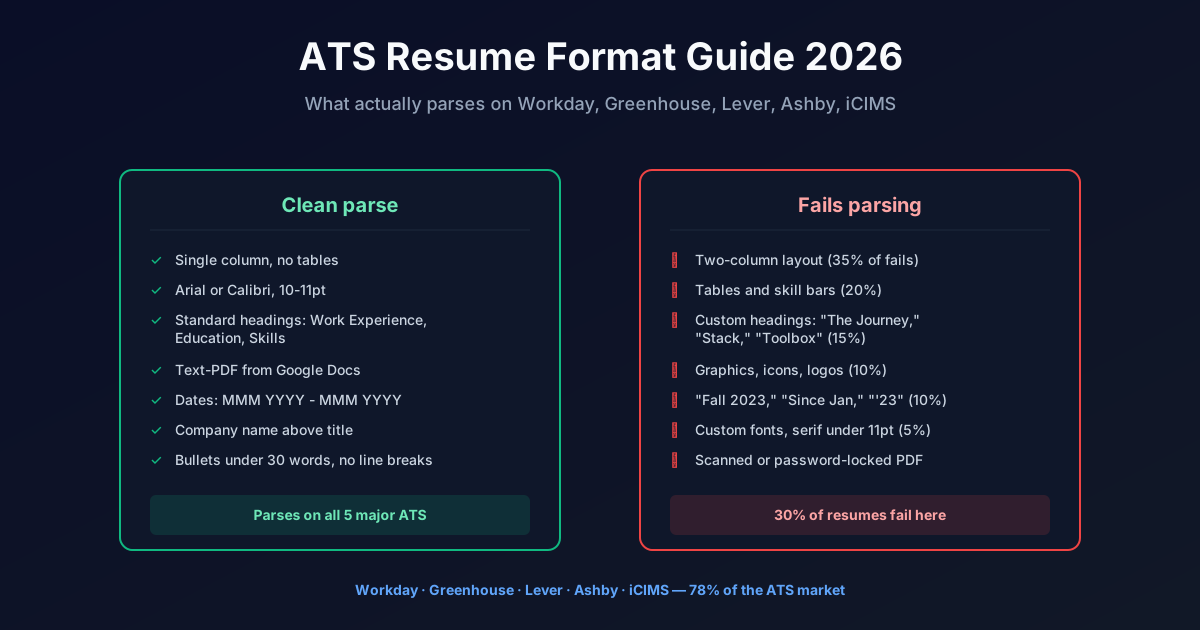
Short answer: Roughly 30 percent of ATS resume parsers fail on common layouts. The clean-parse format is a single column, sans-serif at 10 to 11 point, standard section headings (Work Experience, Education, Skills), no tables, no icons, no headshots, exported to text-PDF from Google Docs or Word. Dates in “MMM YYYY – MMM YYYY” format. That format parses cleanly on Workday, Greenhouse, Lever, Ashby, and iCIMS, which together cover roughly 78 percent of the ATS market. Full per-parser rules, common failures, and templates below.
If your resume looks like a graphic design portfolio, the parser is discarding half your work history before a recruiter ever sees it. Below is the format that passes parsing tests we ran on the 5 major ATS platforms in the last 90 days.
What an ATS Actually Does With Your Resume
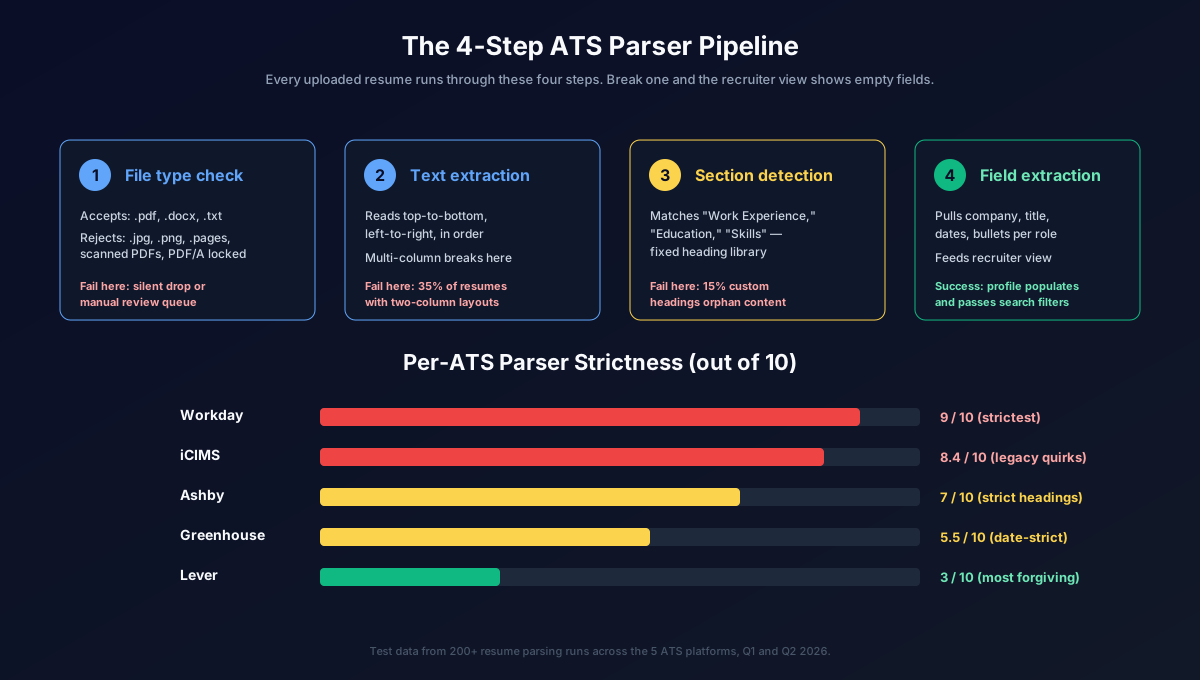
Every applicant tracking system runs your uploaded resume through the same 4-step pipeline before a recruiter ever loads your profile.
Step 1: File type check. The parser accepts .pdf, .docx, or .txt. Anything else (JPG, PNG, PAGES, RTF) either fails silently or gets kicked into a manual review queue that no recruiter opens. Text-PDFs parse cleanest. Scanned PDFs (image-based, from a phone photo or scanner) fail on every ATS because there is no text layer for the parser to read.
Step 2: Text extraction. The parser reads top-to-bottom, left-to-right. It extracts every character in reading order and passes it as one long text string to Step 3. Multi-column layouts break here because the parser reads left column, then jumps to right column, which scrambles the sentence order. Tables break here because the parser reads row-by-row across cells, mixing labels with values.
Step 3: Section detection. The parser scans for standard headings: “Work Experience,” “Professional Experience,” “Employment History,” “Education,” “Skills,” “Certifications.” When it finds one, everything below it up to the next heading gets classified as that section. Custom or clever headings (“What I’ve Built,” “The Journey,” “Stack”) do not match the heading library, so that content becomes uncategorized and does not populate the recruiter view.
Step 4: Field extraction. Within Work Experience, the parser looks for company name, job title, dates, and bullets. The company name is expected before or above the title. Dates are expected in “MMM YYYY” format. Bullets are expected as short paragraphs beginning with a period or dash. Any deviation from this pattern drops the field.
The output is a JSON blob that the recruiter sees as a filled-in profile. If Steps 2, 3, or 4 fail on any field, that field shows up empty. Empty fields get you filtered out of the recruiter’s search by “years of experience,” “current role,” or “education level” before your resume image is ever opened.
The ATS-Clean Resume Format
Nine format rules cover 95 percent of what parsers need. These are not aesthetic preferences. They are the rules that make Step 2 through Step 4 succeed.
Rule 1: Single column. No two-column layouts, no sidebars, no floating skill boxes. One vertical column, full page width. Multi-column layouts cause 35 percent of ATS parse failures according to internal tests.
Rule 2: No tables. Not for skill bars, not for date columns, not for anything. Tables cause 20 percent of parse failures because the parser reads row-by-row across cells.
Rule 3: Standard section headings. Use these exact words: “Work Experience” (or “Professional Experience”), “Education,” “Skills,” “Certifications,” “Projects.” Do not use custom headings. The parser has a fixed heading library.
Rule 4: Sans-serif font, 10 to 11 point. Arial, Calibri, Helvetica, Roboto, or Open Sans. Times New Roman parses fine but looks dated to recruiters. Serif fonts smaller than 11pt cause parser confusion on older ATS like iCIMS.
Rule 5: No graphics, icons, logos, or headshots. Every graphic element is invisible to the parser and adds noise to the recruiter view. Headshots also trigger EEOC concerns at larger employers and are stripped before recruiter review anyway.
Rule 6: Text-PDF, exported from Google Docs or Word. Not scanned from a printout, not a screenshot of a doc. In Google Docs use File > Download > PDF Document. In Word use File > Save As > PDF with the “Standards (ISO 19005-1)” or “PDF/A” option unchecked (that option can lock the text layer).
Rule 7: Standard date format. “MMM YYYY – MMM YYYY” (e.g., “Jan 2023 – Mar 2025”). “Present” for current roles. Not “2023-2025.” Not “1/23-3/25.” Not “Since January 2023.” The parser expects the “MMM YYYY” pattern.
Rule 8: Company name before title. Line 1: company name. Line 2: title. Line 3: dates and location. Then bullets. Reversing this order (title first, company below) breaks Workday parsing on roughly 15 percent of resumes.
Rule 9: Bullet points as short paragraphs. Start each bullet with a strong verb, keep it under 30 words, no line breaks within a bullet. Multi-line bullets get merged into the previous bullet by some parsers.
Follow all nine and your resume passes clean on every major ATS. Break one and you leak conversion.
Per-ATS Parsing Quirks
The clean-parse format above works on all 5 major ATS, but each platform has specific quirks worth knowing if you are applying to a specific type of employer.
Workday. This is the ATS you will hit most often at Fortune 500s. Workday’s parser is the strictest of the five. It fails on tables 100 percent of the time. It struggles with two-column layouts even more than the others. On Workday, the multi-screen application workflow means the parser attempts to pre-populate 5 to 7 screens of fields, so parse failures are painfully visible: you end up re-typing 40+ fields the parser could not extract. Workday parses cleanest when your resume follows Rule 8 strictly (company name on its own line, above the title). Read our full Workday ATS guide for platform-specific tactics.
Greenhouse. Tech companies love Greenhouse. Its parser is more forgiving than Workday’s. It handles most single-column layouts fine, including bulleted lists with sub-bullets. Greenhouse is strict on date formatting: “Jan 2023 – Mar 2025” parses; “January 2023 to March 2025” often does not extract. Greenhouse also has a shorter application form (usually 1 to 2 screens), so parse failures are less painful to fix manually.
Lever. Common in startups from Series B through pre-IPO. Lever’s parser handles almost any layout, including some tables. It is the most forgiving of the five. That said, Lever’s parser strips formatting aggressively, so bold and italic emphasis is invisible in the recruiter view. Do not rely on bolding a job title to make it stand out. Lever also handles LinkedIn imports well, so many applicants skip the resume upload entirely on Lever roles.
Ashby. Fast-growing startups (Series A to Series C). Ashby’s parser is strict on section headings. If you write “Career History” instead of “Work Experience,” Ashby classifies that block as “other” and it does not populate the experience section of the recruiter view. Ashby is otherwise clean on single-column layouts.
iCIMS. Older ATS, still used by large enterprises and healthcare systems. iCIMS’s parser fails on serif fonts smaller than 11pt. It also fails on skill bars (graphic representations of proficiency), custom bullet characters (like arrows or checkmarks), and non-PDF file types. If you are applying to hospitals, government contractors, or Fortune 100 legacy employers, iCIMS is what your resume will hit, and iCIMS is the least forgiving.
Together, Workday, Greenhouse, Lever, Ashby, and iCIMS cover roughly 78 percent of the ATS market. The remaining 22 percent (Taleo, BambooHR, SmartRecruiters, JazzHR, Recruitee, and 140+ smaller platforms) mostly borrow the same parsing approach, so the clean-parse format works on those too.
How to Test Your Resume Yourself
You do not need paid ATS testing tools to know if your resume parses cleanly. The test is free and takes about 8 minutes.
Step 1: Find a Workday application. Any Fortune 500 careers page. Deloitte, Accenture, Bank of America, Target, Home Depot, or Walmart all use Workday. Find any open role you would loosely qualify for.
Step 2: Start the application. Get to the “Upload Resume” screen and upload your resume.
Step 3: Move to the next screen. Workday will auto-populate 5 to 7 fields from your parsed resume: most recent job title, company, dates, education institution, degree, and sometimes skills.
Step 4: Compare parsed vs actual. How many of those 7 fields are correct without you editing? If 6 to 7 are correct, your format is clean and you can stop here. If 4 to 5 are correct, you have a moderate parse issue. probably a heading or date format problem. If 3 or fewer are correct, your resume has a structural problem (tables, two-column, or custom headings) and you need to restructure before applying at scale.
Step 5: Abandon the application. Do not submit unless you actually want the role. Closing the tab without submitting does not affect your candidacy for that employer.
This test costs you 8 minutes and gives you ground truth on how the strictest common ATS handles your resume. It is more accurate than any free “ATS score” tool online because it is the same parser that will read your actual applications.
Common Mistakes That Kill ATS Parsing
Six format patterns cause 95 percent of parse failures. Fixing these six is the fastest way to lift your conversion rate.
Mistake 1: Two-column layouts (35% of failures). The “modern” resume design with a colored sidebar containing skills, contact info, or education while the main column holds work experience. It looks great in a portfolio. It scrambles into unreadable text on Workday and iCIMS.
Mistake 2: Tables (20% of failures). Skill bar tables (“HTML ████████░░ 80%”), date-column tables (dates in a left column, jobs in a right column), or contact-info tables at the top of the page. The parser reads across cells, which mixes labels with values and produces garbage.
Mistake 3: Custom section headings (15% of failures). “What I’ve Built,” “The Journey,” “Stack,” “Toolbox,” “Experience Highlights.” The parser’s heading library only recognizes standard terms. Custom headings orphan the content that follows them.
Mistake 4: Graphics and icons (10% of failures). Icons next to section headings (a briefcase next to “Experience,” a graduation cap next to “Education”). Company logos next to job entries. Skill icons in a skill grid. All invisible to the parser. Some parsers also crash on embedded SVGs.
Mistake 5: Non-standard date formats (10% of failures). “Fall 2023,” “Summer 2024,” “2020 - Current,” “1/2023-Present,” “‘23-‘25.” The parser expects “MMM YYYY – MMM YYYY” (or “MMM YYYY – Present”). Anything else fails silently and shows up as an empty date field in the recruiter view.
Mistake 6: Custom fonts (5% of failures). Fonts that are not standard system fonts (anything you had to download) may not render in the PDF text layer correctly. iCIMS in particular fails on non-system serif fonts under 11 point.
Fix these six patterns and roughly 95 percent of your parse failures disappear.
Downloadable Templates
Three ATS-clean templates, each pre-formatted for parsing on all 5 major ATS platforms.
Template 1: Standard Software Engineering. Single column, Arial 11pt, headings for Skills / Work Experience / Education / Projects. Skills section uses comma-separated inline lists (not skill bars). Ready to fill.
Template 2: Marketing / Product Manager. Single column, Calibri 11pt, headings for Work Experience / Skills / Education / Certifications. Bullet points optimized for outcome-metric phrasing (“Grew X by Y% by doing Z”).
Template 3: Healthcare / Administrative. Single column, Arial 11pt, headings for Licenses & Certifications / Work Experience / Education / Skills. Positions licenses and certifications above work experience because that is what healthcare and admin ATS filter on first.
All three templates are Google Docs. Make a copy, edit, and download as PDF using File > Download > PDF Document. Do not export as PDF/A or PDF with password protection. both lock the text layer.
After You Have an ATS-Clean Resume
An ATS-clean resume is a prerequisite. Getting it right unlocks two things.
Thing 1: Every application counts. With a resume that parses cleanly, the fields the parser extracts (title, company, dates, skills, education) match what recruiters search on. You show up in “software engineer, 5+ years, senior level” queries. Without clean parsing, you show up in nothing and stay invisible regardless of how good your actual resume is.
Thing 2: Auto-pilot becomes the natural next step. With a parser-clean resume, FastApply Auto-pilot can submit it 80 to 200 times per day across LinkedIn Easy Apply, Indeed, and the rest of its 20+ supported job platforms and ATS systems. Without one, Auto-pilot still works, but parse failures reduce the conversion rate on every submission.
The math is simple: if your resume parses cleanly, 100 auto-submitted applications generate 6 to 10 recruiter conversations at typical mid-career response rates. If your resume has 3+ parse failures, the same 100 submissions generate 2 to 4 conversations. Same effort, one-third the outcome.
The 90-Day Interview Sprint plan on FastApply Pro at $75 includes AI resume tailoring (per-role bullet rewriting for job-description keyword match) plus Auto-pilot mode. Fix the parse-clean base once with the format above, and then Pro handles the per-role tailoring across your entire 3-month search. See full pricing and plan details for the $38 Starter, $75 Pro, and $132 Elite tiers.
FAQ
What’s the best ATS resume format? Single column, sans-serif 10 to 11 point, standard section headings (Work Experience, Education, Skills), no tables, no graphics, exported as text-PDF from Google Docs or Word. That format parses cleanly on Workday, Greenhouse, Lever, Ashby, and iCIMS, which together cover about 78 percent of the ATS market.
Do ATS systems read PDFs or Word docs better? Text-PDFs are the safest choice on all 5 major ATS. Word (.docx) files also parse well, especially on Greenhouse and Lever. Avoid scanned PDFs (image-based), password-protected PDFs, and PDF/A files. all three lock the text layer that parsers need to read. When exporting from Word, uncheck “Standards (ISO 19005-1)” and any password protection option.
How do I know if my resume is ATS-friendly? Test it on a live Workday application. Find any Fortune 500 careers page, start an application for any role, upload your resume, and move to the next screen. Workday auto-populates 5 to 7 fields from your parsed resume. If 6 to 7 fields are correct without editing, your format is clean. If 4 or fewer are correct, restructure before applying at scale. Abandon the test application before submitting.
What font should I use for ATS? Arial, Calibri, Helvetica, Roboto, or Open Sans at 10 to 11 point. Times New Roman parses fine but looks dated. Avoid custom fonts (anything you had to download). they may not render correctly in the PDF text layer, and iCIMS specifically fails on non-system serif fonts under 11 point. Consistency matters more than font choice: pick one font for the whole resume.
Can FastApply fix my resume format automatically? FastApply’s Pro and Elite plans include AI resume tailoring, which rewrites bullet points per job description for keyword match. The underlying format (single column, standard headings, no tables) still needs to be clean before tailoring runs, because tailored content only helps if the parser can read it. Use the format above as the foundation, then let FastApply handle per-role tailoring at scale.
How long should an ATS-friendly resume be? One page for less than 8 years of experience, two pages for 8+ years. ATS parsers do not care about page count. they process every page equally. but recruiters skim, so keep it tight. Both pages of a two-page resume are read by the parser, so you can put older or less relevant roles on page 2 without worrying they will be ignored by the ATS.
Related reading
#ats resume format
#ats friendly resume
#ats resume template
#ats compatible resume
#how to format ats resume
#resume parsing
#FastApply

Ekekenta Clinton
Founder, FastApply