Automatically Apply for Jobs: Does It Actually Work?
The short answer
Yes, you can automatically apply for jobs, and it does one thing well: getting more real applications submitted in less time. Does auto apply work as a substitute for targeting? No. In September 2026, FastApply logged 127,964 application attempts from 2,022 users. Of the 58,328 that reached an application form, 66.2% were submitted, so about one in three started applications did not go through. The median submitted application took 79 seconds. Whether it earns an interview depends on fit and on the resume: in Huntr’s public data, tailored applications get interviews at 5.71% against 3.09% for untailored ones.
We build FastApply, so we are not neutral. That is why this post publishes our own numbers, unflattering ones included, with the window and sample size beside each. Most pages that come up for “ai to apply for jobs automatically” or “does auto-apply work” are product pages with no figures on them.
What people actually report
The top Google result for this topic is not a product. It is a Reddit thread on r/jobsearchhacks from April 2026: Has automated job search / auto-apply actually worked for anyone? The poster was getting few interviews by hand and worried that automation would mean sending poorly matched applications.
The objections in the replies are specific and fair:
- Generic applications lose. The most upvoted reply says a tailored resume and cover letter for 5 well-matched roles will usually beat 100 generic auto-applications.
- Recruiters notice. One commenter who reviews applicants says they spot bot-generated applications and do not take them seriously unless the resume is exceptional.
- Paying for a black box. One reply describes buying several subscriptions and finding that some tools charge first and deliver old or irrelevant jobs, and that fully automated ones give no view of what was typed into each field.
- Bad matching. One commenter says tools left unchecked will apply you to dentist and teacher roles.
The positive reports share a pattern. One person says their last three interviews came from an auto-apply app, after filtering for jobs posted in the last 24 hours. Another got 7 interviews in the first week, then replies slowed. Several say the same thing: assisted, not fully automated, and review what goes out.
FastApply gets one mention, and it is not flattering: a job seeker in India found our free plan no use, because most of the jobs it listed were outside India.
A caution: many replies name a specific tool, some read like promotion, and many comments have since been removed. Treat the thread as a list of objections, not as evidence. The rest of this post answers them with data.
The numbers
Everything in this section comes from FastApply’s own application-attempt log, pulled on 2 October 2026. Window: 1 to 30 September 2026. Sample: 127,964 logged application attempts from 2,022 users. An attempt is every job the tool tried, including jobs it skipped. These numbers show whether an application was submitted, not whether it led to an interview.
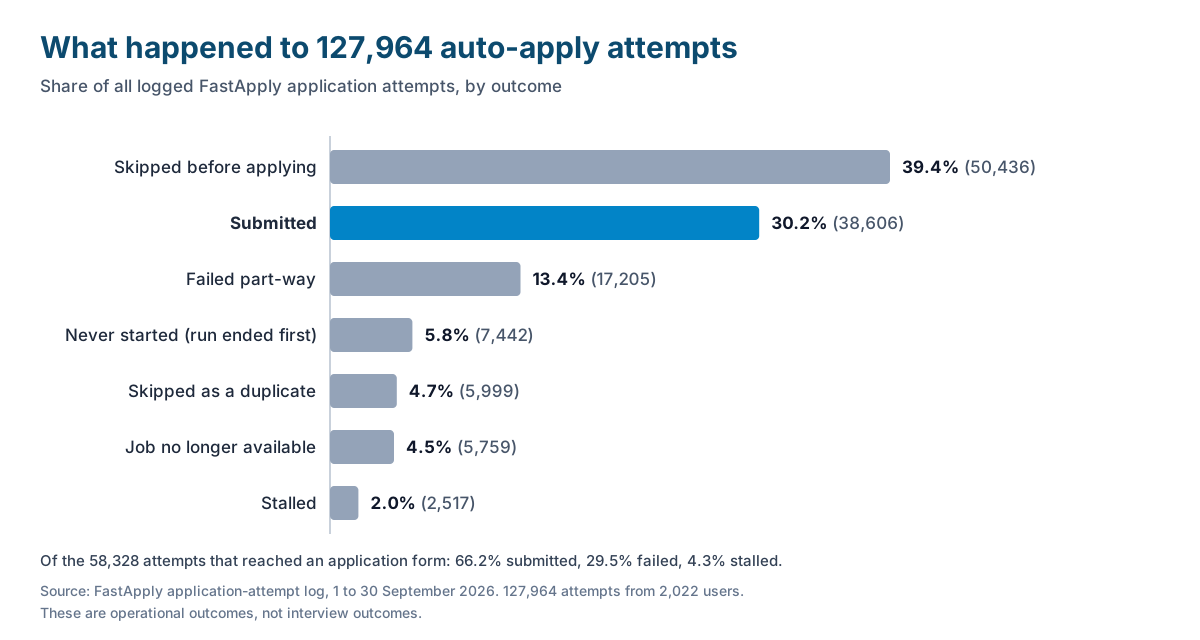
Fewer than a third of attempts end in a submission. 38,606 applications (30.2%) were submitted, by 1,765 users. The biggest bucket, 50,436 attempts (39.4%), is jobs skipped before any form was opened. Top logged reasons: no apply button on the page, a posting that sends you to an external site, the user pressing skip, a profile missing a required detail, a blocklisted company, or a posting that no longer existed. Another 17,205 (13.4%) failed part-way.
It is fast when it works. The median submitted application took 79 seconds from opening the job to submission, and 90% finished within 200 seconds (24,567 submitted applications with timing recorded).
Most people do not mass apply. Among the 1,765 users with at least one submission, the median user sent 5 applications in the month. The mean was 22, and the top 10% sent 46 or more. Mass applying is a small group’s habit.
Tailored versus generic, side by side
The chart most readers want is interview rate for tailored versus generic applications. We cannot draw it: our log does not connect a submission to an interview, so the chart would be made up. Here is what the data does show, for the 6,679 submitted applications in September 2026 where the resume source was recorded:
| Tailored to the job | Standard resume | |
|---|---|---|
| Submitted applications | 4,249 (63.6%) | 2,430 (36.4%) |
| Form completion rate | 58.3% | 56.4% |
| Interview rate | Not measured | Not measured |
Tailoring made almost no difference to whether the form submitted. Any benefit is in how the application reads afterwards. For that, the best public figure we know is Huntr’s Q2 2026 Job Search Trends Report, covering 102,777 applications logged by 5,388 users: a 5.71% recorded interview rate for applications with a tailored resume against 3.09% without one. Huntr sells a resume tailoring tool, and this is their data, not ours, and a correlation.
Our closest thing to an outcome measure is an early signal from a small sample. Between 11 and 30 September 2026, 221 users sent 2,813 applications through a FastApply relay inbox, which lets us count the employer emails that came back. By 1 October those inboxes had received 4,226 employer emails. Sorted by subject-line keywords only:
- 3,064 were acknowledgements (“thanks for applying”)
- 248 mentioned an interview, scheduling, an assessment or next steps
- 82 were rejections or status updates
- 832 were something else
42 of the 221 users (19%) received at least one email in the interview or next-step group. The caveats matter more than the number. This is a keyword match on subject lines, not verified interviews. Assessment invitations are often automated. Three weeks is short, because most employers take longer to reply. And the sample cannot be split into tailored versus generic.
Where the drop-off actually happens
Of the 58,328 attempts that got into an application form, 66.2% were submitted, 29.5% failed and 4.3% stalled. Roughly one in three applications the tool starts does not go through. The largest failure bucket is the tool being unable to confirm the submission (no success page detected). After that come forms it could not complete, a submit button that stayed disabled because a required field was empty, bot detection, and timeouts.
The platform makes a large difference:
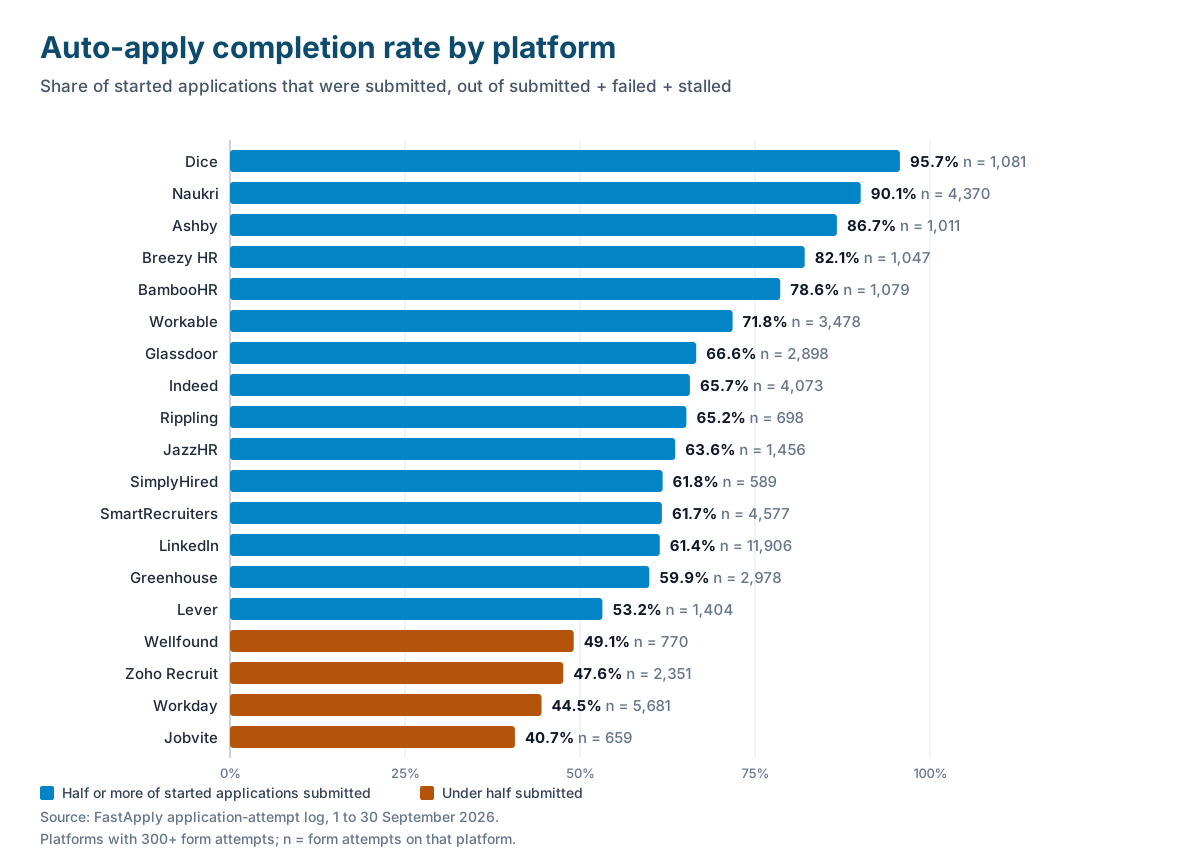
Dice completed 95.7% of the time and Naukri 90.1%. LinkedIn, the largest platform in the sample with 11,906 form attempts, completed 61.4%. Workday, the longest form of the lot, completed 44.5%: under half. So when any tool that claims to apply to jobs automatically reports 100 applications, ask how many were confirmed as submitted. FastApply’s tracking dashboard shows the status of each one, so a failed Workday application is one you can finish by hand.
Where auto-apply works well
Short, standard forms. Dice (95.7%), Naukri (90.1%), Ashby (86.7%), Breezy HR (82.1%) and BambooHR (78.6%) all completed more than three times out of four. Greenhouse (59.9%) and Lever (53.2%) sit in the middle.
High-volume, early-career searches. If you apply to many similar roles with one core resume, the work is mostly retyping, and retyping is what AI auto apply is good at.
Searching several boards at once. One profile covers Indeed, LinkedIn, Glassdoor, ZipRecruiter, Dice and the employer ATS pages their listings lead to. See how FastApply submits an application for the full flow.
Workday, with a caveat. Workday is where people most want help and where automation fails most often. Treat it as assisted filling you supervise in Copilot mode, not a background job. Our guide to beating Workday applications covers the form itself.
Where auto-apply fails
Senior and specialist roles. There are fewer of them and each one counts for more. Apply by hand, or in Copilot with a careful review.
Anything that needs a portfolio or a written answer. A tool can state your years of SQL experience from your profile. It cannot write a good answer to “Why do you want to work here?” without you.
Custom screening questions and long forms. A required field the profile cannot answer leaves the submit button disabled, and a wrong answer can cost you the job. Workday (44.5%), Zoho Recruit (47.6%) and Jobvite (40.7%) all completed under half the time.
Searches where 20 good applications beat 200 generic ones. In the same Huntr report, users who logged 11 to 20 applications in the quarter had an 8.12% interview rate per application, against 2.86% for users with 100 or more. That is partly selection (harder searches send more), but volume alone does not fix a search. For pacing, see how many jobs to apply to per day.
How to automatically apply for jobs without wrecking your chances
The Reddit objections trace back to one mistake: turning on volume before checking quality. This setup does it the other way round, using FastApply as the example.
Setting it up step by step
1. Fill in the whole profile. Upload the resume that fits the roles you want and answer the questions employers repeat: work authorization, sponsorship, salary expectation, notice period, relocation and years of experience. A missing required detail is one of the top logged reasons an application is skipped or fails.
2. Set tight filters before any volume. Choose exact job titles, seniority, location and remote preference, and put companies you do not want, including your current employer, on the blocklist. In Apply for Me, start with a high match threshold.
3. Start in Copilot mode. Copilot fills the whole application, then pauses so you review it before it is submitted. Keep it on for senior and high-priority roles permanently.
4. Hand-check the first ten submissions. Read every field of your first ten applications: screening answers, salary, work authorization and the attached resume. Fix the profile wherever an answer is wrong.
5. Let it run, then review weekly. Once the first ten are clean, move routine roles to Full Autonomous or Apply for Me. Each week, check the tracking dashboard for failed applications and tighten the filters on titles that get no replies.
FastApply gives you two ways to apply to jobs automatically. Browse & Apply runs in your browser through the Chrome extension on every plan, including free, and the tab has to stay open. Apply for Me runs on FastApply’s servers without the browser open, on paid plans only. Per-job AI-tailored resumes and cover letters are on Pro and Elite only.
The settings most people get wrong
- Filters too loose. “Analyst” matches thousands of jobs you would never take. Use the exact titles you want. This is the fix for the “applied me to dentist jobs” complaint.
- Skipping the review step. On Full Autonomous from day one, you find a wrong salary answer after employers have already seen it.
- One resume for every role. On Pro and Elite, leave per-job tailoring on. On Free and Starter, upload the resume that fits the role type before each run.
- Paying for volume you will not use. The median user sends 5 applications a month. Start on the FastApply free plan (5 free applications, no credit card) and move to a paid plan, from $14 a month in the US, only if you are sending more.
If you are looking for the best AI to apply for jobs automatically, run the same checks on each tool: which platforms it submits on, whether you can review before submission, and whether it shows you which applications failed. Our roundup of auto-apply Chrome extensions goes through the options.
Is it safe, and can you get banned?
Yes, you can be restricted or banned on the big job boards. This is what the two largest say in their own terms, read on 2 October 2026.
LinkedIn. Section 8.2 of the LinkedIn User Agreement (effective 3 November 2025) says you agree you will not “use bots or other unauthorized automated methods to access the Services”. The agreement also says LinkedIn “reserves the right to restrict, suspend, or terminate your account” if you breach it. LinkedIn’s help page on Easy Apply limits describes three controls: a daily limit on Easy Apply submissions, a temporary pause when applications are submitted too quickly, and a lower daily limit for accounts whose activity “seems inauthentic”. LinkedIn does not publish the numbers.
Indeed. Indeed’s terms (last updated 29 September 2026) say Indeed may limit the number of daily job applications you can submit, may require email or phone verification, and state: “Use of any automation, scripting, or bots to automate the Indeed Apply process outside of Indeed’s official vendors and tooling is prohibited.”
Those clauses are written about automated tools in general, and auto-apply tools, FastApply included, fall under them. If you automate applications on LinkedIn Easy Apply or Indeed Apply, your account can be limited or suspended. No tool can promise you will not be flagged, and bot detection is one of the logged failure reasons in our own data.
What actually triggers a flag. Going by LinkedIn’s own description: speed, volume, and activity that does not look like a person. If you automate there anyway, keep the volume low, use Copilot mode in your own browser, and stop for the day if the site pauses you.
Employer career sites are a different case. When you apply on a company’s own Workday, Greenhouse or Lever page, there is no job board account to lose. The controls you meet are spam checks: Greenhouse, for example, documents that employers can turn on reCAPTCHA and email verification for applications. The risk is a failed application, not a ban. The lowest-risk pattern: find the role on a job board, then apply on the employer’s own site.
More on data and ethics in is job application automation safe.
The full list of boards and application systems the tool runs on, with the completion rate for each, is in which job sites you can auto apply on.
Frequently Asked Questions
Is there a way to automatically apply for jobs?
Yes. Auto-apply tools fill the employer’s form from a profile you set up once, answer the screening questions, attach your resume and submit, with or without your approval of each one. Not every application lands: in September 2026, 66.2% of the applications FastApply started were submitted, and the rest failed or stalled.
What job app automatically applies you to stuff?
Several do. FastApply is a Chrome extension plus hosted automations that fill and submit real application forms. JobCopilot, AIApply, LoopCV and LazyApply also sell auto-apply products, and Simplify Copilot autofills forms and leaves the submit click to you. Check which platforms each one actually submits on before paying.
Is there an AI that automatically applies to jobs for me?
Yes. An AI auto apply tool reads the posting, maps your profile to the form fields, drafts answers to screening questions and submits. FastApply’s Apply for Me applies to new matching jobs from its servers without your browser open (paid plans), and Browse & Apply runs in your own Chrome tab on every plan, including free.
Can I create a bot to automatically apply for jobs?
You can, with a browser automation library such as Selenium or Playwright and a language model for the screening questions. The hard part is upkeep: every ATS form is different, forms change, and sites run bot detection. LinkedIn’s and Indeed’s terms both prohibit bots on their apply flows, so a home-made bot carries the same account risk.
Does auto-apply actually get you interviews?
It can, but the evidence is thinner than vendors suggest. Tools that auto apply for jobs raise the number of applications you send, not the quality of each one. In an early FastApply sample, 42 of 221 users (19%) received at least one employer email mentioning an interview, assessment or next step within about three weeks, judged by subject-line keywords only. That is a signal, not a verified interview rate.
Will recruiters know I used auto-apply?
Not from the submission itself, which arrives through the employer’s own form under your name. They notice the symptoms: a resume that does not fit the role, generic screening answers, and several applications to one company within minutes. Tight filters and a review step remove most of those.
The verdict and your next step
Automatically applying for jobs works for getting real applications submitted quickly on standard forms. Used that way, it is reasonable to apply to jobs automatically. It does not replace choosing the right jobs, and it does not complete every form: in September 2026 about a third of started applications failed or stalled. If you want to apply for jobs automatically with AI, the setup matters more than the tool.
Your next step:
- Install the FastApply Chrome extension. It is free to install and Chrome only. The listing shows 3.3 out of 5 from 26 ratings (checked 2 October 2026), so read the reviews too.
- Fill in the whole profile, set your exact job titles, and pick Copilot mode.
- Run your 5 free applications and read every field before you approve each one.
- If you carry on, stay in Copilot until you have hand-checked your first ten submissions. Only then let it run on its own.
FastApply auto-applies across 20+ job platforms, and the first five applications will tell you more about whether it makes sense to automatically apply for jobs in your search than any review, including this one. That is the fair test of any tool that promises to auto apply for jobs.
#automatically apply for jobs
#apply to jobs automatically
#ai to apply for jobs automatically
#does auto apply work
#ai auto apply
#auto apply for jobs
#best ai to apply for jobs automatically
#apply for jobs automatically with ai
#is auto apply worth it
#FastApply

Ekekenta Clinton
Founder, FastApply