How to Apply to 500 Jobs in a Week (Sustainable, Not Spam)
Short answer: 500 applications a week sounds insane until you do the math. It is 75 a day spread across three channels: 60 LinkedIn Easy Apply, 50 Indeed, and 100 direct ATS submissions. Auto-pilot mode handles the volume in the background. You spend about 55 minutes a day on review and quality control. Sustained for three weeks, that is 1,500 applications, which is enough to land most mid-career roles. The full setup, daily cadence, and account-risk rules are below.
This is the volume cluster’s ceiling. Above 500/week, tailoring quality drops, recruiter signal degrades, and LinkedIn rate-limit risk climbs fast. Below it, you leave applications on the table for no good reason if you have time to fill. For the general method at any volume, and where volume stops paying off, see our guide on how to mass apply to jobs with AI.
Why 500 Is the Realistic Ceiling, Not 1,000
There is a hard wall at 500/week and it is not technical, it is quality.
The math people quote (LazyApply Ultimate at 1,500/day, for example) assumes a single templated resume sprayed across LinkedIn Easy Apply, Indeed, and ZipRecruiter. That works for getting your application counted. It does not work for getting interviews.
Above 500/week, three things break:
- Per-job tailoring quality drops. Even with AI-generated tailoring, the marginal application past ~75/day starts looking templated because you are choosing speed over signal. Conversion rate drops from ~7% (tailored) to ~1% (templated).
- Recruiter signal degrades. LinkedIn Recruiter and Indeed Resume Search algorithms surface candidates by behavior pattern. Excessive submission frequency without strong profile-to-role match makes you look like a bot and surfaces less.
- Account-restriction risk climbs. LinkedIn has a soft throttle around 100 Easy Apply submissions per day (varies by account age and connection count). Sustained 200/day triggers temporary apply restrictions on most accounts.
Sustained 500/week for three weeks = 1,500 applications. Based on FastApply’s internal conversion data, that is enough to generate 30 to 70 recruiter conversations and 6 to 14 first-round interviews for most mid-career profiles in major metros. That is offer-generating volume. Going higher does not increase offer rate, only application count.
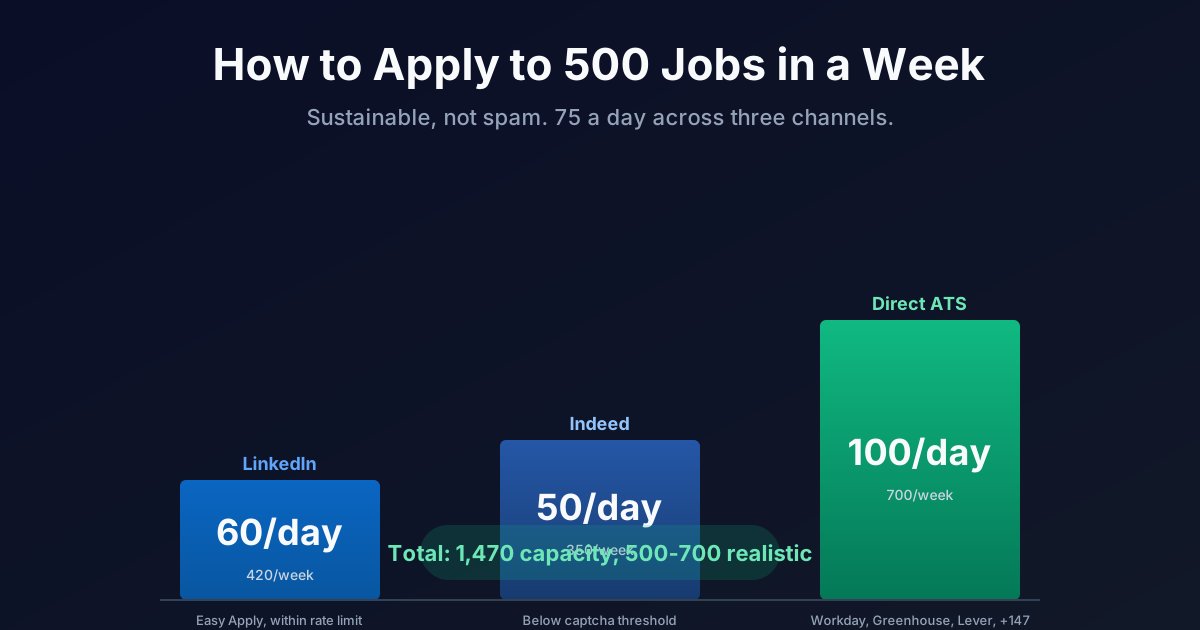
The realistic 500/week breakdown:
The Three-Channel Stack
The 500/week target works because no single channel can carry it alone. You need three running in parallel, each operating below its own ceiling.
Channel 1: LinkedIn Easy Apply. 60 per day = 420 per week. LinkedIn’s soft throttle is around 100/day for established accounts (1+ year old, 500+ connections), lower for newer accounts. Staying at 60 keeps you well below the threshold while still capturing the bulk of LinkedIn-syndicated postings. Auto-pilot handles screening questions using your stored profile answers.
Channel 2: Indeed. 50 per day = 350 per week. Indeed enforces a captcha wall around 75 to 100 daily submissions per IP address. Staying at 50 keeps the workflow clean. Indeed roles tend to skew toward hourly, non-tech, and SMB postings, so this channel is highest-volume for hospitality, retail, healthcare, and trades searches.
Channel 3: Direct ATS. 100 per day = 700 per week. This is the channel most candidates leave on the table. Workday, Greenhouse, Lever, Ashby, Taleo, iCIMS, BambooHR, SmartRecruiters, JazzHR, Recruitee, and other ATS platforms host roles that never appear on LinkedIn or Indeed. Auto-pilot submits directly to the ATS, which means fewer applicants per role (because manual application takes 8 to 15 minutes per submission, deterring spray).
The math adds up to 1,470 weekly capacity. The realistic actual count after filtering for relevance and removing duplicates is 500 to 700 quality applications per week.
The 60/50/100 daily distribution matters because it caps each channel at a safe rate while combining for the volume target. Concentrating 200/day on LinkedIn alone gets you throttled. Spread across three channels, you stay under every individual ceiling.
Auto-Pilot Setup in 4 Steps
The setup is one-time. Once configured, Auto-pilot runs unattended.
Step 1: Install FastApply and complete the profile. Install the FastApply Chrome extension and complete every profile field. Resume, education, work history, work authorization, salary expectations, location preferences, and the standard 15 to 20 screener question answers. Auto-pilot’s conversion rate is directly tied to profile completeness. A 60% profile generates roughly 60% of the application accuracy.
Step 2: Configure Auto-pilot daily caps. In settings, set the daily caps: 60 LinkedIn, 50 Indeed, 100 direct ATS. Set the channel mix to “Distributed” rather than “Maximize one channel” so submissions spread evenly through the day instead of bursting at the top of the hour.
Step 3: Set match criteria. This is where most failed Auto-pilot deployments go wrong. Be specific on job title, seniority, salary floor, location radius, work-style preference (remote/hybrid/onsite), and visa requirements. Loose match criteria generate volume but waste your daily cap on roles you would not accept anyway.
Step 4: Enable the 24/7 AI Job Matcher. The Job Matcher scans 12+ job boards continuously and feeds new matching roles into the Auto-pilot queue within minutes of posting. Early-applicant advantage is one of the largest single levers in modern job search. Roles that have been live for less than 4 hours convert 3 to 5x higher than roles posted 48 hours ago.
That is the setup. Total configuration time: about 90 minutes. Once running, Auto-pilot submits while you work, sleep, or take interview calls.
Daily Cadence: 55 Minutes a Day
Once Auto-pilot is running, your daily active time drops to roughly 55 minutes. The cadence:
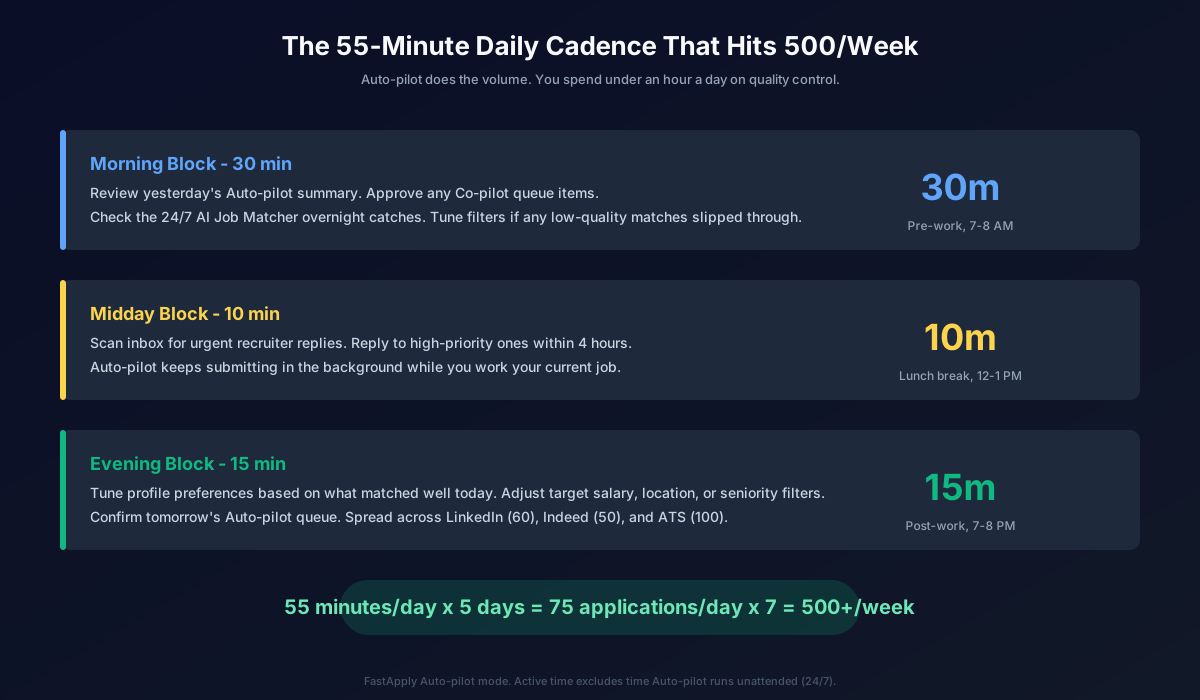
Morning block (30 minutes). Review yesterday’s Auto-pilot summary. Approve anything sitting in the Co-pilot queue (roles flagged for manual review because of unusual screener questions or required attachments). Check overnight Job Matcher catches. Tune filters if low-quality matches slipped through.
Midday block (10 minutes). Scan inbox for urgent recruiter replies. Reply within 4 hours to anything high-priority. Auto-pilot keeps submitting in the background while you work your current job.
Evening block (15 minutes). Tune profile preferences based on what matched well today. Adjust target salary, location, or seniority filters. Confirm tomorrow’s Auto-pilot queue.
Total active time: 55 minutes per day. Auto-pilot does the rest, running unattended across the three channels. This is what makes 500/week sustainable: the human time investment is the time investment of a normal job search at 50/week, but the application volume is 10x.
Quality at Scale: The Per-Job Tailoring Question
Generic resumes at 500/week convert at 0.5 to 1.5%. Tailored resumes at 500/week convert at 4 to 8%. Same volume, 5x the response rate. The difference is whether you generate a fresh resume per submission or reuse a single template.
FastApply Pro and Elite include AI per-job tailoring. The AI reads the job description, pulls the keywords and requirements, and adjusts your resume bullets, summary, and skills section to match. Each submission gets a fresh PDF generated against the specific role.
The tailoring is automatic on Pro and Elite. You do not manually tailor anything. That is the point: at 500/week, you cannot manually tailor each application. AI tailoring is the only path to high volume and high conversion at the same time.
For roles where you are not certain on fit (different industry, lateral move, slight seniority stretch), the AI also generates a per-job cover letter. Cover letters move the needle on roles where the resume signal is ambiguous. For straight-line matches, cover letters are optional.
This is the single largest lever in the volume game. Untailored 500/week is spam. Tailored 500/week is a real campaign.
Account-Risk Management
Three rules to stay safe at 500/week.
Rule 1: Respect the per-channel daily caps. 60 LinkedIn, 50 Indeed, 100 ATS. These caps exist because each platform has rate-limit detection. LinkedIn flags accounts that submit 100+ Easy Applies in a day, especially newer accounts. Indeed shows captcha after 75 to 100 daily submissions. Direct ATS platforms (Workday, Greenhouse, Lever) have no per-day caps because each ATS is hosted by a different company, but FastApply’s per-day cap of 100 prevents downstream IP-based detection.
Rule 2: Spread submissions through the day. Bursting 60 LinkedIn submissions in one hour is the fastest way to get throttled. Auto-pilot’s “Distributed” mode spaces submissions across the day at irregular intervals that look like human behavior.
Rule 3: Vary your behavior. Manual logins to LinkedIn occasionally (browse posts, like a few things, send a connection request). Pure automation patterns are easier to detect than mixed patterns. FastApply runs on top of your normal browser session, so doing some normal LinkedIn activity weekly helps account health.
Get throttled and you lose the LinkedIn channel for 24 to 72 hours. Follow the rules and the channel stays open all 12 weeks of your sprint.
When 500/Week Is Too Much
500/week is the right ceiling for most mid-career searches in major metros (NYC, SF, Boston, Chicago, LA, Seattle, Austin). It is too much for:
- Senior IC and executive roles. There are simply not 75 senior director or VP roles posted per day in most functions. At that seniority, 50 to 100/week of curated submissions converts better than 500/week of broad spray.
- Niche industries. If your target function has fewer than 100 open postings/week in your geo (e.g., specialty medicine, regulated finance, government contracting), you will hit relevance bottom quickly. Drop the volume target, keep the daily review discipline.
- Geographic-restricted searches. Remote-only or single-city searches with strict requirements will rate-limit on supply, not on the application tool. If LinkedIn only shows 80 relevant roles in your filter, no tool can submit 500.
Do not dilute quality to hit a number. The number is a ceiling, not a quota. 200/week of high-relevance applications converts higher than 500/week of forced volume in a niche.
The 90-Day Sprint Math
500/week sustained for 12 weeks = 6,000 applications. At a 7% tailored response rate, that is 420 recruiter conversations. Filter for fit, and you typically see 60 to 100 first-round interviews and 5 to 15 final-round offers, depending on field and seniority.
This is why the 90-Day Interview Sprint plan is priced where it is. $38 (Starter), $75 (Pro), or $132 (Elite) for the full 12-week cycle. Pro at $75 includes per-job AI tailoring and the 24/7 Job Matcher, which are the two unlocks for tailored 500/week.
Monthly billing is fine if you prefer it ($14/$29/$49 per tier). The Sprint pricing exists because most job searches resolve within 90 days when run at 500/week, so the bundle is the lowest total cost for a typical search.
Related guides
- How to Apply to 100 Remote Jobs Per Week Without Burning Out
- How Many Jobs Should You Apply to Per Day in 2026
- How Many Applications to Get an Interview? 2026 Data
- LinkedIn Easy Apply Limit: How to Apply to 200 Jobs Per Day in 2026
- Workday ATS Hack: 7 Tactics for 2026
- Find a Job While Working Full-Time in 2026
- Best AI Job Search Tools in 2026
Try FastApply Free
Stop manually applying to a handful of roles a day. Install the FastApply Chrome extension and run 5 free applications on us. No credit card. Works across 20+ job platforms and ATS systems, including LinkedIn, Indeed, ZipRecruiter, Workday, Greenhouse, Lever, and Ashby.
Turn on Auto-pilot mode and let FastApply hit 500/week while you are at work, on vacation, or asleep. The 24/7 AI Job Matcher finds matching roles within minutes of posting and submits with a fresh AI-tailored resume per role.
Plans start at $14/month, or $75 for the full 90-Day Interview Sprint at the Pro tier (per-job AI tailoring included). Cancel anytime, no annual lock-in.
#apply to 500 jobs
#high volume job application
#apply to many jobs
#mass job application
#job application volume
#auto apply
#FastApply

Ekekenta Clinton
Founder, FastApply