Can You Get Banned for Auto Applying on LinkedIn? What the Rules Say (2026)
Short answer: Yes, you can. LinkedIn’s User Agreement (section 8.2) has members agree not to “Use bots or other unauthorized automated methods to access the Services”, and its help pages say it does not allow “third-party software or browser extensions that scrape, modify the appearance of, or automate activity”. Accounts caught doing this can be restricted, usually for a stated period, and LinkedIn says users of prohibited software “risk having their accounts restricted or shut down”. That applies to FastApply and to every other auto-apply tool that touches LinkedIn. Most cases we hear about are temporary Easy Apply pauses rather than permanent bans; we have no count and will not invent one. You can cut the risk substantially by keeping LinkedIn volume modest, reviewing what goes out, and doing most of your applying on company career pages, which never involve your LinkedIn account.
One visitor in our support chat asked, word for word, “could I get banned by platforms using this tool”. It is the right question and it deserves a straight answer from a company that sells the tool. This post is written in short, direct answers that can be quoted without losing the caveats. Every LinkedIn quote below is from pages we checked on 2 October 2026.
Is auto applying against LinkedIn’s rules?
Yes. Three LinkedIn pages say so in different ways.
The User Agreement, section 8.2, lists things members agree not to do. One of them is to “Use bots or other unauthorized automated methods to access the Services”. An extension that clicks Easy Apply and fills the form for you is an automated method.
LinkedIn’s help page titled “Automated activity on LinkedIn” says LinkedIn does not allow “third-party software or browser extensions that scrape, modify the appearance of, or automate activity”. It describes three categories: scraping tools, extensions that change how LinkedIn looks, and software that automates tasks. Auto-apply is the third.
LinkedIn’s help page on prohibited software and extensions says users of such tools “risk having their accounts restricted or shut down”.
And the Easy Apply limits page sets the operating rules even for people applying by hand: “You can submit a set number of Easy Apply applications each day”, rapid submissions “triggers a temporary pause on Easy Apply”, and LinkedIn “may lower a member’s daily Easy Apply limit if we notice activity that seems inauthentic”.
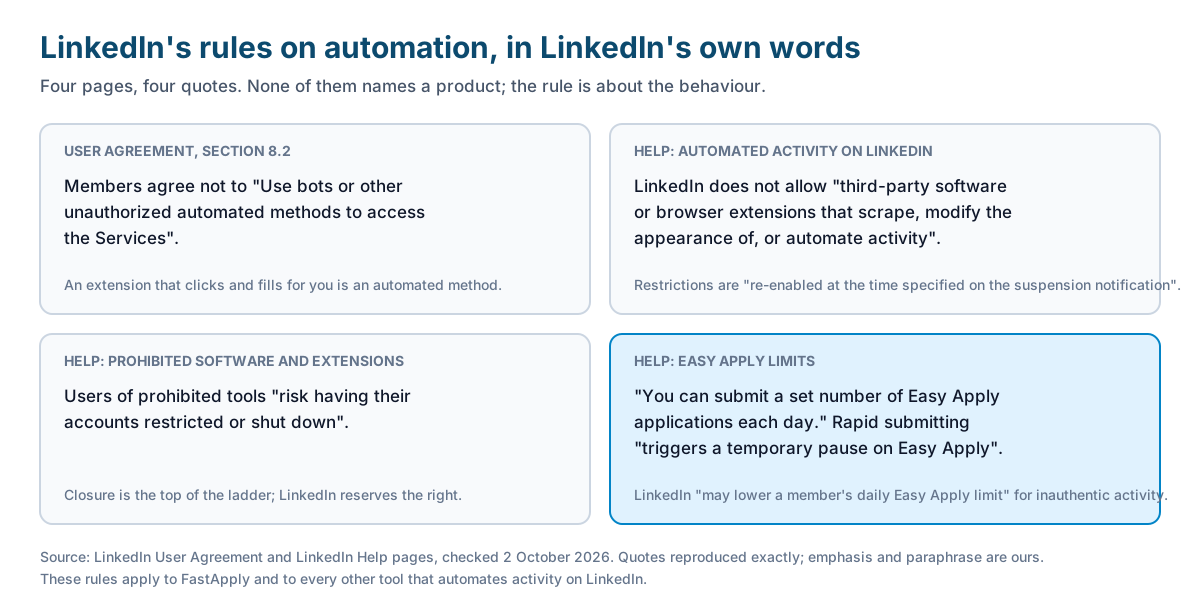
None of these pages names a product. The rule is about the behaviour, not the brand.
What actually happens if LinkedIn catches it?
Usually a temporary restriction, not a permanent ban. The “Automated activity” page describes the restriction as time-limited: “Your account will then automatically be re-enabled at the time specified on the suspension notification”. It asks restricted members to remove the software and secure the account before the restriction lifts.
Below that level there are two softer responses. Submitting Easy Apply applications quickly “triggers a temporary pause on Easy Apply”, which blocks that one feature for a while and leaves the rest of your account alone. And LinkedIn “may lower a member’s daily Easy Apply limit” if the activity looks inauthentic, which you would notice as hitting the cap sooner than before.
Permanent closure is the top of the ladder. LinkedIn’s wording is “restricted or shut down”, so it reserves the right. We have not seen LinkedIn publish how often each outcome happens, and we do not have our own figures either. What we hear in support is mostly the pause and the short restriction. That is anecdote, not data, and you should treat it that way.
Does this apply to FastApply?
Yes. The rules apply to the account the applications come from, whichever tool fills the form. We build an auto-apply tool and we are telling you this because the alternative is you finding out from a restriction notice.
What we do about it: Copilot mode fills the whole application and waits for you to review and press submit, so you set the pace. Our plan caps work out to roughly 7 to 33 applications a day across all platforms, not on LinkedIn alone. And most of the places FastApply applies are not LinkedIn at all. Of the 32 boards and application systems on our supported list, 15 are company application systems such as Workday, Greenhouse and Lever. Applications sent there never pass through your LinkedIn account. Our September 2026 log had 11,906 LinkedIn form attempts out of 58,328 in total, so about one in five started applications touched LinkedIn.
What we cannot do is make LinkedIn automation permitted. Nobody can. Any vendor that tells you their LinkedIn automation is “approved” or “undetectable” is describing something LinkedIn’s own pages say does not exist.
Where does auto-apply touch your LinkedIn account, and where does it not?
It touches your account only on Easy Apply postings. Those are the ones where the form opens inside LinkedIn and is submitted through your LinkedIn session. Everything on that path counts as activity on your account.
A LinkedIn posting with a plain “Apply” button sends you to the employer’s own site. From that moment your LinkedIn account is not involved. The form belongs to the employer’s application system, and it is the employer’s bot detection, not LinkedIn’s, that applies. Those forms are longer and fail more often (Workday completed 44.5% of the time in our September log, LinkedIn Easy Apply 61.4%), but a failure there shows up as an unfinished form, not as a mark on your LinkedIn account. The same is true for applications that start on Indeed, Naukri, Dice or a company career page.
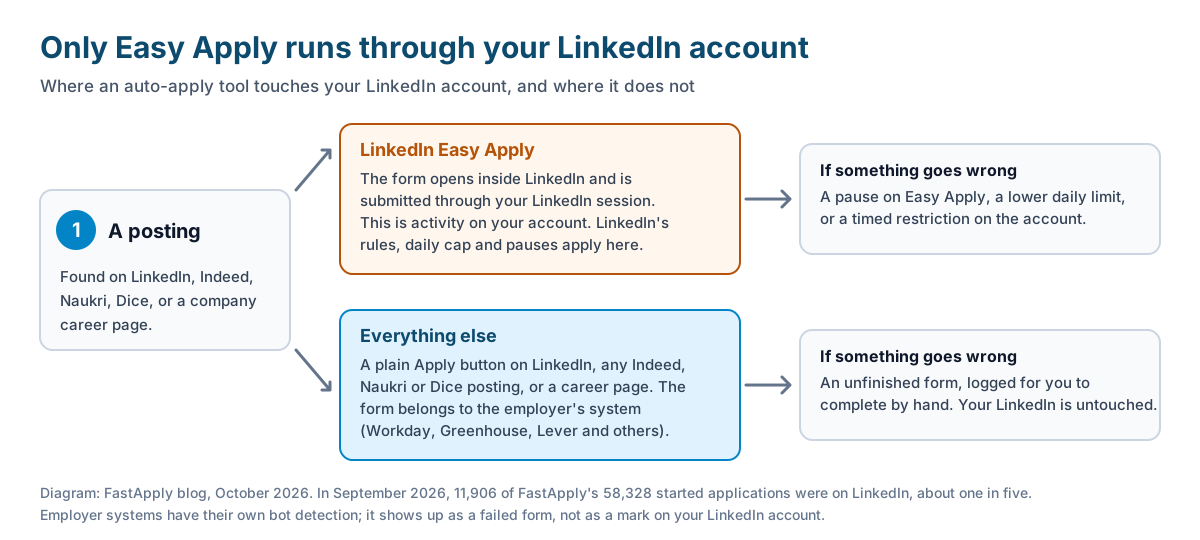
So the practical rule: decide how much of your search runs through Easy Apply, and keep that part modest. Let the rest run on boards and career pages. Our list of which job sites you can auto apply on shows which is which.
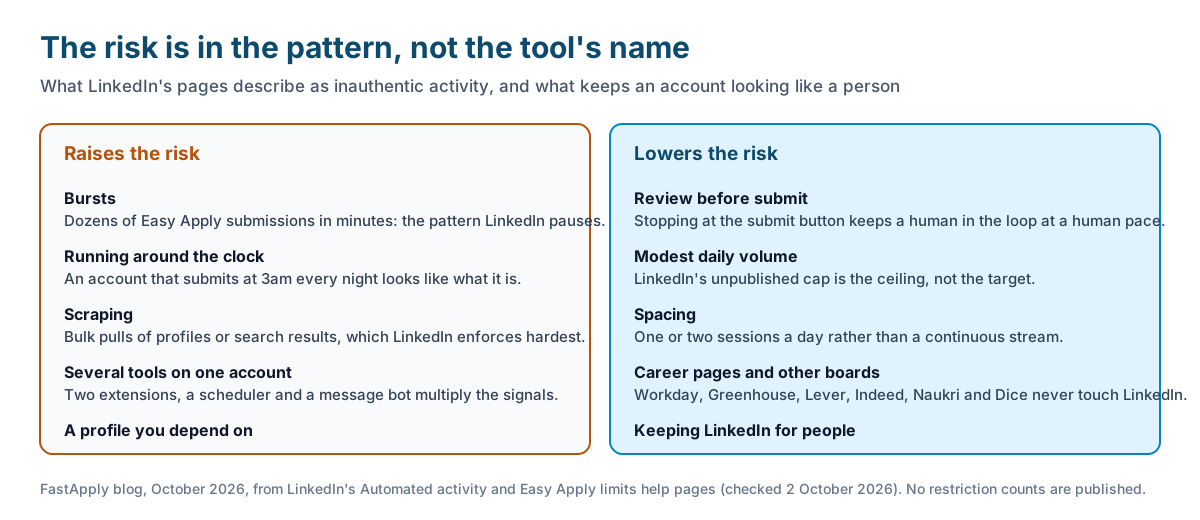
What raises the risk?
- Bursts. Dozens of Easy Apply submissions in a few minutes is the pattern LinkedIn’s own page describes as triggering a pause.
- Running around the clock. A human applies in sessions. An account that submits at 3am every night looks like what it is.
- Scraping. Tools that pull profile data or search results in bulk fall under the first of LinkedIn’s three categories, and that is the one LinkedIn enforces hardest.
- Several tools on one account. Two extensions, a scheduler and a message bot on the same profile multiply the signals.
- A profile you depend on. The cost of a restriction is proportional to how much your network, your recruiter inbound and your reputation live on LinkedIn.
What lowers the risk?
- Review before submit. Copilot mode or any tool that stops at the submit button keeps a human in the loop and the pace human.
- Modest daily volume. LinkedIn’s unpublished cap is the ceiling, not the target. Fewer, better-matched Easy Apply submissions keep you well under it.
- Spacing. Apply in a session or two a day rather than continuously.
- Applying on company career pages and other boards. Applications on Workday, Greenhouse, Lever, Indeed, Naukri or Dice never touch your LinkedIn account.
- Keeping LinkedIn for people. If LinkedIn is where you message recruiters and maintain your network, make it the last place you automate, not the first.
For the daily numbers, our post on the LinkedIn Easy Apply limit covers how to spread volume across platforms, and FastApply vs LinkedIn Easy Apply explains why Easy Apply covers only part of the market anyway.
What about Indeed and Naukri?
The rules differ by board, and only LinkedIn’s are this detailed.
Indeed’s Terms of Service, last updated 29 September 2026, say: “Use of any automation, scripting, or bots to automate the Indeed Apply process outside of Indeed’s official vendors and tooling is prohibited.” That is a clear prohibition; Indeed does not describe its enforcement ladder publicly the way LinkedIn does.
Naukri caps applications at 50 a day, which is a limit rather than a prohibition. Its terms restrict automated access like most boards do, and we have not seen Naukri publish a penalty policy. Staying inside its own daily cap is the sensible line. Our Naukri auto apply guide covers that setup.
Company career pages have no account to restrict. Their bot detection shows up as a form that will not submit, which our log records as a failure for you to finish by hand.
What to do if your account is restricted
Step 1: Remove the extension and any other automation
Uninstall every job-search extension and tool connected to the account, including ones you are not currently using, before you do anything else.
LinkedIn’s restriction page asks for this first, and leaving a tool installed while appealing undercuts the appeal.
Step 2: Change your password and check connected apps
Set a new password and review the apps and services with access to your account in Settings, removing any you do not recognise.
LinkedIn treats automated activity as a possible account-security problem as well as a rules problem, so it wants to see both addressed.
Step 3: Wait for the stated re-enable time
Read the suspension notification for the date and time the restriction lifts, and do not create a second account in the meantime.
A second account is itself a breach and makes a permanent closure more likely.
Step 4: Appeal if the restriction is indefinite
If the notification gives no end time or says the account is closed, use LinkedIn’s appeal form, describe what tool you used and that it has been removed, and provide the identity verification LinkedIn asks for.
Appeals are slow and not guaranteed. The best appeal is the one you never need.
FAQ
-
Is auto applying against LinkedIn’s rules? Yes. LinkedIn’s User Agreement, section 8.2, bars members from using “bots or other unauthorized automated methods to access the Services”, and its help pages say it does not allow third-party software or browser extensions that automate activity. This applies to every auto-apply tool, including FastApply.
-
What happens if LinkedIn catches you auto applying? Usually a temporary restriction. LinkedIn’s help page says an account restricted for automated activity “will then automatically be re-enabled at the time specified on the suspension notification”. Below that, rapid Easy Apply submissions trigger a temporary pause on Easy Apply, and LinkedIn may lower your daily limit. Permanent closure is possible; LinkedIn’s wording is “restricted or shut down”.
-
Can LinkedIn detect Easy Apply automation? LinkedIn’s own pages say it watches for activity that seems inauthentic and for rapid submissions, and it names temporary pauses and lowered limits as responses. Any vendor claiming its automation is undetectable or approved is contradicting LinkedIn’s published rules. Assume it can be detected and keep volume and pace human.
-
Is FastApply safe to use on LinkedIn? The same rules apply to FastApply as to any tool. What lowers the risk is Copilot mode, which waits for you to press submit, modest daily volume, and the fact that most of FastApply’s supported platforms are company application systems and other boards that never touch your LinkedIn account. In September 2026 about one in five of its started applications was on LinkedIn.
-
How many Easy Apply applications can you send a day? LinkedIn does not publish the number. Its help page says you can submit “a set number” a day, that the limit resets daily, and that LinkedIn may lower it for accounts whose activity seems inauthentic. Third parties often quote around 50, but LinkedIn has not confirmed that figure.
-
What is the safer alternative to auto applying on LinkedIn? Apply on company career pages and other boards. Applications submitted on Workday, Greenhouse, Lever, Indeed, Naukri or Dice do not involve your LinkedIn account at all, so a problem there is an unfinished form, not a restriction. Keep LinkedIn for networking and for a modest number of reviewed Easy Apply applications.
Conclusion
The honest answer is yes: LinkedIn’s rules prohibit automated activity, restrictions are usually temporary but closure is possible, and no tool is exempt, including ours. The risk is manageable because it is confined to Easy Apply. Review what goes out, keep LinkedIn volume modest and paced, and send most of your applications through boards and company career pages that never see your LinkedIn account. If a vendor tells you the risk does not exist, that tells you something about the vendor.
#can you get banned for auto applying on linkedin
#linkedin auto apply ban
#linkedin automation rules
#linkedin account restricted automation
#is auto apply safe
#linkedin easy apply bot

Ekekenta Clinton
Founder, FastApply