LinkedIn Easy Apply Limit? Apply to 200+ Jobs/Day in 2026
You sent 30 LinkedIn applications today and now LinkedIn is showing you a cooldown screen. Maybe you’re seeing slower form loads, an unexpected captcha, or a “you’ve reached the daily limit” message. You’re not banned. You hit LinkedIn’s Easy Apply soft throttle. The good news is the workaround takes 15 minutes to set up and gets you applying at 200+ jobs per day sustainably, without losing quality.
This post covers the actual LinkedIn Easy Apply limit (it’s not a published number), why LinkedIn caps applications, and the channel-diversification strategy that takes you from 30/day to 200+/day. The tactical version uses FastApply to handle the volume side; the strategic version works with any auto-apply tool that supports multi-ATS.
What Is the LinkedIn Easy Apply Limit (Actually)?
LinkedIn doesn’t publish a daily Easy Apply limit. There isn’t an official number on any LinkedIn help page, in any TOS document, or in any communication with users. What exists is an empirical throttle that kicks in around the same range for almost everyone.
Observed soft limits in 2026:
- ~30 applications per day before the first cooldown screen on most accounts
- ~50 applications per day before LinkedIn starts visibly throttling (slower form loads, captchas, “try again later” messages)
- ~80 applications per day before risk of a temporary account restriction
The numbers vary by account. Newer accounts (under 6 months old) get throttled around 20-25. Established accounts with strong network signals (500+ connections, regular posts, premium subscription) can sometimes push to 60-70 before the throttle hits.
What the throttle looks like in practice:
- A “You’ve applied to the maximum number of jobs today” message
- The Easy Apply button greys out on new postings
- LinkedIn job search results stop loading or load slowly
- Captchas on actions that shouldn’t require them
- Email from LinkedIn warning about “unusual activity”
Permanent ban risk is low if you’re using Easy Apply normally and not scraping LinkedIn profile data outside the application flow. The throttle is annoying but recoverable. Most accounts reset overnight. Persistent throttling can be addressed by spreading applications across the day (the LinkedIn rate-limit window appears to be rolling, not daily reset).
Why LinkedIn Caps Applications
Three reasons. They aren’t conspiratorial.
Spam prevention. LinkedIn’s recruiter products depend on application quality. If applicants can blast 1,000 applications per day, recruiters drown in noise and pay less for LinkedIn Recruiter. The Easy Apply throttle is partly LinkedIn protecting its enterprise pipeline.
Recruiter-side signal preservation. Recruiters can see which applicants applied with single-click vs. tailored applications. High-volume Easy Apply users get filtered down the queue on the recruiter side, which then makes Easy Apply less valuable, which then reduces LinkedIn’s product utility. The throttle protects the signal.
Rate-limit infrastructure protection. LinkedIn runs auto-scaling infrastructure but the Easy Apply submission path has third-party dependencies (background checks, employer ATS integrations) that don’t scale as quickly. Throttling individual applicants protects the slowest dependency.
None of this is hostile to applicants. It does mean that beating the limit requires diversifying away from LinkedIn alone.
How to Apply to More Jobs Without Hitting the Cap
The strategy: stop treating LinkedIn as your primary application channel. Treat it as one of three.
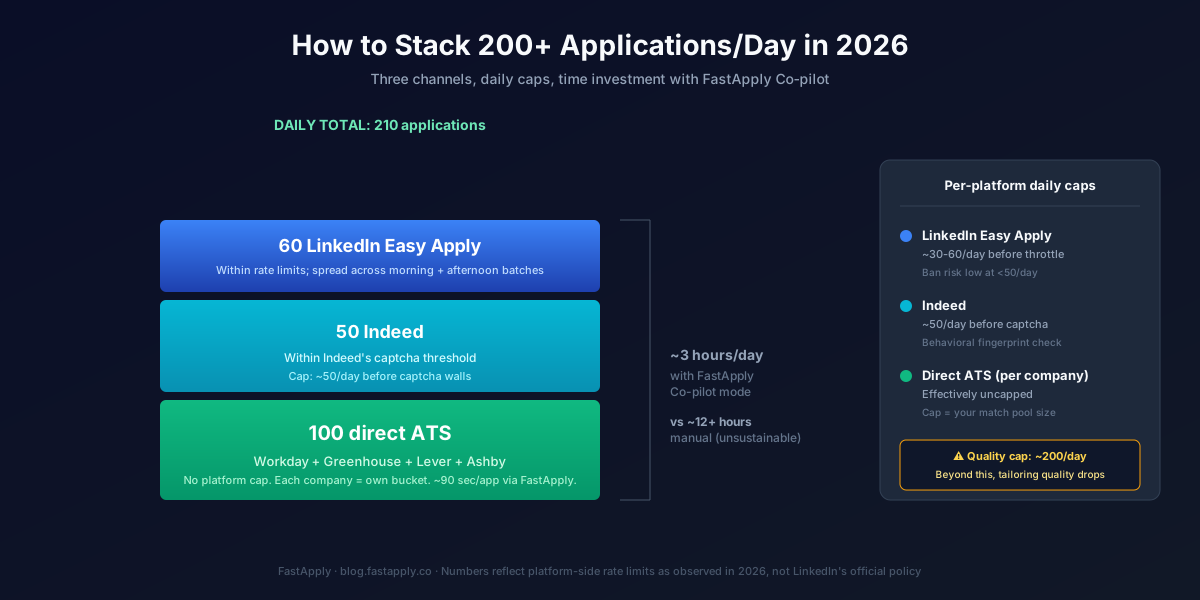
Channel mix that delivers 200+ applications/day:
-
LinkedIn Easy Apply: 60 per day, distributed. Stay under the throttle. Spread applications across 2-3 batches (morning, midday, late afternoon). 60 is the sustainable ceiling for most accounts. Higher than 60 risks throttling; lower than 30 leaves volume on the table.
-
Indeed: 50 per day. Indeed has its own rate limits (captcha-driven) but the throttle hits later and is less aggressive than LinkedIn. 50/day is a sustainable rate.
-
Direct ATS (Workday, Greenhouse, Lever, Ashby): 100+ per day. This is the uncapped channel. Each company has its own ATS bucket. Submitting to 100 companies in their own ATS systems triggers zero platform-level throttling because there’s no platform-level monitor watching you across companies.
Total: 210 applications per day. That’s the realistic ceiling without crossing into spam territory. Most users land at 150-200 once they tune the matching engine for relevance.
Direct ATS Applications: The Uncapped Channel
The direct-ATS channel is where the volume math actually works. Two reasons:
No platform-level rate limit. Workday, Greenhouse, Lever, Ashby, iCIMS, BambooHR, JazzHR, SmartRecruiters, and every other major ATS treats each company as its own tenant. There’s no “you’ve applied to too many companies today” message. Each application is its own context.
Higher per-application response rate. Direct-ATS applications skip the LinkedIn aggregator step. Your application lands directly in the company’s hiring pipeline rather than getting filtered through LinkedIn’s relevance-scoring layer first. Response rates on direct-ATS applications tend to be 2-3x the LinkedIn Easy Apply response rate in our 2026 testing.
The trade-off: each direct ATS form is longer than a LinkedIn Easy Apply submission. A Workday application can take 15 minutes manually. A Greenhouse form takes 5-8 minutes. This is where a multi-ATS automation tool becomes the difference between sustainable and unsustainable.
Tools that handle direct-ATS automation:
- FastApply covers 20+ job platforms and ATS systems, including Workday, Greenhouse, Lever, iCIMS and Taleo
- Sonara covers ~50 boards (premium pricing)
- Most other auto-apply tools are LinkedIn-heavy and don’t have meaningful direct-ATS coverage
Our Workday ATS hack guide covers the 7 tactics that drop Workday application time from 15 minutes to ~90 seconds. Combined with the channel strategy above, the 200/day target becomes a 3-hour daily session.
How to Stack 200+ Applications/Day Sustainably
The arithmetic, with realistic time estimates.
Morning session (90 minutes):
- 30 LinkedIn Easy Apply applications (15-25 minutes with FastApply Co-pilot, ~5 hours manual)
- 25 Indeed applications (15 minutes with FastApply, ~2 hours manual)
- 30 direct ATS applications (45 minutes with FastApply, ~7 hours manual)
Afternoon session (90 minutes):
- 30 LinkedIn Easy Apply applications (spread to avoid throttle)
- 25 Indeed applications
- 70 direct ATS applications (this is where the FastApply Auto-pilot mode earns its price)
Daily total: ~210 applications in 3 hours, vs. 12+ hours manual (which is not sustainable for more than 2-3 days).
For the cadence side of the equation, our guide to applying to 100 remote jobs per week without burning out covers the weekly rhythm that keeps the volume sustainable. How many jobs you should apply to per day in 2026 covers the volume-vs-quality trade-off.
Quality vs Quantity: Don’t Lose Sight
200 generic applications convert worse than 50 tailored applications. The math we keep seeing:
- Tailored applications response rate: 4-8% (recruiter views or interview invites)
- Generic applications response rate: 0.5-1.5%
- The break-even: 50 tailored = 200 generic in absolute response volume, but tailored applications convert further down the funnel
So why stack 200/day? Because tailored at scale beats both. Per-job resume tailoring (which FastApply handles automatically on Pro and Elite tiers) means your 200 applications are tailored, not generic. The volume isn’t a quality compromise; it’s quality plus volume.
The rule: if your tool isn’t generating per-job tailored resumes, don’t push past 50/day. You’re saturating LinkedIn with low-signal applications and burning your account.
If your tool is generating per-job tailored resumes: 200/day with tailoring outperforms 50/day with tailoring by roughly 2.5-3x in interview conversions. The math works because the cost of an additional tailored application is near-zero with automation.
For the deeper category breakdown on what separates real tools from form-fill spam, our guide to AI auto-apply for jobs walks through the five-step pipeline.
When to Use Co-pilot vs Auto-pilot
The two FastApply modes apply differently across the three channels.
Use Co-pilot mode for:
- All LinkedIn Easy Apply submissions (you want to catch wrong screener answers before they go to your highest-visibility platform)
- Senior IC, manager, and executive direct-ATS applications (reputation matters more than speed)
- Companies you actually want to work at (your 10-15 top-priority targets)
Use Auto-pilot mode for:
- High-volume direct-ATS applications to companies in your secondary tier
- International searches where you’re casting wide
- Entry-level postings where the screener questions are minimal
- Indeed applications (lower stakes, higher volume)
The hybrid pattern most FastApply power users settle into: Co-pilot for the first 50-80 applications/day (LinkedIn + top-tier direct ATS), Auto-pilot for the remaining 120-150 (volume direct ATS + Indeed). This gives you tailored review on the applications that matter most and pure volume on the ones where the per-application care has diminishing returns.
Worried about your account? We wrote up what LinkedIn’s rules actually say about auto applying, including what a restriction looks like in practice.
Try FastApply Free
If you’ve hit the LinkedIn Easy Apply limit and want to actually get to 200/day without manually filling Workday forms, install the FastApply Chrome extension and run 5 free applications on us. No credit card. Works on LinkedIn, Indeed, Workday, Greenhouse, Lever, Ashby, iCIMS, Taleo, and the rest of its 20+ supported platforms.
You stay in Co-pilot mode for LinkedIn and high-priority applications, hand it off to Auto-pilot for volume direct-ATS. Plans start at $14/month after the free credits.
Frequently Asked Questions
What is the LinkedIn Easy Apply daily limit?
LinkedIn doesn’t publish an official Easy Apply daily limit. The empirical soft throttle hits around 30 applications/day on most accounts, with visible slowdowns at 50/day and temporary restrictions at 80+/day. Older accounts with stronger network signals can push higher; newer accounts get throttled earlier. The limit is rolling rather than midnight-reset, so spreading applications across the day helps.
Can I get banned from LinkedIn for applying to too many jobs?
Temporary restrictions yes, permanent bans almost never. LinkedIn’s Easy Apply throttle is designed to slow you down, not to ban you. Permanent restrictions only happen when applicants combine high-volume Easy Apply with scraping LinkedIn profile data outside the application flow. Sticking to LinkedIn-permitted automation (Easy Apply only, respecting rate limits, no profile data harvesting) keeps your account safe.
How many jobs should I apply to per day?
For active job seekers in 2026: 100-200 quality applications per day with per-job resume tailoring. Below 50/day at standard tailoring rates leaves volume on the table; above 200/day at any tailoring rate starts hitting diminishing returns on response. The right number depends on your role seniority (senior = lower volume + higher tailoring quality, junior = higher volume) and channel mix (LinkedIn-only caps you at 60, multi-ATS unlocks the 200 ceiling).
Is there an unlimited auto-apply tool?
No, and any tool claiming “unlimited” or “1,000 applications per day” is selling form-fill spam, not real submissions. Realistic per-platform daily limits in 2026: 60 LinkedIn, 50 Indeed, 100+ direct ATS. Total realistic ceiling: about 210/day for sustainable, tailored applications. Tools that claim more are either not actually submitting or are spamming ATS systems in ways that get applications auto-rejected.
How does FastApply handle the LinkedIn limit?
FastApply’s Chrome extension respects LinkedIn’s Easy Apply rate limits by default. It runs LinkedIn submissions at a sustainable pace (typically 30-60/day in Co-pilot mode), then continues with Indeed and direct-ATS submissions to reach the 200+/day target through channel diversification. No LinkedIn account restrictions reported in our user base when operating within these limits. The 24/7 AI Job Matcher also continues scanning while you sleep, so when LinkedIn’s window resets overnight, queued applications are ready to go in the morning.
#linkedin easy apply limit
#let me apply
#automatically apply to jobs
#how to apply to jobs faster
#LinkedIn Easy Apply
#FastApply

Ekekenta Clinton
Founder, FastApply