Naukri Auto Apply: How to Apply to Naukri Jobs Automatically (2026)
Short answer: Naukri has no built-in auto apply. It gives you job alerts, saved searches, recommended jobs and a one-click Apply button, capped at 50 applications a day, and after each Apply it usually asks screening questions about your notice period, CTC and location. To apply to Naukri jobs automatically you need a browser extension that runs in Chrome, reads your stored answers, and clicks through each matching posting for you. FastApply supports Naukri as a regional board, and in September 2026, 90.1% of the 4,370 Naukri applications its users started were submitted, the second-highest completion rate of any platform we track.
“Does it work on Naukri?” is one of the first questions Indian visitors ask us. Almost nobody has written a straight answer, so here it is.
Updated 2 October 2026 with figures from FastApply’s September 2026 application log.
What Naukri gives you, and what it does not
Naukri is built for recruiters to find you and for you to find postings. Applying is still a manual act: one posting at a time, or up to five at once from the recommended, saved or job-alert lists.
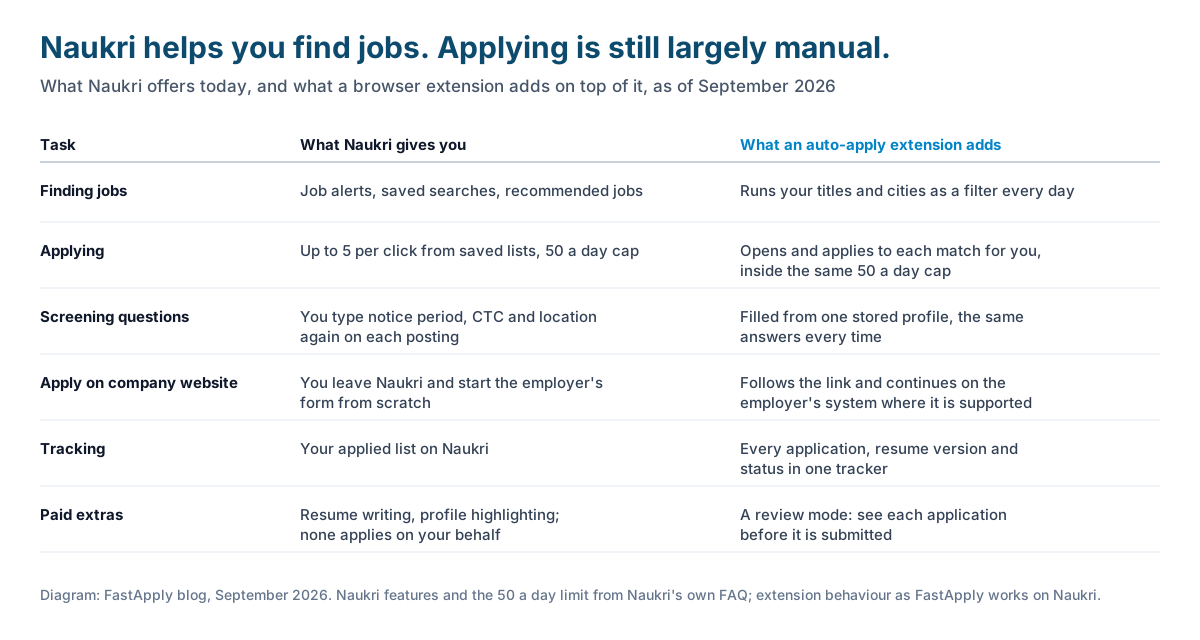
Finding jobs. Job alerts by email, saved searches, and a recommended jobs feed built from your profile. These work well, and an extension does not replace them.
Applying. An Apply button per posting, which submits your Naukri profile and resume; on the Recommended Jobs, Saved Jobs and job-alert pages you can tick up to five postings and apply to them in one go. Naukri’s own FAQ sets the limit: you can apply to a “maximum of 50 jobs in a day” (Naukri FAQ). Nothing filters those five for fit, answers screening questions or queues applications for later.
Screening questions. After you click Apply, many postings ask a short set of questions: notice period, current CTC, expected CTC, preferred location, sometimes a skill or two. You type the same answers every time. Our support chats are full of people who typed them differently across applications, which is how a profile ends up saying “immediate” on one form and “60 days” on the next.
“Apply on company website.” Some postings carry this button instead of Apply. Naukri’s FAQ is clear that you cannot apply to these with your Naukri profile; the button takes you to the employer’s own application system, where you start from scratch.
Tracking. Naukri keeps a list of the jobs you applied to, with recruiter actions where the recruiter shares them. It does not record which resume version went where.
Paid services. Naukri’s paid products are built to make recruiters find you: resume writing, profile and application highlighting, and similar. None of them applies to jobs on your behalf.
So “Naukri auto apply” as a Naukri feature does not exist. It exists as a browser extension that sits on top of Naukri.
How auto apply on Naukri actually works
An auto-apply extension runs inside your Chrome browser, on the Naukri pages you would otherwise be clicking through yourself. Here is the sequence FastApply follows, which is a fair description of the category.
- You install the extension and complete a profile once: resume, notice period, current and expected CTC, cities, skills, and the other answers forms keep asking.
- You set filters: the job titles you want, the cities, the experience band, and companies or keywords to exclude (“skip my current company” is the most common exclusion request we see).
- The extension searches Naukri with those filters, opens each matching posting, clicks Apply, and answers the screening questions from your stored profile.
- Every application is recorded in a tracker with the job, the date, the platform and the resume version used.
Two things decide whether this works well on a given posting. The first is the button. For a plain Apply, the whole flow stays on Naukri and the extension finishes it. For “Apply on company website”, FastApply follows the link to the employer’s system and continues if that system is one it supports (Workday, Greenhouse, Lever, SmartRecruiters and the other application systems on its list); otherwise it skips the posting and tells you. The second is your profile. If your notice period or CTC is blank, the extension cannot answer the question, and the application stalls for you to finish by hand.
Three ways to run it, by how much you want to watch. In Copilot mode the extension fills the whole application and waits for you to read the answers and press submit yourself. In Browse & Apply it runs in your open tab while you watch. On paid plans, Apply for Me runs on FastApply’s servers while you are away from the laptop. Most people start with Copilot for the first ten applications, then switch.
What the numbers say
Naukri is one of the easiest platforms for an automated application to finish, and we have the log to show it.
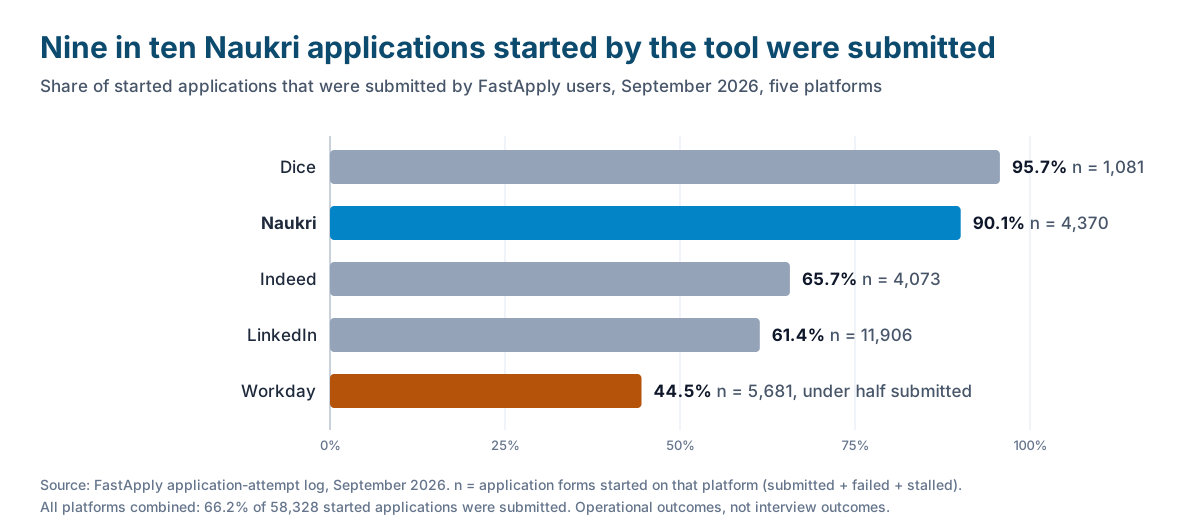
In September 2026, FastApply users started 4,370 applications on Naukri and 90.1% of them were submitted. Only Dice did better, at 95.7% of 1,081. Indeed came in at 65.7% (4,073 started), LinkedIn at 61.4% (11,906 started), and Workday at 44.5% (5,681 started). Across all platforms that month, 66.2% of started applications were submitted; the full breakdown, including why applications fail, is in does auto-apply actually work.
Why Naukri completes so often: the flow is short, the same on every posting, and it never asks you to create an account with the employer. Workday is the opposite, with a new account and a multi-page form per company, which is why under half of those applications finish without help.
Two cautions on reading that chart. A submitted application is an operational outcome, not an interview. And the cap still applies: 50 Naukri applications a day is the ceiling whether a human or an extension is clicking, and a tight filter rarely produces that many fresh matches anyway.
Set it up in five steps
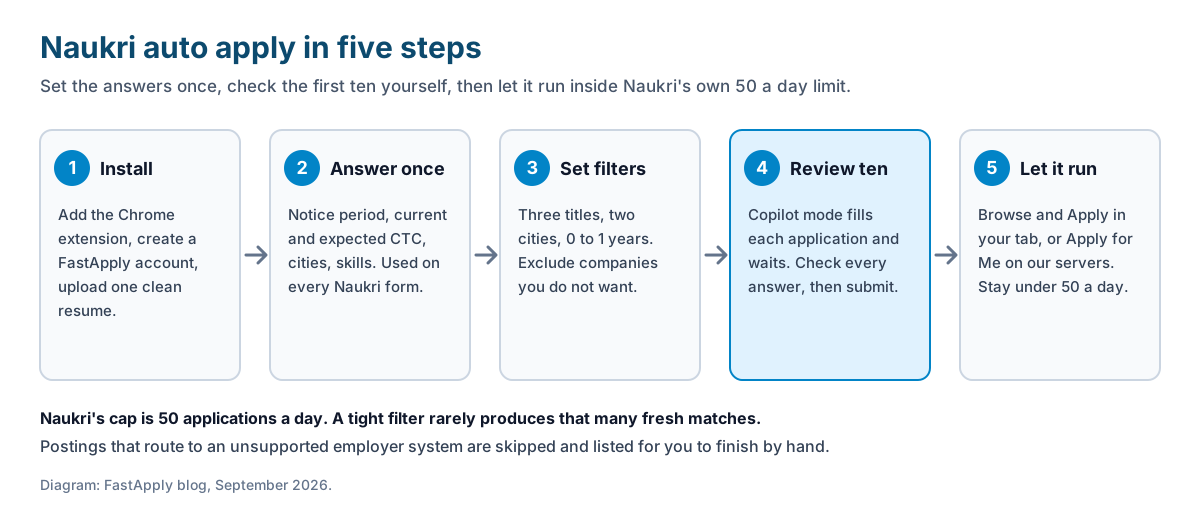
Step 1: Install the extension and complete your profile
Add the FastApply extension to Chrome, create an account, and upload one ATS-clean resume as your default.
The resume should be a single-column, text-based PDF under 2 MB, which is also what Naukri’s own upload screen accepts. The resume for freshers guide has a template; the ATS resume format guide covers the parsing rules for everyone else.
Step 2: Fill the form answers once
Enter your notice period, current CTC, expected CTC, preferred cities, skills and work arrangement in the profile, in the format the forms expect.
These are the answers Naukri’s screening questions ask for, and they are the fields our visitors most often get wrong across applications. A fresher enters Immediate for notice period and 0 for current CTC; our guides to notice period and current and expected CTC cover the wording for everyone else.
Step 3: Set the filters
Choose three exact job titles, two cities, your experience band, and the companies or keywords to exclude, and leave everything else off.
Three titles beat ten. A filter that produces 15 fresh postings a day is a campaign; one that produces 200 is noise, and it burns through Naukri’s daily limit on jobs you did not want.
Step 4: Review the first ten in Copilot mode
Run the first ten applications with Copilot switched on, read every screening answer before you press submit, and correct the profile if anything is off.
This is where you catch a notice period in months when the form wanted days, or an expected CTC typed in rupees where the form wanted lakhs. Fix it once and every later application inherits the fix.
Step 5: Let it run, inside Naukri’s limit
Switch to Browse & Apply in your open tab, or Apply for Me on a paid plan, keep the daily volume under Naukri’s 50, and check the tracker once a week for replies.
Count replies from a recruiter, not applications sent. If 50 applications bring none, change the resume or the titles before sending the next 50. The fresher jobs guide has the full weekly routine.
The limits and the risks
We build an auto-apply tool, so read this section as the part we would rather you heard from us.
Naukri’s own cap. 50 applications a day, per Naukri’s FAQ. The extension stays inside it. If you also apply by hand, your manual applications count against the same limit.
Naukri’s terms. Like other job boards, Naukri’s terms of use restrict automated access to the site. We have not seen Naukri publish a specific penalty policy for applicants using browser tools, and we will not pretend to know what it would do. The sensible position is the same one we give for every board: keep volume inside the limit Naukri itself sets, use a mode where you see what goes out, and keep the profile accurate. LinkedIn’s rules are stricter and better documented; we covered them in can you get banned for auto applying on LinkedIn, and the broader picture of which boards allow what is in which job sites you can auto apply on.
What gets skipped. Postings that route to an employer system the extension does not support are skipped and listed for you to do by hand. Postings that need an answer your profile does not contain stall rather than guess.
The profile still matters. Naukri recruiters search the database as much as they read applications. An extension does not update your Naukri profile’s “last updated” date or its headline; do that yourself every week or two. How to replace the resume on Naukri, LinkedIn and Indeed without disturbing applications already sent is covered in how to upload or replace your resume.
Volume is not matching. Ninety percent completion on a bad filter is ninety percent of nothing. The tool removes the typing; it does not decide which jobs fit you.
What it costs in India
FastApply’s India plans start free: 5 applications, no card, applying with the resume you upload. Paid plans are Rs 599 a month, or Rs 433 a month on the 90-day plan, with Apply for Me on the servers and more resume profiles. Per-job tailored resumes and cover letters are on the Pro and Elite plans. The free 5 are enough to run Step 4 above on real Naukri postings and see whether the answers come out right before you pay anything.
FAQ
-
Does Naukri have an auto apply feature? No. Naukri offers job alerts, saved searches, recommended jobs and a one-click Apply button, capped at 50 applications a day, but nothing that applies for you. Auto apply on Naukri means a browser extension that clicks through the postings on your behalf.
-
How many jobs can I apply to on Naukri in a day? Naukri’s FAQ sets a maximum of 50 applications a day, with no monthly limit beyond that. The cap applies whether you click or an extension does, so a tight filter matters more than raw volume.
-
Does FastApply work on Naukri? Yes. Naukri is on FastApply’s list of supported regional boards. In September 2026, 90.1% of the 4,370 Naukri applications FastApply users started were submitted, the second-highest completion rate of any platform in the log after Dice.
-
What happens with “Apply on company website” jobs on Naukri? Those postings leave Naukri for the employer’s own application system, and Naukri’s FAQ says you cannot apply to them with your Naukri profile. FastApply follows the link and continues if the employer’s system is one it supports, such as Workday, Greenhouse or Lever, and otherwise skips the posting and lists it for you.
-
Is it safe to auto apply on Naukri? Naukri’s terms, like most job boards’, restrict automated access, and we have not seen a published penalty policy for applicants using browser tools. Stay inside Naukri’s own 50-a-day limit, use a review mode so you see what goes out, and keep your profile accurate.
-
Do I still need to update my Naukri profile if I use auto apply? Yes. Recruiters search Naukri’s database by skills and by how recently a profile was updated, and an extension does not change your headline or your last-updated date. Refresh the profile every week or two alongside the applications.
Conclusion
Naukri will find the jobs and let you apply to 50 a day, one click and one set of screening questions at a time. An extension turns that into a filter, a stored set of answers, and a tracker, and on Naukri the applications it starts finish nine times out of ten. Set the answers once, check the first ten yourself, stay inside Naukri’s limit, and judge the result by replies.
#naukri auto apply
#auto apply naukri
#apply to naukri jobs automatically
#naukri apply limit per day
#auto apply jobs india
#naukri job apply
#fresher jobs

Ekekenta Clinton
Founder, FastApply