AI That Applies to Jobs for You: 2026 Guide
Short answer: Yes, AI that applies to jobs for you exists, and it comes in three forms. Some tools only write the resume and cover letter. Some fill and submit the application form. A few do both. Using them is legal, though LinkedIn’s terms restrict bots on its own site. Prices in September 2026 run from free (5 applications at FastApply, 10 a month at LoopCV) to about $49 to $99 a month for hosted agents that apply while you sleep.
We build FastApply, one of the tools below, so read the comparisons with that in mind. Prices were checked on each vendor’s site on 22 September 2026 unless a different date is given. This guide compares the whole category; if you only want to see how FastApply itself does it, with every supported platform and the price on one page, go to AI apply for jobs.
What “AI that applies to jobs for you” actually means
The phrase covers three different products, and most disappointment in this category comes from buying one when you wanted another.
AI that writes. Resume builders, tailoring tools and cover letter generators. They read the job posting and rewrite your documents to match it. You still find the job, open the form, fill it in and click submit. Useful, but they do not apply to jobs for you.
AI that submits. Software that opens the application form, fills every field from your saved profile, answers the screening questions, uploads your resume and clicks submit. This is what most people mean when they search for an AI tool to apply for jobs, and it runs either in your own Chrome tab or on the vendor’s servers.
AI that does both. The tool finds the job, tailors the resume for it, then fills and submits the form. FastApply Pro and Elite, AIApply Auto Apply and JobCopilot Elite all describe this workflow. It is the most hands-off option and the one where match filters matter most: a tailored resume sent to the wrong job is still the wrong job.
One naming note. “AI Apply” is also a product, AIApply at aiapply.co. It is in the tool list below, but this guide is about the category.
Can AI automatically apply for jobs? How AI job appliers work
Every tool in the submit category runs the same loop. You build a profile once (work history, education, answers to the standard 15 to 20 screening questions). The tool scans job boards or a set of career pages, scores each posting against your filters, and queues the ones above your threshold. For each queued job it opens the form, fills the fields, uploads the resume (tailored per job on the better plans), answers the screener and submits. The application is then logged in a tracker.
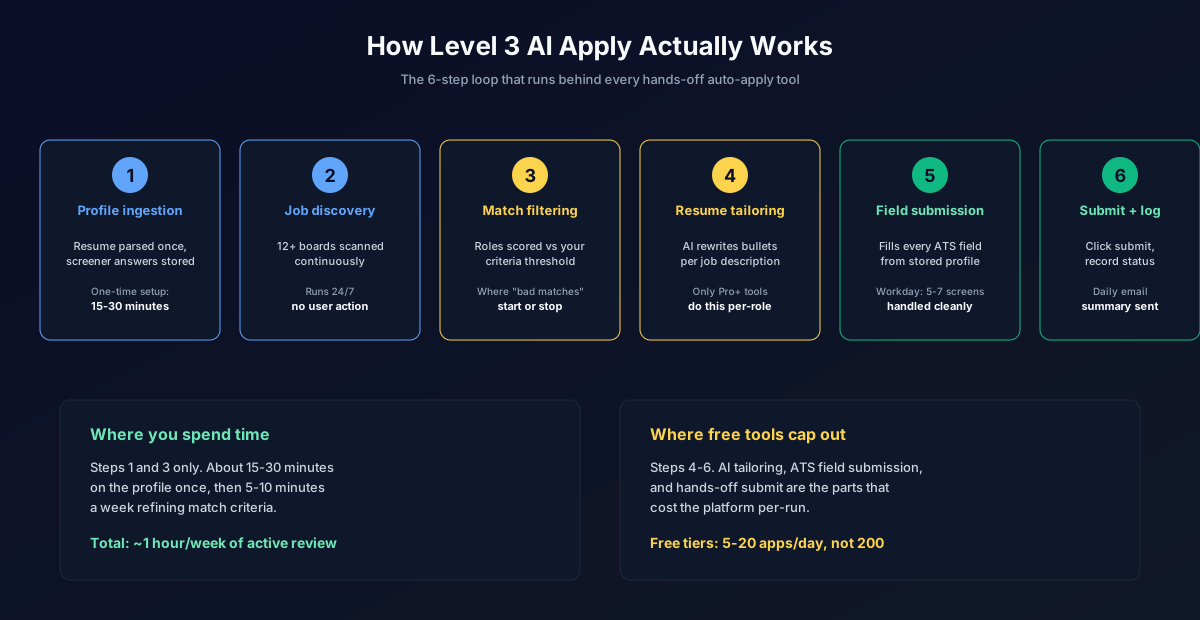
Where one AI job applier differs from another is where that loop runs, how far it reaches, and what happens when a form asks something unexpected.
Browser extensions
Reach: the extension works on whatever job page you open, so coverage depends on which application systems it has been taught to fill. FastApply’s Browse & Apply mode fills Indeed, LinkedIn, Glassdoor, ZipRecruiter and the forms behind them (Workday, Greenhouse, Lever, Ashby, iCIMS, Taleo, BambooHR and more, 20+ platforms in total). Simplify Copilot fills 100+ boards and portals but leaves the final submit click to you.
Cannot: run while the tab is closed, or pass a one-time code sent to your phone or email, so employer sites that demand a fresh login stop it.
Daily cap: whatever the tool’s plan allows and the job board tolerates. FastApply’s how-it-works page says up to 250 applications a day; LazyApply’s plans cap at 15, 150 or 1,500. In practice the board’s own throttle arrives first (more on that below).
At screening questions: the extension answers from the responses you saved during setup. A question it has never seen is the test. FastApply pauses in Co-pilot mode and asks you, then remembers the answer; in Auto-pilot the AI drafts one from your profile. Simplify+ drafts answers for you to approve.
At custom fields and Workday multi-page forms: Workday alone can run five to seven screens, with account creation on the first one. The extensions that name Workday have mapped those screens; the ones that do not name it will usually fill page one and stall.
Hosted agents that apply while you sleep
Reach: the agent runs on the vendor’s servers, so it can apply overnight. FastApply’s Apply for Me automations, AIApply Auto Apply, JobCopilot, LoopCV and Adzuna ApplyIQ all work this way. Reach is limited to the sources the vendor scans: JobCopilot says 500,000+ company career pages, ApplyIQ applies only within Adzuna’s listings, and AIApply, per the Jobity walkthrough our review relied on, applies from its own job board.
Cannot: get past a login wall or a verification code. A Trustpilot reviewer quoted in our AIApply review reported that most jobs the tool tried “required registration/login and OTP verification”, and those applications failed. That limit applies to every hosted agent. LoopCV also falls back to emailing your CV when there is no form, which is not the same as an application inside the employer’s ATS.
Daily cap: set by the plan. JobCopilot advertises up to 50 personalized applications a day on Elite; AIApply sells credits, one per application, and its Terms allow it to “queue, batch, space, delay, reject or cap” submissions; ApplyIQ averages five a week by design; FastApply Apply for Me applies to everything above your match score, up to the monthly allowance (200, 500 or 1,000).
At screening questions and custom fields: the same saved-answer logic as extensions, but you are not there to help, so use the review mode that FastApply, AIApply and JobCopilot all offer for the first week.
Human-assisted services
A person, sometimes with software, applies on your behalf. FlashFire sells one-time packages (250 applications for $199, 500 for $349, 1,200 for $599, prices on 22 September 2026), LoopCV has a Done For You tier at €87.99 a month, and reverse recruiters charge more.
Reach: anywhere a human can log in, so login walls and verification codes are not an obstacle.
Cannot: scale cheaply. FlashFire works out to $0.50 to $0.80 per application against about $0.05 to $0.07 on FastApply’s plans, and turnaround is days, not minutes.
At screening questions: a person reads your notes and answers, so quality depends on the brief you give them.
Can AI apply to jobs for you for free?
Yes, within limits. When people ask a tool to “apply to jobs for me” without paying, they get one of three things: a small one-time allowance, a capped monthly plan, or free autofill where you still click submit. Here is what “AI that applies to jobs for you free” actually gets you, checked 22 September 2026.
| Tool | What is free | The limit | Card needed |
|---|---|---|---|
| FastApply | Full workflow, Browse & Apply mode | 5 applications, one time | No |
| LoopCV | Basic plan, one loop | 10 applications or emails a month | No |
| Simplify Copilot | Autofill, tracker, job matches | Unlimited, but you click submit yourself | No |
| Adzuna ApplyIQ | Hosted agent within Adzuna’s listings | About 5 applications a week, US and UK only | No |
| AIApply | Sample writing tools, job board browsing | No free auto apply | No |
| LazyApply | Nothing | Annual plans only, 30-day refund window | Yes |
| JobCopilot | Nothing shown on its pricing page | Paid plans from $0.93 a day | Yes |
The pattern: nobody gives away unlimited auto-apply, because every submission costs the vendor money. An ad for “unlimited free AI job apply” is almost always autofill (you still submit) or a data-collection play. For the full free-tier breakdown of eight tools, with caps and card rules, see free AI job appliers compared. FastApply’s 5 free applications are enough to watch it complete a Workday or Greenhouse form on a job you actually want, then see what it costs after that.
The tools that apply for you in 2026
Eight tools come up most often when people search for an AI job applier or type “apply to jobs for me” into Google. This is the short version; our full tool comparison ranks twelve, and the auto-apply Chrome extensions roundup covers the browser-based ones.
| Tool | How it applies | Daily or monthly cap | Price | Free tier | Countries |
|---|---|---|---|---|---|
| FastApply | Chrome extension (Browse & Apply) plus hosted Apply for Me automations; fills real ATS forms | Up to 250 a day; 200, 500 or 1,000 a month by plan | $14, $29, $49 a month; 90-Day Sprint $38, $75, $132 | 5 applications | Global, 17 country pages incl. US, UK, Canada, India |
| AIApply | Hosted agent, applies from its own job board, tailored resume per job | Credits, one per application; vendor may cap | Prices after signup; Jobity saw $49 a month for 100, $99 for 250 | Writing tools only | Site in 13 languages |
| LoopCV | Hosted “loops” that fill forms or email your CV | 10, 100 or 300 a month | Free, €8.99, €29.99 a month; Done For You €87.99 | 10 a month | Global |
| LazyApply | Chrome extension, LinkedIn, Indeed, ZipRecruiter, Greenhouse, Dice | 15, 150 or 1,500 a day | $99, $149 or $999 a year, annual only | None | Global |
| Simplify Copilot | Chrome extension autofill, you click submit | None stated | Free; Simplify+ $19.99 a week, $39.99 a month, $89.99 for 3 months | Autofill and tracker | Global |
| Adzuna ApplyIQ | Hosted agent, Adzuna listings only, resume sent unmodified | About 5 a week on average | Free (a PRO version exists; we could not load its page) | Yes | US and UK |
| AutoApply.jobs | Hosted, human-reviewed matches (per last known listing) | 50 or 250 jobs a month | $30 or $90 a month, last seen 7 March 2026 | 1 query, 3 jobs | Unknown |
| JobCopilot | Hosted agent plus autofill extension, 500,000+ career pages | Up to 20 or 50 matches a day | From $0.93 or $1.05 a day; weekly, monthly, quarterly plans | None shown | Global |
A few notes the table cannot hold.
FastApply is the one we build. Every paid plan includes both modes, the free tier is Browse & Apply only, and Pro adds an AI-tailored resume and cover letter per application. US job seekers should start at auto-apply in the US.
AIApply shows no prices before signup, sells auto apply separately from its writing suite, and calls Auto-Apply non-refundable once applications have been submitted. Details in our AIApply review.
LoopCV counts emails and form submissions against the same allowance, so check each loop’s results in week one to see how many reached an ATS (our LoopCV review has the detail). LazyApply bills once a year with no monthly option.
Adzuna ApplyIQ launched on 15 April 2025 in the US and UK. Adzuna’s launch post says it “averages five applications per user a week”. Adzuna’s product page blocked our fetches on 22 September 2026, so the free and PRO details come from its page titles and the launch post.
AutoApply.jobs did not resolve on 22 September 2026 from three DNS resolvers and a fourth crawler, and the Wayback Machine’s last capture of its pricing page is 12 May 2026. The plans in the table are from a ResumeJudge review dated 7 March 2026. Treat it as offline until it reappears.
JobCopilot advertises “up to 50 personalized job applications per day” on Elite, which tailors a resume for every application; Premium gets 20 matches a day and one copilot. See FastApply vs JobCopilot.
How many applications a day is sensible
The tools above range from 5 a week to 1,500 a day, which tells you the number is a setting, not a rule. Three things should set it.
The board’s tolerance. LinkedIn does not publish an Easy Apply limit, but our Easy Apply limit guide collects the observed pattern: a cooldown screen around 30 applications a day on most accounts, visible throttling around 50, and restriction risk around 80. Direct ATS applications (Workday, Greenhouse, Lever) share no counter, which is why spreading volume across boards and career pages beats hammering one.
Duplicates. Applying twice to the same job, or to five near-identical roles at one company in a week, gets you filtered fast. Use a tool whose tracker skips jobs you have already applied to (FastApply’s how-it-works page says it “tracks repeats”), and read our note on applying to multiple roles at the same company before you loosen the filters.
How recruiters see mass applications. An ATS shows the recruiter the same record whether you or a tool filled the form. What they notice is a resume that misses the role’s core skill, a cover letter addressed to the wrong company, or a “why us” answer that could be pasted anywhere. Volume with a tight match threshold looks like a diligent candidate; without one it looks like spam.
A practical range for most people: 20 to 40 tailored applications a day across two or three boards plus direct career pages, with the threshold set so you would take an interview at every job the tool sends. That is far more than the 3 to 5 a day most people manage by hand, and far fewer than the caps allow. Our guide to applying at volume without burning out has a weekly schedule built around that range.
Setting it up in under 15 minutes
The steps below are the same for every tool that will apply to jobs for you. The FastApply-specific screens are noted, and the whole thing takes about 15 minutes the first time.
- Build the profile once. Enter your contact details, work history with dates, education, work authorization, salary expectation, notice period and relocation preference. Answer the standard screening questions now, because every form will ask them.
- Upload the resume the tool will tailor. One clean, ATS-readable resume (no columns, no text boxes). On plans with per-job tailoring, this is the base the AI rewrites from, so keep every claim in it true. See our ATS resume format guide if yours has not been checked.
- Set filters and a match threshold. Job titles, locations or remote, salary floor, seniority, and companies to exclude. Then set the match score the tool must reach before it applies. Start strict. A loose threshold spends your allowance on roles you would not accept.
- Turn on the review queue for the first batch. FastApply calls this Co-pilot mode; AIApply and JobCopilot have a review or save-for-review option too. You see each completed form before it is submitted, fix any answer the tool guessed, and the tool remembers the fix.
- Send a first batch of 10 to 20 and check the tracker. Look at which board each application went to, whether any failed on a login wall, and whether the tailored resume reads well. Adjust the filters, then switch to Auto-pilot (or the hosted automation) and let it run.
What AI still cannot do for you
Knowing the limits saves you from blaming the tool for the wrong thing.
- Pass a login wall or a one-time code. If the careers site emails you a code, the AI stops. Extensions continue once you type it; hosted agents mark the application failed.
- Answer a question it has never seen, well. “Describe a time you disagreed with your manager” gets a plausible paragraph drawn from your profile. Plausible is not the same as yours. Review these in the queue.
- Fix a weak resume. Tailoring rephrases what is there; it should not invent experience, and the good tools do not. If the base resume does not match the roles, more volume produces more rejections faster.
- Network or guarantee a reply. Most offers still involve a referral or a recruiter conversation that no form submission triggers, and most applications, human or automated, get no answer. An AI job applier gets yours in on day one, tailored, on every board; it buys back hours for the networking, it does not replace it.
- Read the terms for you. LinkedIn’s User Agreement bars “bots or other unauthorized automated methods to access the Services”. Filling forms in your own logged-in browser is lower-profile than a server-side bot, but the clause exists. Read our guide on whether job application automation is safe before you rely on one board.
FAQ
Is there an AI that applies to jobs for you?
Yes. In 2026, FastApply, AIApply, LoopCV, LazyApply, JobCopilot and Adzuna ApplyIQ all submit applications on your behalf rather than only autofilling them. They differ in where they run (your browser or the vendor’s servers), which application systems they can complete, and how many applications a day they allow.
Can I get AI to apply for jobs for me?
Yes, and the quickest way to find out whether it suits you is a free tier. FastApply gives 5 full applications with no card, LoopCV’s Basic plan gives 10 a month, and Adzuna ApplyIQ is free in the US and UK at about five applications a week. Set up a profile, run the first batch in a review mode, and check the tracker before paying for anything.
Is there a free AI that applies to jobs for you?
Yes, with limits. If you search for an AI that applies to jobs for you free, you will find FastApply (5 free applications), LoopCV (10 a month on its free Basic plan) and Adzuna ApplyIQ (free, but about five applications a week within Adzuna’s listings). Simplify Copilot’s free autofill is unlimited, but you submit each one yourself. No tool offers unlimited free auto-apply, because each submission costs the vendor money.
Can AI apply to jobs on LinkedIn and Indeed?
Technically yes: FastApply, LazyApply and JobCopilot all fill LinkedIn Easy Apply and Indeed forms. LinkedIn’s User Agreement prohibits “bots or other unauthorized automated methods to access the Services”, so any automation there carries some account risk, and LinkedIn throttles Easy Apply around 30 to 80 applications a day in our observation.
Will employers know an AI submitted my application?
The ATS records an automated application the same way it records a manual one, with your name, resume and answers. There is no flag that says a tool filled the form. What a recruiter can notice is a generic resume, a cover letter that names the wrong company, or a screening answer that does not fit the question. Review the first batch and keep the match threshold strict, and your applications read like careful manual ones.
How many jobs can AI apply to per day?
The caps range from about 5 a week (Adzuna ApplyIQ) to 250 a day (FastApply) and 1,500 a day (LazyApply Ultimate). A sensible number for most people is 20 to 40 tailored applications a day across several boards, with a match threshold you would accept an interview from.
Conclusion
An AI job applier is real, legal to use, and cheap enough that the free tiers answer “does it work for me” before you spend anything. Pick the form that fits: an extension if you want to watch and steer, a hosted agent if you want applications going out overnight, a human service if login walls are the problem and budget is not. Whichever you choose, run the first batch in a review mode, keep the match threshold strict, and spread the volume across boards.
If you are searching in the United States, start with FastApply’s US auto-apply: 5 applications free, no card, on the boards and ATS platforms US employers actually use.
Stop filling the same form twice
FastApply finds matching roles and submits tailored applications on Workday, Greenhouse, Lever, Ashby, iCIMS, Taleo, BambooHR and 20+ platforms, in a review-first Co-pilot mode or hands-off Auto-pilot. Auto apply is included in every paid plan from $14 a month.
Free tier: 5 applications, no credit card.
#ai that applies to jobs for you
#ai job applier
#apply to jobs for me
#ai that applies to jobs for you free
#ai job apply
#ai tool to apply for jobs
#auto apply for jobs
#FastApply

Ekekenta Clinton
Founder, FastApply