
What to Put for Desired Salary on a Job Application (2026)

Short answer: Put a specific number from the middle-to-upper part of the market range for that role in that city, typed in the format the field expects. That means 85000 in a numeric box, 80000-90000 in a range box, “$80,000 to $90,000 depending on total compensation” in a text box, and an hourly rate (the annual figure divided by 2,080) if the form asks per hour. Write “Negotiable” only when the field accepts text and you genuinely have no basis for a number yet. Never enter a figure lower than you would accept, because the number you type becomes the opening offer.
A recurring support question for us is the salary field and its formats: a numeric box that rejected a dollar sign, a form that would not accept 0, a range field with two boxes and no instructions. The number is the easy part once you have done the research. The format is where applications get stuck, and where an auto-filled answer can quietly go wrong on every form. This guide covers both.
What the desired salary field is for
The field has two readers. The first is a filter. Recruiters with a fixed budget use desired salary to remove candidates whose expectations sit above it, and a few applicant tracking systems can do that automatically. The second reader is the person who writes your offer. In most companies the opening offer is built from your stated number and the internal band, and it rarely goes above what you asked for.
That is why the field matters more than it looks. A number that is too high removes you before anyone reads the resume. A number that is too low lands you an offer you resent. The fix is not cleverness. It is ten minutes of research and the right format.
One rule change has made this easier than it was five years ago. Many states and cities now bar employers from asking what you earned at your last job (California, New York, Massachusetts and Illinois are among them), so your old salary no longer has to anchor the new one. They can still ask what you expect, which is exactly what this field does.
Ten minutes of research before you type a number
You need three figures: a floor (the lowest you would accept), a ceiling (the top of what the market pays for the role), and a target between them that leans towards the ceiling.
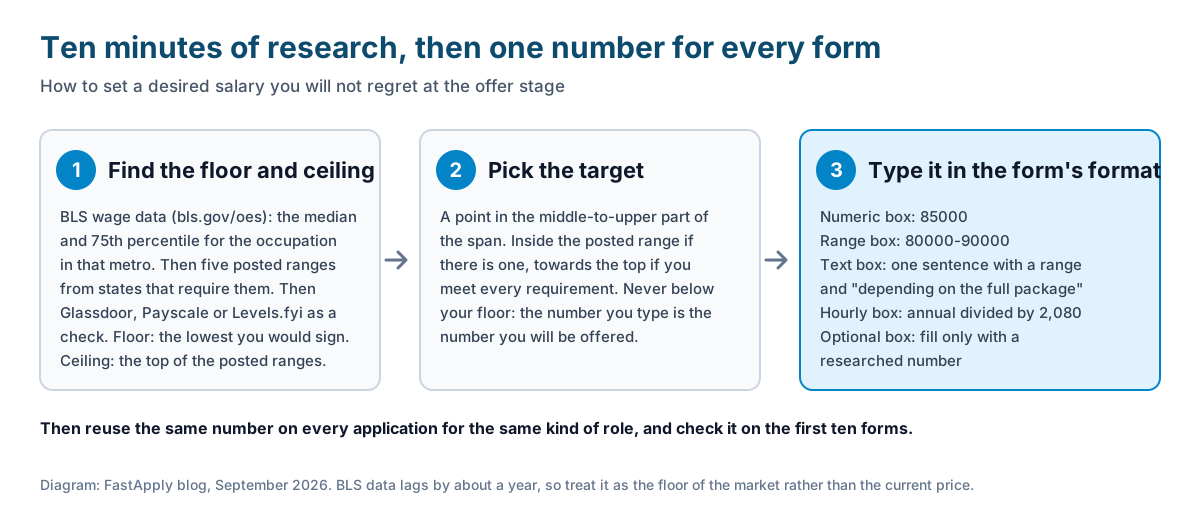
Start with government wage data. The Bureau of Labor Statistics publishes Occupational Employment and Wage Statistics for about 800 occupations by state and metro area, with the median and the 75th percentile. Look up the occupation that matches the job title, in the metro where the job is, and note both numbers. The data lags by about a year, so treat it as the floor of the market rather than the current price.
Then read posted ranges. More than a dozen states now require employers to put a salary range in the job posting itself. Search the same title on LinkedIn or Indeed filtered to New York, California, Colorado or Washington, read five postings, and you have the current market in writing. Use those ranges as a benchmark even if the job you want is in a state without the rule; the companies posting in both places pay from the same band.
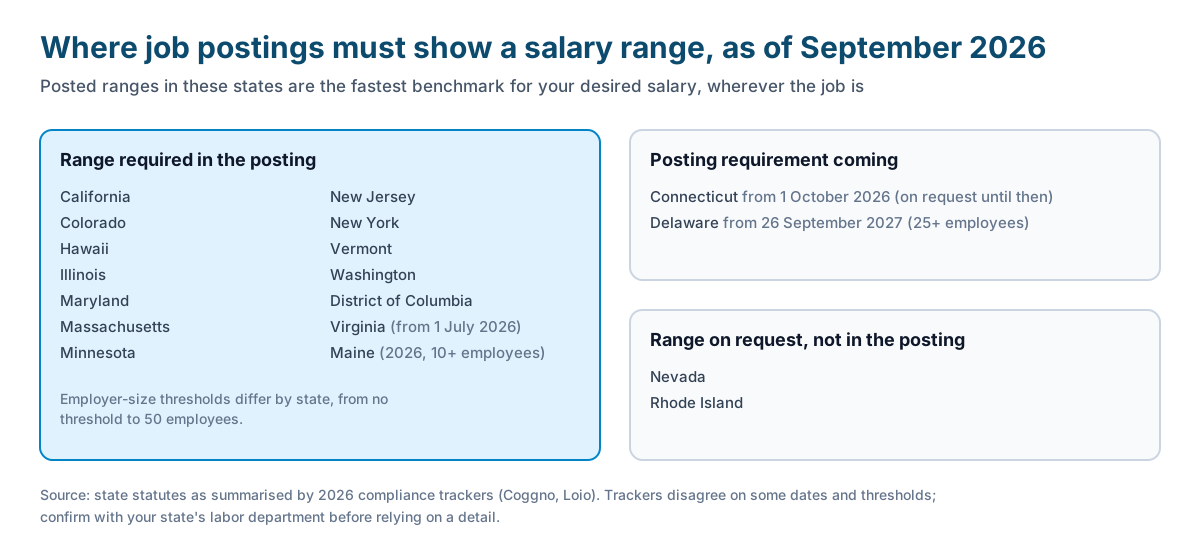
As of September 2026 the states that require a range in the posting are California, Colorado, Hawaii, Illinois, Maryland, Massachusetts, Minnesota, New Jersey, New York, Vermont and Washington, plus the District of Columbia. Virginia joined on 1 July 2026 with no employer-size threshold, and Maine’s law took effect in 2026 for employers with ten or more staff, though the trackers we read disagree on the exact date. Connecticut moves from “on request” to a posting requirement on 1 October 2026, and Delaware follows on 26 September 2027. Nevada and Rhode Island require the range on request, not in the posting. Employer-size thresholds vary, and we took this list from 2026 compliance trackers rather than from each statute, so confirm the detail with your state’s labor department if it matters to you.
Finish with the crowd-sourced sites. Glassdoor, Payscale and salary.com give a role-and-city estimate; Levels.fyi is the best source for technology and product roles because it is built from offer letters. Each has a bias, so use them to check the posted ranges rather than to replace them.
Now set the three numbers. Floor: the lowest offer you would sign, after rent and the commute. Ceiling: the top of the posted ranges for your level. Target: a point in the middle-to-upper part of that span. If the posting itself shows a range, your target goes inside it, towards the top if you meet every requirement.
What to type in each kind of field
Here is where the confusion comes from. The same number has to go into four different kinds of box, and each rejects a different thing.
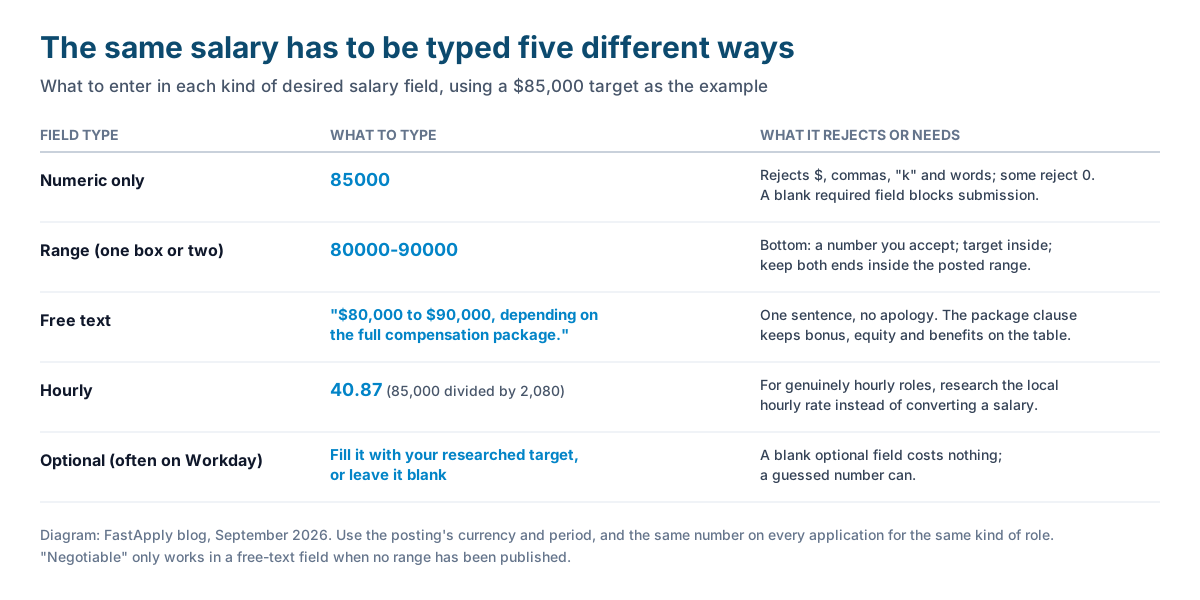
Numeric only. Type the digits: 85000. No dollar sign, no comma, no “k”, no words. These fields are the ones that reject “Negotiable”, and some of them reject 0 as well. If the field is required, leaving it blank blocks the submission, so you need a number. Use your target.
Range. Some forms give one box and accept “80000-90000”; others give a minimum and a maximum. Put a number you would accept at the minimum, never below your floor, and keep your target inside the range, because recruiters read the lower number as the one you will accept. Keep both ends inside the posted range if there is one.
Free text. One sentence, no apology: “$80,000 to $90,000, depending on the full compensation package.” The second clause matters. It tells the recruiter you will weigh bonus, equity and benefits, which gives both sides room later.
Hourly. Divide the annual figure by 2,080, the number of working hours in a standard year. $85,000 a year is about $40.87 an hour. If the role is genuinely hourly (retail, hospitality, healthcare support), research the local hourly rate directly instead of converting a salary, because the two markets price differently.
Optional. Workday’s desired salary box is often optional, and so are some Greenhouse custom questions. Fill it when you have a researched number or the posting shows a range. Leave it blank when you have neither; a blank optional field costs nothing, and a guessed number can.
Should you write “Negotiable”?
Sometimes, and less often than people hope.
It works in a free-text field early in a process, when you do not yet know the level or the full package and the company has not published a range. It also works when the posting says “salary commensurate with experience”, because the employer has signalled it will talk.
It does not work in a numeric field, which will reject it. It does not work when the posting already shows a range, because the recruiter will read “Negotiable” as “did not read the posting”. And it rarely works as a bargaining tactic. A recruiter who sees no number assumes no floor, which is the opposite of what you wanted. The better move in almost every text field is a range with your real floor at the bottom.
Rules that keep the number from costing you an offer
- Never go below your floor. The figure you type is the one you will be offered. There is no “I was being modest” conversation later.
- Answer inside the posted range. If the posting says $90,000 to $110,000 and you type 80,000, you have just given away ten thousand dollars. If you type 130,000, you are filtered out.
- Use the posting’s currency and period. A Canadian posting wants Canadian dollars a year; a UK posting wants pounds a year; an hourly posting wants an hourly rate. Mixing them produces numbers that look like typos.
- Keep one number per role family. If you apply to forty analyst roles with four different salary answers, the recruiters who talk to each other will notice, and so will the applicant tracking systems that store your profile. Decide the number once, then reuse it.
- Check the first ten applications by hand. This is the rule we give for every auto-filled field, from salary to work authorization. A wrong stored value repeated across 200 applications is 200 bad answers. It is step five in our guide to mass applying with AI.
The same discipline applies to the fields next to this one. The notice period field asks when you can start, and the answer has to match what you tell the recruiter later. If you are applying from India, the equivalent question is current and expected CTC, which has its own units problem; see what a fresher should enter for CTC.
When they ask out loud
The interview version is “What are your salary expectations?” and it deserves one sentence, not a speech: “Based on the ranges I am seeing for this role in Denver, I am targeting $85,000 to $95,000, depending on the full package.” Then stop talking. Naming a researched range shows you did the work; adding the package clause keeps bonus and equity on the table; stopping keeps you from negotiating against yourself.
If you have already typed a number on the application, say the same number. Recruiters have the form in front of them.
Why the research pays back
The number you type here follows you through the whole process, and it is one of the few places where ten minutes of work moves an offer by thousands of dollars. How many applications it takes to reach an offer is a separate question; our analysis of how many applications it takes to get an interview covers that, and it is a reason to get this field right once rather than agonise over it forty times.
If you want the forms filled for you, FastApply applies across 20+ job platforms and ATS systems in the United States, including the long Workday forms where the salary box hides on page three; our guide to beating the Workday application explains why that one takes so long by hand. Plans in the US start at $14 a month, after 5 free applications.
FAQ
-
What should I put for desired salary on a job application? A specific number from the middle-to-upper part of the market range for that role and city, based on BLS wage data and posted salary ranges. Type it in the format the field expects: digits only in a numeric box, a range where a range is allowed, one sentence in a text box, and an hourly rate where the form asks per hour.
-
Should I put “negotiable” for desired salary? Only in a free-text field, early in the process, when no range has been published and you have no basis for a number. Numeric fields reject it, and when the posting already shows a range it reads as if you did not read the posting. A range with your real floor at the bottom is usually the stronger answer.
-
What if the desired salary field is required and only accepts numbers? Type your target figure as digits, for example 85000, with no dollar sign, comma or words. Some of these fields reject 0, and a required field left blank will stop the form from submitting, so enter the researched number rather than a placeholder.
-
How do I convert an annual salary to an hourly rate for an application? Divide the annual figure by 2,080, the hours in a standard working year. $85,000 a year is about $40.87 an hour. If the job is genuinely hourly, research the local hourly rate directly instead, because hourly and salaried markets are priced differently.
-
How much higher than my current salary should my desired salary be? Set it from the market range for the new role, not from your current pay. Many states and cities now bar employers from asking your salary history, and a market-based target typed inside the posted range will usually sit above your current salary without you having to justify the jump.
-
Do employers reject applications based on desired salary? Yes, when the number sits above the budget for the role, and some applicant tracking systems can filter on it automatically. A number inside the posted range, or inside the market range you researched, is unlikely to cause a rejection on its own.
Conclusion
The desired salary field rewards ten minutes of preparation and punishes guessing. Find the floor and the ceiling, pick a target that leans towards the top, and type it in the format the box accepts. Then use that same number on every application for the same kind of role, and check the first ten forms to make sure it landed the way you meant.
#what to put for desired salary
#desired salary
#desired salary on job application
#salary expectations answer
#salary requirements
#what to put for salary expectations
#job application form questions

Ekekenta Clinton
Founder, FastApply