How to Mass Apply to Jobs With AI in 2026
Short answer: To mass apply to jobs with AI, build one resume that parses cleanly, set tight filters, pick the boards that carry your roles, tailor per role, check the first ten applications by hand, then track replies instead of submissions. AI tools that mass apply to jobs can send hundreds of applications a month. Whether that gets you interviews depends on how narrow the filters are, and past a certain point extra volume mostly produces skipped jobs, duplicates and failed forms.
If you searched “mass apply jobs ai”, the first result you saw was probably a Reddit thread called “Does those mass auto apply ai stuff actually works?”. The replies there are mostly negative. This guide takes that doubt seriously: it gives the method, then uses FastApply’s own September 2026 submission log to show what happens when volume goes up.
What mass applying with AI actually involves
Mass applying is a strategy: send a large number of applications in a short period so the odds have room to work. It gets confused with two things that are tools, not strategies.
- Autofill speeds up forms you open yourself. You find the job, click apply, the tool fills the fields, and you press submit.
- Auto-apply finds matching jobs and submits the applications for you, either in your browser while you watch or on a server while you do something else.
- Mass applying is the decision to go for volume. You can do it by hand, with autofill, or with auto-apply. AI changes the cost per application. It does not change whether the application was worth sending.
Our own data shows one thing straight away: most people who install an AI mass apply jobs tool never mass apply at all.
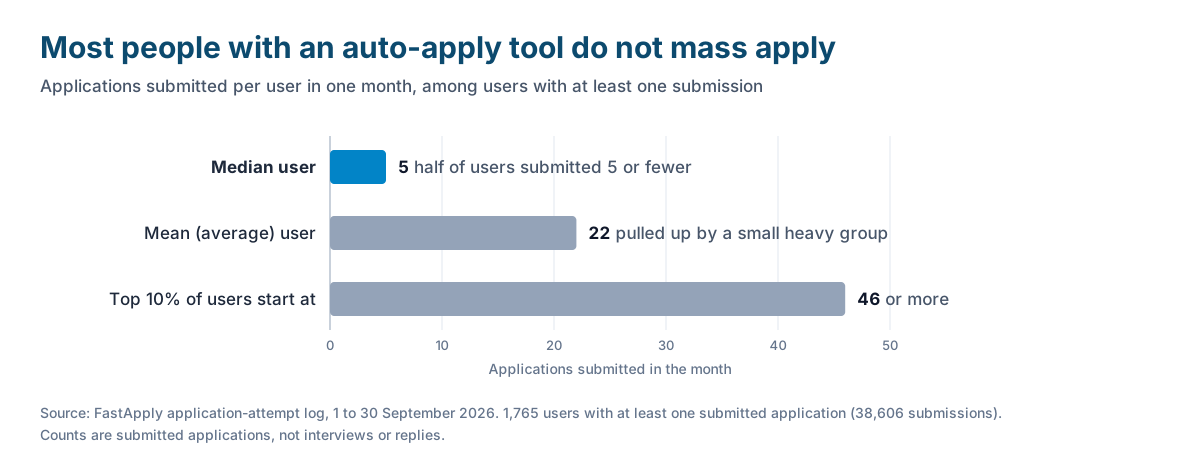
In September 2026, 1,765 FastApply users submitted at least one application. The median user submitted 5 in the month, the mean was 22, and the top 10% submitted 46 or more. Bulk apply jobs tools are sold on volume, but mass applying is a minority behaviour.
How to mass apply for jobs, step by step
You can follow these six steps with free tools or by hand. A paid tool makes steps 3 to 5 faster. It does not replace any of them.
Step 1: Build one resume that survives an ATS
Make one master resume in a single column with standard section headings, saved as a text-based PDF or DOCX, and test it by pasting it into a plain text editor to confirm nothing is scrambled.
Every application you send inherits this file, so a parsing problem is multiplied by every submission. The ATS resume format guide covers what parses and what does not.
Step 2: Set filters tight before you set volume high
Write down three to five exact job titles, your locations or remote rule, a salary floor, and a list of companies and keywords to exclude, and apply only to jobs that pass all of them.
A hundred applications inside a tight filter is a campaign. A hundred outside it is noise that also uses up your daily limits. Put your current employer on the exclusion list on day one.
Step 3: Connect the boards that actually carry your roles
Search your exact titles on each job board, count how many postings from the last seven days pass your filters, and keep only the two or three boards with the most.
The mix differs by field and country: Naukri in India, Reed and CV-Library in the UK, StepStone and XING in Germany, company career pages for many tech roles. Connect a board because your jobs are there, not because a tool supports it.
Step 4: Turn on per-role tailoring
For each role family you target, adjust the summary and the top bullets of your resume so they use the wording of that kind of posting, and save each version under a clear name.
By hand, two or three versions (one per job title) is realistic. Tools can do this per job. In FastApply, per-job tailored resumes and cover letters are on the Pro and Elite plans only; the free plan and Starter apply with the resume you upload.
Tailoring does not make a form more likely to go through. In our September data, form completion was 58.3% with a tailored resume and 56.4% with the standard one (6,679 submitted applications with a resume source recorded). Any benefit is in how the application reads to the employer.
Step 5: Hand-check the first ten before letting it run
Send the first ten applications one at a time and read every answer before it is submitted: work authorisation, salary expectation, years of experience, notice period and any free-text question.
A wrong default answer to “Do you require sponsorship?” repeated across 200 applications is 200 rejections you caused. If you use a tool, use a mode that pauses before submitting. In FastApply that is Copilot mode, which fills the whole application and waits for your review.
Step 6: Track replies, not submissions
Keep a simple sheet with the date, company, role, where you applied and what reply you got, and review it once a week.
Count replies from a person and interviews, not submissions. If replies stay at zero after 50 applications, stop and change the resume or the filters before sending more.
How many jobs can you realistically apply to in a day?
Three things cap the number: the job boards, the tool’s plan, and how many fresh, relevant jobs exist.
The boards. Neither LinkedIn nor Indeed publishes a number.
- LinkedIn’s Easy Apply limits help page says: “You can submit a set number of Easy Apply applications each day. If you reach this limit, you’ll need to wait until it resets at the end of the day (UTC).” It also says that rapidly submitting applications “triggers a temporary pause on Easy Apply” and that LinkedIn “may lower a member’s daily Easy Apply limit if we notice activity that seems inauthentic.” (LinkedIn Help, checked 2 October 2026.)
- Indeed’s Job Seeker Guidelines say: “We may limit the number of job applications you can submit each day,” and “We’ll let you know when you’ve reached your daily application limit.” (Indeed, checked 2 October 2026.)
You will often see “50 a day” quoted for LinkedIn. That figure is commonly reported by third parties (LoopCV’s guide says “approximately 50”), but LinkedIn does not state it. More in our post on the LinkedIn Easy Apply limit.
The plan. Tool caps are usually monthly. FastApply’s US plans allow 200, 500 or 1,000 applications a month, which works out to roughly 7, 17 or 33 a day. JobCopilot states a daily cap of up to 20 or up to 50 depending on plan.
The clock. In our September 2026 log, a submitted application took a median of 79 seconds from opening the job to submission, and 200 seconds at the 90th percentile (24,567 submitted applications with timing recorded). Fifty applications is about an hour of machine time, so time is not the constraint. Supply is: you cannot apply to hundreds of jobs a day if only thirty new postings match your filters.
For a daily target by situation, see how many jobs to apply to per day.
Where mass applying stops working
The chart this section should have is replies plotted against applications sent, showing where the curve flattens. We cannot draw it yet: we do not have reply data across volume levels, and we will not invent a curve. Here is what we can show.
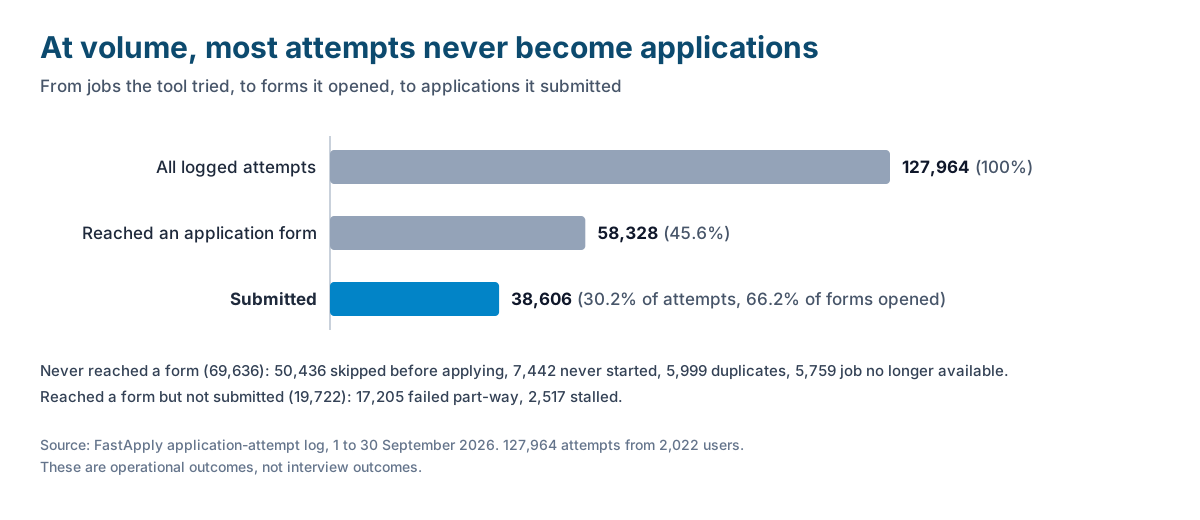
More attempts do not mean more applications. Between 1 and 30 September 2026, FastApply logged 127,964 application attempts from 2,022 users. Only 38,606 (30.2%) were submitted. Another 50,436 (39.4%) were skipped before applying, for reasons such as no apply button or a posting that sends you to an external site. 5,999 (4.7%) were duplicates the user had already applied to, and 5,759 (4.5%) were jobs that no longer existed. Raising the volume setting feeds more jobs into the top of this funnel. It does not create more open, relevant postings.
One in three started applications does not complete. Of the 58,328 attempts that got into a form, 66.2% were submitted, 29.5% failed and 4.3% stalled. Long forms fail most: Dice completed 95.7% of the time, Workday 44.5%. A high-volume run drifts towards the jobs with the easiest forms, which are not necessarily the jobs you want.
The early reply signal is modest. Between 11 and 30 September 2026, 221 users sent 2,813 applications through a FastApply relay inbox, which lets us count employer emails. By 1 October those inboxes had received 4,226 emails: 3,064 were acknowledgements, 248 mentioned an interview, scheduling, an assessment or next steps, 82 were rejections or status updates, and 832 were other. 42 of the 221 users (19%) received at least one email in the interview or next-step group. The caveats matter: this is a subject-line keyword match, not verified interviews; assessment invitations are often automated; three weeks is short, because most employers take longer to reply; and it cannot be split by tailored versus generic resume.
Generic applications are what the skeptics are describing. In the r/jobsearchhacks thread linked above, the top comment says a tool matched LinkedIn jobs and completed some forms but achieved nothing. Another commenter tried it and did not get a single call. A few people report more interviews, and one says tools that personalise beat blind blasting. The common advice is to use AI to tailor the resume and cover letter, then apply yourself to freshly posted jobs. In a second thread on the same forum, a hiring-side commenter says they notice bot-generated applications and discount them.
Senior roles. The more senior the role, the fewer postings exist and the smaller the circle of people hiring for them. A broad run means applying to roles that do not fit, in front of recruiters you may need later.
Flagged accounts. This risk is real and it applies to every auto-apply tool that works on these boards, FastApply included. LinkedIn’s User Agreement, section 8.2, has members agree not to “Use bots or other unauthorized automated methods to access the Services”. Its help page on prohibited software says users “risk having their accounts restricted or shut down.” Indeed’s Terms of Service, last updated 29 September 2026, say: “Use of any automation, scripting, or bots to automate the Indeed Apply process outside of Indeed’s official vendors and tooling is prohibited.” If your LinkedIn account matters to your career, keep automated volume there low or apply by hand. Company career pages do not run through your LinkedIn or Indeed account, though they have their own bot detection, which is one of the failure reasons in our log.
For the full breakdown of that log, see does auto-apply actually work.
Tools that can mass apply for you
Prices and limits below were read from each vendor’s own pages on 2 October 2026 unless a third party is named. We did not sign up for or run the competitor products.
| Tool | Free tier | Volume allowed | Price |
|---|---|---|---|
| FastApply | 5 free applications, no credit card | 200, 500 or 1,000 applications a month by plan | From $14 a month in the US (Starter $14, Pro $29, Elite $49) |
| AIApply | Free account for writing tools. Auto-Apply is not in the free tier | One credit per application, sold in packs (the vendor gives 100 or 250 as examples) | Not published by the vendor. Jobity reported $49 a month for 100 applications and $99 for 250 (its check dated 14 July 2026) |
| JobCopilot | Not published | Up to 20 auto-applies a day on Premium, up to 50 a day on Elite | ”Starts from $0.93 per day” (Premium) and “$1.05 per day” (Elite). Weekly, monthly and quarterly amounts not published |
| LoopCV | Free plan, no credit card: up to 10 applications or emails a month | Up to 100 a month on Standard, up to 300 on Premium | €8.99 and €29.99 a month |
| Massive | Not published | ”Up to 200 great jobs every month” | Not published by the vendor. Tsenta reported $49 a month (up to 50 jobs) and $99 (up to 200), updated 16 July 2026 |
About FastApply. A Chrome extension plus hosted automations. FastApply applies across 20+ job platforms and ATS systems. Browse & Apply runs in your browser on every plan and needs the tab open. Apply for Me runs on our servers, paid plans only. Limits: Chrome only, and the Chrome Web Store rating is 3.3 out of 5 from 26 ratings (checked 2 October 2026). Pricing is regional; US readers can see AI auto-apply in the United States.
Looking for MassApply AI? MassApply AI (massapplyai.com) is a different, unrelated product. It is not Massive and it is not FastApply. On 2 October 2026 all of its plans were marked “Coming Soon” with a waitlist. Its site describes a tool that tailors and fills applications you then submit yourself.
For a wider side-by-side, see auto apply tools compared. If you plan to push volume to the top of the range, our guide to applying to 500 jobs in a week covers that case.
Is mass applying with AI worth it?
It depends on seniority and on how tailored the applications are.
- Early career, broad role, large market. Often yes. There are many similar postings and the forms are repetitive. Start on a free tier and pay only when your reply sheet shows it is working.
- Mid career. Worth it for the form-filling, with moderate volume and tailoring switched on.
- Senior, niche or small-market roles. Usually no as a volume play. Use a review-first mode for the handful of roles that fit, and spend the saved time on referrals.
- Generic resume, wide filters, any level. No. This is the setup the Reddit thread is complaining about.
FAQ
-
How do you mass apply for jobs? Build one ATS-readable resume, set tight filters (titles, location, salary floor, exclusions), pick the two or three boards that carry your roles, tailor the resume per role family, check the first ten applications by hand, then track replies weekly.
-
Is there any AI to apply for jobs? Yes. FastApply, AIApply, JobCopilot, LoopCV and Massive all submit applications for you, with different limits. FastApply gives 5 free applications with no card, and LoopCV’s free plan allows up to 10 applications or emails a month.
-
Is mass applying to jobs a good idea? It can be for early-career and broad roles when the filters are tight and the resume is tailored. It is a poor idea with a generic resume and wide filters. In FastApply’s September 2026 log, only 30.2% of 127,964 attempts ended in a submitted application, so raising volume mostly adds skipped and failed attempts.
-
Is auto-apply AI worth the investment? It is worth paying for if you are already applying to many similar roles and your reply rate holds up once volume rises. Test on a free tier first and judge it on replies, not the submitted count. For senior or niche roles it is usually not worth it as a volume tool.
-
How many jobs should I apply to per day? As many as pass your filters, which for most people is a modest number. LinkedIn and Indeed both limit daily applications without publishing a figure, and tool plans cap volume too: FastApply’s US plans work out to roughly 7 to 33 applications a day.
-
Can mass applying get your account banned? Yes, it can. LinkedIn’s User Agreement (section 8.2) prohibits bots and unauthorized automated methods, and Indeed’s terms, updated 29 September 2026, prohibit automating Indeed Apply outside its official tooling. This applies to any auto-apply tool on those boards.
Conclusion
Mass apply jobs AI tools do the mechanical part: they fill forms and submit them quickly. They cannot make a poorly matched application worth sending. Our log shows about 30% of attempts becoming applications and one in three started forms failing, and we cannot yet show a reply-rate curve. So run it as a method: tight filters, a resume that parses, the first ten checked by hand, and a weekly look at replies. If the replies come, raise the volume.
Stop filling the same form twice
Try the six steps on FastApply's free plan: 5 applications, no credit card, and Copilot mode pauses for your review before anything is submitted. Paid plans start from $14 a month in the US.
Free tier: 5 applications, no credit card.
#mass apply jobs ai
#mass apply to jobs ai
#how to mass apply for jobs
#ai mass apply jobs
#bulk apply jobs
#apply to hundreds of jobs

Ekekenta Clinton
Founder, FastApply