Best Tools to Manage Indeed Applications in 2026 (10 Tested Picks)
Indeed is the world’s largest job board, with hundreds of millions of postings indexed across countries and industries. For job seekers, that’s both an opportunity and a problem: the volume on Indeed is unmatched, but applying to enough jobs to actually get interviews, while tracking which ones you’ve submitted, which ATS keywords each posting requires, and which applications have responded, quickly becomes its own full-time job.
This guide covers the 10 best tools to manage Indeed applications in 2026. Each one solves a specific slice of the problem: auto-applying at scale, autofilling forms faster, tracking your pipeline, optimizing your resume against the ATS, or curating which Indeed jobs are even worth applying to. We pulled current pricing in May 2026, evaluated each tool through a real Indeed-heavy job search, and ranked by what actually moves the needle on response rates.
Short answer: For most Indeed-heavy job seekers, FastApply is the strongest single tool, auto-apply across Indeed plus 11+ other major job boards, per-job AI resume tailoring on Pro and above, 5 free application credits with no card to start, and $14/month Starter with cancel-anytime billing. The 9 other tools below cover specific use cases and are worth pairing with FastApply or using on their own depending on your workflow.
The 5 Problems Indeed-Heavy Applicants Face
Before the tool list, here’s what you’re actually solving for. Most “best tools” lists skip this, which is why their recommendations don’t fit your situation.
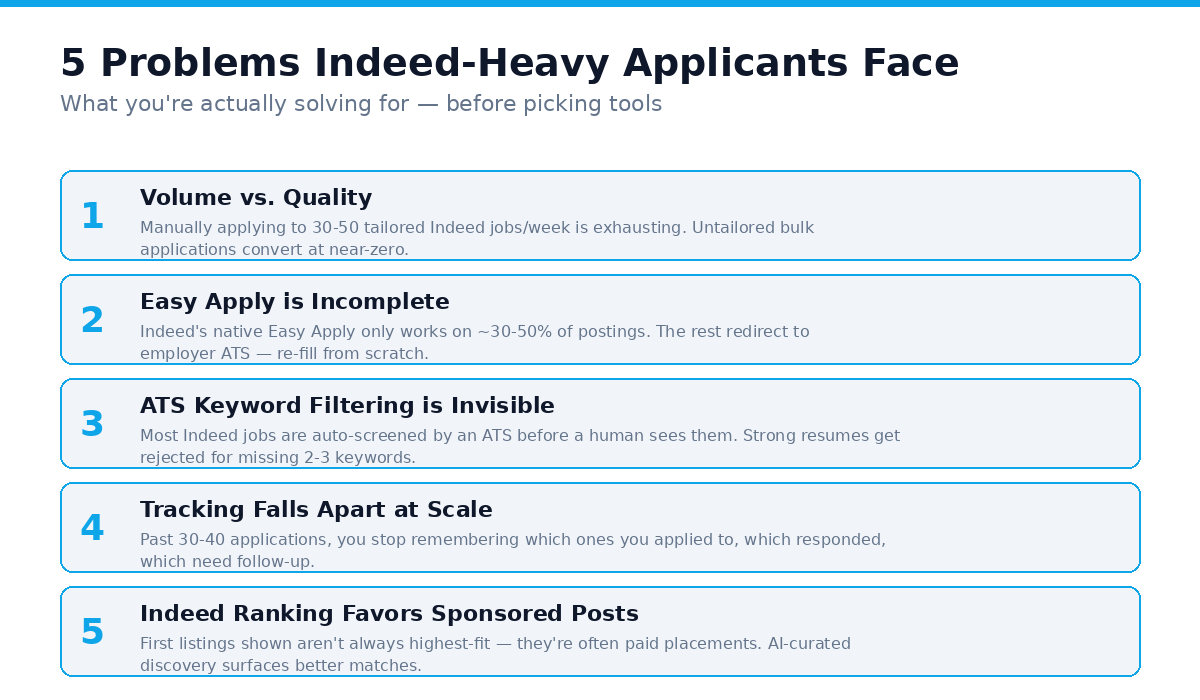
Problem 1: Application volume vs. quality. Indeed surfaces thousands of postings per day in popular categories. Manually applying to enough of them to hit recruiter response thresholds (typically 30-50 applications per week) is exhausting if you’re tailoring each one, and useless if you’re not.
Problem 2: Indeed Easy Apply is incomplete. Indeed’s native one-click feature only works on a fraction of postings. The rest redirect you to the employer’s ATS (often Workday, Greenhouse, or Lever) where you re-fill the same fields again.
Problem 3: ATS keyword filtering is invisible. Most Indeed jobs are screened by an ATS before a human sees them. Your resume can be objectively strong but get auto-rejected because it’s missing the specific keywords the ATS scores for.
Problem 4: Tracking falls apart at scale. Once you’re past 30-40 applications, you stop remembering which ones you applied to, which ones responded, and which ones need follow-up. Indeed’s native “Applied” tab helps but only covers Indeed-internal applications, not redirects.
Problem 5: Indeed’s own ranking favors employer-paid postings. The first roles you see aren’t always the highest-fit, they’re often sponsored. AI-curated discovery tools surface higher-fit roles independent of who’s paying for visibility.
The right tool stack solves at least 3 of these 5. Below are the 10 worth knowing about.
The 10 Tools, Ranked
1. FastApply, Best Overall for Indeed Auto-Apply with AI Tailoring
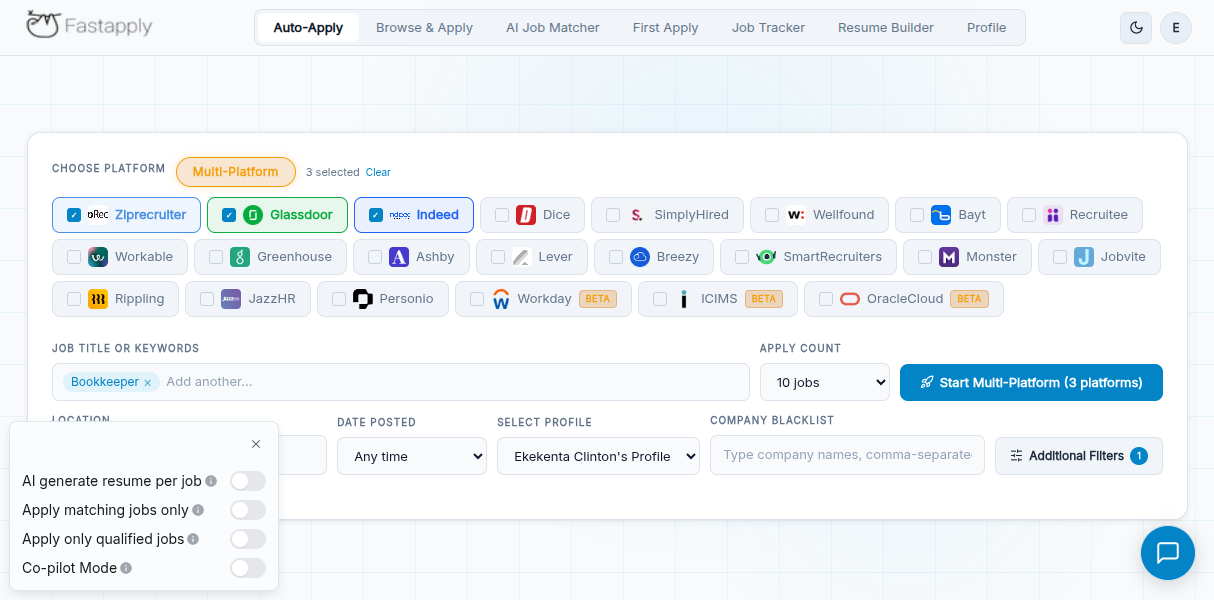
FastApply is the most comprehensive tool for managing Indeed applications at scale in 2026. It works as a Chrome extension and web dashboard, auto-applies to Indeed roles (plus LinkedIn, ZipRecruiter, Glassdoor, Workday, Greenhouse, Lever, Ashby, and 5+ other boards) with per-job AI-tailored resumes, and runs a 24/7 AI Job Matcher that auto-applies the moment a high-fit Indeed posting drops.
What it solves: Volume + quality + ATS keyword tailoring + tracking, in a single tool.
Pricing (May 2026): 5 free application credits (no card required) → Starter $14/mo (200 apps/mo) → Pro $29/mo (500 apps + AI resume tailoring + AI cover letters) → Elite $49/mo (1,000 apps + priority support).
Why it stands out for Indeed specifically: FastApply’s per-job AI tailoring rewrites your resume to match each Indeed posting’s specific keyword requirements, which directly improves your ATS pass rate. The AI Job Matcher checks Indeed continuously and auto-applies the moment a matching role drops, putting you in front of the recruiter as one of the first applicants, typically delivering 5-10x higher response rates than late applicants.
Best for: Anyone running Indeed-heavy job searches who wants quality applications at volume without spending hours per day on manual form-filling.
2. Simplify, Best Free Browser Autofill for Indeed Forms
Simplify (simplify.jobs) is a free Chrome extension that autofills application forms across Indeed, LinkedIn, Workday, Greenhouse, Lever, and most major ATS systems. You still review and click “Apply” yourself, it’s not auto-apply, but it eliminates 80% of the per-application form-filling time.
What it solves: The form-filling tax on Indeed applications that redirect to employer ATS systems.
Pricing: Free for autofill. Premium tier ($x/mo, verify on their site) adds tracking and AI assistance.
Best for: Job seekers who prefer to manually review each application before submitting but want to eliminate the typing tax. Pair with FastApply for the auto-apply layer if you want both.
3. Indeed Easy Apply, The Native One-Click Feature
Indeed’s own Easy Apply lets you submit your stored Indeed profile to participating roles in one click, no form-filling required. Free, included with your Indeed account.
What it solves: Speed on the subset of Indeed jobs where employers enabled Easy Apply.
Trade-offs: Easy Apply only works on a fraction of total Indeed postings, typically 30-50% in major US categories. The submitted application uses your generic profile resume, not a per-job tailored one, so ATS keyword match is whatever your default profile happens to score. No cross-platform automation. No tracking beyond Indeed’s “Applied” tab.
Best for: Casual job seekers applying to a few roles and not optimizing for response rates.
4. LazyApply, Best for High-Volume Indeed Auto-Apply
LazyApply (lazyapply.com) takes a volume-first approach with explicit daily caps. Premium ($149/year) supports 150 applications/day; Ultimate ($999/year) supports 1,500/day. Works on Indeed, LinkedIn, and ZipRecruiter as primary platforms.
Pricing (May 2026): Basic $99/year → Premium $149/year → Ultimate $999/year. Annual billing only, no monthly option, no free trial. Account creation requires a Gmail address.
Trade-offs: Per-job AI resume tailoring is not the primary workflow, LazyApply submits your stored resume across many roles rather than re-tailoring per posting. Annual lock-in means no flexibility if you find a job in month two. Read the full FastApply vs LazyApply comparison.
Best for: Confirmed 12-month searches where you want maximum daily volume on Indeed and don’t need premium AI tailoring.
5. Jobscan, Best for Indeed ATS Keyword Optimization
Jobscan (jobscan.co) lets you paste your resume and any Indeed job description, then scores your match rate against the ATS keyword requirements. It tells you exactly which keywords you’re missing and which ones the role’s ATS will score for.
What it solves: Invisible keyword filtering that auto-rejects strong resumes before a human ever sees them.
Pricing: Free tier for limited scans → paid tiers (~$49.95/mo or annual options) for unlimited scans + LinkedIn optimization.
Best for: Job seekers running Indeed searches who want to verify their resume actually passes the ATS keyword bar before submitting. Use on every high-fit Indeed posting before applying.
6. Teal, Best for Indeed Application Tracking + Multi-Resume Management
Teal (tealhq.com) combines a Chrome extension that saves Indeed jobs in one click, an application tracking dashboard with status pipelines (saved → applied → interviewing → offer), and an AI resume builder for managing multiple resume variants per role type.
What it solves: Tracking-pipeline collapse at scale + multi-resume complexity for applicants targeting multiple role types.
Pricing: Free tier (basic tracking + 1 resume) → Teal+ at ~$9-13/week or annual options (verify current price on their site).
Best for: Job seekers tracking 50+ active applications across Indeed and other boards, particularly anyone applying to mixed role types where one resume doesn’t cut it.
7. Huntr, Best Visual Kanban Tracker for Indeed Pipelines
Huntr (huntr.co) is a Kanban-style application tracker with a Chrome extension that saves Indeed jobs into customizable pipeline columns (e.g., Saved → Applied → Phone Screen → On-site → Offer → Rejected).
What it solves: Visual pipeline tracking for applicants who think in Trello/Notion-style boards.
Pricing: Free tier with limits → paid tiers for unlimited tracking and analytics (verify current price on their site).
Best for: Visual learners who want to see their entire job search pipeline at a glance, particularly anyone who finds spreadsheets fatiguing.
8. BetterApply, Indeed Auto-Apply with Unlimited Submissions
BetterApply (betterapply.co) is a competing AI auto-apply tool with a marketed “unlimited applications” model. Works on Indeed plus several other major boards.
Pricing (May 2026): $19.99 introductory first month → $50/mo regular thereafter on the 1-month plan. No free trial.
Trade-offs: $50/month regular is much higher than FastApply Starter’s $14/mo. Platform-by-platform coverage isn’t as explicitly enumerated as FastApply. Read the full FastApply vs BetterApply comparison.
Best for: High-volume Indeed applicants who specifically want unlimited submissions and don’t mind paying $50/month after the intro period.
9. Sonara, Indeed-Compatible AI Auto-Apply with Annual Pricing
Sonara (sonara.ai) markets a “personal AI job hunter” service with a clean two-tier pricing structure.
Pricing (May 2026): $2.95 paid 14-day trial → auto-renews to $23.95 every 4 weeks; or $5.95/mo on the Annual Access plan (~$71/year up front). Money-back guarantee during trial.
Trade-offs: No free trial, the lowest entry is the $2.95 paid trial requiring a card. Platform coverage isn’t publicly enumerated. Read the full FastApply vs Sonara comparison.
Best for: Job seekers committed to a 12-month Indeed-led search who want the cheapest annual price in the auto-apply category.
10. Indeed’s Own Resume Review and Salary Tools
Indeed has built useful native tools beyond just the job listings: an AI resume review feature in your Indeed account, a salary range estimator on most postings, and company review/rating data on most employers.
What it solves: Free, integrated optimization signals that don’t require a separate tool.
Pricing: Free with your Indeed account.
Best for: Anyone using Indeed as a primary job search source. These tools won’t replace dedicated optimizers like Jobscan, but they’re free, decent-quality, and right where you’re already working.
Quick Comparison: The 4 Most Common Tool Choices for Indeed
| Feature | FastApply | LazyApply | Simplify | Indeed Easy Apply |
|---|---|---|---|---|
| Auto-apply (no clicks) | ✓ | ✓ | ✗ (you click) | ✓ (Indeed-only) |
| Per-job AI resume tailoring | ✓ (Pro/Elite) | Limited | ✗ | ✗ |
| Free trial | ✓ 5 credits, no card | ✗ | ✓ Free tier | ✓ Free |
| Indeed coverage | ✓ Full | ✓ Full | ✓ Form autofill | ✓ Easy Apply jobs only |
| Other platforms | 11+ (LinkedIn, Workday, Greenhouse, +) | LinkedIn, ZipRecruiter | Most major ATS | None |
| Tracking dashboard | ✓ | ✓ | Premium tier | ”Applied” tab only |
| Cancel anytime | ✓ Monthly | ✗ Annual lock-in | ✓ Free | ✓ Free |
| Entry price | $14/mo (or 5 free credits) | $99/year | $0 | $0 |
How to Build Your Indeed Application Stack
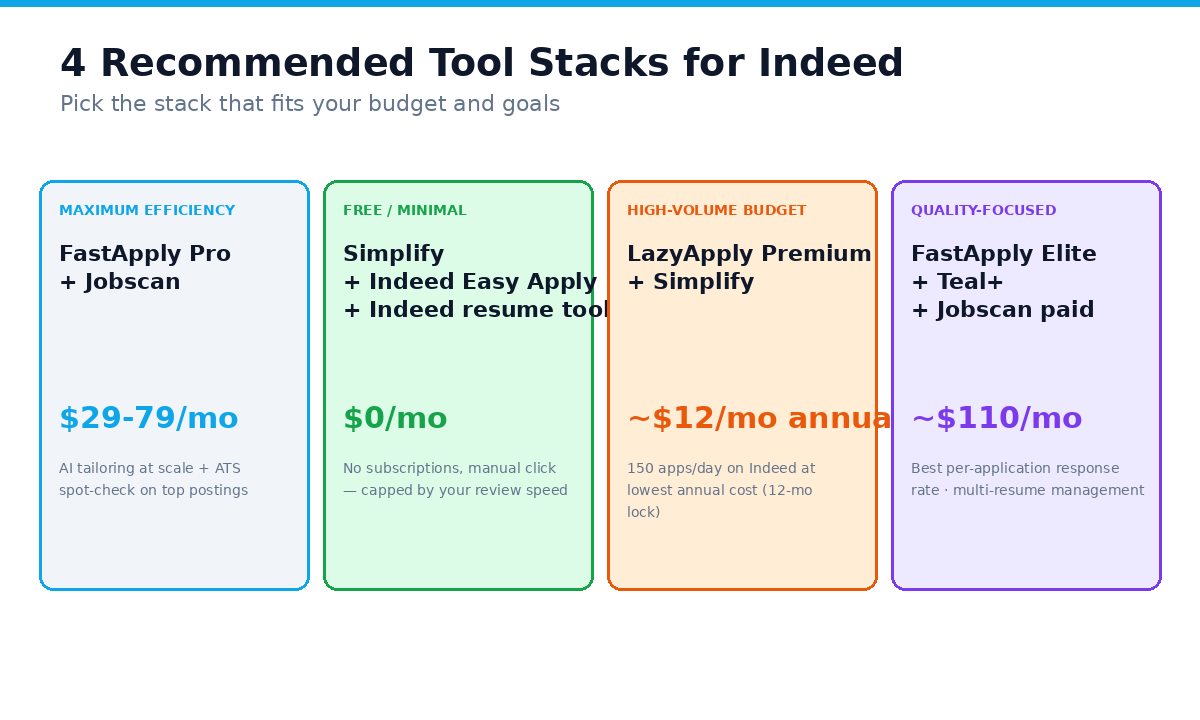
Most serious Indeed-heavy applicants run a stack of 2-3 tools that solve different problems. Here are the most effective combinations:
Stack 1: Maximum efficiency (recommended for most)
FastApply (Pro $29/mo) + Jobscan (free or paid), FastApply auto-applies across Indeed and 11+ other boards with per-job AI tailoring, and Jobscan lets you spot-check the highest-priority Indeed postings against the ATS keyword bar before applying. Total: $29-79/month depending on Jobscan tier.
Why this works: FastApply handles the volume and tailoring at scale; Jobscan gives you a sanity check on the 5-10 most important Indeed roles where you want to maximize match rate.
Stack 2: Free / minimal-cost
Simplify (free) + Indeed Easy Apply (free) + Indeed’s own resume tools (free), Eliminates the form-filling tax on most Indeed jobs without any spend. You manually click “Apply” on each role but the typing time drops to near zero.
Why this works: No subscription fees. Trade-off is you’re capped by your manual review speed, so application volume is lower than the auto-apply stacks.
Stack 3: High-volume budget play
LazyApply Premium ($149/yr) + Simplify (free), LazyApply auto-applies to Indeed at 150/day; Simplify covers any Indeed-redirect ATS forms LazyApply doesn’t handle. Total: ~$12.42/month equivalent on the LazyApply commitment.
Why this works: Cheapest “auto-apply at high volume” stack. Trade-off is per-job AI tailoring is not LazyApply’s primary workflow, so response rates per application run lower than the FastApply stack.
Stack 4: Quality-focused / premium
FastApply Elite ($49/mo) + Teal+ (subscription) + Jobscan paid ($49.95/mo), Elite handles the auto-apply volume with priority support; Teal+ tracks the pipeline and manages multi-resume variants; Jobscan paid validates every high-priority Indeed posting. Total: ~$110-140/month.
Why this works: Best per-application response rate at the cost of the highest monthly subscription. Worth it for senior or high-stakes searches where each interview slot is valuable.
What to Avoid
1. “Indeed scrapers” that promise unlimited free applications. Tools that scrape and auto-submit without using legitimate APIs or extension-based workflows risk getting your Indeed account flagged or banned. Stick with tools that operate via browser extensions and respect each platform’s rate limits.
2. Generic resume submissions at high volume. Submitting 1,500 applications/day with the same untailored resume to Indeed roles tanks your response rate AND can flag your Indeed account for spammy behavior. If you’re going high-volume, pair it with per-job AI tailoring (FastApply Pro/Elite) or expect very low conversion.
3. Tools that bypass ATS forms entirely. Some “magic” tools claim to skip the ATS form-filling step. They typically don’t work, the ATS rejects the submission, and you’ve burned a recruiter relationship. Use legitimate autofill (Simplify) or auto-apply (FastApply) tools that respect the platform.
4. Subscriptions to multiple overlapping auto-apply tools. FastApply + LazyApply is overkill for almost everyone. Pick one auto-apply tool and complement it with non-overlapping tools (a tracker, an ATS optimizer, a free autofill).
5. Tools without published pricing. If you have to “request a demo” or fill a sales form, the tool isn’t priced for individual job seekers and you’re not the customer.
Frequently Asked Questions
What’s the best tool to manage Indeed applications in 2026?
For most job seekers, FastApply is the strongest single tool for managing Indeed applications. It auto-applies to Indeed (plus 11+ other boards), generates per-job AI-tailored resumes on Pro and Elite plans, gives every new user 5 free application credits with no card required, and bills monthly with cancel-anytime ($14-$49/mo). For specific complementary use cases, pair with Simplify (free autofill), Jobscan (ATS optimization), or Teal (tracking + resume builder).
Can I auto-apply to Indeed jobs?
Yes, with the right tool. FastApply, LazyApply, BetterApply, and Sonara all support Indeed auto-apply via Chrome extension. Indeed’s own Easy Apply also handles a subset of postings natively. Use the auto-apply tool that best matches your budget, search timeline, and AI tailoring needs.
Does Indeed Easy Apply work for all jobs?
No. Indeed Easy Apply only works on the subset of postings where the employer enabled it, typically 30-50% of US listings in major categories. The remaining roles redirect you to the employer’s ATS (often Workday, Greenhouse, or Lever) where you re-fill the application from scratch. Tools like Simplify autofill those redirect forms, and tools like FastApply auto-apply across Indeed plus those redirected ATS systems on the same plan.
Are auto-apply tools allowed on Indeed?
Indeed’s terms of service restrict aggressive automated activity. Most legitimate auto-apply tools work via browser extensions that simulate user clicks at moderate, human-like pace, the same mechanism Indeed allows for password managers and accessibility tools. Use any auto-apply tool at reasonable volume (FastApply’s plans cap at 200-1,000 applications per month, which is well below abuse thresholds) and you won’t trigger Indeed’s anti-spam systems.
What’s the cheapest way to apply to many Indeed jobs?
The cheapest free path is Simplify (free browser autofill) + Indeed Easy Apply (native, free). You manually click “Apply” on each role but the typing time drops to near zero. The cheapest paid path with auto-apply is FastApply Starter ($14/mo, 200 applications) or LazyApply Basic ($99/year, 15 applications/day) if you’re committed to a full year. FastApply offers 5 free application credits with no card to test before committing.
How many Indeed applications should I send per day?
For most job seekers, 6-10 well-tailored applications per day (about 30-50 per week) outperforms 100+ untailored applications per day. Indeed’s ATS systems and recruiters filter for keyword relevance and role-specific signals, quality compounds. For deeper math on application volume, see our how many jobs to apply to per day in 2026 guide.
Does FastApply work on Indeed?
Yes. FastApply supports Indeed as a primary job board, alongside LinkedIn, ZipRecruiter, Glassdoor, Workday, Greenhouse, Lever, Ashby, Dice, and more, 12+ supported boards total on every plan. The 24/7 AI Job Matcher monitors Indeed continuously and auto-applies to high-fit postings the moment they drop, putting you in front of the recruiter as one of the first applicants.
How do I track all my Indeed applications?
Three options. Indeed’s own “Applied” tab tracks applications submitted through Indeed (free, but doesn’t cover redirects to other ATS). Teal offers a dedicated tracking dashboard with pipeline columns (free tier available). Huntr offers a visual Kanban-style tracker. FastApply’s dashboard tracks applications submitted via the FastApply extension across all 12+ supported boards. For most users, FastApply’s dashboard or Teal’s pipeline gives you the cleanest single source of truth.
Should I use Jobscan or just rely on Indeed’s resume tools?
Both have their place. Indeed’s native resume review is free and decent for general optimization. Jobscan is more rigorous on per-job ATS keyword matching, paste your resume and any specific Indeed JD, and Jobscan scores your match against that role’s ATS keyword bar. Use Jobscan when you’ve found a genuinely high-fit Indeed role and want to maximize your chances on that specific application. Use Indeed’s tools as a baseline for resume hygiene.
Is auto-applying to Indeed jobs ethical?
Yes, as long as the tool submits accurate information tailored to the role, which legitimate tools like FastApply do. The ethical line is misrepresentation, not automation. See our full write-up on job application automation ethics.
Does FastApply do AI resume tailoring?
Yes. FastApply Pro ($29/mo) and Elite ($49/mo) include per-job AI resume tailoring as a core feature, alongside the auto-apply workflow across 12+ job boards. The AI rewrites your resume’s summary, skills, and bullet-point emphasis per application to match each posting’s keywords. AI cover letters are generated per-job on the same plans. Unlike standalone resume builders (Kickresume, Rezi, Teal), FastApply combines AI tailoring with auto-apply in a single workflow. For the full breakdown of the AI resume tailoring landscape, see our How to Tailor Your Resume with AI in 2026 guide.
Final Recommendation
If you want a single tool that covers Indeed plus the rest of your job search: start with FastApply. The 5 free application credits cost nothing to evaluate, and you’ll know within those first 5 applications whether AI auto-apply moves the needle for your Indeed-heavy search. Pair it with Simplify (free autofill) for any edge-case Indeed redirects FastApply doesn’t cover, and Jobscan (free tier or $49.95/mo paid) for high-priority postings where you want to maximize ATS match rate.
For a budget-only stack, Simplify + Indeed Easy Apply + Indeed’s own resume review tools cover most of the workflow at $0/month, just at lower volume than the FastApply stack.
Either way, the goal is the same: stop spending hours per day on form-filling and tracking, and start spending that time preparing for the interviews your Indeed applications generate.
Your next interview is one tailored Indeed application away.
#best tools for managing indeed applications
#indeed application manager
#indeed easy apply
#auto apply indeed
#indeed applications tracker
#AI job application
#auto apply tools
#job search automation

Ekekenta Clinton
AI/ML Engineer