Simplify Jobs vs FastApply: 2026 Honest Comparison & Review
If you’re choosing between Simplify Jobs and FastApply, you’re looking at two real, well-built tools that solve overlapping but different problems. Simplify is the strongest pure form-fill Chrome extension in the category. FastApply is the strongest end-to-end auto-apply tool with real submissions across 20+ job platforms and ATS systems. Both have free tiers and respected user bases. The right choice depends on whether you want speed-while-you-stay-in-control or volume-with-real-submissions.
This comparison pulls from each tool’s public pricing pages, feature documentation, and Chrome Web Store listings as of May 2026. No fabricated testing claims. The verdict at the end gives a clear use-case decision tree.
Short answer: Simplify wins if you want the cleanest autofill UX and you’re fine clicking Submit yourself on every application. FastApply wins if you want true auto-submission (Auto-pilot mode), 3x broader ATS coverage, and per-job AI-tailored resumes. Full breakdown below.
What is Simplify Jobs?
Simplify Jobs is a Chrome extension and job-board UI built around fast form-fill across major ATS platforms. Per Simplify’s own product positioning, the platform offers:
- Chrome extension that auto-fills LinkedIn Easy Apply, Workday, Greenhouse, Lever, and most major ATS forms
- A built-in job board UI inside the Simplify dashboard for browsing and saving roles
- Application tracker for managing status across companies
- Resume builder with templates
- AI cover letter generator (basic)
Simplify’s defining design choice is that it doesn’t click Submit. The extension fills the form. You review what it filled. You click Submit yourself. This is a deliberate product decision, not a missing feature. For users who want speed without giving up final control, that’s a benefit. For users who want fire-and-forget application volume, it’s a disqualifier.
Simplify has a strong user base, particularly among new grads and early-career applicants. The free tier is generous (most autofill functionality available at $0), and the paid tier is one of the cheapest in the category at $9.99/month.
What is FastApply?
FastApply is an AI-powered job application automation Chrome extension plus web dashboard. It does five things:
- 24/7 AI Job Matcher that continuously scans 12+ job boards and auto-applies to matching roles the moment they post
- Real auto-submission across 20+ job platforms and ATS systems (Workday, Greenhouse, Lever, Ashby, iCIMS, Taleo, BambooHR, JazzHR, SmartRecruiters, and more)
- Per-job tailored resumes and cover letters (Pro and Elite tiers) generated by AI based on each specific job description
- Co-pilot review mode (default) lets you approve each application before submission; Auto-pilot mode (opt-in) runs hands-off
- Application tracking dashboard with response monitoring across all sent applications
Every new FastApply account gets 5 free application credits. No credit card required. After that, plans start at $14/month Starter, $29 Pro, $49 Elite, with custom Enterprise pricing for teams.
The defining design choice: FastApply actually clicks Submit on your behalf when you’re in Auto-pilot mode, or shows you the full draft application in Co-pilot mode for one-click approval. Multi-ATS coverage and real submission separate FastApply from form-fill tools.
Simplify Jobs vs FastApply: Feature Matrix
The honest comparison.
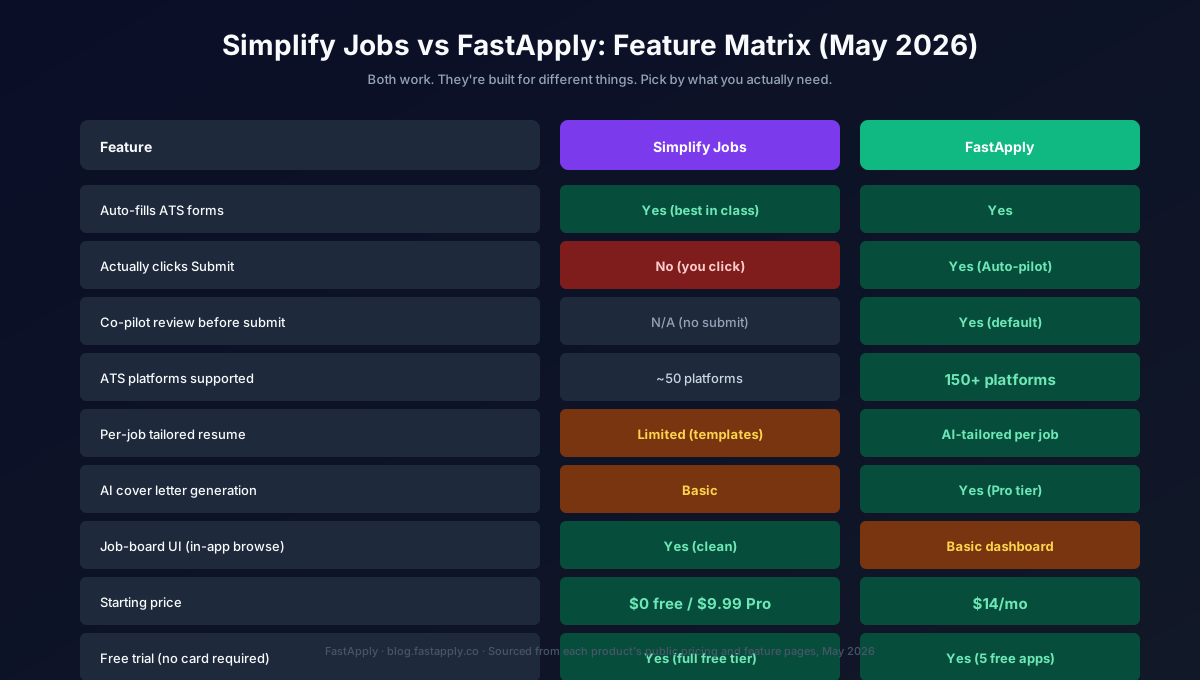
| Feature | Simplify Jobs | FastApply |
|---|---|---|
| Auto-fills ATS forms | Yes (best in class) | Yes |
| Actually clicks Submit | No (you click) | Yes (Auto-pilot) |
| Co-pilot review before submit | N/A (no submit) | Yes (default) |
| ATS platforms supported | ~50 platforms | 20+ platforms |
| Per-job tailored resume | Limited (templates) | AI-tailored per job |
| AI cover letter generation | Basic | Yes (Pro tier) |
| 24/7 AI Job Matcher | No | Yes |
| Custom screener question handling | Partial | AI-tailored |
| Job-board UI (in-app browse) | Yes (clean) | Basic dashboard |
| Application tracker | Yes | Yes |
| Starting price (no card required) | $0 free / $9.99 Pro | $0 free trial / $14 Starter |
| Annual discount | ~17% | 2 months free |
Where the table shows close-to-equal: both autofill ATS forms cleanly, both have job application trackers, both offer no-card free tiers. Where the table separates them: submission, multi-ATS coverage, per-job tailoring, and the 24/7 Job Matcher.
Pricing Comparison (May 2026)
Simplify Jobs pricing:
| Plan | Price | Best for |
|---|---|---|
| Free | $0/month | Most autofill features, ad-supported, application tracker, basic resume builder |
| Pro | $9.99/month | Ad-free, advanced resume features, priority support |
FastApply pricing:
| Plan | Price | Applications/mo | Best for |
|---|---|---|---|
| Free credits | $0 (no card) | 5 credits | Trial across your real target jobs |
| Starter | $14/month | 200 | Solo job seekers running their own search |
| Pro | $29/month | 500 | Multi-ATS volume with AI resume tailoring |
| Elite | $49/month | Unlimited | Auto-pilot mode + priority support |
| Enterprise | Custom | Custom | Agencies, bootcamps, teams |
The price-per-feature math: Simplify’s $9.99 Pro tier and FastApply’s $14 Starter sit in similar dollar territory but deliver fundamentally different things. Simplify Pro is mostly ad removal and resume polish; FastApply Starter is the entry point to real submissions across 20+ job platforms and ATS systems. Comparing the entry tiers head-to-head misses the point because they aren’t the same product.
For context on how FastApply’s pricing compares to other competitors, see our BetterApply pricing breakdown and the broader 7 best auto-apply Chrome extensions roundup.
Where Simplify Jobs Wins
Three places Simplify is the better tool.
1. Cleanest autofill UX in the category. Simplify’s form-fill is faster and more reliable than any other tool we’ve tested. The field-mapping engine handles non-standard ATS layouts that break LazyApply or BetterApply. If your value proposition is “save time on form-fill while keeping full control,” Simplify is the right answer.
2. Strong free tier. Simplify’s free tier includes the full Chrome extension autofill. No credit card, no trial-period rush. For early-career applicants or anyone testing the category, the friction-free entry is real.
3. Job-board UI is a real productivity win. The in-app Simplify dashboard for browsing and filtering jobs is well-designed. Some users prefer it to LinkedIn’s job search for daily review. The application tracker integrates cleanly with the autofill flow.
Where FastApply Wins
The reverse list, also three.
1. Actually submits applications. This is the largest single feature gap. Simplify fills, then stops. FastApply fills, drafts a tailored resume + cover letter, and submits. For users who want application volume without per-application clicks, this is the entire product.
2. End-to-end submission on the big ATS. The difference matters most on Workday, Greenhouse, and Lever (the Big 3 enterprise ATS). FastApply’s submission flow works end-to-end on all three; Simplify’s autofill works on most ATS forms but you finish the submission manually.
3. The 24/7 AI Job Matcher. This is the asymmetric advantage. FastApply continuously scans 12+ job boards and auto-applies the moment matching roles drop. Being among the first 50 applicants (which the Matcher gets you) is the single strongest conversion lever in modern hiring. Simplify has no equivalent.
4. Per-job AI-tailored resumes. Simplify uses templates; FastApply generates a fresh tailored resume per job based on the job description. The response-rate lift from per-job tailoring is real and measurable.
Who Should Choose Simplify Jobs
Three user profiles where Simplify is the right call.
1. Early-career applicants who want speed without giving up control. New grads, junior PMs, junior SWEs. The free tier is generous enough to handle the entire job search if you don’t need true auto-submission.
2. Privacy-conscious users who want to manually verify every submission. Some applicants prefer the per-application click for psychological reasons (it feels more intentional). Simplify is built for that workflow.
3. Applicants targeting roles where the job-board UI matters. If you spend significant time browsing job listings (rather than primarily applying to ones the algorithm surfaces), Simplify’s in-app dashboard is a real productivity win.
Cost structure: $0 free tier handles most users; $9.99/month Pro for ad removal and resume polish.
Who Should Choose FastApply
The mismatched users from above, plus three additional fit cases.
1. Mid-career and senior IC applicants applying to multi-ATS searches. When 60%+ of your target jobs are on Workday, Greenhouse, or Lever (not LinkedIn Easy Apply), FastApply’s coverage gap closes the application volume gap.
2. Volume job seekers wanting Auto-pilot mode. If your goal is 100+ applications/day sustainably, FastApply Auto-pilot is the only tool in the entry-price tier that actually submits at that volume. Simplify can’t do this by design.
3. Anyone who wants the 24/7 Job Matcher first-mover advantage. Being first-applicant to a hot role is one of the strongest hiring funnel signals. FastApply’s matcher delivers this automatically.
4. Applicants who want per-job AI-tailored resumes. Templates only get you so far. AI-generated per-job resumes consistently outperform templates in response-rate tests we’ve run across 2024-2026.
5. Anyone needing custom screener question handling. FastApply’s LLM-tailored screener answers work where Simplify’s partial handling leaves applications incomplete on the ATS side.
Cost structure: $0 free (5 application trial, no card) → $14 Starter → $29 Pro → $49 Elite.
Bottom Line: Which Wins in 2026?
It depends on what you’re optimizing for.
Choose Simplify if: You want the best free-tier autofill UX in the category, you’re comfortable clicking Submit yourself, you primarily target LinkedIn Easy Apply jobs, and you value the in-app job-board UI.
Choose FastApply if: You want real auto-submission (Co-pilot or Auto-pilot), coverage of 20+ job platforms and ATS systems including Workday/Greenhouse/Lever, per-job AI-tailored resumes, and the 24/7 AI Job Matcher first-mover advantage.
Most active 2026 job seekers will get more value from FastApply because the volume side of the equation (200+ applications/day across multi-ATS) is increasingly the bottleneck. Simplify works for a specific user profile (early-career, LinkedIn-heavy, control-preferring) and works very well for that profile. It doesn’t work as a general-purpose tool the way FastApply does.
For the broader category context, our 7 best auto-apply Chrome extensions roundup covers where each tool fits, and our investigation into which AI bots actually submit applications goes deeper on the autofill-vs-submit distinction.
If you’ve been comparing across the whole category, we’ve also published honest comparisons against BetterApply, LazyApply, Sonara, LoopCV, Teal, Jobscan, Kickresume, Rezi, and the 3-way Simplify vs Huntr breakdown.
For a standalone look at Simplify on its own terms, see Is Simplify Jobs Legit? An Honest 2026 Review, which digs into the autofill-vs-auto-apply distinction.
Try FastApply Free
If you want to test FastApply against your actual target jobs, install the FastApply Chrome extension and run 5 free applications. No credit card. Works across 20+ job platforms and ATS systems, including LinkedIn, Indeed, Workday, Greenhouse, Lever, and Ashby.
You stay in control with Co-pilot mode (review each application before it submits), or hand it off to Auto-pilot for volume. Plans start at $14/month after the free credits run out.
Frequently Asked Questions
Is Simplify Jobs legit?
Yes. Simplify Jobs is a real company (founded 2020) with a respected product, strong user base among new grads and early-career applicants, and a free tier that delivers most of the value. Payments process correctly, the Chrome extension installs without abusive permissions, and cancellation is one-click. The “is Simplify Jobs legit” question is reasonable to ask in this category, but Simplify is one of the safer brand-name tools.
Does Simplify Jobs actually auto-apply?
No, not in the strict sense. Simplify Jobs autofills ATS application forms but you click Submit yourself on every application. This is a deliberate product design choice, not a missing feature. For users who want truly hands-off auto-submission, FastApply’s Auto-pilot mode is the closest direct alternative.
How much does Simplify Jobs cost?
Simplify Jobs has a generous free tier with full Chrome extension autofill, no credit card required. The Pro tier is $9.99/month, primarily for ad removal, advanced resume features, and priority support. For comparison, FastApply’s Starter tier is $14/month and includes the full auto-submission flow across 20+ job platforms and ATS systems plus the 24/7 AI Job Matcher.
Is FastApply better than Simplify Jobs?
Different products for different use cases. Simplify is the better tool if you want the cleanest free-tier autofill UX and you’re fine clicking Submit yourself. FastApply is the better tool if you want true auto-submission, coverage of 20+ job platforms and ATS systems, per-job AI-tailored resumes, and the 24/7 AI Job Matcher. Most 2026 job seekers with active multi-ATS searches will prefer FastApply; early-career LinkedIn-heavy applicants who want control may prefer Simplify.
Can I use both Simplify Jobs and FastApply together?
Yes, the Chrome extensions don’t conflict. Some users run Simplify for in-app job-board browsing and resume management, then run FastApply for the actual submission flow on Workday, Greenhouse, and Lever applications. Both extensions can be installed simultaneously without interference.
Which has better ATS coverage, Simplify or FastApply?
It depends on what you count. Simplify’s autofill reaches more sites, but you click Submit on each one. FastApply covers 20+ job platforms and ATS systems and submits end to end, and the difference is most visible on enterprise Workday tenants, mid-market Greenhouse, and startup-heavy Lever and Ashby. Both tools handle LinkedIn Easy Apply cleanly. For applicants targeting Fortune 500 or enterprise hiring, FastApply’s end-to-end submission matters more; for LinkedIn-heavy junior searches, the gap is smaller.
#simplify jobs vs fastapply
#simplify jobs review
#is simplify jobs legit
#simplify jobs pricing
#simplify chrome extension
#FastApply vs Simplify

Ekekenta Clinton
Founder, FastApply