
Job Application Tracker: Free Template and an Automatic Option (2026)
Short answer: A job application tracker is a spreadsheet with about 14 columns, filled in at the moment you apply and reviewed once a week. Download the CSV template; it opens in Excel, Google Sheets and Numbers, and it already has the columns that matter: date, company, role, source, link, resume version, status, next action and notes. The automatic option is a tool that logs every application it sends for you, with the resume version attached. FastApply does that for the applications it submits. Either way, the number to watch each week is replies, not submissions.
The reason this post exists is a question that keeps arriving in our support chat, in some form of “which jobs did it apply to, and with which resume?” People were asking a software product, but the question is older than software. If you cannot answer it from a list you control, you cannot tell which resume is working, which board is wasting your time, or which recruiter you promised to call back.
Download the template, and what each column is for
The template has 14 columns and two example rows you can delete. Here is why each column is there, because a tracker with the wrong columns gets abandoned by week three.
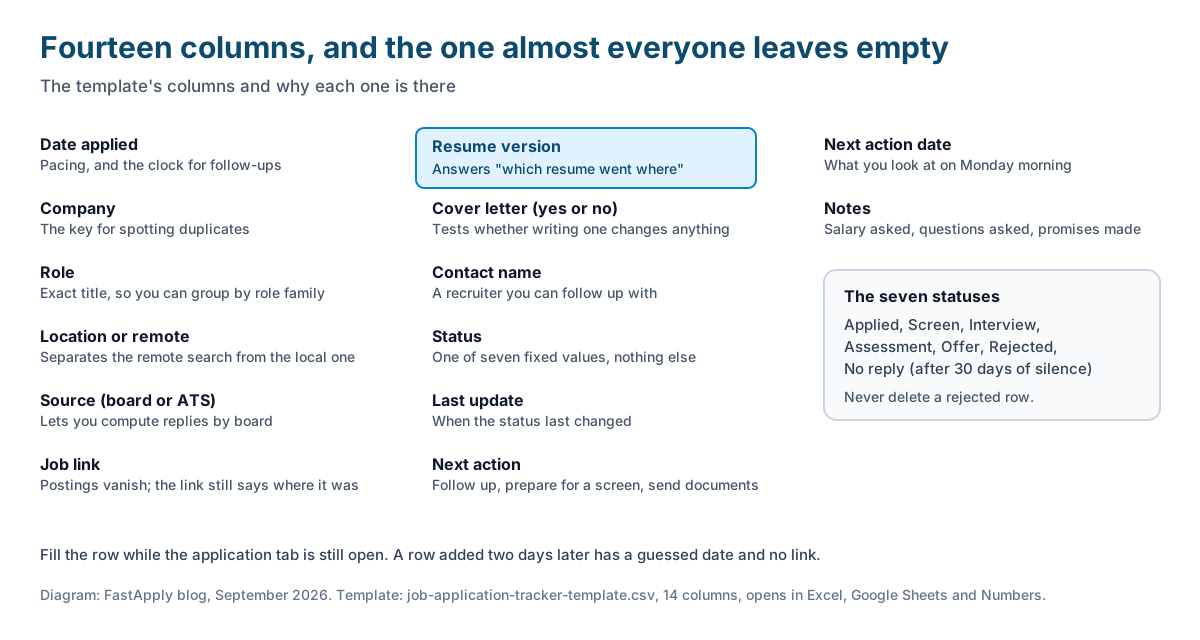
| Column | Why it exists |
|---|---|
| Date applied | Pacing, and the clock for follow-ups |
| Company | The obvious one, and the key for spotting duplicates |
| Role | Exact title from the posting, so you can group by role family later |
| Location or remote | Separates the “only remote” search from the local one |
| Source (board or ATS) | Lets you compute replies by board |
| Job link | Postings vanish; the link still tells you where it was |
| Resume version | The column almost everyone skips, and the one that answers the chat question |
| Cover letter (yes or no) | Lets you test whether writing one changes anything |
| Contact name | A recruiter you can follow up with |
| Status | One of seven fixed values (next section) |
| Last update | When the status last changed |
| Next action | Follow up, prepare for a screen, send documents |
| Next action date | What you look at on Monday morning |
| Notes | Salary asked, questions they asked, anything you promised |
Fill it in while the application tab is still open. A row added two days later is a row with a guessed date and no link.
The statuses that keep the sheet honest
Use exactly seven values in the Status column and nothing else: Applied, Screen, Interview, Assessment, Offer, Rejected, No reply. Free-text statuses (“waiting”, “they said maybe”) cannot be counted, and counting is the entire point.
Two rules make the list work. Move a row to No reply after 30 days with nothing back, so your open list stays short enough to act on. And never delete a rejected row; rejections are data, and a cluster of them from one board or one resume version is the clearest signal you will get.
The weekly review: three numbers
Once a week, on the same day, compute three reply rates from the sheet. A reply is anything from a human or a scheduling system that is not an automated acknowledgement: a screen, an interview, an assessment, a rejection with a reason.
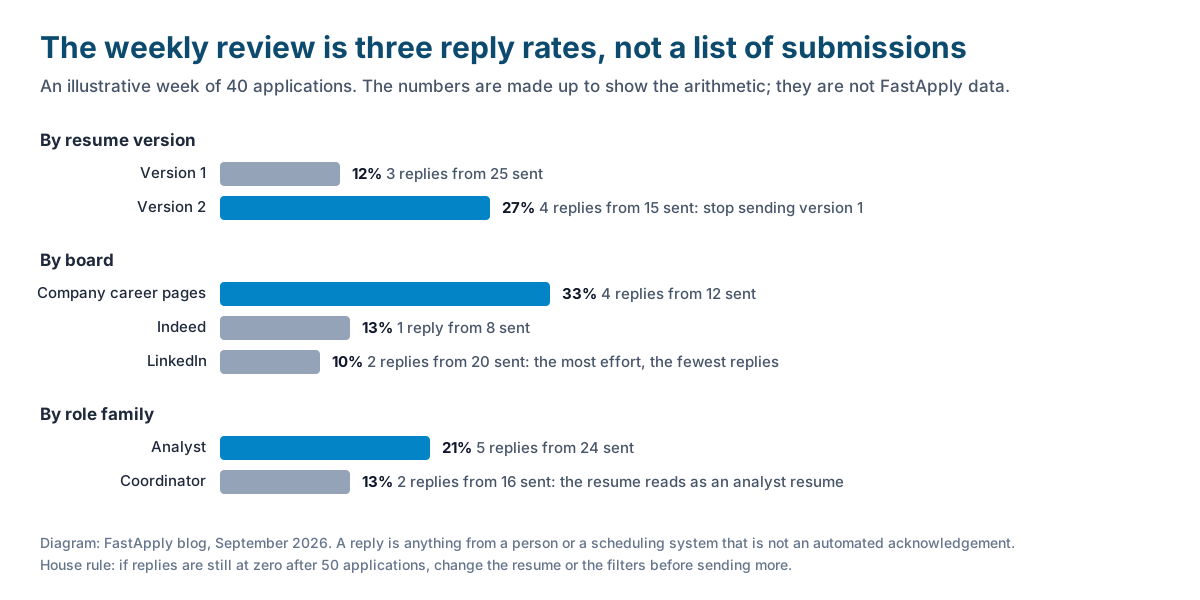
- Replies by resume version. If version two gets replies and version one does not, stop sending version one. This is the only experiment most job seekers ever run, and most never run it because the column is empty.
- Replies by board. Company career pages, LinkedIn, Indeed, Naukri and agencies behave differently for different roles. Put your time where the replies are.
- Replies by role family. If “analyst” applications get replies and “coordinator” ones do not, your resume is an analyst resume, whatever you think it is.
The numbers in the chart are made up to show the arithmetic; they are not FastApply data. The rule we apply to our own users comes from our guide to mass applying with AI: if replies are still at zero after 50 applications, change the resume or the filters before sending more. For what a normal reply rate looks like, and why submissions alone tell you nothing, read how many applications it takes to get an interview.
Follow-ups, and when to close a row
Follow up once, between seven and ten days after applying, and only where the sheet has a contact name or the posting named a recruiter. A short message that restates the role and your one strongest fit is enough. Record it in Notes and move Next action date forward.
Close the row at 30 days of silence. Closing does not mean deleting; it means the row stops appearing in your Monday list. If the company replies in week six, which happens, reopen it. The point of the 30-day rule is that an open list of 200 rows is a list nobody reads, and the sheet only helps if you read it.
Pace matters too. The sheet will show you quickly whether you are sending five applications a week or fifty, and our guide to how many jobs to apply to per day gives a target by situation.
Manual sheet or automatic tracker?
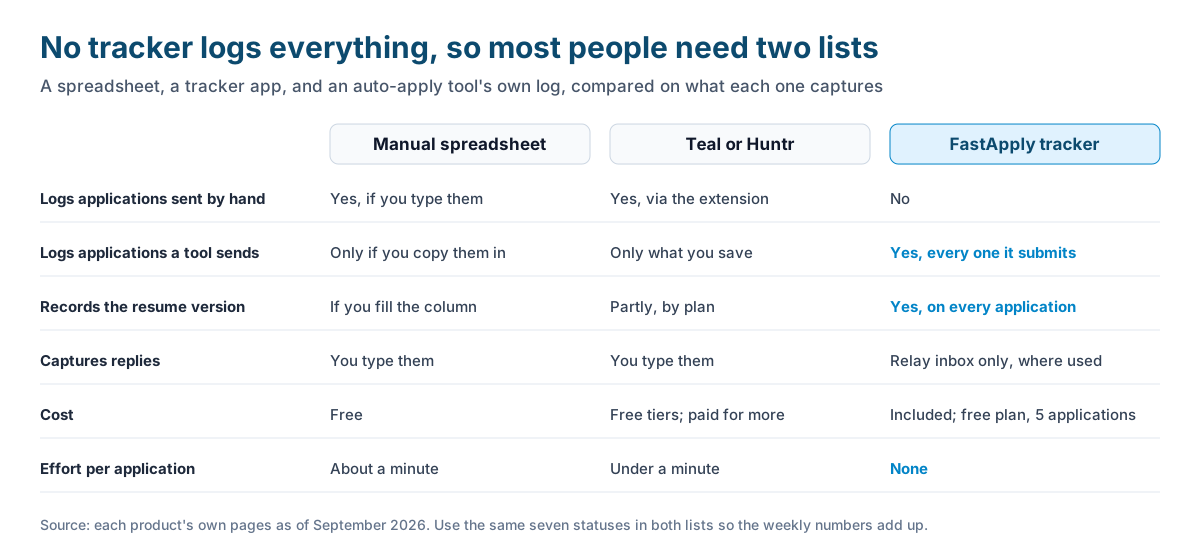
| Manual spreadsheet | Tracker apps (Teal, Huntr) | FastApply tracker | |
|---|---|---|---|
| Logs applications you send by hand | Yes, if you type them | Yes, with a browser extension that saves postings | No |
| Logs applications a tool sends | Only if you copy them in | Only what you save | Yes, every one it submits |
| Records the resume version | If you fill the column | Partly, depending on plan | Yes, on every application |
| Captures replies | You type them | You type them | Only for the relay inbox, where used |
| Cost | Free | Free tiers, paid plans for more | Included; free plan covers 5 applications |
| Effort per application | About a minute | Under a minute with the extension | None |
The honest reading of that table: no tool logs everything. A spreadsheet logs what you remember to type. Teal and Huntr log what you save, and both have free tiers worth trying; our comparisons of Huntr and FastApply and Teal and FastApply cover their tracking in detail. FastApply logs every application it submits, with the resume version, but it cannot see the applications you send by hand on a board it does not cover.
So the practical setup for most people is two lists. The FastApply Resume Tracker for everything the tool sends, and the CSV for the handful of applications you send by hand, with the same seven statuses in both so the weekly numbers add up. If Indeed is your main board, our guide to managing Indeed applications covers what Indeed’s own dashboard does and does not show.
Which resume went where
Back to the chat question. In FastApply, the resume in your profile is the default for every application, Starter holds up to three resume profiles, and Pro and Elite generate a tailored resume per posting. The tracker records which of those went to each employer. That is what makes the replies-by-version number possible without any typing: run version A on one role family for two weeks, version B on another, and read the result.
If you apply across LinkedIn, Indeed and Naukri by hand as well, each board stores its own copy of your resume and they drift apart over time. Our guide to uploading and replacing your resume on LinkedIn, Indeed and Naukri explains where each one keeps the file, so the version in the sheet matches the version the employer saw.
FAQ
-
What should a job application tracker include? Date applied, company, role, location, the board or ATS used, the job link, the resume version, whether a cover letter was sent, a contact name, a fixed status, the last update date, a next action with a date, and notes. The resume version column is the one most people skip and the one that tells you which resume works.
-
Is there a free job application tracker template? Yes. The CSV template linked in this post has 14 columns and two example rows, and it opens in Excel, Google Sheets and Numbers. Delete the example rows and start adding yours.
-
What is the best app to track job applications? A spreadsheet is enough for most searches. Teal and Huntr have free tiers and browser extensions that save postings. FastApply logs every application it submits automatically, including the resume version, but not applications you send by hand elsewhere.
-
How often should I update the tracker? Add the row while the application tab is still open, and review the whole sheet once a week on a fixed day. Compute replies by resume version, by board and by role family, and move anything silent for 30 days to No reply.
-
How do I know which resume I sent to which job? Record the file name in a resume version column at the moment you apply, and keep dated file names so versions are distinguishable. In FastApply, the Resume Tracker lists the version used on each application automatically.
-
Should I track submissions or replies? Replies. Submissions measure effort; replies measure whether the resume and the targeting work. If replies stay at zero after 50 applications, change the resume or the filters before sending more.
Conclusion
A tracker is worth keeping only if it changes what you do next week, and it can only do that if it has a resume version column, fixed statuses, and a weekly review that produces three numbers. Download the template, fill rows while the tab is open, and let software fill the rows for the applications it sends. Then read the replies column, because that is the only one that counts.
#job application tracker
#job application tracker template
#job search spreadsheet
#track job applications
#job application tracker excel
#application tracking spreadsheet

Ekekenta Clinton
Founder, FastApply