Huntr vs FastApply: Honest 2026 Comparison & Review
If you’re choosing between Huntr and FastApply, you’re looking at two well-built products that solve different parts of the job search. Huntr is the best Kanban-style application tracker in the category. FastApply is the strongest end-to-end auto-apply tool with real submissions across 20+ job platforms and ATS systems. They’re not direct competitors. Most active job seekers actually use both: FastApply to submit applications at volume, Huntr (or FastApply’s built-in dashboard) to track the pipeline once recruiters start responding.
Below is the honest breakdown of where each tool fits, with pricing and feature data pulled from each product’s public pages as of June 2026. Disclosure: I’m the founder of FastApply. The framing below is fair to Huntr; they’re a strong product in their lane.
Short answer: If you only need to track applications you submit manually, Huntr is the right tool and the free tier covers most users. If you want a system that actually submits applications while you work, sleep, or vacation, FastApply is the right tool, and the dashboard tracking it includes makes a separate Huntr subscription redundant for most users. Full breakdown below.
What is Huntr?
Huntr is a Kanban-style application tracker. The Chrome extension clips job postings from LinkedIn, Indeed, and most major job boards into your dashboard. You then move cards through stages (Wishlist → Applied → Phone Screen → Onsite → Offer) by drag-and-drop, the same way a Trello board works.
Per Huntr’s public positioning, the platform offers:
- Browser extension that saves job postings in one click
- Kanban board with customizable columns
- Document storage (resume versions, cover letters)
- Contact tracker for recruiters and referrals
- Activity log per application
- Calendar view for interview scheduling
- Basic resume tailoring assist (newer feature)
Huntr is a legitimate, well-built tracker with a strong user base, particularly among new grads and bootcamp candidates organizing their early-career search. The free tier is generous; most casual users never need to upgrade. Pro tier at $9/month adds higher limits on saved jobs and analytics.
What Huntr doesn’t do: it doesn’t submit applications. You click Apply on every job yourself. It doesn’t generate AI-tailored resumes per job. It doesn’t have a 24/7 job matcher. It’s a tracker. That’s the design.
What is FastApply?
FastApply is an AI-powered job application automation Chrome extension plus web dashboard. It does five things:
- 24/7 AI Job Matcher that scans 12+ job boards continuously and auto-applies to matching roles the moment they post.
- Real auto-submission across 20+ job platforms and ATS systems (Workday, Greenhouse, Lever, Ashby, iCIMS, BambooHR, JazzHR, SmartRecruiters, and more).
- Per-job tailored resumes and cover letters (Pro and Elite tiers) generated by AI based on each specific job description.
- Co-pilot review mode (default) for approving each application; Auto-pilot mode (opt-in) for hands-off submission.
- Application tracking dashboard with response monitoring, status timelines, and recruiter contact history.
Every new FastApply account gets 5 free application credits. No credit card required. Plans start at $14/month Starter, $29 Pro, $49 Elite. The 90-Day Interview Sprint plan launched in late May 2026 at $38 / $75 / $132 across the three tiers, anchored on the documented average job-search window.
The defining design choice: FastApply submits applications on your behalf when Auto-pilot mode is enabled. The dashboard tracking is built in. You don’t need a separate tracker for the apps FastApply sends.
Huntr vs FastApply: Feature Matrix
The honest comparison.
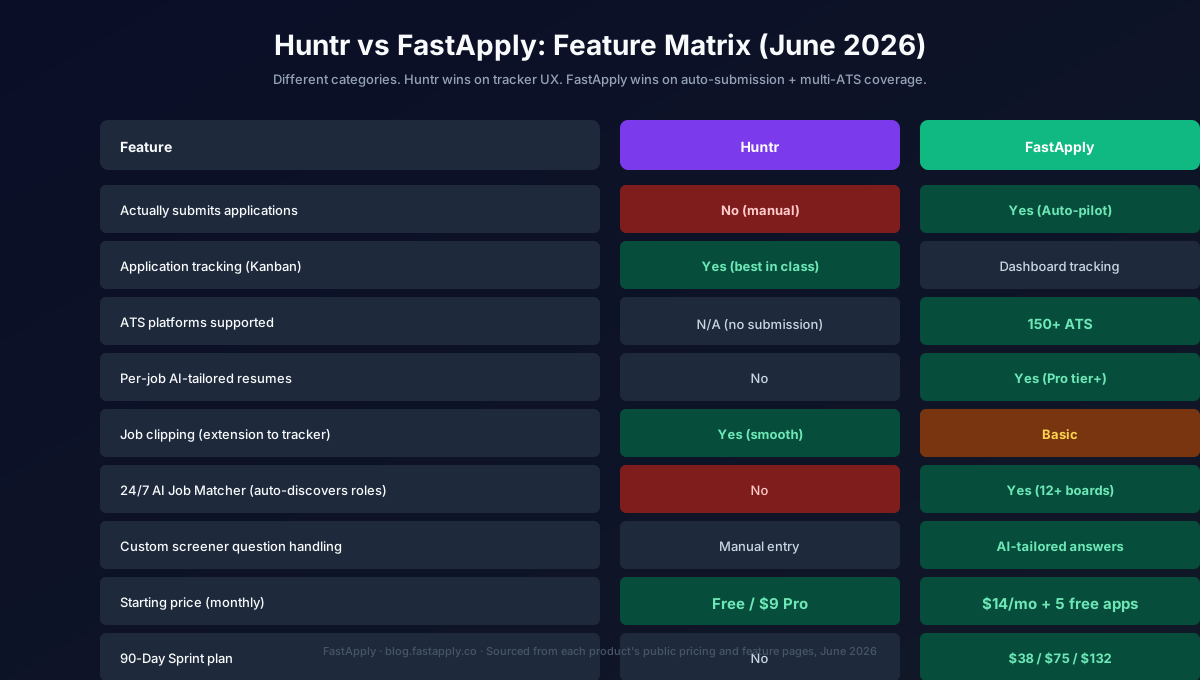
| Feature | Huntr | FastApply |
|---|---|---|
| Actually submits applications | No (you click manually) | Yes (Auto-pilot mode) |
| Application tracking (Kanban) | Yes, best in class | Yes, dashboard view |
| ATS platforms supported | N/A (no submission) | 20+ |
| Per-job AI-tailored resumes | No | Yes (Pro tier+) |
| AI cover letter generation | Basic | Yes (Pro tier+) |
| Job clipping (extension to tracker) | Yes (smooth) | Basic |
| 24/7 AI Job Matcher | No | Yes (12+ boards) |
| Custom screener question handling | Manual entry | AI-tailored answers |
| Document storage | Yes | Yes |
| Calendar view | Yes | Basic |
| Browser extension | Yes | Yes |
| Starting price (monthly) | Free / $9 Pro | $14/mo + 5 free apps |
| 90-Day Sprint plan | No | $38 / $75 / $132 |
Where Huntr wins: pure tracker UX. The Kanban board is the best in the category for organizing a pipeline visually. The Chrome extension’s job-clipping flow is smooth and fast. If your job search is “I find roles myself, apply manually, and need to organize my pipeline,” Huntr is the right tool.
Where FastApply wins: the four categories Huntr doesn’t enter. Auto-submission across 20+ job platforms and ATS systems. Per-job AI resume tailoring. The 24/7 AI Job Matcher that surfaces new roles automatically. Built-in dashboard tracking that overlaps with what Huntr provides. For a job seeker who wants the system running while they work, FastApply is structurally the right product.
Pricing Breakdown (June 2026)
Huntr pricing:
| Plan | Price | Best for |
|---|---|---|
| Free | $0/month | Most casual users; full Kanban tracker, ~100 saved jobs, basic features |
| Pro | $9/month | Higher saved-job limit, analytics, contact management |
FastApply pricing:
| Plan | Price | Applications/mo | Best for |
|---|---|---|---|
| Free credits | $0 (no card) | 5 credits | Trial across your real target jobs |
| Starter | $14/month | 200 | Solo job seekers running their own search |
| Pro | $29/month | 500 | Multi-ATS volume with AI resume tailoring |
| Elite | $49/month | Unlimited | Auto-pilot mode + priority support |
| 90-Day Sprint | $38 / $75 / $132 | Same as monthly tiers, 3 months upfront | Focused job search window |
Per-feature math: Huntr at $9/month is cheaper than FastApply at $14/month entry tier, but they’re solving different problems. Huntr Pro gives you a better tracker than the free tier. FastApply Starter gives you actual application submission across 20+ job platforms and ATS systems plus tracking. Comparing the two on price alone misses the category difference.
For the broader category context, see our Best AI Job Search Tools roundup which ranks 10 tools by category coverage.
Where Huntr Wins
Three places Huntr is the better tool.
1. Pure tracker UX. The Kanban board, the drag-and-drop, the column customization, the calendar view, all best in class. If your daily ritual is reviewing a board of cards, Huntr is built for that ritual. FastApply’s dashboard is functional but less rich.
2. The free tier. Huntr’s free tier covers most active users. No card required, no limits that force an upgrade in the first 30 days. The Pro tier exists for power users tracking 200+ active applications.
3. Job clipping flow. Huntr’s “save this job” extension button is one click. The job appears in your tracker with all metadata pre-populated. FastApply’s extension is built for submission, not for clipping-without-applying.
Where FastApply Wins
The reverse list, also three.
1. Actually submits applications. This is the structural gap. Huntr is a tracker, not an applier. FastApply Auto-pilot submits while you work, sleep, or vacation. For users who want to compress their job search by automating the volume side, this is the entire product.
2. Coverage of 20+ job platforms and ATS systems, with AI tailoring. Huntr saves jobs you find manually. FastApply’s 24/7 AI Job Matcher discovers roles you wouldn’t have seen, then submits to them with per-job AI-tailored resumes. The “discovery + submission” loop is what makes the 90-day timelines viable.
3. Built-in tracking removes the need for a separate tracker. FastApply Pro and Elite include dashboard tracking sufficient for most users. Pairing FastApply with Huntr is redundant for the median job seeker. The FastApply dashboard already covers stage tracking, response monitoring, and recruiter contacts.
Who Should Choose Huntr
Three user profiles where Huntr is the right call.
1. Manual-application users who organize visually. If you prefer to discover roles yourself, click Apply yourself, and need a Kanban board to keep track, Huntr is the right tool. The free tier likely covers your whole search.
2. Career coaches managing multiple clients. Huntr’s per-board organization works well for coaches running pipelines for several candidates. The contact management and per-stage notes are well-suited to coaching workflows.
3. Users who don’t want auto-apply on principle. Some job seekers prefer to manually click Apply on every role to maintain a sense of intentionality. That’s a valid preference. Huntr supports it; FastApply Auto-pilot doesn’t fit it.
Who Should Choose FastApply
The mismatched users from above, plus three additional fit cases.
1. Active job seekers running volume searches. If you’re applying to 50+ roles per week, manual clicking through Huntr’s saved jobs becomes the bottleneck. FastApply Auto-pilot eliminates the bottleneck entirely.
2. Employed job seekers who can’t browse all day. Find a Job While Working Full-Time covers this in detail. Auto-pilot is the only tool that lets you run a meaningful application volume while at work.
3. Multi-ATS searches (Workday-heavy, Greenhouse-heavy). Huntr can save these jobs but you still apply manually. FastApply submits them automatically. For enterprise hiring (which lives on Workday) or modern tech (Greenhouse, Lever, Ashby), FastApply’s coverage matters.
4. Anyone wanting the 24/7 first-mover advantage. First-applicant submissions outperform Day-7 submissions consistently. Huntr doesn’t catch new postings; you find them yourself. FastApply’s AI Job Matcher catches them within hours of going live.
Bottom Line: Is Huntr Legit?
Yes. Huntr is legit. It’s a real, well-built tool with a respected user base, particularly among new grads and bootcamp candidates managing their first job search. The free tier covers most users; the Pro tier is fairly priced. Payments process, support responds, the Chrome extension installs cleanly.
But “legit” and “best fit” are different questions. Huntr is the right tool for users who manually apply to jobs they find themselves and need a tracker. It’s the wrong tool for users who want a system running on Auto-pilot while they work.
For the broader category context, see the Best AI Job Search Tools roundup. For the deeper auto-apply category, Set It and Forget It: 5 AI Tools That Auto-Apply 24/7 ranks the tools that actually submit. For the strategic playbook on running an Auto-pilot search, Find a Job While Working Full-Time walks through setup end-to-end.
If you’ve been comparing across the category, we’ve also published honest comparisons against BetterApply, LazyApply, Sonara, LoopCV, Teal, Jobscan, Kickresume, Rezi, and Simplify Jobs.
Try FastApply Free
Stop applying one job at a time. Install the FastApply Chrome extension and run 5 free applications on us. No credit card. Works on LinkedIn, Indeed, Workday, Greenhouse, Lever, Ashby, iCIMS, Taleo, and the rest of FastApply’s 20+ job platforms and ATS systems.
Turn on Auto-pilot mode and let FastApply apply while you’re at work, on vacation, or asleep. Set your preferences once. The 24/7 AI Job Matcher finds matching roles the moment they’re posted and submits with a tailored resume per job.
Plans start at $14/month, or $38 for the full 90-Day Interview Sprint (save vs paying monthly). Cancel anytime.
Frequently Asked Questions
Is Huntr legit?
Yes. Huntr is a real, well-built application tracker with a respected user base. Payments process correctly, the Chrome extension installs without abusive permissions, and the free tier covers most users. The “is Huntr legit” question gets asked because of the proliferation of low-quality tracking tools, but Huntr is one of the well-established ones. The real question is whether it fits your specific job search, not whether it works.
Does Huntr auto-apply to jobs?
No. Huntr is a tracker, not an auto-applier. You discover roles yourself, save them to your Huntr board, and click Apply on each one manually. The tool then helps you organize the pipeline (Wishlist, Applied, Interviewing, Offer). For users who want a system that actually submits applications, FastApply’s Auto-pilot mode is the closest direct alternative.
How much does Huntr cost?
Huntr has a generous free tier that covers most casual users. The Pro tier is $9/month and adds higher saved-job limits, analytics, and advanced contact management. Comparing to FastApply, Huntr Pro at $9/month is cheaper than FastApply Starter at $14/month, but they solve different problems. Huntr tracks; FastApply submits.
Is FastApply better than Huntr?
Different products for different use cases. Huntr is the better tool if you discover roles manually and need a Kanban tracker to organize your pipeline. FastApply is the better tool if you want a system that submits applications on your behalf across 20+ job platforms and ATS systems, with per-job AI-tailored resumes and a 24/7 Job Matcher. Most active job seekers prefer FastApply because it includes built-in tracking that overlaps with Huntr’s core feature.
Can I use both Huntr and FastApply together?
Yes, the Chrome extensions don’t conflict. Some users run FastApply for application submission and Huntr for the pipeline tracker if they prefer Huntr’s Kanban UX. For most users this stack is redundant because FastApply’s built-in dashboard tracking covers what Huntr provides for the apps FastApply sends. The two-tool stack makes sense if you also manually apply to a meaningful subset of roles and want those tracked in the same board as the auto-submitted ones.
What’s the best Huntr alternative for auto-apply?
FastApply is the most direct alternative for users who initially picked Huntr but realized they need actual application submission. FastApply includes dashboard tracking sufficient for most users, plus Auto-pilot mode across 20+ job platforms and ATS systems, per-job AI resume tailoring, and the 24/7 AI Job Matcher. For tracking-only Huntr alternatives, Teal is the closest comparable product with a similar free tier and resume builder.
#huntr vs fastapply
#is huntr legit
#huntr review
#huntr pricing
#huntr alternative
#huntr chrome extension

Ekekenta Clinton
Founder, FastApply