
How to Upload or Replace Your Resume on LinkedIn, Indeed and Naukri (2026)
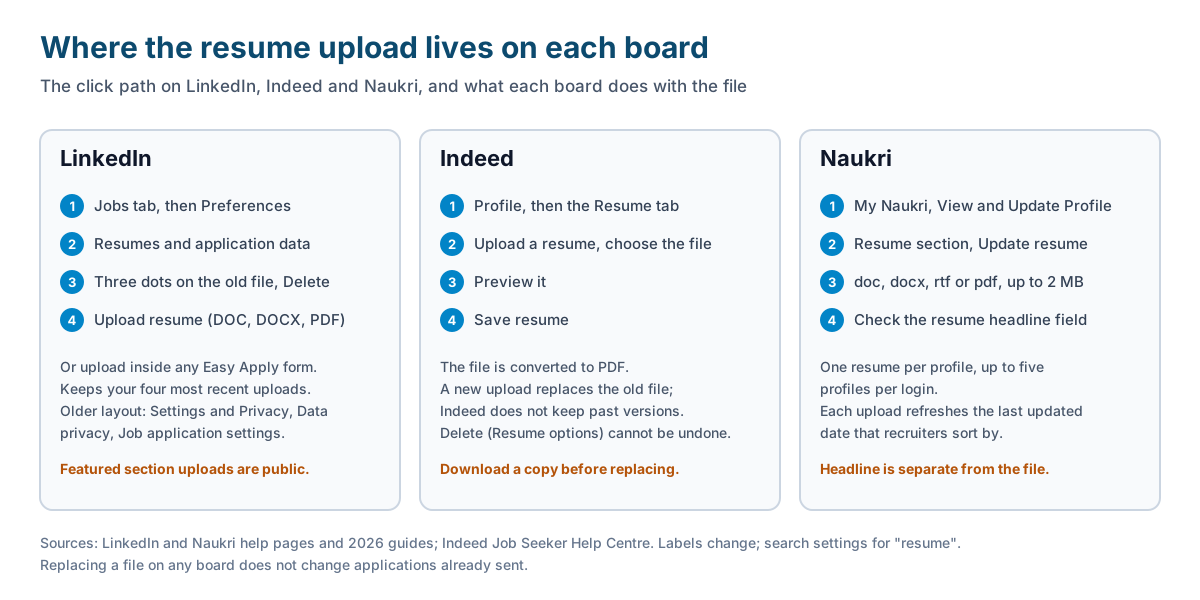
Short answer: On LinkedIn you upload a resume inside an Easy Apply form, and LinkedIn keeps your four most recent uploads under the Jobs tab, in Preferences, under Resumes and application data (older guides route you through Settings and Privacy, Data privacy, Job application settings). Delete the old file from its three-dot menu, then upload the new one. On Indeed, open your Profile, go to the Resume tab, click Upload a resume, preview it and click Save resume; the new file replaces the old one and is converted to PDF. On Naukri, open My Naukri, View and Update Profile, then the Resume section, and click Update resume; the upload screen takes doc, docx, rtf or pdf up to 2 MB. Replacing a file never changes applications you have already sent.
Resume uploads are the most common how-to question in our support chat, and the wording is always some version of “how to upload resume”, “why the same CV each time” or “edit tailored resume”. Two of those three questions are about job boards. The third is about how an auto-apply tool decides which file to send, and I will answer that one too.
Before you upload: one file rule for all three boards
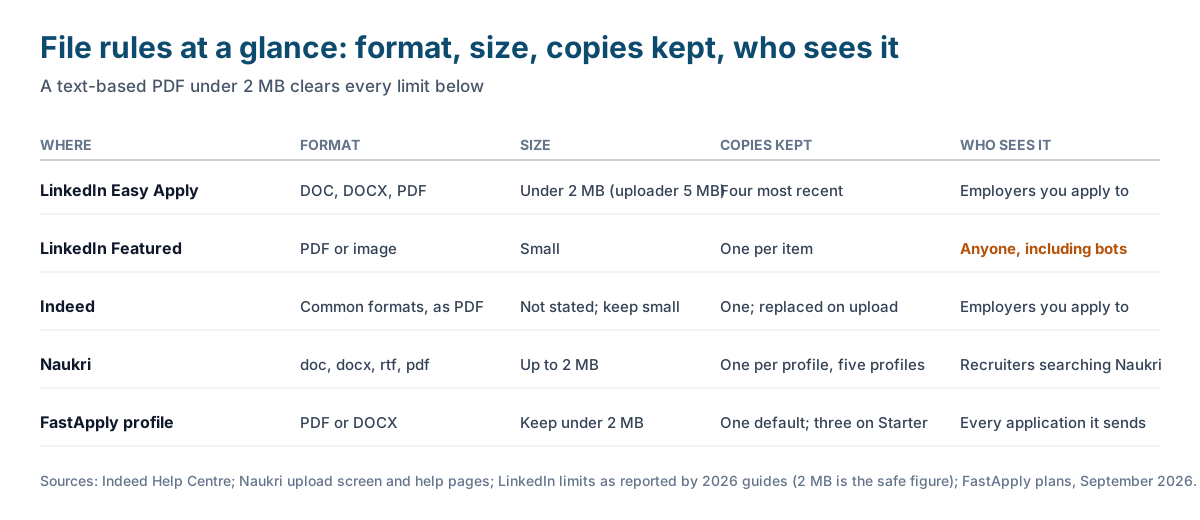
Every board parses your file into text, and the parsing is what recruiters search. So the file you upload should be a single-column, text-based PDF or DOCX with standard headings and a plain file name, such as Priya-Sharma-Resume.pdf. Scans and photographs of a resume fail on all three boards. Two columns, text boxes and icons fail on some. Keep the file under 2 MB and you will never meet a size limit on any of them. Our ATS resume format guide covers the layout rules, and the resume guide for freshers has a template that parses.
LinkedIn: two places a resume can live, and one of them is public
LinkedIn stores resumes in two separate places, and people mix them up.
Inside Easy Apply. When a posting carries the Easy Apply button, the form has an Upload resume step. It accepts DOC, DOCX and PDF. Guides written in 2026 report that the uploader accepts files up to 5 MB and that LinkedIn recommends staying under 2 MB; the smaller figure is the safe one. The file you upload there goes to that employer and is also saved to your account for reuse. If the posting shows a plain Apply button instead, LinkedIn sends you to the employer’s own site, and nothing you stored on LinkedIn is used.
Saved application resumes. LinkedIn keeps your four most recent Easy Apply uploads so you can pick one next time. This is the list to manage when you want to replace an old version.
- Open the Jobs tab and click Preferences. If your account still shows the older layout, go to Settings and Privacy, then Data privacy, then Job application settings.
- Open Resumes and application data.
- Click the three dots next to the outdated file and choose Delete.
- Click Upload resume and choose the new PDF or DOCX, under 2 MB.
- Check that the file name shown is the new one. It will be offered as the default on your next Easy Apply.
The menu labels have changed more than once in the last two years and the guides online disagree with each other, so if you cannot find a label, search the settings page for the word “resume”.
The Featured section. You can also add a resume to the Featured section of your profile. That copy is public. Anyone who views your profile, including the bots that harvest phone numbers, can download it. If you use it, strip your phone number and address first. It has nothing to do with Easy Apply.
Indeed: one file, converted to PDF, replaced rather than edited
Indeed’s help centre describes the upload in four steps: click Upload a resume in the Resume tab of your Profile, choose a document from your phone or computer, preview it, then click Save resume or choose a different file. The uploaded file is automatically converted into a PDF so employers can open it. Indeed warns against scanning or photographing a resume and against photos and graphics, and it does not list every accepted format, only that not all formats are accepted, so a plain PDF or DOCX is the safe choice.
Three things about replacing matter more than the clicks.
- You cannot edit an uploaded file. To change it, you upload a new file, and the new file overwrites the old one.
- Indeed does not keep past files. Download a copy of the current resume before you replace it. Delete, in the Resume options menu, cannot be undone either.
- Employers who already have the old version keep it. Replacing the file changes nothing about applications already sent. If an application went out with the wrong file, you contact the company directly.
If Indeed is your main board, our guide to managing Indeed applications and the comparison of FastApply and Indeed cover what the board does and does not track for you.
Naukri: update the resume and the date recruiters sort by
Naukri works differently from the other two in one important way: recruiters search the Naukri database and sort by profile freshness, so the act of updating matters almost as much as the file.
- Log in and open My Naukri, then View and Update Profile.
- Scroll to the Resume section and click Update resume.
- Choose the file. The upload screen accepts doc, docx, rtf and pdf, up to 2 MB.
- Check the resume headline separately. It is its own field, not read from the file, and it is what recruiters see first in search results.
Naukri’s help pages explain that one login can hold up to five profiles and that each profile carries one resume, either a text resume or a visual one. In practice most people need one profile with the resume they want recruiters to find, plus two or three versions stored elsewhere for direct applications. Each upload updates the “last updated” date, which is why experienced Naukri users re-upload the same file every couple of weeks during a search. Our Naukri auto apply guide covers the rest of the Naukri workflow, including the 50 applications a day cap.
Why an auto-apply tool sends the same CV each time
“Why the same CV each time” is the question behind many of those messages, and the answer is mechanical. In FastApply, the resume in your profile is the default for every application. On the free plan and on Starter, that file is what goes out, every time, to every employer. On Pro and Elite, the tool writes a resume tailored to each posting and a cover letter to match, and the tailored version is what goes out.
So if you are on the free plan and want a different CV for data roles than for support roles, you have two options. Replace the profile resume before each session from the dashboard, or move to Starter, which holds up to three resume profiles you can switch between. “Edit tailored resume”, the other chat question, is a Pro and Elite feature in Copilot mode: the tool fills the application, shows you the tailored resume and the answers, and waits for you to change anything before you press submit.
The part that solves the “which file went where” problem is the Resume Tracker, which lists your applications and the resume version used on each. If you also apply by hand on boards FastApply does not cover, our job application tracker template has a column for resume version for the same reason. The list of boards where the tool applies is in which job sites you can auto apply on.
What replacing a resume changes, and what it does not
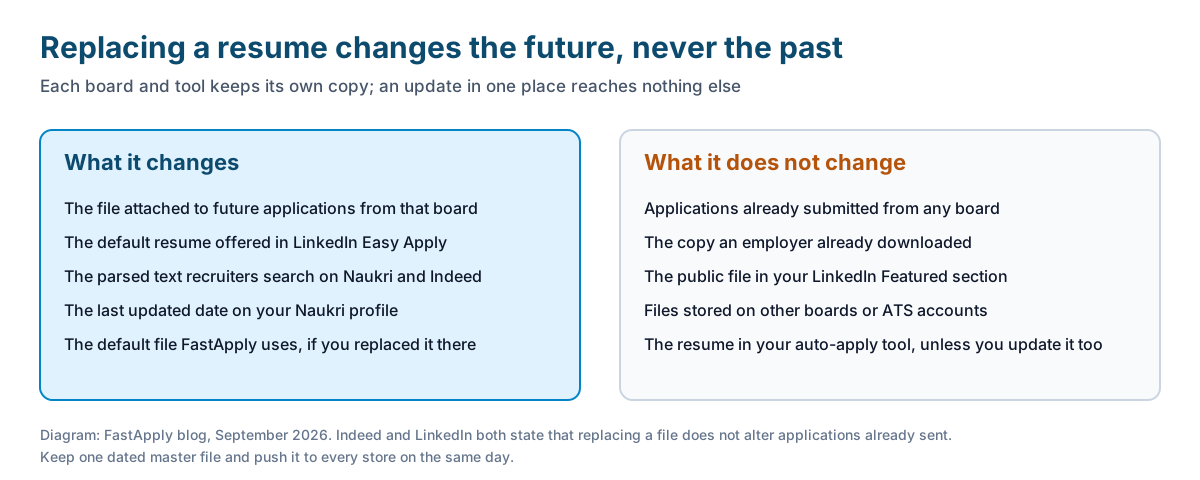
Replacing a file on any of the three boards changes four things: the file attached to future applications from that board, the default offered in Easy Apply, the parsed text recruiters search, and the “last updated” signal on Naukri. It does not change applications already submitted, the copy an employer downloaded, the public file in your LinkedIn Featured section, or the files stored on other boards and in your auto-apply tool. Each store is separate. If you keep one master file and update it, the job is to push it to every place it lives on the same day: LinkedIn saved resumes, Indeed, Naukri, the FastApply profile, and whichever ATS accounts you created on company career pages.
The upload failures we see most, and the fix for each
- File too big. Export from Word or Google Docs as PDF rather than printing to PDF, and remove the photo. A one-page text resume should be well under 500 KB.
- Upload accepted, but the preview is blank or scrambled. The file is a scan or an image-heavy design. Rebuild it as text. Test by copying the PDF text into a plain text editor; what you see is what the parser sees.
- The wrong file went out. On LinkedIn, check the four saved resumes and delete the stale ones; the form defaults to the most recent upload, which may not be the one you meant. On Indeed, download the current file and read it before applying.
- The board still shows the old version. Log out and back in, or clear the cached preview. On Indeed, confirm the conversion to PDF finished by opening the profile preview.
- Different boards hold different versions. Keep a dated file name (Priya-Sharma-Resume-2026-09.pdf) so you can tell at a glance which one a board has.
If you are sending applications in volume, the first ten are the ones to check by hand, which is the fifth step in our guide to mass applying with AI.
FAQ
-
How do I upload a resume to LinkedIn? Inside any Easy Apply form, use the Upload resume step, which accepts DOC, DOCX and PDF; keep the file under 2 MB. To manage stored files, open the Jobs tab, then Preferences, then Resumes and application data (older layouts: Settings and Privacy, Data privacy, Job application settings). LinkedIn keeps your four most recent uploads.
-
Where is my uploaded resume on LinkedIn? Under Resumes and application data in the Jobs tab preferences, or under Job application settings in Data privacy on older layouts. A resume added to the Featured section is a separate, public copy on your profile.
-
How do I replace my resume on Indeed? Open your Profile, go to the Resume tab, click Upload a resume, choose the new file, preview it and click Save resume. The new file replaces the old one and is converted to PDF. Download a copy of the old file first, because Indeed does not keep past versions.
-
Does replacing my resume on Indeed change applications I already sent? No. Employers who received the old version keep it. To correct an application already submitted, contact the company directly.
-
What file size and format does Naukri accept? The Naukri upload screen accepts doc, docx, rtf and pdf files up to 2 MB. Each profile holds one resume, and one login can have up to five profiles. The resume headline is a separate field.
-
Why does FastApply send the same CV every time? Because the resume in your profile is the default file, and the free plan and Starter apply with that file. Pro and Elite tailor a resume to each posting. Starter holds up to three resume profiles you can switch between, and the Resume Tracker shows which version went to each employer.
Conclusion
Three boards, three storage rules. LinkedIn keeps four recent Easy Apply files and a separate public copy in Featured. Indeed keeps one file, converts it to PDF and overwrites it on upload. Naukri keeps one file per profile and rewards you for updating it. None of them can reach back into an application already sent, so check the file before you apply, keep one dated master version, and push it to every store on the same day.
#how to upload resume to linkedin
#how to update resume on indeed
#how to update resume on naukri
#replace resume on linkedin
#linkedin job application settings
#resume upload file size

Ekekenta Clinton
Founder, FastApply