
Resume for Freshers: A Format That Passes ATS (2026, With Template)
Short answer: A fresher resume that passes ATS is one page, one column, with standard headings (Summary, Skills, Projects, Internships, Education, Certifications), saved as a text-based PDF or DOCX under 2 MB and named Firstname-Lastname-Resume.pdf. No photo, no tables, no text boxes, no icons, no two-column template from Canva. With no work history, projects and internships carry the page, and every bullet needs a number. Test it by copying the text out of the PDF into Notepad: if the order is scrambled there, the parser sees the same mess.
Resume upload and replacement is the most common topic in FastApply’s support chat, and a good share of those messages come from people who describe themselves with the words “I am a fresher”. The resume is usually one of two things: a visually heavy template that application systems cannot read, or a half-empty page because “I have no experience”. This post fixes both, and ends with a template you can paste into a document and fill in.
What an application system does with your resume
An applicant tracking system (ATS) does not look at your resume. It reads it. The file is parsed into fields: name, contact, education, skills, employers, dates. A recruiter then searches those fields (“SQL”, “Power BI”, “B.Tech 2026”) or sorts by them, and only opens the PDF for the candidates who come up. Naukri’s recruiter search works the same way on your profile.
That is why layout matters more for a fresher than for anyone else. An experienced candidate with a scrambled resume still has a job title and an employer name that survive parsing. A fresher has projects and skills, and those are exactly the parts a two-column template turns into noise. Our full ATS resume format guide covers how each major system parses; this post is the fresher version.
The format that parses
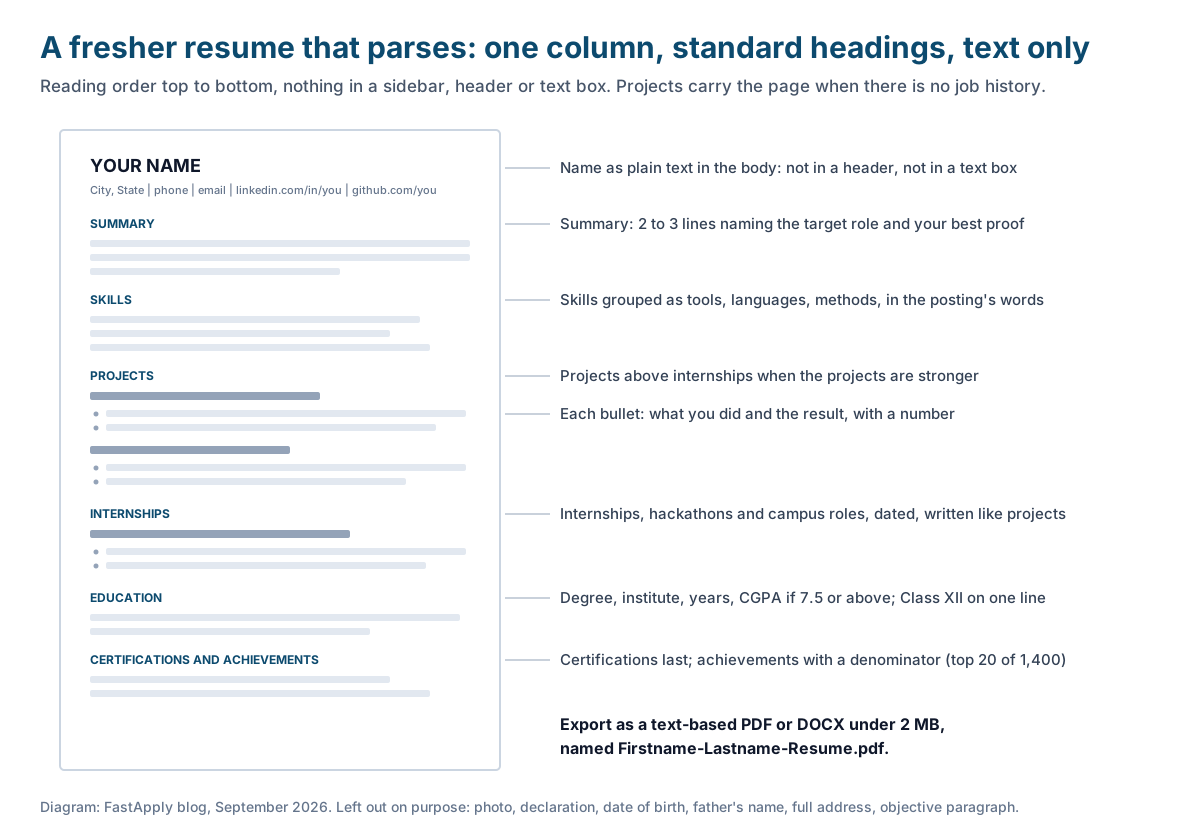
- One page. A fresher resume that needs two pages is padded. Recruiters screening a drive spend seconds per page.
- One column, top to bottom. Everything in reading order. No sidebar for skills, no two-column header.
- Standard headings, in this order: Summary, Skills, Projects, Internships (or Experience, if you have any), Education, Certifications and Achievements. Put Projects above Internships if your projects are stronger, which for most freshers they are.
- Plain fonts, 10.5 to 11 point, 0.75 to 1 inch margins. Calibri, Arial, Georgia, or any system font. Bold for section headings and project titles, nothing else.
- Contact details in the body, directly under your name: city, phone, email, LinkedIn, GitHub if you have projects there. Not in the document header, which some parsers skip.
- A text-based PDF or DOCX. Export from Word or Google Docs. Never print to PDF from an image, never scan.
- File name: Firstname-Lastname-Resume.pdf. Recruiters download dozens of files called “resume.pdf”.
How to build it, section by section
Step 1: Write the summary last, but put it first
Write two or three lines naming the role you want, your degree and year, and your single best proof (a project, an internship, a competition result), and place it directly under your contact details.
“B.Tech (Computer Science) graduate, 2026, seeking a junior data analyst role. Built three analytics projects in SQL, Excel and Power BI, including a dashboard used by a 40-member committee.” That is enough. No adjectives about being hardworking.
Step 2: Group your skills into tools, languages and methods
List the tools, languages and methods you can actually be tested on, grouped on three short lines, using the exact words the postings use.
“Tools: Excel (pivots, XLOOKUP), Power BI, Git” reads better and parses better than a cloud of twenty keywords. If a posting says “MS Excel” and you wrote “Excel”, add the posting’s version. Do not list skills you could not demonstrate in a ten-minute test.
Step 3: Describe two or three projects with numbers
For each project, give a title with the tools in brackets, the dates, and two bullets that say what you did and what the result was, with a number in each bullet.
“Cleaned two years of ticket data (14,000 rows) and built a dashboard tracking revenue by event” is a bullet. “Worked on a dashboard project” is not. Our data analyst jobs for freshers guide explains which three projects to build if you have none yet.
Step 4: List internships, college roles and part-time work with dates
Add any internship, training, hackathon, campus role or part-time job as a dated entry with one or two bullets, written the same way as the projects.
A two-month internship with a real outcome (“reduced report mismatches from 9% to under 1%”) is worth more than a vague six-month one. If you have nothing here, leave the section out rather than filling it with “Member, Cultural Committee”.
Step 5: Add education, then certifications and achievements
Give the degree, specialisation, institute, years and CGPA if it is 7.5 or above, then your Class XII board and percentage on one line, then certifications and achievements with context.
Certifications go last because they are the weakest evidence on the page. Achievements need a denominator: “top 20 of 1,400 teams” means something, “finalist” alone does not.
Step 6: Export, test and name the file
Export as a text-based PDF, open it, select all, copy, paste into Notepad or any plain text editor, and read it top to bottom; then save it as Firstname-Lastname-Resume.pdf under 2 MB.
If the pasted text has your skills interleaved with your projects, or your name split across lines, the parser will see the same thing. Simplify the layout until the pasted text reads like the page.
The template
Paste this into a blank Word or Google document, keep the headings, replace every line with your own, and delete anything you cannot fill truthfully.
YOUR NAME
City, State | +91 98xxx xxxxx | [email protected] | linkedin.com/in/yourname | github.com/yourname

SUMMARY
B.Tech (Computer Science) graduate, 2026, seeking a junior data analyst role. Built three
analytics projects in SQL, Excel and Power BI, including a sales dashboard used by a
40-member college committee. Comfortable with large, messy datasets.

SKILLS
Tools: Excel (pivots, XLOOKUP), Power BI, Git
Languages: SQL (MySQL), Python (pandas, matplotlib)
Methods: data cleaning, descriptive statistics, dashboard design

PROJECTS
Sales Dashboard for the College Fest Committee (Power BI, Excel), Jan to Mar 2026
- Cleaned 2 years of ticket and sponsorship data (14,000 rows) and built a dashboard
  tracking revenue by event
- Found that 3 of 12 events produced 61% of revenue; the committee dropped 2 loss-making
  events the following year

Customer Churn Analysis (SQL, Python), Aug to Oct 2025
- Wrote 20 SQL queries against a public telecom dataset to segment 7,000 customers by
  tenure and plan
- Found a 2.3x higher churn rate among month-to-month contracts; documented the findings
  in a 4-page report

INTERNSHIPS
Data Analyst Intern, Example Analytics Pvt Ltd, Pune, Jun to Jul 2025
- Maintained a weekly MIS report in Excel for 6 client accounts and automated 3 recurring pivots
- Reconciled two CRM exports and reduced mismatches from 9% to under 1%

EDUCATION
B.Tech, Computer Science, Example Institute of Technology, Pune, 2022 to 2026, CGPA 8.1/10
Class XII (CBSE), Example School, 2022, 91%

CERTIFICATIONS AND ACHIEVEMENTS
Google Data Analytics Professional Certificate, 2025
Finalist, Unstop Analytics Case Challenge, 2025 (top 20 of 1,400 teams)
The example is for an analyst. For a support, sales or testing role, keep the structure and change the proof: a typing speed with a number, a sales target met during an internship, a bug count from a testing project.
Eight things that break parsing
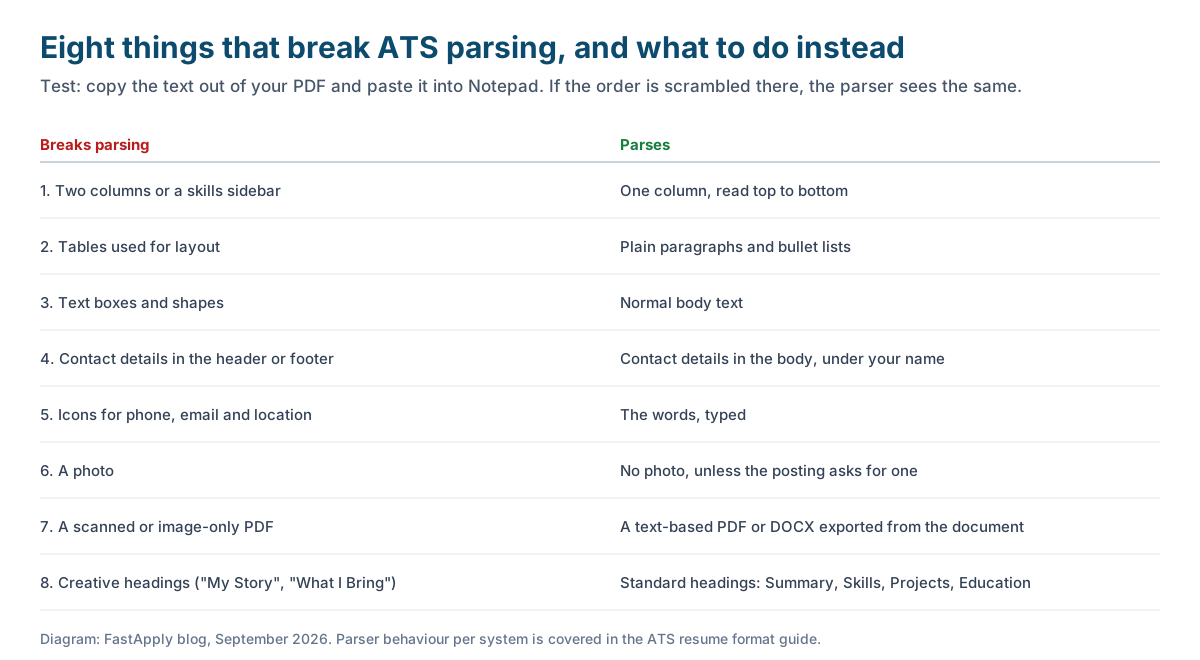
- Two columns or a sidebar. Parsers read left to right across the page, so a skills sidebar gets stitched into your project bullets.
- Tables used for layout. Some systems read cell by cell, some skip tables entirely.
- Text boxes and shapes. Often invisible to the parser. Your name in a text box can vanish.
- Contact details in the header or footer. Several systems ignore headers. Put them in the body.
- Icons for phone, email and location. The icon is an image; the parser needs the word.
- A photo. Adds nothing a parser can read, and some Indian employers’ systems reject image-heavy files for size.
- A scanned or image-only PDF. The parser sees a picture. Export from the document, do not scan a print-out.
- Creative headings. “My Story” and “What I Bring” do not map to the fields the system expects. “Summary” and “Skills” do.
Canva templates fail on at least four of the eight. They look good to you and read as garbage to the system.
What to leave off an Indian fresher resume
Old habits from college placement cells still show up on fresher resumes, and none of them helps.
- The declaration line (“I hereby declare that the above information is true”) and the signature.
- Date of birth, father’s name, marital status, religion, caste, nationality.
- A full postal address. City and state are enough.
- The heading “Curriculum Vitae” or “Resume” at the top. Your name is the heading.
- A career objective paragraph about growth and learning. The summary replaces it.
- A photo, unless the posting specifically asks, which in India is rare outside hospitality and aviation.
Removing these usually frees a third of the page for projects, which is where a fresher wins or loses.
Match the posting’s words
Recruiters search the parsed fields with the words from their own posting. If the posting says “MS Excel”, “MySQL” and “Power BI”, your skills line should contain those strings, not “spreadsheets”, “databases” and “visualisation”. Read three postings for your target title, note the tools and titles they repeat, and make sure each appears once in your Skills or Projects sections. Once is enough; stuffing a keyword five times does nothing a parser rewards and reads badly to a human.
Two or three versions of the resume, one per target title, is realistic to maintain by hand. The versions differ in the summary line and the order of skills, not in the facts. Our guide to tailoring a resume for each job covers the fast way to do this.
Upload rules on Naukri, LinkedIn and Indeed
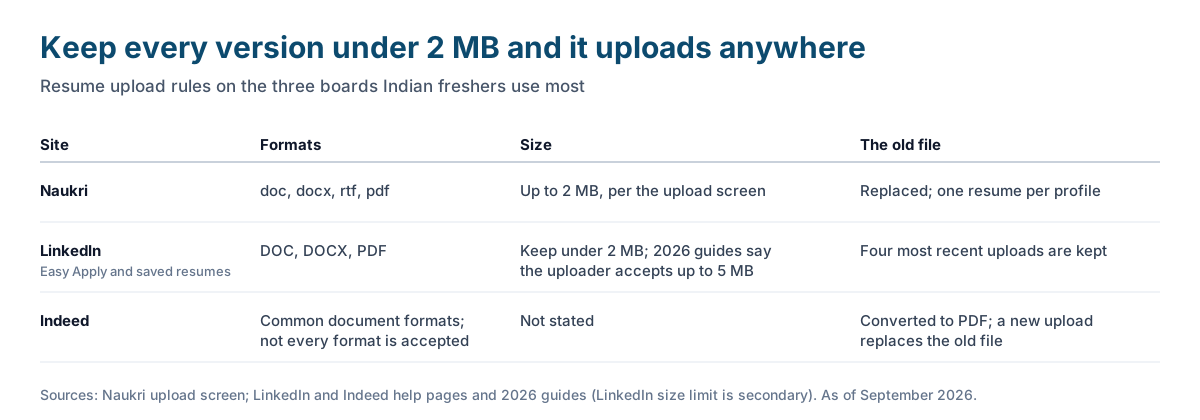
| Site | Formats | Size | What happens to the old file |
|---|---|---|---|
| Naukri | doc, docx, rtf, pdf | Up to 2 MB, per the upload screen | Replaced. One resume per profile |
| LinkedIn (Easy Apply and saved resumes) | DOC, DOCX, PDF | Keep under 2 MB; 2026 guides say the uploader accepts up to 5 MB | LinkedIn keeps your four most recent uploads |
| Indeed | Common document formats; Indeed says not every format is accepted | Not stated | Converted to PDF; a new upload replaces the old file |
Most fresher resumes come in well under 1 MB once the photo and the graphics are gone. If yours is larger, that is the first sign the template is wrong. The step-by-step for each site, including how to replace a file without breaking applications already sent, is in how to upload or replace your resume on LinkedIn, Indeed and Naukri.
Sending it out
Once the file parses, the remaining work is volume and consistency. Three titles, two cities, applications within 48 hours of posting, a daily cap and a weekly count of replies. The full routine is in our fresher jobs guide, and the two form fields that trip up fresher applications most, current CTC and notice period, are covered in current and expected CTC for freshers.
If you want the repetitive part handled, FastApply applies with your resume on Naukri, LinkedIn, Indeed and Glassdoor and on the application systems behind company portals. The free plan and the Starter plan apply with the file you upload; Pro and Elite tailor a version to each posting. In India it is 5 free applications, then Rs 599 a month, or Rs 433 a month on the 90-day plan.
FAQ
-
What should a fresher resume contain? A two to three line summary naming the target role, a grouped skills section, two or three projects with numbered bullets, any internships or college roles with dates, education with CGPA, and certifications and achievements last. One page, one column.
-
Should a fresher resume be one page? Yes. Recruiters screening a fresher drive spend seconds per file, and a second page for a candidate with no work history reads as padding. Remove the declaration, personal details and objective paragraph and the content fits.
-
Should I put a photo on my resume in India? No, unless the posting asks for one, which is rare outside hospitality and aviation. A photo adds nothing a parser can read and pushes the file size up.
-
Which format is best for ATS, PDF or Word? A text-based PDF exported from Word or Google Docs is the safest default, and a DOCX is fine where a form asks for it. Never upload a scanned or image-only PDF, because the parser sees a picture.
-
How do I make my fresher resume ATS friendly? Use one column, standard headings, plain fonts, contact details in the body, no tables, text boxes, icons or photos, and the exact tool names from the postings. Then copy the PDF’s text into Notepad and check the order reads correctly.
-
What is the resume upload size limit on Naukri? Naukri’s upload screen accepts doc, docx, rtf and pdf files up to 2 MB, and keeps one resume per profile. LinkedIn and Indeed accept similar formats; keep every version under 2 MB and it will upload anywhere.
Conclusion
A fresher resume is judged by a parser before a person, so the format is the first test. One page, one column, standard headings, projects with numbers, a text-based PDF under 2 MB, and the Notepad test before you upload. Everything the placement cell told you to add, from the declaration to the photo, comes off. What is left is shorter and gets read.
#resume for freshers
#ats friendly resume
#fresher resume format
#resume format for freshers
#ats resume
#fresher resume template
#resume for freshers india

Ekekenta Clinton
Founder, FastApply