FastApply vs Sprout: Swipe to Apply or Let It Apply for You?
Last updated 9 November 2026. Sprout facts come from usesprout.com and its App Store listing, and FastApply facts from fastapply.co, all checked on 9 November 2026. We are FastApply, so weigh this accordingly. We have not used a paid Sprout plan.
Short answer: Sprout applies one job at a time. You swipe right on a job in its app, or tap apply, and Sprout sends the application with a tailored resume and cover letter. FastApply’s Apply for Me works the other way round: you set your role, location, salary floor and match score once, and it keeps finding matching jobs and applying to them 24/7 from our servers, with a tailored resume and cover letter on the paid AI Tailoring add-on. FastApply also has Swipe to Apply on your phone for days you want to pick jobs yourself. Pick Sprout if you want tailoring bundled into one price and an app-store app. Pick FastApply if you want applications going out while you sleep.
What is Sprout?
Sprout is an AI job search app made by Magnifex AI, Inc. It shows you job cards one at a time, and its home page sums up the model in four words: “Swipe right. Sprout applies.” It also calls itself “basically, Tinder for jobs.” When you swipe right, Sprout fills the application and submits it with a resume and cover letter written for that role.
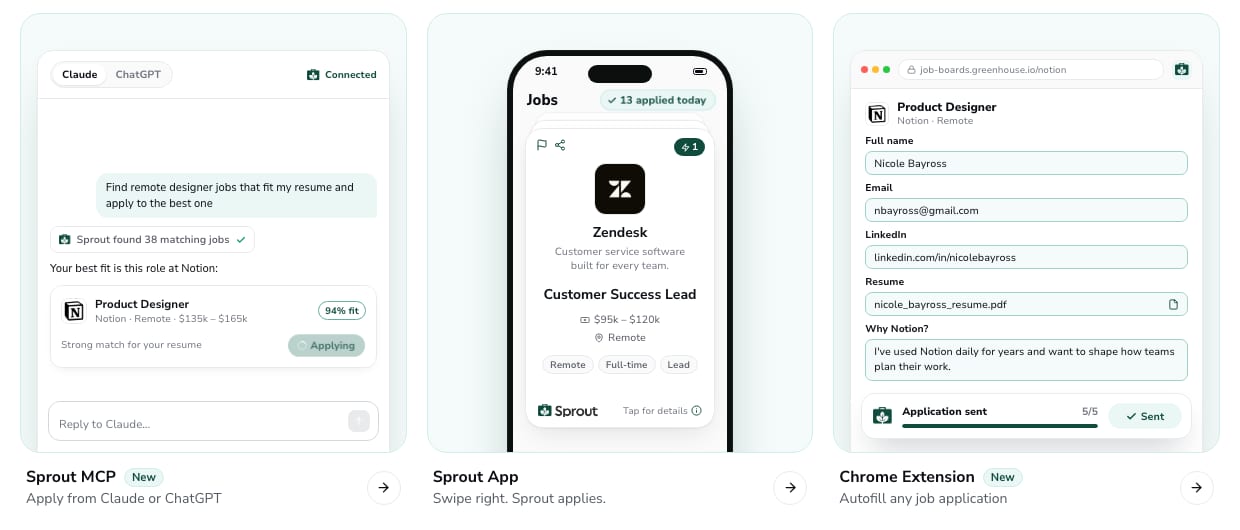
Sprout’s home page, captured 9 November 2026: the app card reads “Swipe right. Sprout applies.”
Sprout runs on iPhone, Android and the web. Its site also lists a Chrome extension that autofills job applications, and a “Sprout MCP” connector that lets you ask Claude or ChatGPT to find a job and apply through Sprout. Its pricing page says you can “Review first, or tap to apply”, and that every plan includes tailored cover letters, resume tailoring and application tracking.
On the Apple App Store, Sprout showed 4.6 out of 5 from 71,711 ratings on 9 November 2026. Sprout’s own site says 4.8.
What is FastApply’s Apply for Me?
FastApply is a Chrome extension and web app that fills in and submits job applications for you. Apply for Me is the part that runs without you. It is on paid plans only and runs on FastApply’s servers 24/7, so your laptop can be closed.
You set it up once:
- Upload your resume. FastApply builds your application profile from it, including your work authorization and screening answers.
- Set your preferences. Each Apply for Me automation watches one job profile: the role, the location, your salary floor and any filters you add.
- Pick a match score. Apply for Me applies only to new jobs that score above it.
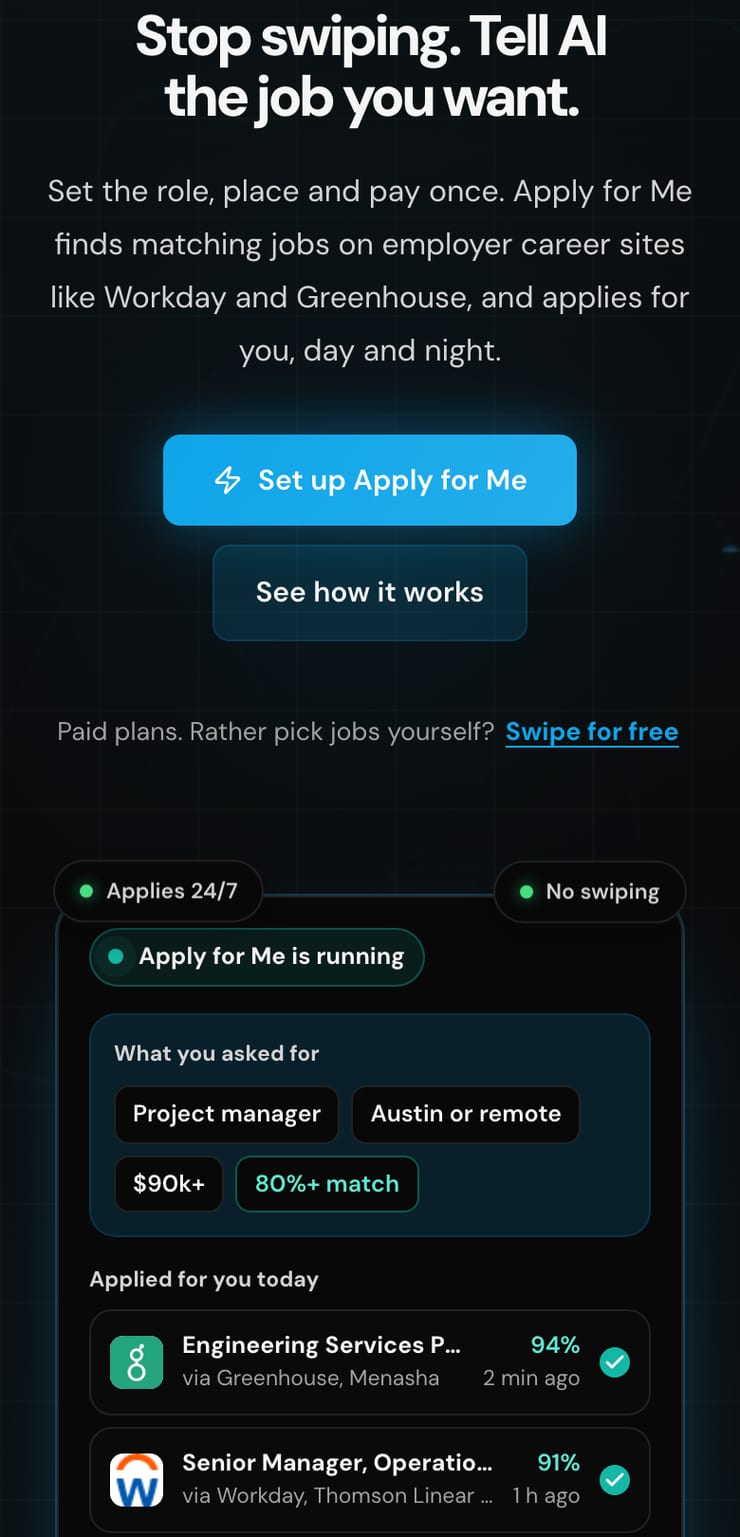
FastApply’s home page on a phone, captured 9 November 2026. The Apply for Me screen is a sample.
From then on it keeps finding jobs that fit and applying to them. With the paid AI Tailoring add-on (+$7/+$12/+$19/+$29 a month by plan), each application gets a resume and cover letter written for that posting from your real profile. FastApply keeps a copy of every application it sends, plus the tailored resume used, so you can check what went out under your name.
Apply for Me submits on employer application systems such as Workday, iCIMS, Greenhouse, Workable, SmartRecruiters, Taleo, Oracle Cloud and Personio. Job boards like LinkedIn Easy Apply run through the Chrome extension instead, which has two modes: Auto-pilot tailors and submits automatically, and Co-pilot stops at each step so you can review.
FastApply has a swipe option too. Swipe to Apply works on your phone: swipe right to apply, left to skip. It has its own daily cap of 5 swipes a day on the free plan, 10 on Starter, 20 on Pro and 25 on Elite and Max, per the FastApply help page. Each right swipe is one application. See how Apply for Me finds and applies to jobs for you.
Swipe and apply vs Apply for Me: what is the real difference?
The difference is who starts each application. On Sprout, you do: every application begins with your swipe or tap. On FastApply, Apply for Me does: you describe the jobs you want, and it applies to each new match without waiting for you. You can still swipe on FastApply when you want to, but you don’t have to.
That changes three things in practice.
- Your time. Sprout says each job takes a few seconds, but it still needs you holding the phone. To send 200 applications a month on Sprout’s monthly plan, you swipe right 200 times. Apply for Me sends them from your saved preferences.
- Timing. Apply for Me checks for new matches around the clock, including nights and weekends, so it can apply soon after a job is posted. On Sprout, a job posted at 2am waits until you next open the app.
- Control. Swiping gives you a yes or no on every single job. That is Sprout’s real strength. With Apply for Me, your control sits in the preferences and the match score, plus the record of every application afterwards. If you want a per-job check inside FastApply, swipe on your phone or use the extension’s Co-pilot mode.
We found no setting on Sprout’s public pages that applies in the background without a swipe or tap. If you are a Sprout user and that changes, the comparison changes with it.
How much does Sprout cost compared with FastApply?
Sprout costs $19.99 a week for 50 applications, $39.99 a month for 200, or $79.99 for 600 applications over three months, per its pricing page on 9 November 2026. All features, including tailoring, are in every plan. The pricing page lists no free plan.
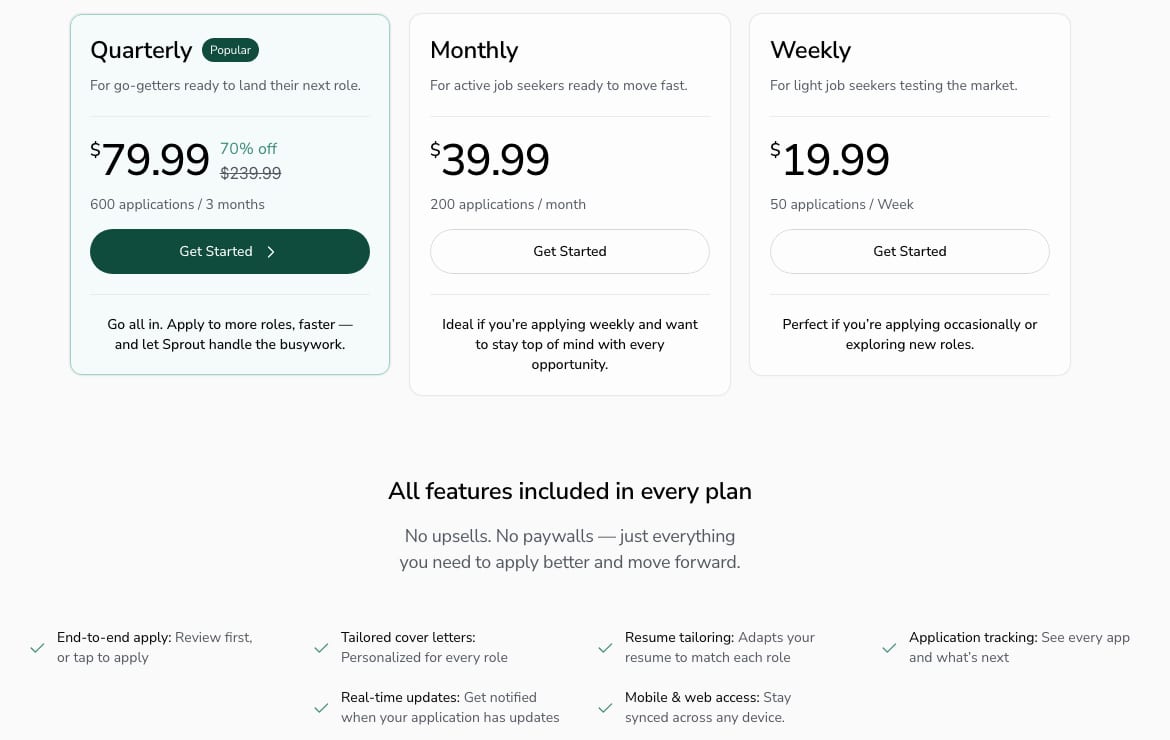
Sprout’s pricing page, captured 9 November 2026.
FastApply starts with a free plan: up to 5 jobs a day for 7 days, no card. Paid plans give 200, 500, 1,000 or 2,000 applications a month. In the US they cost $14, $29, $49 or $89 a month, and most countries see local prices on the FastApply pricing page. Tailoring is the paid AI Tailoring add-on on individual plans.
| Plan, US prices checked 9 November 2026 | Applications | Price | Tailored resume and cover letter |
|---|---|---|---|
| Sprout Weekly | 50 a week | $19.99 a week | Included |
| Sprout Monthly | 200 a month | $39.99 a month | Included |
| Sprout Quarterly | 600 over 3 months | $79.99 | Included |
| FastApply free plan | Up to 5 jobs a day for 7 days | $0, no card | Not on the free plan |
| FastApply Starter | 200 a month | $14 a month | +$7 a month add-on |
| FastApply Pro | 500 a month | $29 a month | +$12 a month add-on |
| FastApply Elite | 1,000 a month | $49 a month | +$19 a month add-on |
| FastApply Max | 2,000 a month | $89 a month | +$29 a month add-on |
At the same volume of 200 applications a month, Sprout is $39.99 with tailoring, and FastApply Starter is $14 without tailoring or $21 with the add-on. Sprout’s weekly plan is the priciest way to apply in this table: four weeks of it costs $79.96 for 200 applications.
One thing to watch: Sprout’s App Store listing shows in-app purchases from $5.49 to $29.99, which don’t line up with the web pricing page. Check the price at checkout on the device you pay from. Sprout’s terms say subscriptions renew automatically, and plans bought through Apple or Google must be cancelled in your app store account settings.
FastApply vs Sprout: side-by-side
| Checked 9 November 2026 | Sprout | FastApply |
|---|---|---|
| How an application starts | You swipe right or tap apply on each job | Apply for Me applies to new matches from your saved preferences (paid plans) |
| Runs while you are away | Not described on Sprout’s site | Yes, Apply for Me runs 24/7 on FastApply’s servers |
| Preferences you set | Profile and matching based on your experience | Role, location, salary floor, filters and a match score, per automation |
| Tailored resume | Every plan | Paid AI Tailoring add-on (+$7/+$12/+$19/+$29 a month) |
| Tailored cover letter | Every plan | Paid AI Tailoring add-on |
| Pick each job yourself | Yes, every application | Yes, with Swipe to Apply on your phone or the extension’s Co-pilot mode |
| Application systems named | Not listed on Sprout’s pages | Workday, iCIMS, Greenhouse, Workable, SmartRecruiters, Taleo, Oracle Cloud, Personio and more; LinkedIn Easy Apply through the extension |
| On your phone | iOS and Android apps | Swipe to Apply (5 swipes a day free; 10, 20 or 25 on paid plans); Apply for Me needs no device on |
| Free plan | None on the pricing page | Up to 5 jobs a day for 7 days, no card |
| Entry price | $19.99 a week (50 applications) | $14 a month in the US (200 applications) |
| Record of what was sent | Application tracking dashboard | A copy of every application plus the tailored resume used |
What Sprout does well
- Native apps. Sprout has iPhone and Android apps in the app stores. FastApply’s swipe works on your phone too, but Sprout’s whole product is built around it.
- Tailoring in the price. Every Sprout plan includes a tailored resume and cover letter. On FastApply that is an add-on you pay for.
- A yes or no on every job. If you worry about applying to the wrong roles, swiping keeps you in the loop for each one.
- AI assistant access. The Sprout MCP connector lets you search and apply from Claude or ChatGPT, which FastApply does not offer.
Where Sprout falls short
- Your thumb is the bottleneck. Every application waits for a swipe. Volume depends on how often you open the app.
- No free plan on the pricing page, and the cheapest plan is weekly, which adds up fast in a long search.
- Coverage is not published. Sprout’s pages don’t say which application systems, such as Workday or Greenhouse, it submits on, so you can’t check before you pay.
- Prices differ by channel. The App Store in-app prices don’t match the web plans.
Who should choose Sprout, and who should choose FastApply?
Choose Sprout if you want to approve every application by hand, you do most of your job search on your phone, or you want tailoring bundled into one price and only need up to 50 applications a week.
Choose FastApply if you want a steady flow of applications without opening an app each day. Set your preferences once and Apply for Me keeps applying to jobs that match them 24/7, with a tailored resume and cover letter on the AI Tailoring add-on. When you do want to hand-pick, Swipe to Apply is there on your phone. It also suits you if you apply through Workday, Greenhouse or LinkedIn Easy Apply, or want to test before paying.
Either way, keep applying by hand where it counts. A referral or a direct message to the hiring manager still beats any tool for senior roles and your top-choice companies. For the volume behind the rest, see how many jobs to apply to per day, and if you only want free options, read which auto-apply tools are actually free.
Frequently Asked Questions
Is Sprout better than FastApply?
Neither is better for everyone. Sprout is better if you want to approve each job yourself on your phone, with tailoring included in every plan. FastApply is better if you want applications to keep going out without you: Apply for Me applies to jobs that match your preferences 24/7 on paid plans, and there is a free plan of up to 5 jobs a day for 7 days, no card.
Does Sprout apply to jobs automatically?
Sprout fills and submits the application for you, but each one starts with your swipe right or tap. Its pricing page says you can review first or tap to apply. We found no setting on Sprout’s site, checked 9 November 2026, that applies in the background without you.
How much does Sprout cost?
Sprout costs $19.99 a week for 50 applications, $39.99 a month for 200, or $79.99 for 600 over three months, per its pricing page on 9 November 2026. Every plan includes resume tailoring and cover letters. The pricing page lists no free plan, and App Store in-app prices differ from the web prices.
Does FastApply write a tailored resume and cover letter for each job?
Yes, with the paid AI Tailoring add-on (+$7/+$12/+$19/+$29 a month by plan). It writes a resume and cover letter for each posting from your real profile. Without the add-on, FastApply submits the resume you uploaded and fills every form from your profile.
Can FastApply apply to jobs while I sleep?
Yes, on paid plans. Apply for Me runs on FastApply’s servers 24/7, so your browser and laptop can be closed. It watches for new jobs that match the role, location, salary floor and match score you set, and applies to them.
Does FastApply have swipe to apply?
Yes. Swipe to Apply works on your phone: swipe right to apply and left to skip. It has a daily cap of 5 swipes on the free plan, 10 on Starter, 20 on Pro and 25 on Elite and Max, and each right swipe is one application. Apply for Me is the option that applies without any swiping.
Related reading
#fastapply vs sprout
#sprout vs fastapply
#sprout job app
#sprout ai review
#sprout alternative
#swipe to apply jobs
#auto apply for jobs

Ekekenta Clinton
Founder, FastApply