Best AI Job Application Tool 2026: 12 Tested
The phrase “best AI job application tool” covers three different products that share one label: tools that write your resume, tools that submit applications for you, and tools that track what you sent. This ranking separates them. We ran ten of the twelve tools below through a typical job search workflow in May 2026, re-checked every price against each vendor’s page on 22 September 2026, and added two tools (AIApply and JobCopilot) in this refresh from vendor pages and dated third-party reviews. FastApply owns this blog and makes one of the twelve, so every figure is dated and the method is spelled out.
The short answer
- Best overall: FastApply. Fills and submits real ATS forms on 20+ platforms, 5 free applications, $14 a month for 200.
- Best free: Simplify Copilot. Free autofill on 100+ ATS platforms; you still click submit.
- Best for volume: LazyApply Ultimate. 1,500 applications a day for $999 a year.
- Best for tailored applications: FastApply Pro, $29 a month for 500 applications with a resume and cover letter written per job. Runner-up: AIApply, if you also want interview practice.
| Tool | How it applies | Entry price | Free tier | Price checked |
|---|---|---|---|---|
| FastApply | Extension plus hosted automations | $14/mo (200 applications) | 5 applications, no card | 22 Sep 2026 |
| Simplify Copilot | Extension, you submit | Free; Simplify+ $39.99/mo | Unlimited autofill | 22 Sep 2026 |
| LazyApply | Extension | $99/yr (15 a day) | None | 22 Sep 2026 |
| LoopCV | Hosted agent | €8.99/mo (100) | 10 applications | 11 Sep 2026 |
| AIApply | Hosted agent | $49/mo (100 auto applies) | Limited writing tools | 31 Aug 2026 (Jobity) |
| JobCopilot | Hosted agent | From $0.93 a day | Not listed | 22 Sep 2026 |
| Sonara | Hosted agent | $2.95 trial, then $23.95 per 4 weeks | None (paid trial) | June 2026 |
| BetterApply | Hosted agent | $19.99 intro, $50/mo after | None | 22 Sep 2026 (Trustpilot-reported) |
| Massive | Hosted agent | Not public | Not public | 22 Sep 2026 |
| Jobscan | Does not apply | $29.98/mo (quarterly) | 5 scans a month | 22 Sep 2026 |
| Teal | Does not apply | $13 a week | Unlimited resumes and tracking | May 2026 |
| Jobright | Pre-fills, you submit | $22/mo Pro | 10 daily matches | 6 Jul 2026 |
How we tested
The method has not changed since May 2026. Every tool was scored on five dimensions: free access (can you test it on your own target jobs before paying), pricing transparency (is the regular price and billing interval on a public page), platform coverage (LinkedIn, Indeed and ZipRecruiter are the baseline; Workday, Greenhouse, Lever, Ashby, iCIMS and Taleo separate serious tools from limited ones), AI tailoring depth (does it rewrite the resume per posting), and cancel and refund policy.
What changed on 22 September 2026. We re-fetched every vendor’s pricing page with a desktop browser; seven of the twelve had changed prices or pulled them off public pages since May. Three pages could not be fetched, so those tools keep their last verified figure with its date: Sonara (site timed out), Teal (Cloudflare block) and Massive (prices only shown after login). AIApply and JobCopilot were not in the May test; they are desk-checked from vendor pages, our own dated reviews and Trustpilot, and their blocks say so. We did not re-run applications through any tool this week.
The 12 best AI job application tools, ranked
1. FastApply, best overall
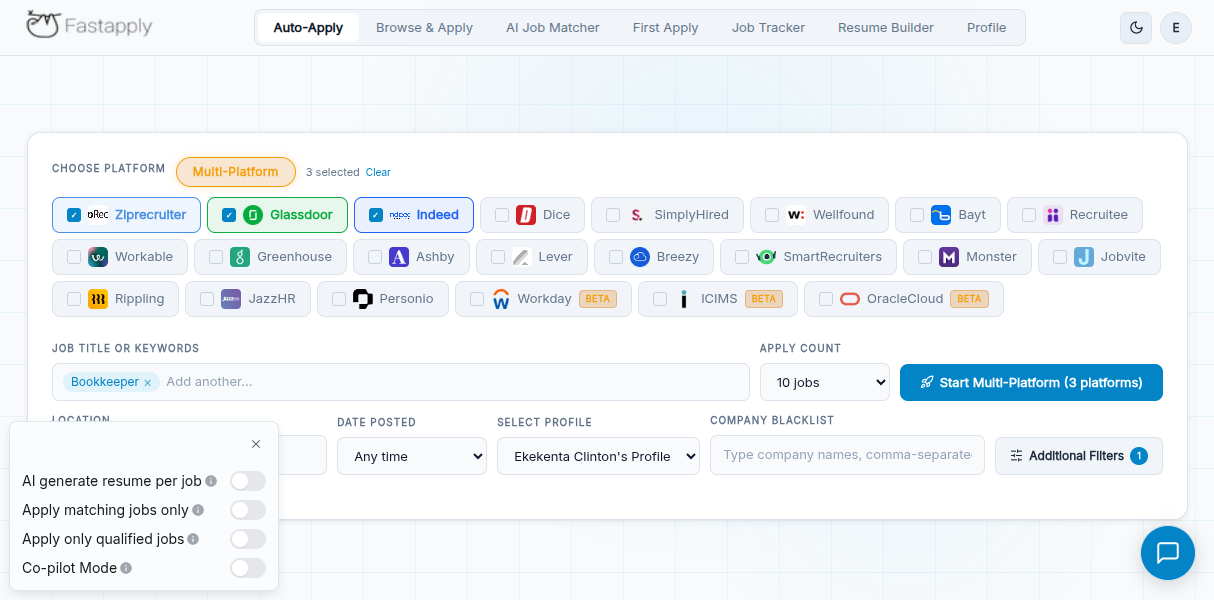
What it does. A Chrome extension plus web dashboard that finds matching roles, then fills and submits the employer’s application form. Pro and Elite rewrite the resume and cover letter for each posting.
How it applies. Extension (Browse & Apply) plus hosted automations (Apply for Me) that run without a tab open. Co-pilot mode shows you each application first; Auto-pilot submits hands-off.
Price tiers (22 Sep 2026). Starter $14/month for 200 applications, Pro $29/month for 500 with tailored resume and cover letter per job, Elite $49/month for 1,000. A 90-Day Sprint prepays three months for $38, $75 or $132. Monthly plans cancel any time. See FastApply pricing.
Free tier. 5 applications, no card.
Cap. 200, 500 or 1,000 a month.
ATS coverage. 20+ job platforms and ATS systems, including Workday, Greenhouse, Lever, Ashby, iCIMS, Taleo and BambooHR, plus LinkedIn, Indeed, Glassdoor, ZipRecruiter and Dice.
Where it breaks. Employer sites that demand a new account with a one-time code still need you. No annual discount. The Chrome Web Store listing showed 3.3 stars from 26 ratings and 10,000 users on 22 September 2026, so read the reviews.
Verdict. Lowest cost per submitted application here ($0.05 to $0.07), the widest published ATS list, and a real free test. We own it, so check the free tier yourself.
2. Simplify Copilot, best free
What it does. A free Chrome extension that autofills applications from your saved profile and tracks them. Simplify+ adds AI resume tailoring and cover letters.
How it applies. Extension. It fills the form; you review and click submit every time.
Price tiers (22 Sep 2026). Free base extension. Simplify+ is $19.99 a week, $39.99 a month or $89.99 for 3 months, shown only in-app (simplify.jobs/pricing returns a 404). No free trial of Simplify+; purchases are non-refundable.
Free tier. Unlimited autofill and tracking.
Cap. None; the limit is your own clicking.
ATS coverage. 100+ ATS platforms, including Workday, Greenhouse, Taleo, Lever and iCIMS. In our May test, accuracy was high on Greenhouse and Lever and more variable on Workday.
Where it breaks. It is not an ai job applier: a 100-application week is still a 100-click week.
Verdict. The best free option if you want to apply yourself, faster. Chrome Web Store: 4.9 stars, 500,000 users.
3. LazyApply, best for volume
What it does. A mass-apply extension that pushes your stored resume to as many matching listings as your daily cap allows.
How it applies. Extension, in your browser, on LinkedIn, Indeed and ZipRecruiter.
Price tiers (22 Sep 2026). Annual only. Basic $99 a year (struck from $119), Premium $149 (struck from $179), Ultimate $999 (struck from $1,099).
Free tier. None.
Cap. 15, 150 or 1,500 a day, with 1, 5 or 20 resume profiles.
ATS coverage. LinkedIn, Indeed and ZipRecruiter. It does not complete Workday or Greenhouse forms.
Where it breaks. No tailoring per job, so response rates on volume runs are low. Signup needs a Gmail address. A full year is charged up front; our LazyApply comparison covers the refund complaints.
Verdict. The cheapest way to send thousands of generic applications. Chrome Web Store: 215 ratings, 20,000 users.
4. LoopCV
What it does. You set up “loops” (saved searches); LoopCV scans 20 job boards, matches roles, and applies or emails employers on a schedule.
How it applies. Hosted agent; applications and emails share one allowance.
Price tiers (11 Sep 2026). Basic free, Standard €8.99 a month for 100, Premium €29.99 for 300 with AI answers to screening questions, Done For You €87.99 with a weekly advisory call.
Free tier. One loop, 10 applications or emails, no card.
Cap. 10, 100 or 300 a month.
ATS coverage. 20 job boards on paid plans (3 on free). No published list of ATS forms it completes.
Where it breaks. The gap between “matched” and “submitted” is the most common complaint, especially on enterprise ATS flows. Details in our LoopCV review.
Verdict. A fair, cheap hosted option with a real free plan. Verify the match-to-submit ratio on your boards before paying.
5. AIApply (desk-checked)
What it does. A web suite with resume builder, cover letters, interview practice and, sold separately, Auto Apply. Desk-checked from AIApply’s pages, Jobity’s 31 August 2026 checkout report and Trustpilot; we have not run applications through it.
How it applies. Hosted agent with a review mode. Jobity reports it applies to roles from AIApply’s own job board, and some applications go out by email rather than into the employer’s ATS.
Price tiers (Jobity, 31 Aug 2026). Shown only after signup. Application Kit Pro $29 a month ($12 a month annual). Auto-Apply $49 a month for 100 applications, $99 for 250, or $199 for 3 months on Pro+.
Free tier. Limited writing tools; no Auto Apply.
Cap. 100 or 250 auto applications a month.
ATS coverage. None published.
Where it breaks. Auto-Apply is non-refundable once used. Reviewers report failed submissions on sites that need a login or one-time code. Trustpilot: 4.3 from 1,773 reviews (11 Sep 2026).
Verdict. Strong writing and interview tools, expensive per application. Read our full AIApply review before paying.
6. JobCopilot (desk-checked)
What it does. Hosted “copilots” that find daily matches and apply, with a resume builder, cover letters and mock interviews bundled. Desk-checked from jobcopilot.com and our June 2026 comparison.
How it applies. Hosted agent; you can save applications for review before they go.
Price tiers (22 Sep 2026). Premium “from $0.93 per day” (1 copilot, up to 20 job matches daily). Elite “from $1.05 per day” (3 copilots, up to 50 matches daily, resume tailored per application). Only daily rates are public; that is roughly $28 and $32 a month, confirmed at checkout.
Free tier. Not listed on the pricing page on 22 September 2026; our June 2026 comparison saw one with limited credits.
Cap. 20 or 50 matches a day.
ATS coverage. Strongest on LinkedIn Easy Apply per our JobCopilot comparison; no ATS list published.
Where it breaks. “Matches” are not “applications”; a match can still stall on a login wall.
Verdict. Reasonable mid-priced hosted option. Confirm the monthly total and the free tier in the app.
7. Sonara
What it does. A hands-off “AI job hunter” that finds and applies to matches from aggregated listings.
How it applies. Hosted agent.
Price tiers (June 2026; site timed out on 22 Sep 2026). $2.95 for a 14-day trial that auto-renews to $23.95 every 4 weeks (13 charges a year, about $311), or $5.95 a month billed annually ($71.40 up front). Money-back guarantee during the trial.
Free tier. None; the trial is paid and needs a card.
Cap. Not published.
ATS coverage. Not published. Our Sonara comparison describes an aggregator footprint rather than direct ATS forms.
Where it breaks. The 4-week cycle adds an extra charge a year over monthly billing, and the trial converts on day 15 unless you cancel.
Verdict. Cheapest annual price in the category if you are certain of a 12-month search. Otherwise the billing math works against you.
8. BetterApply
What it does. Auto apply with an unlimited-applications pitch and AI interview prep.
How it applies. Hosted agent.
Price tiers (22 Sep 2026). Not public; the pricing page is an app shell. Trustpilot reviewers report a $19.99 intro month renewing at $50 a month, a $39 tier and a 14-day refund window. Our BetterApply pricing breakdown has the sourced table.
Free tier. None.
Cap. Unlimited, per its marketing.
ATS coverage. LinkedIn-heavy; no per-platform list.
Where it breaks. Trustpilot on 22 September 2026: 2.0 from 70 reviews, 61% one-star, with repeated complaints about irrelevant matches and charges after cancelling.
Verdict. Unlimited volume at $50 a month is only a bargain if the matches are relevant, and the reviews say they often are not.
9. Massive
What it does. “Your job search on Autopilot”: a profile, daily matches, and automated applications to up to 200 roles a month, per usemassive.com on 22 September 2026.
How it applies. Hosted agent, with an iOS app for swiping matches.
Price tiers. Not public. The pricing endpoint requires a login. Massive’s old massive.app domain now redirects to an unrelated file-transfer product, so use usemassive.com.
Free tier. Not public.
Cap. Up to 200 a month.
ATS coverage. Not published.
Where it breaks. No public price, no platform list, and its AI answers screening questions for you.
Verdict. Worth a look only if you are willing to sign up to see the price.
10. Jobscan, best for ATS resume checks
What it does. Scores your resume against a job description and lists the keywords to add. It does not apply; Auto Apply credits are sold separately.
How it applies. It does not.
Price tiers (22 Sep 2026). Free forever with 5 resume scans a month. Quarterly $29.98 a month billed $89.95 every 3 months, with a 7-day free trial on that plan only. Monthly $49.95, no trial. Cancel any time; access runs to the end of the period.
Free tier. 5 scans a month, job tracker, resume builder, Chrome extension.
Cap. Unlimited scans on paid plans.
ATS coverage. Not applicable.
Where it breaks. Cancellation needs an email, per Trustpilot (4.3 from 341 reviews on 22 Sep 2026).
Verdict. The right tool before you apply, not instead of applying.
11. Teal, best free tracker and resume builder
What it does. Application tracker, resume builder and a Chrome extension that saves job posts.
How it applies. It does not.
Price tiers (May 2026; tealhq.com blocked our fetch on 22 Sep 2026). Free Forever with unlimited resumes and tracking. Teal+ at $13 a week, $29 per 30 days or $79 per 90 days.
Free tier. Unlimited resumes, unlimited tracking, 10 templates, limited AI credits, no card.
Cap. Not applicable.
ATS coverage. Not applicable.
Where it breaks. Weekly billing runs to about $56 a month if you forget it; our Teal comparison has the per-day math.
Verdict. The best free tracker here. Use it alongside a submit tool, not instead of one.
12. Jobright
What it does. AI job matching with per-posting insights and insider connections, plus pre-filled applications.
How it applies. Pre-fills forms; you click submit.
Price tiers (6 Jul 2026; jobright.ai/pricing returned a 404 on 22 Sep 2026). Free with 10 daily matches. Pro $22 a month, Premium $44 a month, as recorded in our Jobright comparison. Prices now appear in-app.
Free tier. 10 matched jobs a day, ongoing.
Cap. 10 free matches a day; unlimited on paid plans.
ATS coverage. Not published; the submit step is yours.
Where it breaks. It is a discovery tool with a pre-fill layer, not a submitter.
Verdict. Good for finding the ten roles a day worth a tailored application. Send them through a submit tool.
Removed this refresh: AutoApply.jobs. The domain did not resolve on 22 September 2026 from three DNS providers and a commercial crawler, and the Wayback Machine’s last capture of its pricing page is 12 May 2026. Its last known plans (resumejudge.com, 7 March 2026) were $30 a month for 50 human-reviewed jobs and $90 for 250.
Pricing compared
Cost per application is the number that matters once you have picked a category. Arithmetic shown.
| Tool | Free tier | Entry price | Top tier | Applications included | Cost per application |
|---|---|---|---|---|---|
| FastApply | 5 applications | $14/mo | $49/mo | 200, 500 or 1,000 a month | $14 ÷ 200 = $0.07; $29 ÷ 500 = $0.06; $49 ÷ 1,000 = $0.05 |
| LazyApply | None | $99/yr ($8.25/mo) | $999/yr | 15 a day (Basic) to 1,500 a day (Ultimate) | $8.25 ÷ 450 a month at the cap = $0.02; depends on days used |
| LoopCV | 10 | €8.99/mo | €87.99/mo | 100 (Standard), 300 (Premium, DFY) a month | €8.99 ÷ 100 = €0.09; €29.99 ÷ 300 = €0.10 |
| AIApply | Writing tools only | $49/mo | $99/mo | 100 (Starter), 250 (Pro) a month | $49 ÷ 100 = $0.49; $99 ÷ 250 = $0.40 |
| JobCopilot | Not listed | $0.93 a day (about $28/mo) | $1.05 a day (about $32/mo) | Up to 20 or 50 matches a day | $28 ÷ 600 matches = $0.05 at the cap; matches are not guaranteed submissions |
| Sonara | Paid trial | $23.95 per 4 weeks | $71.40/yr | Not published | Cannot be calculated |
| BetterApply | None | $19.99 intro | $50/mo | Unlimited, per marketing | Depends on match quality |
| Massive | Not public | Not public | Not public | Up to 200 a month | Cannot be calculated |
| Simplify Copilot | Unlimited autofill | $39.99/mo (Simplify+) | $19.99/wk | Unlimited, you submit | $0 on the free extension |
| Jobscan | 5 scans/mo | $29.98/mo (quarterly) | $49.95/mo | Does not apply | Not applicable |
| Teal | Unlimited tracking | $29 per 30 days | $13/wk | Does not apply | Not applicable |
| Jobright | 10 matches/day | $22/mo | $44/mo | Pre-fills only | Not applicable |
The tools with the lowest cost per application (FastApply, LazyApply, JobCopilot at its cap) are the ones that publish a cap. The ones that say “unlimited” or publish nothing (BetterApply, Sonara, Massive) also have the weakest review scores in this set.
What “AI job application tool” actually covers
Job application software splits into three jobs, and most tools do only one well.
Write. Tools that produce or score the documents: Jobscan (ATS keyword score), Teal (resume builder), AIApply’s Application Kit, Simplify+ and Jobright’s resume tools. FastApply Pro and JobCopilot Elite also rewrite the resume per application, but as part of submitting it.
Submit. The ai job applier category. Extension-based: FastApply (also hosted), Simplify Copilot (autofill only) and LazyApply. Hosted agents: LoopCV, AIApply, JobCopilot, Sonara, BetterApply and Massive. A third route is human-assisted: done-for-you services such as FlashFire sell one-time packages (desk-checked at $199 for 250 applications on 22 September 2026, no refunds) and have staff submit for you. Our auto-apply tools compared guide goes deeper on this category, and auto-apply Chrome extensions covers the extension route only.
Track. Teal, Simplify, Jobscan’s tracker, and the dashboards inside FastApply, LoopCV, AIApply and JobCopilot.
When a job seeker asks for the best AI for job applications, they usually mean “submit”; when a recruiter says it, they mean “write”. Decide which job you are hiring for first, because a $49.95 Jobscan plan and a $49 AIApply Auto-Apply plan buy completely different things.
How to choose
Fewer than 10 roles a week
Use free tiers: Teal Free for tracking, Jobscan’s 5 free scans to check keywords, then Simplify Copilot to fill the forms yourself. Total: $0. At this volume a hosted agent does not earn its subscription.
Volume
If you accept generic submissions, LazyApply Premium ($149 a year, 150 a day) or Ultimate ($999, 1,500 a day) is cheapest. If you want volume with per-job tailoring on real ATS forms, FastApply Elite gives 1,000 tailored applications a month for $49. Our guide to how many jobs to apply to per day explains why 30 to 50 tailored applications a week beats 1,500 generic ones a day.
Visa sponsorship or country-specific searches
Pick a tool that filters by sponsorship and location and completes the employer’s own ATS form, since sponsoring employers are mostly large companies on Workday, Greenhouse or iCIMS. FastApply publishes those platforms and has country pages, including India pricing. LoopCV bills in euros and covers European boards. A LinkedIn-only tool will miss most of these roles.
Tailored rather than mass
FastApply Pro ($29 a month, 500 applications, resume and cover letter per job) is the cheapest per tailored application. AIApply’s Auto-Apply Pro does the same at $99 for 250 and adds interview practice. If you would rather tailor by hand, the how to tailor your resume with AI guide plus Simplify Copilot works at zero cost.
Frequently asked questions
What is the best AI tool for job applications in 2026?
For most people it is FastApply, because it completes real ATS forms on 20+ platforms, tailors the resume per job on Pro, costs $0.05 to $0.07 per application and gives 5 free applications with no card. For a free option pick Simplify Copilot, and for raw volume pick LazyApply. We make FastApply, so test the free tier rather than trust the ranking.
Which AI agent is best for a job application?
An agent that submits the employer’s own form, lets you review before it sends, and publishes which platforms it covers. FastApply’s Co-pilot mode meets all three. JobCopilot and AIApply also offer a review step but do not publish an ATS list.
Which AI is best for making applications?
For writing the application, Jobscan scores it against the posting and Teal builds it free. For making and sending it, FastApply Pro writes a resume and cover letter per job and submits them for $29 a month. The best AI for job applications depends on whether you mean the document or the submission.
Is there a free AI job application tool?
Yes. Simplify Copilot autofills unlimited applications free, LoopCV’s Basic plan sends 10 applications or emails free with no card, Teal’s free plan tracks unlimited jobs, and FastApply gives 5 free auto-submitted applications with no card. Jobscan includes 5 free scans a month.
Do AI job application tools get you rejected by ATS systems?
Not by themselves. An ATS ranks applications on keywords, required fields and screening answers, not on how the form was filled. Rejections come from generic resumes sent at volume, wrong screening answers, or applications to roles you do not fit. Tools that tailor per job and let you review answers avoid all three.
How many jobs a day can these tools apply to?
Published caps on 22 September 2026: LazyApply 15, 150 or 1,500 a day; JobCopilot up to 20 or 50 matches a day; FastApply 200, 500 or 1,000 a month; LoopCV 10, 100 or 300 a month; AIApply 100 or 250 a month; Massive up to 200 a month. BetterApply says unlimited and Sonara publishes no cap.
Is using AI to apply for jobs allowed?
Applying through an employer’s own careers site with accurate information is allowed; employers do not require you to type it by hand. LinkedIn’s User Agreement prohibits bots and automated methods on its platform, so tools that automate LinkedIn carry account risk. Our guide to whether job application automation is safe and ethical covers the line between automation and misrepresentation.
Can I use ChatGPT for job applications?
Yes, for drafting. ChatGPT can rewrite bullet points against a job description and draft a cover letter, but it does not know the employer’s form, cannot submit anything, and will invent details if you let it. Paste in your real resume and the posting, edit the output, and use a submit tool or your own hands for the form.
Can employers detect AI resumes?
Sometimes. Recruiters recognise ChatGPT phrasing, repeated buzzwords and bullet points that do not match your dates or titles, and some ATS vendors flag near-duplicate applications. They cannot detect a resume that uses AI to tighten your own facts. Keep the numbers, names and dates yours and the risk is low.
Conclusion
Of the 12 best AI job application tools ranked here, only six submit applications on their own and publish a cap you can price. If you want one action: install FastApply, run the 5 free applications in Co-pilot mode on real Workday or Greenhouse postings, and decide on your own results. If it fits, Starter is $14 a month; if not, you have spent nothing.
Stop filling the same form twice
FastApply auto-submits tailored applications on Workday, Greenhouse, Lever, Ashby, iCIMS, Taleo and the rest of its 20+ supported platforms, with auto apply included in every paid plan from $14 a month.
Free tier: 5 applications, no credit card.
#best ai job application tool
#best ai job application tools
#ai job application tool
#best ai for job applications
#ai job applier
#job application software
#auto apply tools
#job search automation

Ekekenta Clinton
Founder, FastApply